Page 78 of 122
Re: SDFtool Flasher
Posted: Wed Nov 27, 2024 9:17 pm
by MartyMcNuts
Commo wrote: Wed Nov 27, 2024 1:17 am
I am having an issue. I can not get my drive to flash at all.
Here is from MakeMKV:
Code: Select all
Drive Information
OS device name: H:
Manufacturer: HL-DT-ST
Product: BD-RE WP50NB40
Revision: 1.03
Serial number: [redacted]
Firmware date: 2121-07-08 16:09
Bus encryption flags: 17

LibreDrive Information
Status: Possible, not yet enabled
Drive platform: MT1959

No disc inserted

That's because you are doing it wrong. Follow the guide for BP50NB40 SVC NB52 in the first post of this thread.
Re: SDFtool Flasher
Posted: Fri Nov 29, 2024 4:21 pm
by Scylune
MartyMcNuts wrote: Tue Aug 18, 2020 1:39 am
I have created a windows GUI for the MakeMKV sdftool command line flasher.
Enjoy!!

Hey !
I've just registered here to say THANKS !
Thank you, also thanks to everyone that contributed to this ^^
I've received like half a hour ago my BH16NS55 from amazon warehouse. It was cheap

(label on it : manufactured 2024/04 -- well I tried anyway ^^)
SDFTool 1.3.5 + HL-DT-ST-BD-RE_BH16NS55-1.05-NM00400-212004211049.bin + START : YES ! It works ^^
So, thanks again eveyone

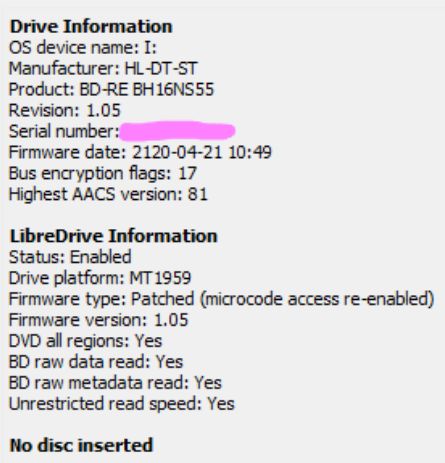
- flash.jpg (35.57 KiB) Viewed 10670 times
Re: SDFtool Flasher
Posted: Fri Nov 29, 2024 10:33 pm
by CrashOveride
MartyMcNuts wrote: Sat Nov 23, 2024 1:55 am
Which version of MakeMKV are you using? Is it a fresh install? If so, you may need to insert a standard blu-ray disc first and open it in MakeMKV so that the latest SDF can be downloaded.
Also, your drive is not one of the common models so the GUI may not work with it. You may have to use the command line instead.
Apologies, I was able to figure it out before the post had even been approved; I had to reinstall MakeMKV
After the reinstall the GUI worked flawlessly and I was able to flash the HL-DT-ST-BD-RE_WH16NS60-1.02-NM00100-211810291936 firmware just fine, and it's worked great so far
Re: SDFtool Flasher
Posted: Sat Nov 30, 2024 7:12 pm
by Gassious
melkore wrote: Wed Sep 09, 2020 3:06 am
When trying to update my drive for the first time I am getting the error in the attached file. I can dump the firmware. I've tried with and without enc enabled.
I'm new to this ripping and am interested in putting all of my discs on a R_volution PlayerPro. Before purchasing the unit I want to be sure I have everything I need to rip my discs.
I have a LG WH16NS60 with 1.03 firmware. When i try to flash the firmware to the HL-DT-ST-BD-RE_WH16NS60-1.02-NM00100-211810291936.bin, I receive the message "Command produced error code 0Xff056103". Sorry if this has been cover before, I don't have the time and patience to read through all 78 pages of posts.

How do I fix this? If i can't be fixed, suggestions on purchasing the best separate external drive would be greatly appreciated.
Re: SDFtool Flasher
Posted: Sun Dec 01, 2024 1:12 am
by Mr_Orange
The original firmware is encrypted so you need to use the "enc" syntax if using the command line. SDFtool flasher should automatically detect it though. If it isn't make sure the "enc" box is ticked.
Re: SDFtool Flasher
Posted: Sun Dec 01, 2024 1:16 am
by MartyMcNuts
Gassious wrote: Sat Nov 30, 2024 7:12 pm
melkore wrote: Wed Sep 09, 2020 3:06 am
When trying to update my drive for the first time I am getting the error in the attached file. I can dump the firmware. I've tried with and without enc enabled.
I'm new to this ripping and am interested in putting all of my discs on a R_volution PlayerPro. Before purchasing the unit I want to be sure I have everything I need to rip my discs.
I have a LG WH16NS60 with 1.03 firmware. When i try to flash the firmware to the HL-DT-ST-BD-RE_WH16NS60-1.02-NM00100-211810291936.bin, I receive the message "Command produced error code 0Xff056103". Sorry if this has been cover before, I don't have the time and patience to read through all 78 pages of posts.
How do I fix this? If i can't be fixed, suggestions on purchasing the best separate external drive would be greatly appreciated.
Ensure the drive tray is empty and closed.
Ensure MakeMKV is installed in default location.
Re: SDFtool Flasher
Posted: Sun Dec 01, 2024 7:21 am
by zittrig
Scylune wrote: Fri Nov 29, 2024 4:21 pm
MartyMcNuts wrote: Tue Aug 18, 2020 1:39 am
I have created a windows GUI for the MakeMKV sdftool command line flasher.
Enjoy!!
Hey !
I've just registered here to say THANKS !
Thank you, also thanks to everyone that contributed to this ^^
I've received like half a hour ago my BH16NS55 from amazon warehouse. It was cheap
(label on it : manufactured 2024/04 -- well I tried anyway ^^)
SDFTool 1.3.5 + HL-DT-ST-BD-RE_BH16NS55-1.05-NM00400-212004211049.bin + START : YES ! It works ^^
So, thanks again eveyone
flash.jpg
Enjoy your 4k friendly drive.
If you've issues with ripping speed e.g. try firmware WH16NS60 1.02-MK. This is the recommended one for the compatible internal LG drives.
Re: SDFtool Flasher
Posted: Sun Dec 01, 2024 5:45 pm
by Gassious
MartyMcNuts wrote: Sun Dec 01, 2024 1:16 am
Gassious wrote: Sat Nov 30, 2024 7:12 pm
melkore wrote: Wed Sep 09, 2020 3:06 am
When trying to update my drive for the first time I am getting the error in the attached file. I can dump the firmware. I've tried with and without enc enabled.
I'm new to this ripping and am interested in putting all of my discs on a R_volution PlayerPro. Before purchasing the unit I want to be sure I have everything I need to rip my discs.
I have a LG WH16NS60 with 1.03 firmware. When i try to flash the firmware to the HL-DT-ST-BD-RE_WH16NS60-1.02-NM00100-211810291936.bin, I receive the message "Command produced error code 0Xff056103". Sorry if this has been cover before, I don't have the time and patience to read through all 78 pages of posts.
How do I fix this? If i can't be fixed, suggestions on purchasing the best separate external drive would be greatly appreciated.
Ensure the drive tray is empty and closed.
Ensure MakeMKV is installed in default location.
Thank you. The drive had a disc in it and removing it worked!
Re: SDFtool Flasher
Posted: Tue Dec 17, 2024 1:57 pm
by daemon9
I just got my BH16NS55 in...
Code: Select all
Drive Information
OS device name: E:
Manufacturer: HL-DT-ST
Product: BD-RE BH16NS55
Revision: 1.05
Serial number: [redacted]
Firmware date: 2120-06-18 13:42
Bus encryption flags: 17

LibreDrive Information
Status: Possible, not yet enabled
Drive platform: MT1959

No disc inserted
Flasher tools don't seem to work at all. Any help would be appreciated.
Re: SDFtool Flasher
Posted: Wed Dec 18, 2024 12:41 am
by zittrig
Which firmware you want flash?
Re: SDFtool Flasher
Posted: Wed Dec 18, 2024 12:46 am
by d00zah
daemon9 wrote: Tue Dec 17, 2024 1:57 pm
I just got my BH16NS55 in...
Code: Select all
Drive Information
OS device name: E:
Manufacturer: HL-DT-ST
Product: BD-RE BH16NS55
Revision: 1.05
Serial number: [redacted]
Firmware date: 2120-06-18 13:42
Bus encryption flags: 17

LibreDrive Information
Status: Possible, not yet enabled
Drive platform: MT1959

No disc inserted
Flasher tools don't seem to work at all. Any help would be appreciated.
The guide says"
Revision: 1.05 FW is encrypted, so make sure 'Enc' is checked. No disc in tray. Tray closed.
Re: SDFtool Flasher
Posted: Wed Dec 18, 2024 9:59 pm
by mfrankroro
Hoping someone can tell me how I screwed up. Drive SVC code is NB50. I used Marty's link to DE_LG_BP50NB40-NB50_1.03_MK for the first flash and his BU40N_1.00 for the second one. Tried the drive with latest/registered versions MakeMKV and VLC on Windows 11 and Mac silicon (w/gatekeeper workaround) - both attempted 5 times to read a disc with no luck. This is my first try at this so I won't be surprised if there's a glaringly obvious rookie mistake.
Drive Information
OS device name: D:
Manufacturer: HL-DT-ST
Product: BD-RE BP50NB40
Revision: 1.03
Serial number:
Firmware date: 2120-05-07 09:17
Bus encryption flags: 17
LibreDrive Information
Status: Enabled
Drive platform: MT1959
Firmware type: Patched (microcode access re-enabled)
Firmware version: 1.03
DVD all regions: Yes
BD raw data read: Yes
BD raw metadata read: Yes
Unrestricted read speed: Yes
Re: SDFtool Flasher
Posted: Thu Dec 19, 2024 1:56 am
by MartyMcNuts
mfrankroro wrote: Wed Dec 18, 2024 9:59 pm
Hoping someone can tell me how I screwed up. Drive SVC code is NB50. I used Marty's link to DE_LG_BP50NB40-NB50_1.03_MK for the first flash and his BU40N_1.00 for the second one. Tried the drive with latest/registered versions MakeMKV and VLC on Windows 11 and Mac silicon (w/gatekeeper workaround) - both attempted 5 times to read a disc with no luck. This is my first try at this so I won't be surprised if there's a glaringly obvious rookie mistake.
Drive Information
OS device name: D:
Manufacturer: HL-DT-ST
Product: BD-RE BP50NB40
Revision: 1.03
Serial number:
Firmware date: 2120-05-07 09:17
Bus encryption flags: 17
LibreDrive Information
Status: Enabled
Drive platform: MT1959
Firmware type: Patched (microcode access re-enabled)
Firmware version: 1.03
DVD all regions: Yes
BD raw data read: Yes
BD raw metadata read: Yes
Unrestricted read speed: Yes
You have only done the first flash. You must use the recovery option for the second part. Follow the guide in the first post of this thread exactly.
Re: SDFtool Flasher
Posted: Thu Dec 19, 2024 4:23 am
by mfrankroro
MartyMcNuts wrote: Thu Dec 19, 2024 1:56 am
mfrankroro wrote: Wed Dec 18, 2024 9:59 pm
Hoping someone can tell me how I screwed up. Drive SVC code is NB50. I used Marty's link to DE_LG_BP50NB40-NB50_1.03_MK for the first flash and his BU40N_1.00 for the second one. Tried the drive with latest/registered versions MakeMKV and VLC on Windows 11 and Mac silicon (w/gatekeeper workaround) - both attempted 5 times to read a disc with no luck. This is my first try at this so I won't be surprised if there's a glaringly obvious rookie mistake.
Drive Information
OS device name: D:
Manufacturer: HL-DT-ST
Product: BD-RE BP50NB40
Revision: 1.03
Serial number:
Firmware date: 2120-05-07 09:17
Bus encryption flags: 17
LibreDrive Information
Status: Enabled
Drive platform: MT1959
Firmware type: Patched (microcode access re-enabled)
Firmware version: 1.03
DVD all regions: Yes
BD raw data read: Yes
BD raw metadata read: Yes
Unrestricted read speed: Yes
You have only done the first flash. You must use the recovery option for the second part. Follow the guide in the first post of this thread exactly.
I did exactly like your visual aid. What I haven't mentioned (if it matters) is that out-of-the box, the drive was a BD-RE BP50NB40, NB50 - MT1959, 1.03. Libredrive was "possible - not enabled." I used SDFtool 1.3.5.
I read through this thread and one on Reddit many times and I thought I was well prepared... If this new info doesn't help at all, could it be I had a brain fart and didn't realize that I was supposed to do the "READ" and not just the "WRITE"? I only did the 'WRITE' and then the BU40N "Recovery." I left the Master boot box unchecked for the recovery.
Re: SDFtool Flasher
Posted: Thu Dec 19, 2024 8:42 pm
by MartyMcNuts
mfrankroro wrote: Thu Dec 19, 2024 4:23 am
MartyMcNuts wrote: Thu Dec 19, 2024 1:56 am
mfrankroro wrote: Wed Dec 18, 2024 9:59 pm
Hoping someone can tell me how I screwed up. Drive SVC code is NB50. I used Marty's link to DE_LG_BP50NB40-NB50_1.03_MK for the first flash and his BU40N_1.00 for the second one. Tried the drive with latest/registered versions MakeMKV and VLC on Windows 11 and Mac silicon (w/gatekeeper workaround) - both attempted 5 times to read a disc with no luck. This is my first try at this so I won't be surprised if there's a glaringly obvious rookie mistake.
Drive Information
OS device name: D:
Manufacturer: HL-DT-ST
Product: BD-RE BP50NB40
Revision: 1.03
Serial number:
Firmware date: 2120-05-07 09:17
Bus encryption flags: 17
LibreDrive Information
Status: Enabled
Drive platform: MT1959
Firmware type: Patched (microcode access re-enabled)
Firmware version: 1.03
DVD all regions: Yes
BD raw data read: Yes
BD raw metadata read: Yes
Unrestricted read speed: Yes
You have only done the first flash. You must use the recovery option for the second part. Follow the guide in the first post of this thread exactly.
I did exactly like your visual aid. What I haven't mentioned (if it matters) is that out-of-the box, the drive was a BD-RE BP50NB40, NB50 - MT1959, 1.03. Libredrive was "possible - not enabled." I used SDFtool 1.3.5.
I read through this thread and one on Reddit many times and I thought I was well prepared... If this new info doesn't help at all, could it be I had a brain fart and didn't realize that I was supposed to do the "READ" and not just the "WRITE"? I only did the 'WRITE' and then the BU40N "Recovery." I left the Master boot box unchecked for the recovery.
No. Not doing the READ first makes no difference. Also, there's really no need to ever check the boot box.
You still must not have done the recovery part correctly otherwise it would have worked.
1 select recovery
2. In the popup window select the BP50NB40 1.03-MK firmware you currently have on the drive
3 in the firmware drop down box select the BU40N 1.00 firmware
4. Press Start