Thank you for that! I didn’t think there was a disk in there but the flash did work! I tried putting in Ballerina and it still didn’t recognize the media. I didn’t have the chance to try another disk before I had to head out so is it a chance the media is just too new or something?MartyMcNuts wrote: Wed Mar 11, 2026 3:52 amTake the disc out of the drive!epicchancellor wrote: Tue Mar 10, 2026 1:37 am Hi all,
After doing some investigation on Reddit in regards to flashing a 4K firmware onto my ASUS BW-16D1-XU drive, a user said I could use a firmware for what seems to be an LG drive (DE_LG_WH16NS60_1.02_MK) and it worked for that user. Trying to flash it onto my drive and it spits out an error, screenshots attached. I'm super new to this so any advice would be greatly appreciated!
SDFtool Flasher
-
epicchancellor
- Posts: 12
- Joined: Tue Mar 10, 2026 1:25 am
Re: SDFtool Flasher
-
MartyMcNuts
- Posts: 4915
- Joined: Wed Nov 22, 2017 11:45 pm
Re: SDFtool Flasher
Balleriina has been out for months so doubt it. Have you made sure MakeMKV has internet access? It is required so that MakeMKV's internal Hashed Keys database can be downloaed and updated as required.epicchancellor wrote: Wed Mar 11, 2026 11:21 amThank you for that! I didn’t think there was a disk in there but the flash did work! I tried putting in Ballerina and it still didn’t recognize the media. I didn’t have the chance to try another disk before I had to head out so is it a chance the media is just too new or something?MartyMcNuts wrote: Wed Mar 11, 2026 3:52 amTake the disc out of the drive!epicchancellor wrote: Tue Mar 10, 2026 1:37 am Hi all,
After doing some investigation on Reddit in regards to flashing a 4K firmware onto my ASUS BW-16D1-XU drive, a user said I could use a firmware for what seems to be an LG drive (DE_LG_WH16NS60_1.02_MK) and it worked for that user. Trying to flash it onto my drive and it spits out an error, screenshots attached. I'm super new to this so any advice would be greatly appreciated!
You can also copy and paste the MakeMKV drive info & libredrive info sections so we can ensure the flash worked.
Copy and paste the log window text when you get an error or what not so that we can help further.
Cheers 
----------------------------------------------------------------------------------------------------------------------------
For UHD enabled drives (AU/NZ/SG + Others) & DIY Single Drive Flasher (WW): https://uhdenableddrives.com
----------------------------------------------------------------------------------------------------------------------------
For UHD enabled drives (AU/NZ/SG + Others) & DIY Single Drive Flasher (WW): https://uhdenableddrives.com
-
epicchancellor
- Posts: 12
- Joined: Tue Mar 10, 2026 1:25 am
Re: SDFtool Flasher
I think I see my issue; LibreDrive status is marked "possible, not yet enabled", not "enabled".
Drive Information
OS device name: F:
Manufacturer: ASUS
Product: BW-16D1X-U
Revision: A105
Serial number: KLGP37D4330
Firmware date: 2120-12-02 11:14
Bus encryption flags: 1F
Highest AACS version: 68
LibreDrive Information
Status: Possible, not yet enabled
Drive platform: MT1959
I flashed it with the previously mentioned firmware, at least I thought I did? Maybe it somehow got screwed up?
Drive Information
OS device name: F:
Manufacturer: ASUS
Product: BW-16D1X-U
Revision: A105
Serial number: KLGP37D4330
Firmware date: 2120-12-02 11:14
Bus encryption flags: 1F
Highest AACS version: 68
LibreDrive Information
Status: Possible, not yet enabled
Drive platform: MT1959
I flashed it with the previously mentioned firmware, at least I thought I did? Maybe it somehow got screwed up?
-
epicchancellor
- Posts: 12
- Joined: Tue Mar 10, 2026 1:25 am
Re: SDFtool Flasher
Please disregard my prior comment; I reflashed the firmware, and it now reads "enabled" under the status. Guess I screwed something up! As a sanity check, I threw in my 4K copy of Ballerina and it worked. Thank you guys for the excellent help and patience!
Re: SDFtool Flasher
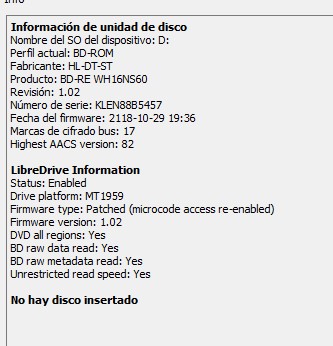
I have an Asus drive (WH16NS60) flashed with 1.02 version (LG)...I am having problems to rip some discs (sean connery 6 films and tried with 2 different copies)...I saw there is a 1.03 version...should it flash it with the most new one? Where I can find the last version? In the firts page I download the zip with all bin but I only see 1.02
-
Billycar11
- Posts: 5834
- Joined: Sun Aug 24, 2014 5:49 am
Re: SDFtool Flasher
most likely not a fw issueneo14 wrote: Sun Mar 15, 2026 12:25 pm
I have an Asus drive (WH16NS60) flashed with 1.02 version (LG)...I am having problems to rip some discs (sean connery 6 films and tried with 2 different copies)...I saw there is a 1.03 version...should it flash it with the most new one? Where I can find the last version? In the firts page I download the zip with all bin but I only see 1.02
we need to know the error to help could be a key download issue or dirty disc's or laser or a failing drive
Buy a drive from the guide and video maker: https://www.makemkv.com/forum/viewtopic ... 20&t=17831
UHD Drive Guide: https://www.makemkv.com/forum/viewtopic ... 16&t=19634
Auto flash kit $40 Email Billycar5924@gmail.com No attachments
UHD Drive Guide: https://www.makemkv.com/forum/viewtopic ... 16&t=19634
Auto flash kit $40 Email Billycar5924@gmail.com No attachments
Re: SDFtool Flasher
I opened a thread:Billycar11 wrote: Sun Mar 15, 2026 12:42 pmmost likely not a fw issueneo14 wrote: Sun Mar 15, 2026 12:25 pm
I have an Asus drive (WH16NS60) flashed with 1.02 version (LG)...I am having problems to rip some discs (sean connery 6 films and tried with 2 different copies)...I saw there is a 1.03 version...should it flash it with the most new one? Where I can find the last version? In the firts page I download the zip with all bin but I only see 1.02
we need to know the error to help could be a key download issue or dirty disc's or laser or a failing drive
viewtopic.php?f=12&t=41310
This is the second pack I have, so I discard problems with discs. Some of them I was able to rip, like From Russia with Love, Goldfinger, Thunderball...the rest impossible. Now I made a backup with makemkv of Diamonds are Forever and I receive this error:
a file did not exceed the hash
-
sgibbers17
- Posts: 14
- Joined: Wed May 29, 2013 12:41 pm
Re: SDFtool Flasher
I just downloaded the tool but does not show up correctly on my windows 11 machine. It appears that the windows is too small and I can not see the check marks and the text is cutoff. Windows will not let me make the window bigger.
- Attachments
-
- Screenshot 2026-03-18 172559.png (17.68 KiB) Viewed 9630 times
-
MartyMcNuts
- Posts: 4915
- Joined: Wed Nov 22, 2017 11:45 pm
Re: SDFtool Flasher
From the first post.sgibbers17 wrote: Wed Mar 18, 2026 10:39 pm I just downloaded the tool but does not show up correctly on my windows 11 machine. It appears that the windows is too small and I can not see the check marks and the text is cutoff. Windows will not let me make the window bigger.
NOTE: If the GUI looks a bit deformed (happens on a 4k monitor), you can right click the exe and select properties. In the compatibility tab, click "Change high DPI settings" then under "High DPI scaling override" tick the box and select "System (Enhanced)" in the dropbox.
Cheers
----------------------------------------------------------------------------------------------------------------------------
For UHD enabled drives (AU/NZ/SG + Others) & DIY Single Drive Flasher (WW): https://uhdenableddrives.com
----------------------------------------------------------------------------------------------------------------------------
For UHD enabled drives (AU/NZ/SG + Others) & DIY Single Drive Flasher (WW): https://uhdenableddrives.com
-
sgibbers17
- Posts: 14
- Joined: Wed May 29, 2013 12:41 pm
Re: SDFtool Flasher
that didn't work the app will not even show up.MartyMcNuts wrote: Wed Mar 18, 2026 10:48 pmFrom the first post.sgibbers17 wrote: Wed Mar 18, 2026 10:39 pm I just downloaded the tool but does not show up correctly on my windows 11 machine. It appears that the windows is too small and I can not see the check marks and the text is cutoff. Windows will not let me make the window bigger.
NOTE: If the GUI looks a bit deformed (happens on a 4k monitor), you can right click the exe and select properties. In the compatibility tab, click "Change high DPI settings" then under "High DPI scaling override" tick the box and select "System (Enhanced)" in the dropbox.
-
MartyMcNuts
- Posts: 4915
- Joined: Wed Nov 22, 2017 11:45 pm
Re: SDFtool Flasher
What?!?sgibbers17 wrote: Wed Mar 18, 2026 10:56 pmthat didn't work the app will not even show up.MartyMcNuts wrote: Wed Mar 18, 2026 10:48 pmFrom the first post.sgibbers17 wrote: Wed Mar 18, 2026 10:39 pm I just downloaded the tool but does not show up correctly on my windows 11 machine. It appears that the windows is too small and I can not see the check marks and the text is cutoff. Windows will not let me make the window bigger.
NOTE: If the GUI looks a bit deformed (happens on a 4k monitor), you can right click the exe and select properties. In the compatibility tab, click "Change high DPI settings" then under "High DPI scaling override" tick the box and select "System (Enhanced)" in the dropbox.
1. right click the exe
2. select properties
3. In the compatibility tab, click "Change high DPI settings"
4. under "High DPI scaling override" tick the box and select "System (Enhanced)"
5. click apply and close this window
6. Now run the exe.
Cheers
----------------------------------------------------------------------------------------------------------------------------
For UHD enabled drives (AU/NZ/SG + Others) & DIY Single Drive Flasher (WW): https://uhdenableddrives.com
----------------------------------------------------------------------------------------------------------------------------
For UHD enabled drives (AU/NZ/SG + Others) & DIY Single Drive Flasher (WW): https://uhdenableddrives.com
-
sgibbers17
- Posts: 14
- Joined: Wed May 29, 2013 12:41 pm
Re: SDFtool Flasher
This is a screenshot of before settings are changed.MartyMcNuts wrote: Wed Mar 18, 2026 10:58 pmWhat?!?sgibbers17 wrote: Wed Mar 18, 2026 10:56 pmthat didn't work the app will not even show up.MartyMcNuts wrote: Wed Mar 18, 2026 10:48 pm
From the first post.
NOTE: If the GUI looks a bit deformed (happens on a 4k monitor), you can right click the exe and select properties. In the compatibility tab, click "Change high DPI settings" then under "High DPI scaling override" tick the box and select "System (Enhanced)" in the dropbox.
1. right click the exe
2. select properties
3. In the compatibility tab, click "Change high DPI settings"
4. under "High DPI scaling override" tick the box and select "System (Enhanced)"
5. click apply and close this window
6. Now run the exe.
- Screenshot 2026-03-18 182549.png (152.92 KiB) Viewed 9540 times
- Screenshot 2026-03-18 182705.png (36.82 KiB) Viewed 9540 times
- Attachments
-
- Screenshot 2026-03-18 182735.png (85.21 KiB) Viewed 9540 times
-
MartyMcNuts
- Posts: 4915
- Joined: Wed Nov 22, 2017 11:45 pm
Re: SDFtool Flasher
Wow, never seen that happen before! Just download the old original from the first post and use that. It should look correct.sgibbers17 wrote: Wed Mar 18, 2026 11:33 pmThis is a screenshot of before settings are changed.MartyMcNuts wrote: Wed Mar 18, 2026 10:58 pmWhat?!?
1. right click the exe
2. select properties
3. In the compatibility tab, click "Change high DPI settings"
4. under "High DPI scaling override" tick the box and select "System (Enhanced)"
5. click apply and close this window
6. Now run the exe.
Screenshot 2026-03-18 182549.png
Screenshot of my settings
Screenshot 2026-03-18 182705.png
what it looks like with the new settings.
Cheers
----------------------------------------------------------------------------------------------------------------------------
For UHD enabled drives (AU/NZ/SG + Others) & DIY Single Drive Flasher (WW): https://uhdenableddrives.com
----------------------------------------------------------------------------------------------------------------------------
For UHD enabled drives (AU/NZ/SG + Others) & DIY Single Drive Flasher (WW): https://uhdenableddrives.com
-
h3jdoktqLGP4PygBp
- Posts: 13
- Joined: Tue May 20, 2025 2:19 pm
Re: SDFtool Flasher
I am unable to use SDFtool Flasher on VMware Fusion (Windows 11 Home Arm) via my ARM-based M2 Mac. Here's the drive info from makemkv running on my mac:
Here's the same info as reported by makemkv running in my VMware Windows VM:
When I load the SDFtool (v1.3.6) and select the drive I get the following error:
I can hit continue on the error but I can't dump the existing firmware or write new firmware to the drive.
Code: Select all
Drive Information
Manufacturer: HL-DT-ST
Product: BD-RE BP50NB40
Revision: 1.03
Serial number: SIK05Q91B1943
Firmware date: 2121-07-08 16:03
Bus encryption flags: 17
Highest AACS version: 82

LibreDrive Information
Status: Possible (with patched firmware)
Drive platform: MT1959
Harware support: Yes
Firmware support: No
Firmware type: Original (patched version available)
Firmware version: 1.03
DVD all regions: Possible (with patched firmware)
BD raw data read: Possible (with patched firmware)
BD raw metadata read: Possible (with patched firmware)
Unrestricted read speed: Possible (with patched firmware)

No disc inserted
Code: Select all
Drive Information
OS device name: E:
Manufacturer: NECVMWar
Product: VMware SATA CD00
Revision: 1.00
Serial number: SIK05Q91B1943
Firmware date: 2121-07-08 16:03
Bus encryption flags: 17

LibreDrive Information
Status: Possible (with patched firmware)
Drive platform: MT1959
Harware support: Yes
Firmware support: No
Firmware type: Original (patched version available)
Firmware version: 1.03
DVD all regions: Possible (with patched firmware)
BD raw data read: Possible (with patched firmware)
BD raw metadata read: Possible (with patched firmware)
Unrestricted read speed: Possible (with patched firmware)

No disc inserted
Code: Select all
System.FormatException: Input string was not in a correct format.
   at System.Number.ThrowOverflowOrFormatException(ParsingStatus status, TypeCode type)
   at System.Int32.Parse(String s)
   at SDFtool_Flasher_Updated.Form1.comboBox_DriveList_SelectedIndexChanged(Object sender, EventArgs e)
   at System.Windows.Forms.ComboBox.OnSelectedIndexChanged(EventArgs e)
   at System.Windows.Forms.ComboBox.WmReflectCommand(Message& m)
   at System.Windows.Forms.ComboBox.WndProc(Message& m)
   at System.Windows.Forms.Control.ControlNativeWindow.WndProc(Message& m)
   at System.Windows.Forms.NativeWindow.Callback(IntPtr hWnd, WM msg, IntPtr wparam, IntPtr lparam)


************** Loaded Assemblies **************
System.Private.CoreLib
    Assembly Version: 6.0.0.0
    Win32 Version: n/a
    CodeBase:
----------------------------------------
SDFtool Flasher
    Assembly Version: 1.3.6.0
    Win32 Version: n/a
    CodeBase:
----------------------------------------
System.Runtime
    Assembly Version: 6.0.0.0
    Win32 Version: n/a
    CodeBase:
----------------------------------------
System.Windows.Forms
    Assembly Version: 6.0.2.0
    Win32 Version: n/a
    CodeBase:
----------------------------------------
System.Windows.Forms.Primitives
    Assembly Version: 6.0.2.0
    Win32 Version: n/a
    CodeBase:
----------------------------------------
System.ComponentModel.Primitives
    Assembly Version: 6.0.0.0
    Win32 Version: n/a
    CodeBase:
----------------------------------------
System.Runtime.InteropServices
    Assembly Version: 6.0.0.0
    Win32 Version: n/a
    CodeBase:
----------------------------------------
System.Drawing.Primitives
    Assembly Version: 6.0.0.0
    Win32 Version: n/a
    CodeBase:
----------------------------------------
System.Collections.Specialized
    Assembly Version: 6.0.0.0
    Win32 Version: n/a
    CodeBase:
----------------------------------------
System.Drawing.Common
    Assembly Version: 6.0.0.0
    Win32 Version: n/a
    CodeBase:
----------------------------------------
System.Threading
    Assembly Version: 6.0.0.0
    Win32 Version: n/a
    CodeBase:
----------------------------------------
System.Diagnostics.TraceSource
    Assembly Version: 6.0.0.0
    Win32 Version: n/a
    CodeBase:
----------------------------------------
System.Collections
    Assembly Version: 6.0.0.0
    Win32 Version: n/a
    CodeBase:
----------------------------------------
System.Diagnostics.Process
    Assembly Version: 6.0.0.0
    Win32 Version: n/a
    CodeBase:
----------------------------------------
Microsoft.Win32.Primitives
    Assembly Version: 6.0.0.0
    Win32 Version: n/a
    CodeBase:
----------------------------------------
System.ComponentModel.EventBasedAsync
    Assembly Version: 6.0.0.0
    Win32 Version: n/a
    CodeBase:
----------------------------------------
System.Threading.Thread
    Assembly Version: 6.0.0.0
    Win32 Version: n/a
    CodeBase:
----------------------------------------
Accessibility
    Assembly Version: 4.0.0.0
    Win32 Version: n/a
    CodeBase:
----------------------------------------
System.ComponentModel.TypeConverter
    Assembly Version: 6.0.0.0
    Win32 Version: n/a
    CodeBase:
----------------------------------------
System.Numerics.Vectors
    Assembly Version: 6.0.0.0
    Win32 Version: n/a
    CodeBase:
----------------------------------------
System.Memory
    Assembly Version: 6.0.0.0
    Win32 Version: n/a
    CodeBase:
----------------------------------------
System.ComponentModel
    Assembly Version: 6.0.0.0
    Win32 Version: n/a
    CodeBase:
----------------------------------------
System.Resources.Extensions
    Assembly Version: 6.0.0.0
    Win32 Version: n/a
    CodeBase:
----------------------------------------
System.Drawing
    Assembly Version: 6.0.2.0
    Win32 Version: n/a
    CodeBase:
----------------------------------------
System.Collections.Concurrent
    Assembly Version: 6.0.0.0
    Win32 Version: n/a
    CodeBase:
----------------------------------------
System.ObjectModel
    Assembly Version: 6.0.0.0
    Win32 Version: n/a
    CodeBase:
----------------------------------------
System.Linq
    Assembly Version: 6.0.0.0
    Win32 Version: n/a
    CodeBase:
----------------------------------------
System.Runtime.Serialization.Formatters
    Assembly Version: 6.0.0.0
    Win32 Version: n/a
    CodeBase:
----------------------------------------
mscorlib
    Assembly Version: 4.0.0.0
    Win32 Version: n/a
    CodeBase:
----------------------------------------
Microsoft.Win32.SystemEvents
    Assembly Version: 6.0.0.0
    Win32 Version: n/a
    CodeBase:
----------------------------------------
System.Collections.NonGeneric
    Assembly Version: 6.0.0.0
    Win32 Version: n/a
    CodeBase:
----------------------------------------
System.Configuration.ConfigurationManager
    Assembly Version: 6.0.0.0
    Win32 Version: n/a
    CodeBase:
----------------------------------------
System.Runtime.InteropServices.RuntimeInformation
    Assembly Version: 6.0.0.0
    Win32 Version: n/a
    CodeBase:
----------------------------------------
System.Private.Uri
    Assembly Version: 6.0.0.0
    Win32 Version: n/a
    CodeBase:
----------------------------------------
System.Security.Cryptography.Algorithms
    Assembly Version: 6.0.0.0
    Win32 Version: n/a
    CodeBase:
----------------------------------------
System.Security.Cryptography.Primitives
    Assembly Version: 6.0.0.0
    Win32 Version: n/a
    CodeBase:
----------------------------------------
System.Xml.ReaderWriter
    Assembly Version: 6.0.0.0
    Win32 Version: n/a
    CodeBase:
----------------------------------------
System.Private.Xml
    Assembly Version: 6.0.0.0
    Win32 Version: n/a
    CodeBase:
----------------------------------------
System.Text.RegularExpressions
    Assembly Version: 6.0.0.0
    Win32 Version: n/a
    CodeBase:
----------------------------------------
System.Net.WebClient
    Assembly Version: 6.0.0.0
    Win32 Version: n/a
    CodeBase:
----------------------------------------
System.Text.Encoding.Extensions
    Assembly Version: 6.0.0.0
    Win32 Version: n/a
    CodeBase:
----------------------------------------
System.Xml.XmlSerializer
    Assembly Version: 6.0.0.0
    Win32 Version: n/a
    CodeBase:
----------------------------------------
System.Runtime.CompilerServices.Unsafe
    Assembly Version: 6.0.0.0
    Win32 Version: n/a
    CodeBase:
----------------------------------------
System.Runtime.Loader
    Assembly Version: 6.0.0.0
    Win32 Version: n/a
    CodeBase:
----------------------------------------
System.Diagnostics.StackTrace
    Assembly Version: 6.0.0.0
    Win32 Version: n/a
    CodeBase:
----------------------------------------
System.Reflection.Metadata
    Assembly Version: 6.0.0.0
    Win32 Version: n/a
    CodeBase:
----------------------------------------
System.Collections.Immutable
    Assembly Version: 6.0.0.0
    Win32 Version: n/a
    CodeBase:
----------------------------------------

************** JIT Debugging **************Re: SDFtool Flasher
You can't dump the firmware on any platform. Only the calibration info.
You need to modify the options in VMWare to pass the drive through. Not only via the emulation. Can't remember how but just google it.
You need to modify the options in VMWare to pass the drive through. Not only via the emulation. Can't remember how but just google it.