Page 171 of 756
Re: Dolby Vision now possible through MP4 Mux.
Posted: Fri Jun 05, 2020 3:38 am
by chrisandy
jlpsvk wrote: Thu Jun 04, 2020 10:53 pm
jesus... just mux it with version I linked.... you don't need to change "level" in tsMuxer.
Thanks - I realized my error soon before you posted

Edit #3: Got the .ts file to work with DV on Plex for Shield but it's constantly stuttering. Is this a KP?
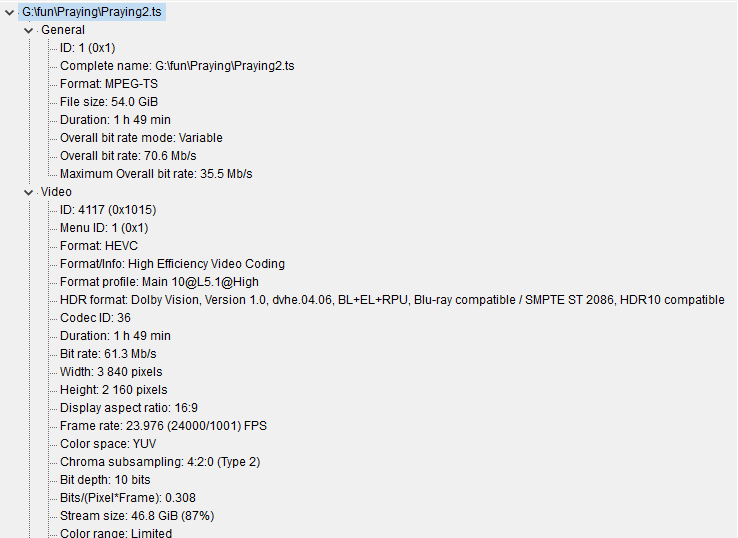
- Annotation 2020-06-04 225541.png (33.36 KiB) Viewed 32999 times
Re: Dolby Vision now possible through MP4 Mux.
Posted: Sun Jun 07, 2020 8:34 pm
by jlpsvk
chrisandy wrote: Fri Jun 05, 2020 3:38 am
jlpsvk wrote: Thu Jun 04, 2020 10:53 pm
jesus... just mux it with version I linked.... you don't need to change "level" in tsMuxer.
Thanks - I realized my error soon before you posted
Edit #3: Got the .ts file to work with DV on Plex for Shield but it's constantly stuttering. Is this a KP?
Annotation 2020-06-04 225541.png
you need to use BL+RPU, not BL+EL+RPU (MODE 2 of tool)
Re: Dolby Vision now possible through MP4 Mux.
Posted: Sun Jun 07, 2020 8:52 pm
by VictorLemon
Hello, does anyone know how to add subtitles to the MP4 container without losing the DV?
a greeting
Re: Dolby Vision now possible through MP4 Mux.
Posted: Sun Jun 07, 2020 10:07 pm
by flashback8
sonysg wrote: Tue Jun 02, 2020 12:32 am
sonysg wrote: Tue May 26, 2020 5:23 am
Dear all,
I'm using OPPO 205 and Sony X950G
I have a problem when playing Dolby Vision disc or MP4 muxed Dolby Vision files
How could we enforced film to full screen(No Black bar) when play back DV contains? It said this operation is not permitted when I pressed "Zoom" on the Oppo's remote
I could do full screen easily on HDR10 but not in Dolby Vision format, only Full screen Dolby Vision contain could (i.e BumbleBee, Transformer 4) :( I wish I could to do that for every Dolby Vision titles to enhance the movie viewing experience
How to we bypass this restriction? it could because of the metadata of second layer(1920*1080) of Dolby Vision contains prevent this to be happened, because muxing Dolby Vision using MP4 container is possible now, I would like to save hard disk space and get rid of black bar whenever possible, Does MakeMKV allow or maximise the full screen properties when muxing in MP4 format?
Looking forward for your suggestion
I'm sorry to bumped up this question but no one seem to be giving me an overall idea on this
Is this restriction on the player itself or the DV authoring prevent the "Zoom" happening but its possible still on HDR10 contains
It's due to the processing chips being underpowered (or so Oppo claimed long ago). The 203/205 replacements presumably would've addressed that flaw, and others.
Re: Dolby Vision now possible through MP4 Mux.
Posted: Mon Jun 08, 2020 1:10 am
by shawnc22
jlpsvk wrote: Sun Jun 07, 2020 8:34 pm
chrisandy wrote: Fri Jun 05, 2020 3:38 am
jlpsvk wrote: Thu Jun 04, 2020 10:53 pm
jesus... just mux it with version I linked.... you don't need to change "level" in tsMuxer.
Thanks - I realized my error soon before you posted
Edit #3: Got the .ts file to work with DV on Plex for Shield but it's constantly stuttering. Is this a KP?
Annotation 2020-06-04 225541.png
you need to use BL+RPU, not BL+EL+RPU (MODE 2 of tool)
No you don't for the Shield and mode 2 of yusecope's tool gives you BL+EL+RPU, not BL+RPU.
Re: Dolby Vision now possible through MP4 Mux.
Posted: Mon Jun 08, 2020 1:14 pm
by sonysg
flashback8 wrote: Sun Jun 07, 2020 10:07 pm
sonysg wrote: Tue Jun 02, 2020 12:32 am
sonysg wrote: Tue May 26, 2020 5:23 am
Dear all,
I'm using OPPO 205 and Sony X950G
I have a problem when playing Dolby Vision disc or MP4 muxed Dolby Vision files
How could we enforced film to full screen(No Black bar) when play back DV contains? It said this operation is not permitted when I pressed "Zoom" on the Oppo's remote
I could do full screen easily on HDR10 but not in Dolby Vision format, only Full screen Dolby Vision contain could (i.e BumbleBee, Transformer 4)

I wish I could to do that for every Dolby Vision titles to enhance the movie viewing experience
How to we bypass this restriction? it could because of the metadata of second layer(1920*1080) of Dolby Vision contains prevent this to be happened, because muxing Dolby Vision using MP4 container is possible now, I would like to save hard disk space and get rid of black bar whenever possible, Does MakeMKV allow or maximise the full screen properties when muxing in MP4 format?
Looking forward for your suggestion
I'm sorry to bumped up this question but no one seem to be giving me an overall idea on this
Is this restriction on the player itself or the DV authoring prevent the "Zoom" happening but its possible still on HDR10 contains
It's due to the processing chips being underpowered (or so Oppo claimed long ago). The 203/205 replacements presumably would've addressed that flaw, and others.
Do you have news or link for that claimed its underpowered? Oppo already stop the production of 203/205 unlikely they would fix this issue on these model, too bad not much UHD Bluray player out there now
Re: Dolby Vision now possible through MP4 Mux.
Posted: Mon Jun 08, 2020 1:39 pm
by thetoad
can one do it on any other dolby vision bluray player? if not, I'd make a guess that its a dolby restriction, not allowing dolby vision content to be viewed in manners that they dislike
Re: Dolby Vision now possible through MP4 Mux.
Posted: Mon Jun 08, 2020 2:29 pm
by box4m
flashback8 wrote: Sun Jun 07, 2020 10:07 pm
sonysg wrote: Tue Jun 02, 2020 12:32 am
sonysg wrote: Tue May 26, 2020 5:23 am
Dear all,
I'm using OPPO 205 and Sony X950G
I have a problem when playing Dolby Vision disc or MP4 muxed Dolby Vision files
How could we enforced film to full screen(No Black bar) when play back DV contains? It said this operation is not permitted when I pressed "Zoom" on the Oppo's remote
I could do full screen easily on HDR10 but not in Dolby Vision format, only Full screen Dolby Vision contain could (i.e BumbleBee, Transformer 4)
I wish I could to do that for every Dolby Vision titles to enhance the movie viewing experience
How to we bypass this restriction? it could because of the metadata of second layer(1920*1080) of Dolby Vision contains prevent this to be happened, because muxing Dolby Vision using MP4 container is possible now, I would like to save hard disk space and get rid of black bar whenever possible, Does MakeMKV allow or maximise the full screen properties when muxing in MP4 format?
Looking forward for your suggestion
I'm sorry to bumped up this question but no one seem to be giving me an overall idea on this
Is this restriction on the player itself or the DV authoring prevent the "Zoom" happening but its possible still on HDR10 contains
It's due to the processing chips being underpowered (or so Oppo claimed long ago). The 203/205 replacements presumably would've addressed that flaw, and others.
This is interesting, what replacements do u mean btw?
Re: Dolby Vision now possible through MP4 Mux.
Posted: Mon Jun 08, 2020 3:58 pm
by GabryLiv
Hello
Can you explain how the mel or fel files are recognized?
what is the procedure to insert the dolby vision into the mp4?
Demux the hevc file and the audio with tsmuxer
After how do we proceed?
Thanks
Re: Dolby Vision now possible through MP4 Mux.
Posted: Mon Jun 08, 2020 6:08 pm
by flashback8
sonysg wrote: Mon Jun 08, 2020 1:14 pm
flashback8 wrote: Sun Jun 07, 2020 10:07 pm
sonysg wrote: Tue Jun 02, 2020 12:32 am
I'm sorry to bumped up this question but no one seem to be giving me an overall idea on this
Is this restriction on the player itself or the DV authoring prevent the "Zoom" happening but its possible still on HDR10 contains
It's due to the processing chips being underpowered (or so Oppo claimed long ago). The 203/205 replacements presumably would've addressed that flaw, and others.
Do you have news or link for that claimed its underpowered? Oppo already stop the production of 203/205 unlikely they would fix this issue on these model, too bad not much UHD Bluray player out there now :(
It's buried somewhere in the Oppo-203/205 thread on the blu-ray.com forum. They talked about it sometime in 2018, I think.
Re: Dolby Vision now possible through MP4 Mux.
Posted: Mon Jun 08, 2020 6:09 pm
by flashback8
box4m wrote: Mon Jun 08, 2020 2:29 pm
flashback8 wrote: Sun Jun 07, 2020 10:07 pm
sonysg wrote: Tue Jun 02, 2020 12:32 am
I'm sorry to bumped up this question but no one seem to be giving me an overall idea on this
Is this restriction on the player itself or the DV authoring prevent the "Zoom" happening but its possible still on HDR10 contains
It's due to the processing chips being underpowered (or so Oppo claimed long ago). The 203/205 replacements presumably would've addressed that flaw, and others.
This is interesting, what replacements do u mean btw?
Oppo would've come out with a newer player at some point. One of their execs is an A/V nut and pushed real hard for quality players. Alas, phones were too profitable, so Oppo ended up disbanding the A/V division (or greatly reducing it, perhaps) so that there would be more time and factory space dedicated to phones.
Re: Dolby Vision now possible through MP4 Mux.
Posted: Tue Jun 09, 2020 9:29 am
by sonysg
if anyone know a UHD Player that could do full zoom of Dolby Vision please let us know the model
Likely there would not be any player so far what I heard but still hoping its not restriction from Dolby Lab that prevent full screen to be happen

Re: Dolby Vision now possible through MP4 Mux.
Posted: Tue Jun 09, 2020 6:27 pm
by djbuddha
jlpsvk wrote: Mon Jun 01, 2020 10:33 am
so... I achieved this... with the help of mp4box
i think, would be good enough.
1) demux with tsMuxer...
2) encode BL
3) mux BL_encode.hevc with EL.hevc with yousesope's tools with mode 2 to BL+RPU
4) mux only video to mp4 with mp4muxer 1.0.1
5) add audio, subs, chapters to MP4 with mp4box
So I followed these steps, and changed it a little, here are the results.
Demuxed the file
muxed the BL & EL using yousesope w/ mode 2
muxed the BL+RPU with all the other assets (subs and all the other audio) to .TS (using the tsMuxer nightly that you linked... thank you btw)
Here's what I found:
- My Apple TV 4K plays the file as Dolby Vision via Infuse. The Atmos track plays as 7.1 which is fine (as the Apple TV can't play Atmos from Infuse from the disc's audio file anyway).
- My nVidia Shield 2017 plays the file as HDR10 (plays fine) and Atmos plays back perfectly.
- All subs work.
So .... it looks like I got it right. Getting my hands on a new 2019 Shield Pro at some point. In THEORY this resulting .TS file should play both the Dolby Vision & Atmos ...
Am I getting this right?
I don't care if the container is MP4, MKV or TS .. for Dolby Vision titles they will get their own folder anyway given the way I organize... but this SHOULD be ok no?
Re: Dolby Vision now possible through MP4 Mux.
Posted: Tue Jun 09, 2020 11:15 pm
by shawnc22
djbuddha wrote: Tue Jun 09, 2020 6:27 pm
jlpsvk wrote: Mon Jun 01, 2020 10:33 am
so... I achieved this... with the help of mp4box
i think, would be good enough.
1) demux with tsMuxer...
2) encode BL
3) mux BL_encode.hevc with EL.hevc with yousesope's tools with mode 2 to BL+RPU
4) mux only video to mp4 with mp4muxer 1.0.1
5) add audio, subs, chapters to MP4 with mp4box
So I followed these steps, and changed it a little, here are the results.
Demuxed the file
muxed the BL & EL using yousesope w/ mode 2
muxed the BL+RPU with all the other assets (subs and all the other audio) to .TS (using the tsMuxer nightly that you linked... thank you btw)
Here's what I found:
- My Apple TV 4K plays the file as Dolby Vision via Infuse. The Atmos track plays as 7.1 which is fine (as the Apple TV can't play Atmos from Infuse from the disc's audio file anyway).
- My nVidia Shield 2017 plays the file as HDR10 (plays fine) and Atmos plays back perfectly.
- All subs work.
So .... it looks like I got it right. Getting my hands on a new 2019 Shield Pro at some point. In THEORY this resulting .TS file should play both the Dolby Vision & Atmos ...
Am I getting this right?
I don't care if the container is MP4, MKV or TS .. for Dolby Vision titles they will get their own folder anyway given the way I organize... but this SHOULD be ok no?
When you get a 2019 Shield pro, hopefully the DV standard for MKV is set in place by then, and you can just go directly from disk to mkv with makemkv and be done. If not, the files you have already created will play fine, but they are missing the EL, so titles that have a full enhancement layer might not be shown in the way they were intended to.
Re: Dolby Vision now possible through MP4 Mux.
Posted: Wed Jun 10, 2020 12:04 am
by djbuddha
shawnc22 wrote: Tue Jun 09, 2020 11:15 pm
djbuddha wrote: Tue Jun 09, 2020 6:27 pm
jlpsvk wrote: Mon Jun 01, 2020 10:33 am
so... I achieved this... with the help of mp4box
i think, would be good enough.
1) demux with tsMuxer...
2) encode BL
3) mux BL_encode.hevc with EL.hevc with yousesope's tools with mode 2 to BL+RPU
4) mux only video to mp4 with mp4muxer 1.0.1
5) add audio, subs, chapters to MP4 with mp4box
So I followed these steps, and changed it a little, here are the results.
Demuxed the file
muxed the BL & EL using yousesope w/ mode 2
muxed the BL+RPU with all the other assets (subs and all the other audio) to .TS (using the tsMuxer nightly that you linked... thank you btw)
Here's what I found:
- My Apple TV 4K plays the file as Dolby Vision via Infuse. The Atmos track plays as 7.1 which is fine (as the Apple TV can't play Atmos from Infuse from the disc's audio file anyway).
- My nVidia Shield 2017 plays the file as HDR10 (plays fine) and Atmos plays back perfectly.
- All subs work.
So .... it looks like I got it right. Getting my hands on a new 2019 Shield Pro at some point. In THEORY this resulting .TS file should play both the Dolby Vision & Atmos ...
Am I getting this right?
I don't care if the container is MP4, MKV or TS .. for Dolby Vision titles they will get their own folder anyway given the way I organize... but this SHOULD be ok no?
When you get a 2019 Shield pro, hopefully the DV standard for MKV is set in place by then, and you can just go directly from disk to mkv with makemkv and be done. If not, the files you have already created will play fine, but they are missing the EL, so titles that have a full enhancement layer might not be shown in the way they were intended to.
Wait, doesn't yousesope's script put the layer in the newly exported hevc file before remuxing it to TS?