Page 113 of 116
Re: SDFtool Flasher
Posted: Mon Mar 30, 2026 11:06 pm
by professor-t
MartyMcNuts wrote: Mon Mar 30, 2026 5:41 am
professor-t wrote: Mon Mar 30, 2026 12:10 am
MartyMcNuts wrote: Sun Mar 29, 2026 11:38 pm
To flash from 103-MK to 1.00, you don't need enc as MK firmware is not encrypted.
Yeah I know it’s not encrypted. It still won’t flash from 1.03-MK to 1.00, so I’m looking for help with that. I don’t know why it’s not working. SDFtool shows progress up to 100% and says it completes, but the drive is still on 1.03-MK.
Try the RECOVER method and see if that works. In the popup window, choose the 1.03-MK firmware currently on the drive, then in the normal firmware selection drop down box choose the 1.00 firmware.
Thanks this worked! I tried using the Recover method before, but didn't select the current firmware in the popup, so that's why it didn't work before. Now that I have this drive on 1.00 it's now reading 4K BDs.
Are there recommended slim drive enclosures that don't have copy protection built in? The one this new drive came with blocks it unfortunately.
Re: SDFtool Flasher
Posted: Tue Mar 31, 2026 2:48 am
by MartyMcNuts
professor-t wrote: Mon Mar 30, 2026 11:06 pm
MartyMcNuts wrote: Mon Mar 30, 2026 5:41 am
professor-t wrote: Mon Mar 30, 2026 12:10 am
Yeah I know it’s not encrypted. It still won’t flash from 1.03-MK to 1.00, so I’m looking for help with that. I don’t know why it’s not working. SDFtool shows progress up to 100% and says it completes, but the drive is still on 1.03-MK.
Try the RECOVER method and see if that works. In the popup window, choose the 1.03-MK firmware currently on the drive, then in the normal firmware selection drop down box choose the 1.00 firmware.
Thanks this worked! I tried using the Recover method before, but didn't select the current firmware in the popup, so that's why it didn't work before. Now that I have this drive on 1.00 it's now reading 4K BDs.
Are there recommended slim drive enclosures that don't have copy protection built in? The one this new drive came with blocks it unfortunately.
Dunno. I suggest just getting the cheapest one you can but I'd be only looking at one's that use a USB-C connection, not a built in cable.
Re: SDFtool Flasher
Posted: Tue Mar 31, 2026 5:09 pm
by nicholfd
professor-t wrote: Mon Mar 30, 2026 11:06 pm
MartyMcNuts wrote: Mon Mar 30, 2026 5:41 am
professor-t wrote: Mon Mar 30, 2026 12:10 am
Yeah I know it’s not encrypted. It still won’t flash from 1.03-MK to 1.00, so I’m looking for help with that. I don’t know why it’s not working. SDFtool shows progress up to 100% and says it completes, but the drive is still on 1.03-MK.
Try the RECOVER method and see if that works. In the popup window, choose the 1.03-MK firmware currently on the drive, then in the normal firmware selection drop down box choose the 1.00 firmware.
Thanks this worked! I tried using the Recover method before, but didn't select the current firmware in the popup, so that's why it didn't work before. Now that I have this drive on 1.00 it's now reading 4K BDs.
Are there recommended slim drive enclosures that don't have copy protection built in? The one this new drive came with blocks it unfortunately.
I purchased this on Amazon:
External CD/DVD Drive for Laptop, DVD Burner CD Reader for Laptop, 8-in-1 USB 3.0 Portable CD Players for about $18, December, 2025. I removed the included drive & now use it with a BU40N equivalent. I just set aside the included drive (no use for it). This enclosure has an "attached/captured" USB cable with both a USB-C & USB-A connector for power/data (this cable is removable/replaceable inside the inclosure). It also includes a dedicated USB-C port for additional power only & includes an additional USB-C -> USB-A cable for power only. The other features/ports are just "nice to have".
It's worked perfectly for both flashing & ripping 4K/UHD.
Thanks,
Frank
Re: SDFtool Flasher
Posted: Wed Apr 01, 2026 4:52 am
by mfann6619
Why am I getting this error? How can I resolve this?
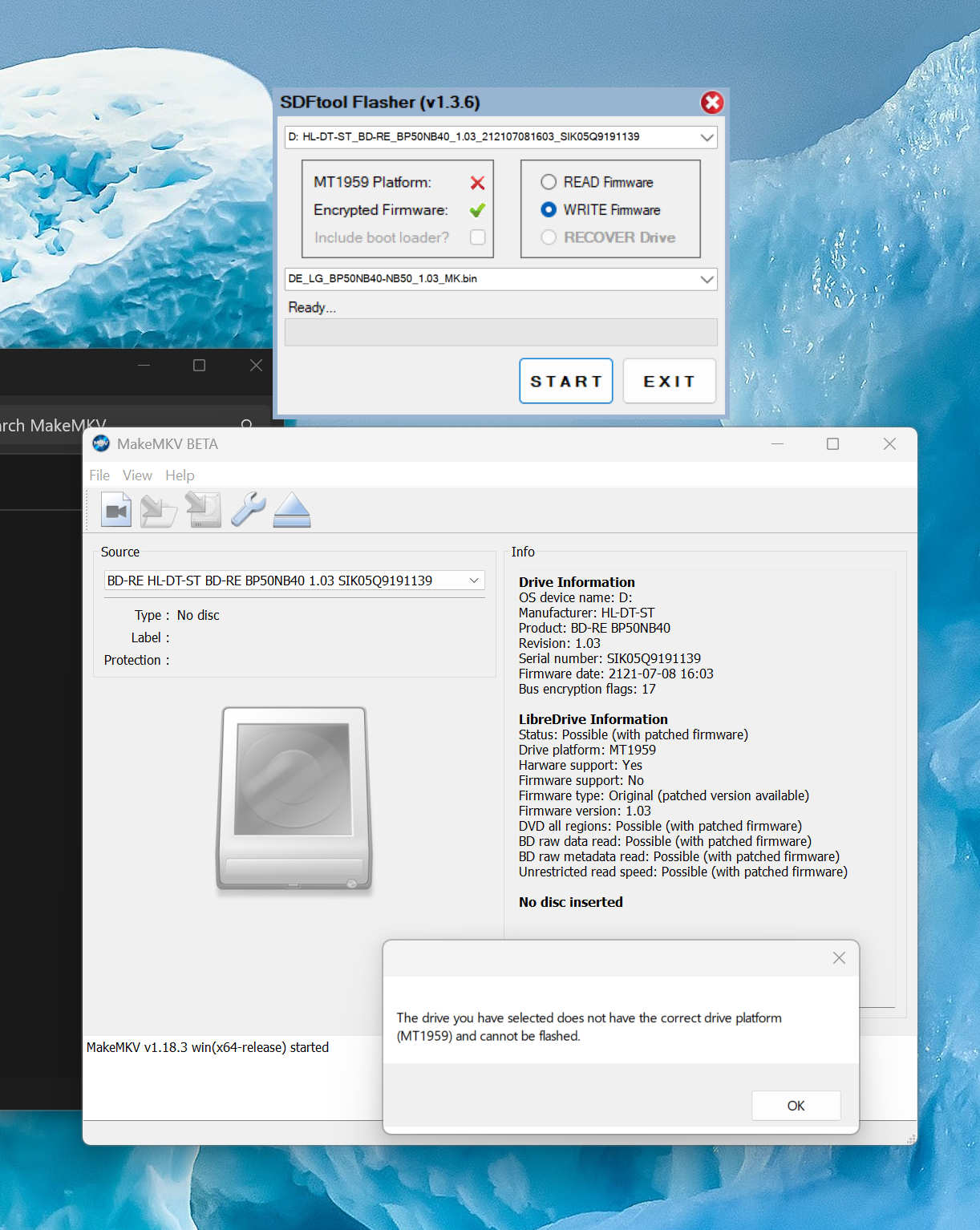
- Screenshot 2026-04-01 005015.png (1.14 MiB) Viewed 8579 times
Re: SDFtool Flasher
Posted: Wed Apr 01, 2026 10:37 pm
by MartyMcNuts
mfann6619 wrote: Wed Apr 01, 2026 4:52 am
Why am I getting this error? How can I resolve this?
Screenshot 2026-04-01 005015.png
Are you using a real windows 11 64 bit PC or some sort of VM?
Re: SDFtool Flasher
Posted: Wed Apr 01, 2026 11:25 pm
by wdhtx01
cinerama19806 wrote: Mon Jan 19, 2026 3:56 am
Note of course I haven't even gotten to the point of having to read a 4K disc as I haven't yet been able to flash the drive. I continue to successfully burn single and double layer discs from one of the front 3.0 ports on my computer. When I once again get to the point of trying to flash the drive, I'll search out one of the USB ports on the rear of my computer; another option is to go to an older computer that's not connected to a 4K monitor and hook up my new drive to that after installing MakeMKV on it.
I have the display setting scale on my computer set to 300 (which is recommended for my 4K monitor). If I had it set to 100 I wouldn't be able to see any text. (One issue noted with the interface is that the high DPI settings much be changed so the interface is visible and usable.)
I was having the same flashing issues as you were, then I switched to the MakeMKV command-line (wherever you installed MakeMkv, add that to your path). Then open a command prompt and run makemkcon64 f -l (this will list drives available). Then, using the command, run "makemkvcon64.exe f --all-yes -d “ your drive letter here Example: D:” rawflash full enc -i “path to your firmware". You can try with and without the "enc" (stands for encoded firmware). I found that I was missing that "enc". Once I added it, everything worked (using this command-line option.)
Cheers and good luck!
Re: SDFtool Flasher
Posted: Wed Apr 01, 2026 11:25 pm
by mfann6619
MartyMcNuts wrote: Wed Apr 01, 2026 10:37 pm
mfann6619 wrote: Wed Apr 01, 2026 4:52 am
Why am I getting this error? How can I resolve this?
Screenshot 2026-04-01 005015.png
Are you using a real windows 11 64 bit PC or some sort of VM?
I am on a real Windows 11 64 bit PC. A Minisforum MS-01.
Re: SDFtool Flasher
Posted: Thu Apr 02, 2026 1:57 am
by MartyMcNuts
mfann6619 wrote: Wed Apr 01, 2026 11:25 pm
MartyMcNuts wrote: Wed Apr 01, 2026 10:37 pm
mfann6619 wrote: Wed Apr 01, 2026 4:52 am
Why am I getting this error? How can I resolve this?
Screenshot 2026-04-01 005015.png
Are you using a real windows 11 64 bit PC or some sort of VM?
I am on a real Windows 11 64 bit PC. A Minisforum MS-01.
What is the SVC code of your drive? It will be written on the label on the side of the box and also underneath the drive. If it is SVC NB72, it is not compatible.
Re: SDFtool Flasher
Posted: Thu Apr 02, 2026 2:29 am
by mfann6619
MartyMcNuts wrote: Thu Apr 02, 2026 1:57 am
mfann6619 wrote: Wed Apr 01, 2026 11:25 pm
MartyMcNuts wrote: Wed Apr 01, 2026 10:37 pm
Are you using a real windows 11 64 bit PC or some sort of VM?
I am on a real Windows 11 64 bit PC. A Minisforum MS-01.
What is the SVC code of your drive? It will be written on the label on the side of the box and also underneath the drive. If it is SVC NB72, it is not compatible.
It is SVC NB52.
Re: SDFtool Flasher
Posted: Thu Apr 02, 2026 3:21 am
by Billycar11
mfann6619 wrote: Thu Apr 02, 2026 2:29 am
MartyMcNuts wrote: Thu Apr 02, 2026 1:57 am
mfann6619 wrote: Wed Apr 01, 2026 11:25 pm
I am on a real Windows 11 64 bit PC. A Minisforum MS-01.
What is the SVC code of your drive? It will be written on the label on the side of the box and also underneath the drive. If it is SVC NB72, it is not compatible.
It is SVC NB52.
run the flasher as admin
some windows 11 pcs hide drive info from stuff
seen this with the pioneer flasher
Re: SDFtool Flasher
Posted: Thu Apr 02, 2026 4:38 am
by mfann6619
Billycar11 wrote: Thu Apr 02, 2026 3:21 am
mfann6619 wrote: Thu Apr 02, 2026 2:29 am
MartyMcNuts wrote: Thu Apr 02, 2026 1:57 am
What is the SVC code of your drive? It will be written on the label on the side of the box and also underneath the drive. If it is SVC NB72, it is not compatible.
It is SVC NB52.
run the flasher as admin
some windows 11 pcs hide drive info from stuff
seen this with the pioneer flasher
Still no good.
Re: SDFtool Flasher
Posted: Thu Apr 02, 2026 10:16 pm
by razer
Another LG_BU40N successfully flashed. Thanks Marty!
Re: SDFtool Flasher
Posted: Sun Apr 05, 2026 6:42 am
by davikki
Thanks Marty / Billycar for what you've done for the community.
I have flashed my blu ray drive. Followed your guide. I believe its done correctly. Rips blu ray fine. But the drive does not detect the 4k UHD disk. "no disc inserted." I have unplugged and plugged the drive back in. Tried on different computers. Something I'm missing? It is a WP50NB40 SVC:nb52
Drive Information
OS device name: F:
Manufacturer: HL-DT-ST
Product: BD-RE WP50NB40
Revision: 1.03
Serial number: ***************
Firmware date: 2120-05-07 09:29
Bus encryption flags: 17
Highest AACS version: 75
LibreDrive Information
Status: Enabled
Drive platform: MT1959
Firmware type: Patched (microcode access re-enabled)
Firmware version: 1.03
DVD all regions: Yes
BD raw data read: Yes
BD raw metadata read: Yes
Unrestricted read speed: Yes
No disc inserted
Re: SDFtool Flasher
Posted: Sun Apr 05, 2026 12:48 pm
by Billycar11
davikki wrote: Sun Apr 05, 2026 6:42 am
Thanks Marty / Billycar for what you've done for the community.
I have flashed my blu ray drive. Followed your guide. I believe its done correctly. Rips blu ray fine. But the drive does not detect the 4k UHD disk. "no disc inserted." I have unplugged and plugged the drive back in. Tried on different computers. Something I'm missing? It is a WP50NB40 SVC:nb52
Drive Information
OS device name: F:
Manufacturer: HL-DT-ST
Product: BD-RE WP50NB40
Revision: 1.03
Serial number: ***************
Firmware date: 2120-05-07 09:29
Bus encryption flags: 17
Highest AACS version: 75
LibreDrive Information
Status: Enabled
Drive platform: MT1959
Firmware type: Patched (microcode access re-enabled)
Firmware version: 1.03
DVD all regions: Yes
BD raw data read: Yes
BD raw metadata read: Yes
Unrestricted read speed: Yes
No disc inserted
You have to flash this drive multiple times
See guide or
Marty's way linked in op with gif
Both work
Re: SDFtool Flasher
Posted: Sun Apr 05, 2026 5:33 pm
by davikki
Thank Billy. Its amazing what a little bit of sleep will do. I just didn't follow Marty's guide to the T. 4k movies sure take a lot longer to rip.
FYI after reflashing it should change the product to whatever you reflash it to. In my case BU40N 1.0