Flashing LG and Pioneer drives for UHD, incl. Pioneer firmware 12/2022+ (trev.bot)

Forum for discussions about UHD-capable dives
skyrider
Posts: 100
Joined: Thu Mar 12, 2026 11:01 am

Flashing LG and Pioneer drives for UHD, incl. Pioneer firmware 12/2022+ (trev.bot)

Post by skyrider »

trev.bot flash 1.0: LG and Pioneer drives for UHD, including Pioneer firmware 12/2022+

Updated October 2026 for the 1.0 release.

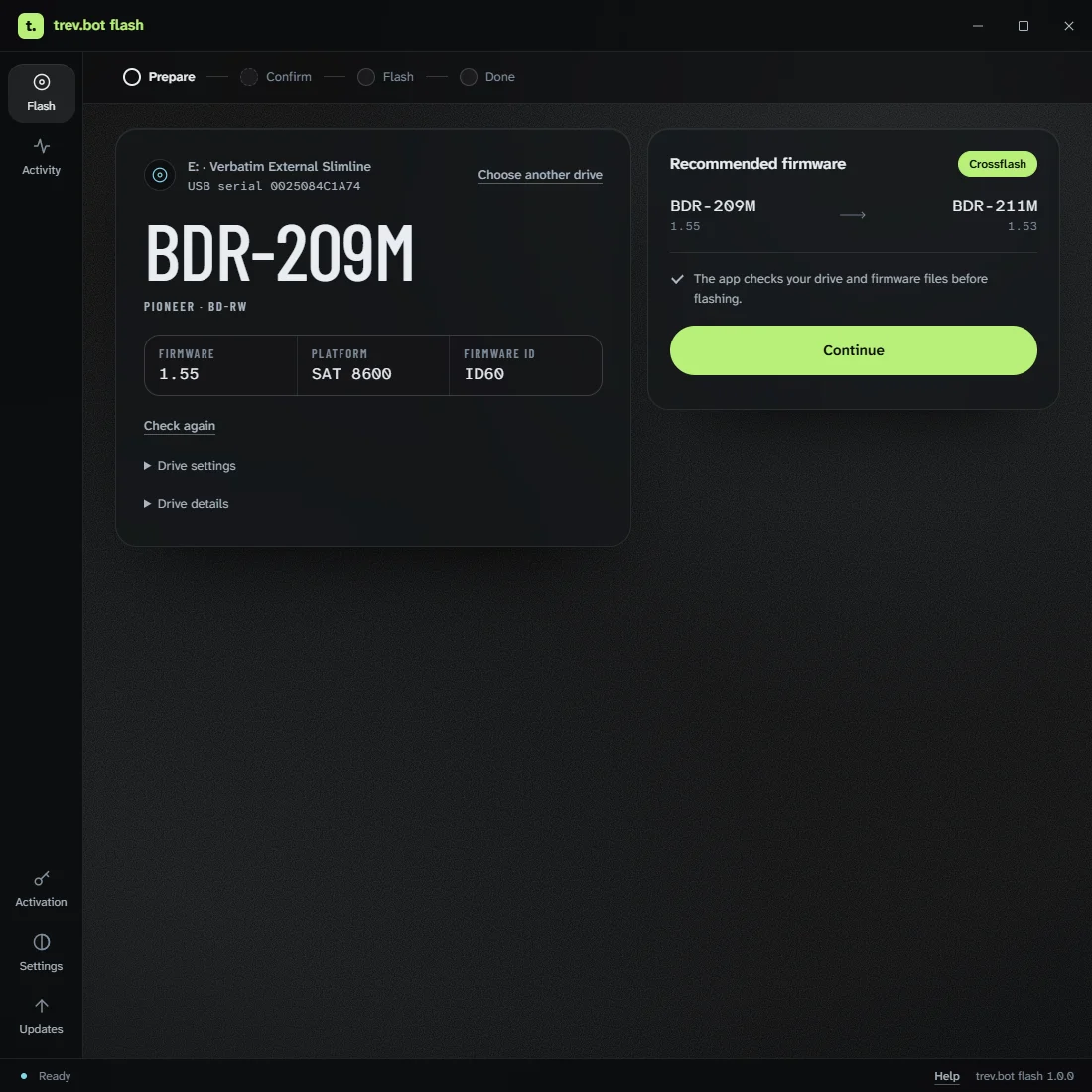
trev.bot flash is a desktop app by Trevor (trevbot here on the forum) that gets LG and Pioneer Blu-ray drives ready for 4K UHD discs. It checks your drive, downloads the right firmware for it and walks you through the flash. No command line and no hunting for firmware files.

It started with Pioneer drives on firmware from December 2022 or later, which couldn't be downgraded or crossflashed the usual way. Version 1.0 adds LG drives as well.

What's new in 1.0
  • Windows, macOS and Linux.
  • LG drives, including ASUS and Buffalo drives built on LG hardware.
  • Pioneer drives, including ones on 12/2022+ firmware.
  • AutoFlash: check the drive, the app picks the firmware and flashes it.
  • It can read the drive inside an external case.
Image

What it costs
Checking a drive is free and needs no activation code. The check tells you whether a flash is available for your exact model and firmware.

Flashing needs a license. One personal license covers your own supported drives on up to 3 computers and doesn't expire. The launch price is $29.99. LG flashing needs no license at launch. If you already bought a flash license earlier, it has been upgraded automatically.

How it works
  1. Download the app from trev.bot/download.
  2. Connect the drive with no disc inside, open the app and run the free check.
  3. If a flash is available, the app downloads and checks the firmware, and tells you if the drive needs to be reconnected.
  4. Confirm the drive and the risk, then press and hold to flash.
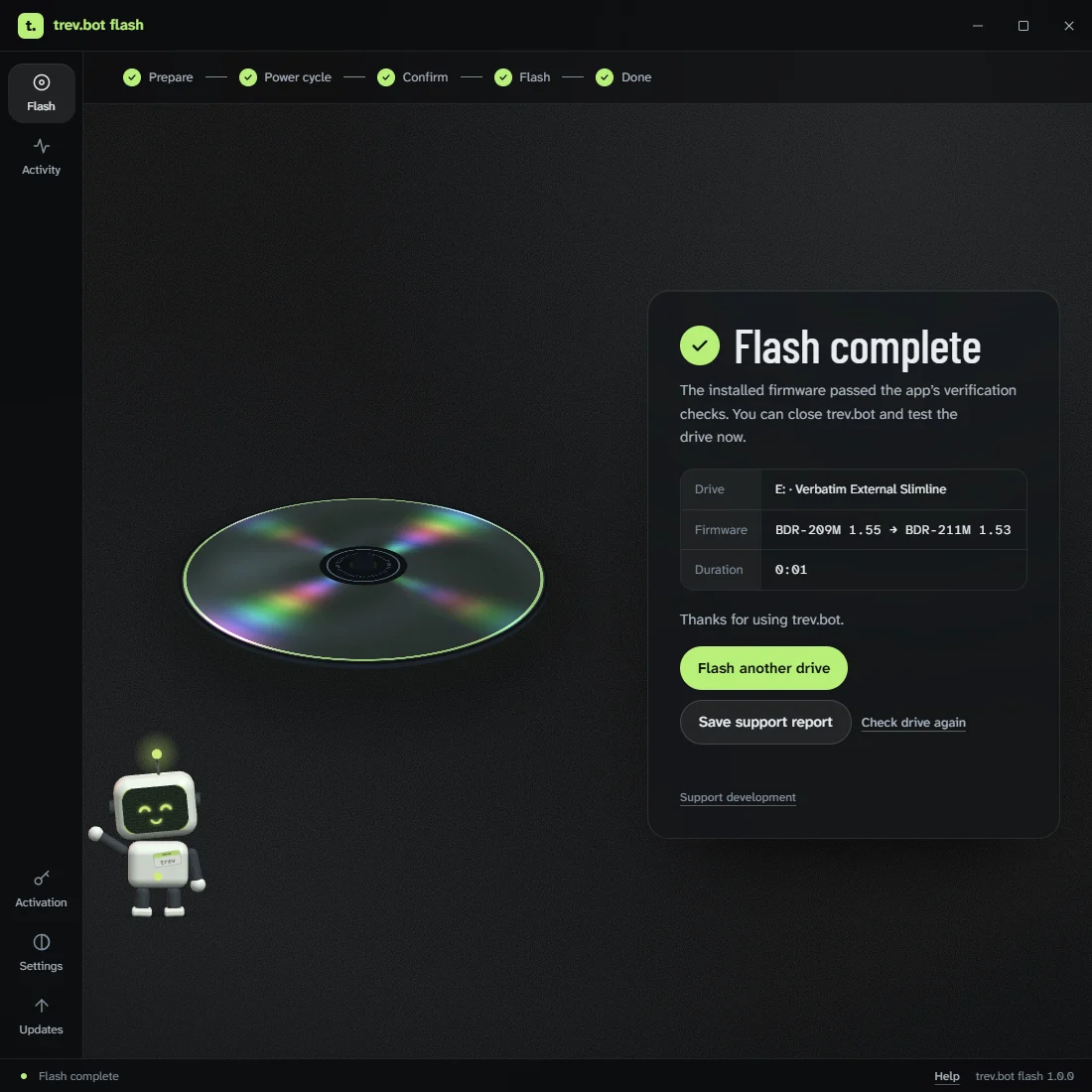
  5. When it says Flash complete, test the drive with your discs.
Image

Firmware flashing always carries some risk. The app checks the drive and the firmware before writing, but no check can rule out a failure. Use an empty drive, keep its cable and power connected and leave the app open until it finishes. More in Before you flash.

Drive not supported yet?
Run the free Analyze drive option in the app. With your approval it reads the drive and sends the results to Trevor to help add support. It never flashes anything, and there's no guarantee support will follow, but this is how most of the current Pioneer support came about.

Help
If something goes wrong, save the app's support report and email it to help@trev.bot. Trevor answers those himself, usually quickly.

How this thread started
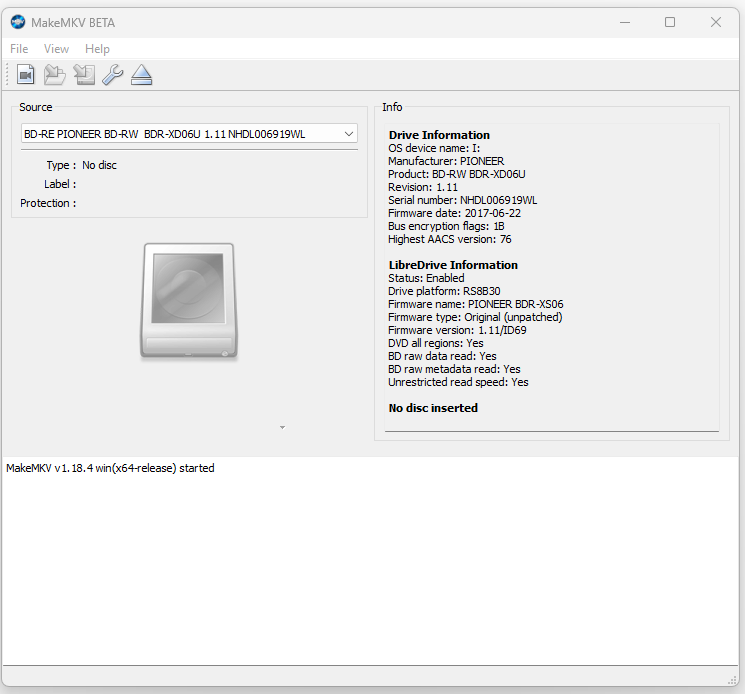
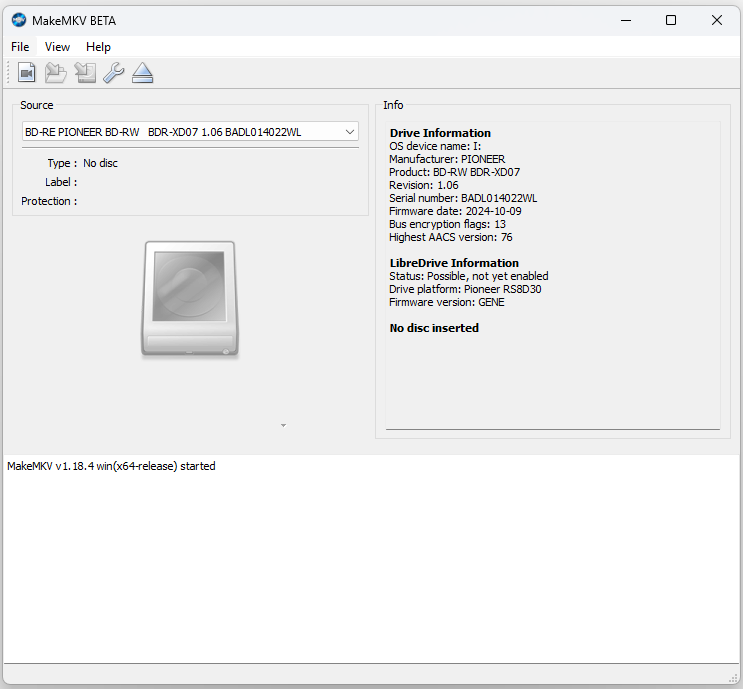
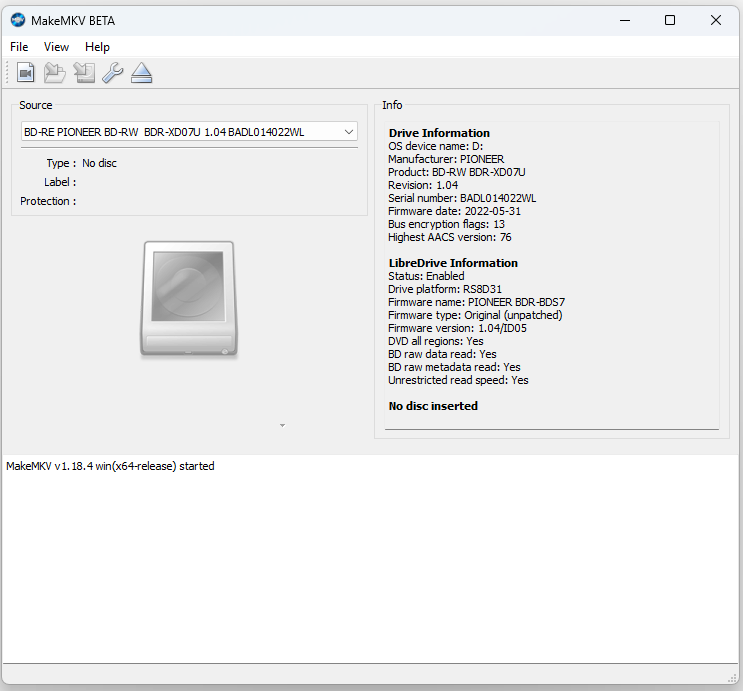
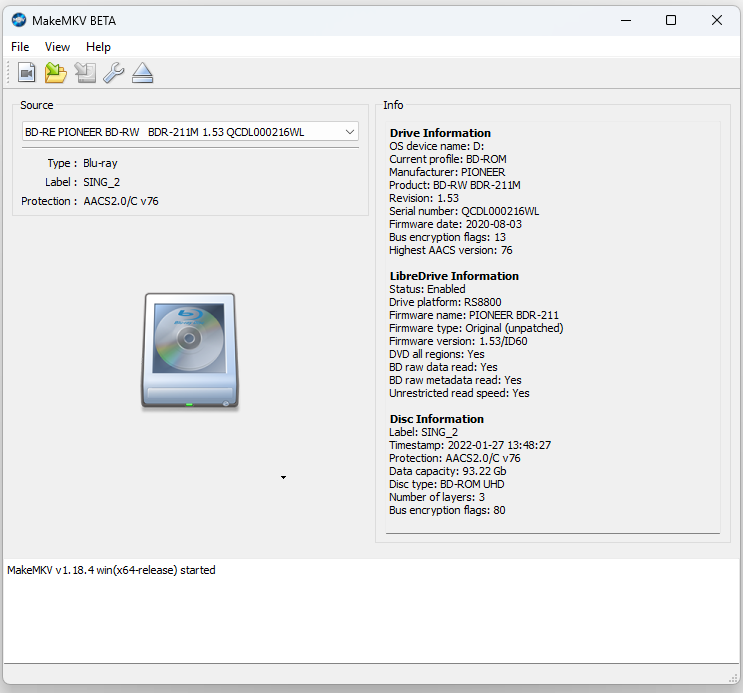
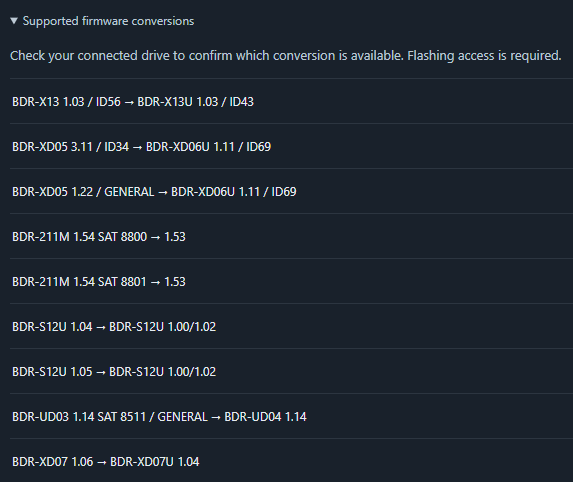
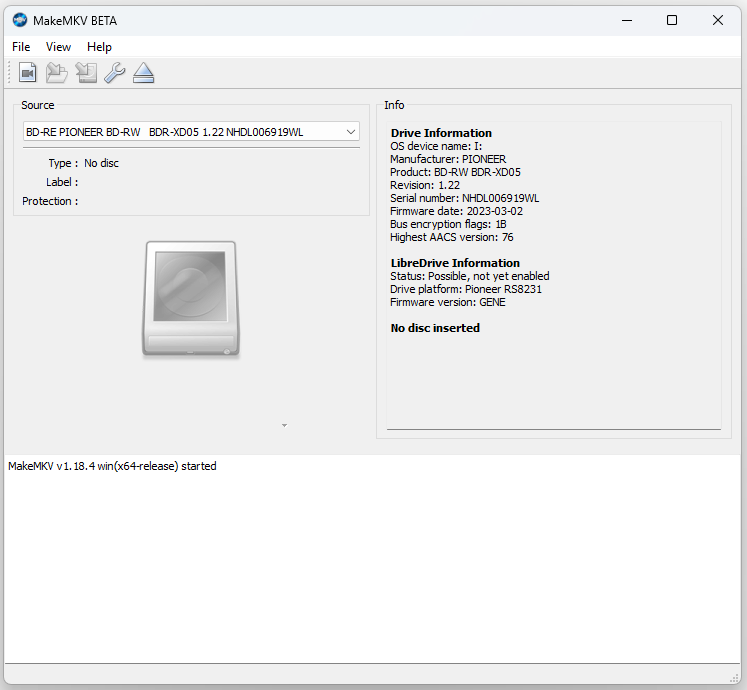
I own several Pioneer drives that had firmware from after December 2022, and for a long time there was no practical way to downgrade or crossflash them. When I saw Trevor's post on the cdrinfo forum, I contacted him and sent MakeMKV screenshots of my drives. He prepared a test build for me, and I went from BDR-XD05T 1.22 straight to BDR-XD06U 1.11 in one step. My BDR-XD07TB and BDR-211UBK followed. Since then, other people in this thread have done XD07, XD08 and 212EBK drives too.

Before:
Image

After:
Image

Links
Download: https://trev.bot/download
Pricing: https://trev.bot/pricing
Every screen of the app: https://trev.bot/how-it-works
Changelog: https://trev.bot/changelog

Trevor also made OpenRipper, a free, open-source auto-ripper that uses MakeMKV: https://github.com/redharp/openripper
Last edited by skyrider on Wed Oct 14, 2026 7:47 am, edited 2 times in total.
Looking for a Pioneer 4K UHD drive?
Click here
Billycar11
Posts: 6382
Joined: Sun Aug 24, 2014 5:49 am

Re: Flashing Pioneer drives with firmware 12/2022+

Post by Billycar11 »

There is something to be said about reverse engineering
:(

but anyone who reaches out to me i will provide free 12/22+ pioneer flashers on request
for personal use only no resellers
Last edited by Billycar11 on Tue Sep 29, 2026 12:12 am, edited 2 times in total.
Buy a drive from the guide and video maker: viewtopic.php?t=17831
UHD Drive Guide: viewtopic.php?t=19634
Auto flash kit $40 Email Billycar5924@gmail.com No attachments
Yethidran
Posts: 252
Joined: Fri Nov 01, 2024 12:07 pm

Re: Flashing Pioneer drives with firmware 12/2022+

Post by Yethidran »

Thanks for the info and heads up. Great!
cashkey1
Posts: 9
Joined: Wed Mar 31, 2021 6:59 am

Re: Flashing Pioneer drives with firmware 12/2022+

Post by cashkey1 »

Thats Superb!!! Cheer's!!!
skyrider
Posts: 100
Joined: Thu Mar 12, 2026 11:01 am

Re: Flashing Pioneer drives with firmware 12/2022+

Post by skyrider »

Another Pioneer drive has been successfully downgraded thanks to Trevor.
This time it's the BDR‑XD07TB, which landed in my hands with the latest firmware already installed.
It is now fully ready to read 4K UHD discs.

Before:

Image

After:

Image
Looking for a Pioneer 4K UHD drive?
Click here
skyrider
Posts: 100
Joined: Thu Mar 12, 2026 11:01 am

Re: Flashing Pioneer drives with firmware 12/2022+

Post by skyrider »

trev.bot research beta 0.1.8 - full firmware captures requested.

Below I am including Trevor's request.

The new trev.bot research beta 0.1.8 build is now available at https://research.trev.bot/
Download here - https://research.trev.bot/downloads/Tre ... ws-x64.zip
All previously issued and valid beta invitation codes remains active.

This release focuses on expanding data collection with full firmware captures, not just basic identification.
After running "Identify", please proceed with "Capture and send firmware" including main firmware when the tool offers it.

Uploads are handled automatically. Once the server confirms receipt, the local capture is removed.
Any failed uploads remain encrypted and will be retried until successful.

Version 0.1.8 introduces six new exact read profiles for the BDR‑211M, 212BK, and 213M series.
These profiles still require physical validation, so every test run is highly appreciated.

The tool functions strictly as a research collector, it does not flash drives, so don't worry.
Even refused read diagnostics are valuable and help us improve support for additional models.

Thanks in advance for your help.
Looking for a Pioneer 4K UHD drive?
Click here
glider_pilot
Posts: 1
Joined: Wed Sep 23, 2026 3:20 am

Re: Flashing Pioneer drives with firmware 12/2022+

Post by glider_pilot »

Another success story.

Flashed Pioneer BD-RW BDR-XD07 to BDR-XD07U. In now can read UHD disks.

Before:
Drive Information
OS device name: /dev/sr0
Current profile: BD-ROM
Manufacturer: PIONEER
Product: BD-RW BDR-XD07
Revision: 1.06
Serial number: TIDL004642UC
Firmware date: 2024-10-09
Bus encryption flags: 13
Highest AACS version: 57

LibreDrive Information
Status: Possible, not yet enabled
Drive platform: Pioneer RS8D30
Firmware version: GENE

After
Drive Information
OS device name: D:
Current profile: BD-ROM
Manufacturer: PIONEER
Product: BD-RW BDR-XD07U
Revision: 1.04
Serial number: TIDL004642UC
Firmware date: 2022-05-31
Bus encryption flags: 13
Highest AACS version: 72

LibreDrive Information
Status: Enabled
Drive platform: RS8D31
Firmware name: PIONEER BDR-BDS7
Firmware type: Original (unpatched)
Firmware version: 1.04/ID05
DVD all regions: Yes
BD raw data read: Yes
BD raw metadata read: Yes
Unrestricted read speed: Yes

Many thanks to the author!
skyrider
Posts: 100
Joined: Thu Mar 12, 2026 11:01 am

Re: Flashing Pioneer drives with firmware 12/2022+

Post by skyrider »

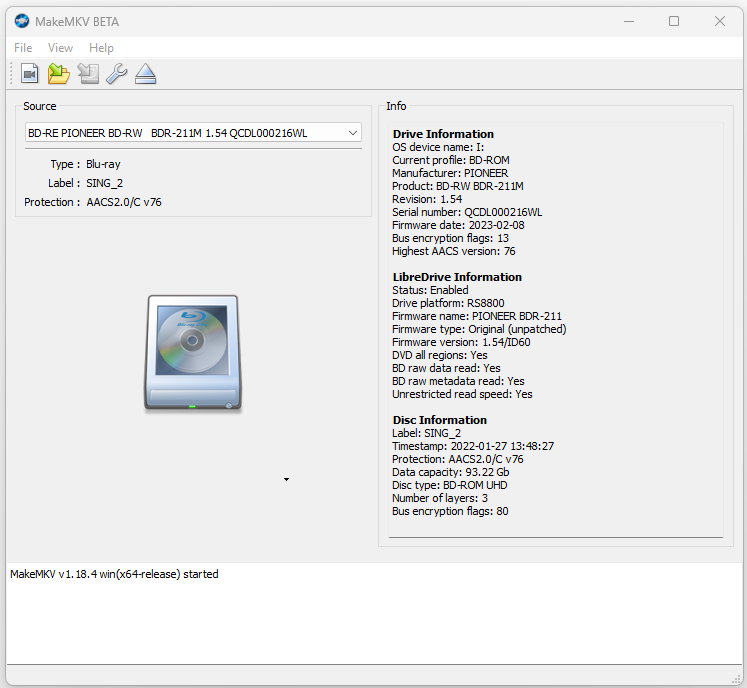
Another Pioneer drive has been successfully downgraded thanks to Trevor.
This time it's the BDR‑211UBK, which landed in my hands with the 1.54 firmware already installed.
Now successfully downgraded to 1.53.

Before:

Image

After:

Image

trev.bot 0.6.0-beta.5 brings the diagnostics work into the main trev.bot app. The biggest differences from the standalone diagnostic build are:
- Broader surveys: it keeps the existing firmware-capture methods and adds the verified XD08U 1.04 capture. Drives without an exact capture match now get additional capability probes instead of stopping at identification.
- Updates in the app: we can deliver new versions and research procedures through the signed updater.
- One app for research and supported flashing: the Research survey itself does not flash firmware.
- Automatic uploads remain: the diagnostic build already had these, and they’re now integrated into the main app, including encrypted storage and automatic retries when delivery fails.
Looking for a Pioneer 4K UHD drive?
Click here
skyrider
Posts: 100
Joined: Thu Mar 12, 2026 11:01 am

Re: Flashing Pioneer drives with firmware 12/2022+

Post by skyrider »

trev.bot 0.6.0-beta.11

UD03 flashing is available again. Fixed a completion-check error caused by two zero padding bytes in a valid Windows drive-status response. The app now continues its existing bounded completion checks and final firmware verification instead of stopping on that response.

No changes to firmware payloads, transfer commands or retry rules. A previous interrupted operation must not be repeated just to test this update; retain its journal and use the original app version for its saved verification workflow.

BDR-211 flashing remains paused. Existing keys, server-controlled route availability and automatic research survey uploads continue to work.

Image
Looking for a Pioneer 4K UHD drive?
Click here
Yethidran
Posts: 252
Joined: Fri Nov 01, 2024 12:07 pm

Re: Flashing Pioneer drives with firmware 12/2022+

Post by Yethidran »

i have a pioneer BDR-UD02 which i flashed a long time ago to UD03 then UD04, but unfortunately the flashing it bricked it. i still have the drive with me. how do i upload using the trevor tool?
Yethidran
Posts: 252
Joined: Fri Nov 01, 2024 12:07 pm

Re: Flashing Pioneer drives with firmware 12/2022+

Post by Yethidran »

Drive Information
OS device name: \Device\CdRom5
Current profile: BD-ROM
Manufacturer: PIONEER
Product: BD-RW BDR-UD02
Revision: 1.00
Serial number: LJDL050094WL
Firmware date: 2012-08-23
Bus encryption flags: 1B
Highest AACS version: 68


LibreDrive Information
Status: Enabled
Drive platform: RS8410
Firmware name: PIONEER BDR-US02
Firmware type: Original (unpatched)
Firmware version: 1.00/ID19
DVD all regions: Yes
BD raw data read: Yes
BD raw metadata read: Yes
Unrestricted read speed: Yes
Yethidran
Posts: 252
Joined: Fri Nov 01, 2024 12:07 pm

Re: Flashing Pioneer drives with firmware 12/2022+

Post by Yethidran »

this was the makemkv readout months ago, when it was on the stock ud-02 firmware.. but now its been upgraded to ud-04 firmware and it totally cannot read or write anything anymore. just a dead drive.
Coopervid
Posts: 4846
Joined: Tue Feb 19, 2019 10:32 pm

Re: Flashing Pioneer drives with firmware 12/2022+

Post by Coopervid »

Yethidran wrote: Thu Sep 24, 2026 6:09 am this was the makemkv readout months ago, when it was on the stock ud-02 firmware.. but now its been upgraded to ud-04 firmware and it totally cannot read or write anything anymore. just a dead drive.
UD02 can not be flashed to UD04. It's bricked.
Billycar11
Posts: 6382
Joined: Sun Aug 24, 2014 5:49 am

Re: Flashing Pioneer drives with firmware 12/2022+

Post by Billycar11 »

Yethidran wrote: Thu Sep 24, 2026 6:07 am Drive Information
OS device name: \Device\CdRom5
Current profile: BD-ROM
Manufacturer: PIONEER
Product: BD-RW BDR-UD02
Revision: 1.00
Serial number: LJDL050094WL
Firmware date: 2012-08-23
Bus encryption flags: 1B
Highest AACS version: 68


LibreDrive Information
Status: Enabled
Drive platform: RS8410
Firmware name: PIONEER BDR-US02
Firmware type: Original (unpatched)
Firmware version: 1.00/ID19
DVD all regions: Yes
BD raw data read: Yes
BD raw metadata read: Yes
Unrestricted read speed: Yes
Email me about this we have a ud03 flasher we maybe able to replace the ud02 fw in it to spoof it back worth a try but you will need to flash to a specific ud03 this flasher is targeting
Buy a drive from the guide and video maker: viewtopic.php?t=17831
UHD Drive Guide: viewtopic.php?t=19634
Auto flash kit $40 Email Billycar5924@gmail.com No attachments
Yethidran
Posts: 252
Joined: Fri Nov 01, 2024 12:07 pm

Re: Flashing Pioneer drives with firmware 12/2022+

Post by Yethidran »

thanks billy, just wondering if there will be a "Charge" for that special ud03 firmware?