The problem was probably with my mini PC.
I reinstalled makemkv on my server with a 700W power supply and a USB-C to USB-C cable, and it reads the UHD without any problems.
I don't know what insufficient power has to do with the inability to decrypt it, though.
Is my Verbatim 43888 flashable
Re: Is my Verbatim 43888 flashable
Power issues create all kinds of weird messages in Makemkv.reinerzufall wrote: Wed Mar 25, 2026 2:30 pm The problem was probably with my mini PC.
I reinstalled makemkv on my server with a 700W power supply and a USB-C to USB-C cable, and it reads the UHD without any problems.
I don't know what insufficient power has to do with the inability to decrypt it, though.
-
reinerzufall
- Posts: 13
- Joined: Fri Mar 20, 2026 2:02 pm
Re: Is my Verbatim 43888 flashable
More power was the solution.
What is the advantage of copying the keydb.cfg file into the .makekmkv folder?
There's a keydb-deu and a keydb-eng file. Should I use the keydb-eng file?
What is the advantage of copying the keydb.cfg file into the .makekmkv folder?
There's a keydb-deu and a keydb-eng file. Should I use the keydb-eng file?
Re: Is my Verbatim 43888 flashable
The keydb.cfg file is usually more up-to-date regarding keys compared to Makemkv itself.It also supports the newest MKB 82.reinerzufall wrote: Wed Mar 25, 2026 3:04 pm More power was the solution.
What is the advantage of copying the keydb.cfg file into the .makekmkv folder?
There's a keydb-deu and a keydb-eng file. Should I use the keydb-eng file?
Usually 50 to 100 keys are added per day. Don't worry about the different versions. The deu just lists the movie name in German while the other list it in English. But just download the KeyDB-helper.exe and run it from time to time to update your local keydb.cfg. No need to download it seperately. The program will do it just fine and put it in the right place if you have chosen a non-default location for Makemkv. I just have put it on my desktop and run it every few days with the synchronize option.
-
reinerzufall
- Posts: 13
- Joined: Fri Mar 20, 2026 2:02 pm
Re: Is my Verbatim 43888 flashable
One last question.
I downloaded and started the keydb helper.
It writes the keydb.cfg file to the folder
C:\Users\name\AppData\Roaming\aacs
The keydb website says to copy the keydb.cfg file to the following folder??
C:\Users\name\.MakeMKV
Which is correct?
I downloaded and started the keydb helper.
It writes the keydb.cfg file to the folder
C:\Users\name\AppData\Roaming\aacs
The keydb website says to copy the keydb.cfg file to the following folder??
C:\Users\name\.MakeMKV
Which is correct?
Re: Is my Verbatim 43888 flashable
KeyDB_helper loads it in the first directory and then puts a copy in the second. And if .Makemkv is in a non-standard location it checks the registry and puts it there.reinerzufall wrote: Wed Mar 25, 2026 4:03 pm One last question.
I downloaded and started the keydb helper.
It writes the keydb.cfg file to the folder
C:\Users\name\AppData\Roaming\aacs
The keydb website says to copy the keydb.cfg file to the following folder??
C:\Users\name\.MakeMKV
Which is correct?
Re: Is my Verbatim 43888 flashable
You forgot to say thank you.
Re: Is my Verbatim 43888 flashable
Hi,
I also bought a Verbatim 43888, flashed without any errors and was able to rip an entire BR (FullHD; not UHD) but when i try to open it using Pot Play or VLC, it doesn't work.
If it matters, i have a paid license for MakeMKV.
I saw something about public keydb but i'm too noob to know how to properly do it.
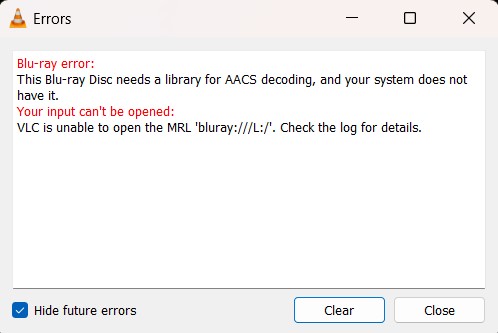
VLC gives the following error: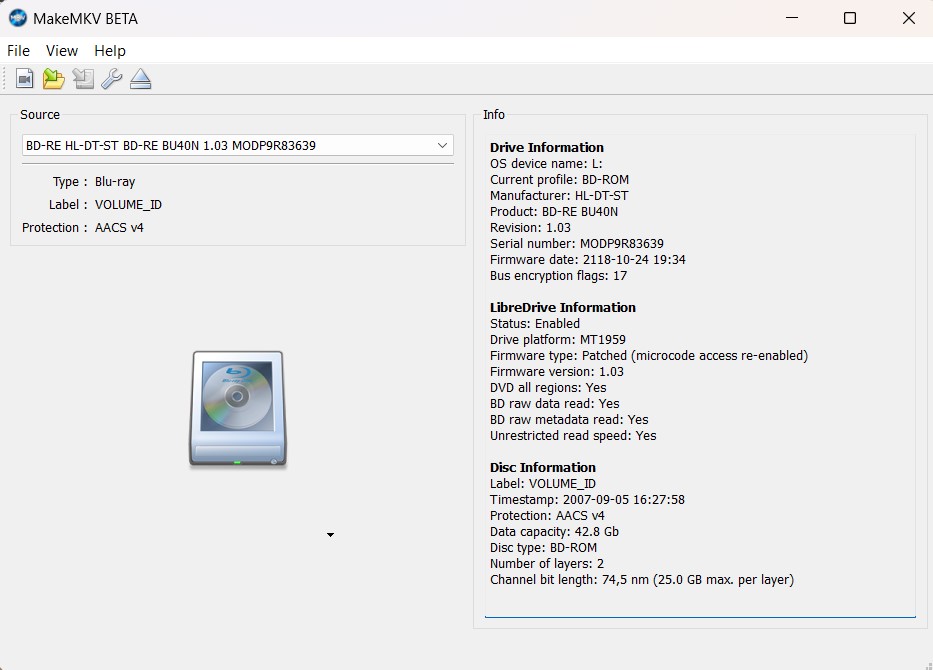
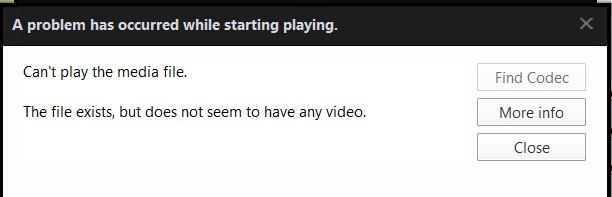
Thanks
I also bought a Verbatim 43888, flashed without any errors and was able to rip an entire BR (FullHD; not UHD) but when i try to open it using Pot Play or VLC, it doesn't work.
If it matters, i have a paid license for MakeMKV.
I saw something about public keydb but i'm too noob to know how to properly do it.
VLC gives the following error:
Blu-ray error:
This Blu-ray Disc needs a library for AACS decoding, and your system does not have it.
Thanks
-
MartyMcNuts
- Posts: 5031
- Joined: Wed Nov 22, 2017 11:45 pm
Re: Is my Verbatim 43888 flashable
If you used the disc backup function to backup the entire disc, you must ensure the decrypt box is checked.EICP958 wrote: Fri Mar 27, 2026 4:01 am Hi,
I also bought a Verbatim 43888, flashed without any errors and was able to rip an entire BR (FullHD; not UHD) but when i try to open it using Pot Play or VLC, it doesn't work.
If it matters, i have a paid license for MakeMKV.
I saw something about public keydb but i'm too noob to know how to properly do it.
VLC gives the following error:Blu-ray error:
This Blu-ray Disc needs a library for AACS decoding, and your system does not have it.
Thanks
Cheers 
----------------------------------------------------------------------------------------------------------------------------
** NEW Single Drive Flasher ** available worldwide! https://payhip.com/b/MyeJ9
Email: martymcnuts@outlook.com
----------------------------------------------------------------------------------------------------------------------------
** NEW Single Drive Flasher ** available worldwide! https://payhip.com/b/MyeJ9
Email: martymcnuts@outlook.com
-
Billycar11
- Posts: 6089
- Joined: Sun Aug 24, 2014 5:49 am
Re: Is my Verbatim 43888 flashable
enable integration in makemkv for direct disc playbackEICP958 wrote: Fri Mar 27, 2026 4:01 am Hi,
I also bought a Verbatim 43888, flashed without any errors and was able to rip an entire BR (FullHD; not UHD) but when i try to open it using Pot Play or VLC, it doesn't work.
If it matters, i have a paid license for MakeMKV.
I saw something about public keydb but i'm too noob to know how to properly do it.
VLC gives the following error:Blu-ray error:
This Blu-ray Disc needs a library for AACS decoding, and your system does not have it.
Thanks
Buy a drive from the guide and video maker: viewtopic.php?t=17831
UHD Drive Guide: viewtopic.php?t=19634
Auto flash kit $40 Email Billycar5924@gmail.com No attachments
UHD Drive Guide: viewtopic.php?t=19634
Auto flash kit $40 Email Billycar5924@gmail.com No attachments
Re: Is my Verbatim 43888 flashable
MartyMcNuts wrote: Fri Mar 27, 2026 4:23 am If you used the disc backup function to backup the entire disc, you must ensure the decrypt box is checked.
Hum, not sure what you mean about that.

I made a backup/rip without any issue but then I wanted to try to play the BR (not the MKV file created).
After going to "Preferences - Integration", I checked all the boxes ("C:\Windows/System32", "C:\Windows/SysWOW64" and "C:\Program Files\VideoLAN\VLC") and now I'm able to play the BR on VLC but it says:
I thought that installing Java was already something from the past.Java required:
This Blu-ray disc requires Java for menus support. Java was not found on your system.
The disc will be played without menus.
 I'm using W11.
(and playing, without menus, the video freezed twice after 1.xx minutes. Now is playing consistenly)
Either way, I don't use VLC; I always use Pot Player and even with the integrations enabled, it doesn't play (don't know how to post here the error log without using too much space)
-
MartyMcNuts
- Posts: 5031
- Joined: Wed Nov 22, 2017 11:45 pm
Re: Is my Verbatim 43888 flashable
I thought you meant you tried to play the backup. Why rip it then try to play the disc? That's silly. Don't bother with disc playback, you will ruin your drive's lasers faster.EICP958 wrote: Fri Mar 27, 2026 4:13 pmMartyMcNuts wrote: Fri Mar 27, 2026 4:23 am If you used the disc backup function to backup the entire disc, you must ensure the decrypt box is checked.
Hum, not sure what you mean about that.
I made a backup/rip without any issue but then I wanted to try to play the BR (not the MKV file created).
After going to "Preferences - Integration", I checked all the boxes ("C:\Windows/System32", "C:\Windows/SysWOW64" and "C:\Program Files\VideoLAN\VLC") and now I'm able to play the BR on VLC but it says:
I thought that installing Java was already something from the past.Java required:
This Blu-ray disc requires Java for menus support. Java was not found on your system.
The disc will be played without menus.
(and playing, without menus, the video freezed twice after 1.xx minutes. Now is playing consistenly)
Either way, I don't use VLC; I always use Pot Player and even with the integrations enabled, it doesn't play (don't know how to post here the error log without using too much space)
Yes, MakeMKV does use Java and probably VLC too. I don't use VLC so couldn't say for sure.
Cheers
----------------------------------------------------------------------------------------------------------------------------
** NEW Single Drive Flasher ** available worldwide! https://payhip.com/b/MyeJ9
Email: martymcnuts@outlook.com
----------------------------------------------------------------------------------------------------------------------------
** NEW Single Drive Flasher ** available worldwide! https://payhip.com/b/MyeJ9
Email: martymcnuts@outlook.com
Re: Is my Verbatim 43888 flashable
C'mon Marty, i'm noob but not that muchMartyMcNuts wrote: Fri Mar 27, 2026 10:20 pm I thought you meant you tried to play the backup. Why rip it then try to play the disc? That's silly. Don't bother with disc playback, you will ruin your drive's lasers faster.
Yes, MakeMKV does use Java and probably VLC too. I don't use VLC so couldn't say for sure.
I don't want to play BR with this drive (it's the only one i have) but tried and it didn't worked so i was trying to know why and how can i solve this.
Thanks
-
MartyMcNuts
- Posts: 5031
- Joined: Wed Nov 22, 2017 11:45 pm
Re: Is my Verbatim 43888 flashable
Blu-ray discs use Java for the menu's and stuff so yeah, it is still required for to play them.EICP958 wrote: Fri Mar 27, 2026 11:12 pmC'mon Marty, i'm noob but not that muchMartyMcNuts wrote: Fri Mar 27, 2026 10:20 pm I thought you meant you tried to play the backup. Why rip it then try to play the disc? That's silly. Don't bother with disc playback, you will ruin your drive's lasers faster.
Yes, MakeMKV does use Java and probably VLC too. I don't use VLC so couldn't say for sure.
I don't want to play BR with this drive (it's the only one i have) but tried and it didn't worked so i was trying to know why and how can i solve this.
Thanks
Cheers
----------------------------------------------------------------------------------------------------------------------------
** NEW Single Drive Flasher ** available worldwide! https://payhip.com/b/MyeJ9
Email: martymcnuts@outlook.com
----------------------------------------------------------------------------------------------------------------------------
** NEW Single Drive Flasher ** available worldwide! https://payhip.com/b/MyeJ9
Email: martymcnuts@outlook.com
Re: Is my Verbatim 43888 flashable
Power does matter more with 4K/UHD. I have an older LG slim drive that would not read 4K/UHD w/o dual USB connections (Y Cable). Worked perfectly fine for DVD/Blu-Ray with just a single USB connection.reinerzufall wrote: Mon Mar 23, 2026 9:20 am Is it possible that the drive is having problems because it's not getting enough power via USB?
Then regular Blu-rays would probably have the same problems, right?
Need a cable something like this, with the appropriate drive connector at the end of the "Y":
cablecc USB-C to USB 3.0 Male & USB 2.0 Dual Power Data Y Cable for Laptop & Hard Disk
There are different versions of that "Y" cable on the same page, with different connectors.
Thanks,
Frank
For sale 4K UHD Flashed USB drives:
ASUS Slim, Buffalo Slim, LG Slim,
Buffalo 5 1/4", ASUS 5 1/4",
drives@nicholasfamilycentral.com
ASUS Slim, Buffalo Slim, LG Slim,
Buffalo 5 1/4", ASUS 5 1/4",
drives@nicholasfamilycentral.com