LG BU40N enclosure

Forum for discussions about UHD-capable dives
Post Reply
rsaotome
Posts: 20
Joined: Wed Apr 26, 2017 7:30 am

LG BU40N enclosure

Post by rsaotome »

I just purchased 2x LG BU40N drives, I need a good quality enclosure, preferably one that doesn't have the cable permanently attached.

I don't know if there's been problems flashing drives in slimline external enclosures, but if so, any that won't give me problems would be nice. :D

TIA!
Rabster
Posts: 9
Joined: Sun Jan 04, 2026 9:20 pm

Re: LG BU40N enclosure

Post by Rabster »

I'm waiting on an enclosure coming from Delock. Once it's arrived hopefully I the next couple of days I can see what it's like. It's model number 42603
boguslecina
Posts: 42
Joined: Tue Dec 17, 2024 12:21 am

Re: LG BU40N enclosure

Post by boguslecina »

I bought something like this and it's ok, it was possible to patch my BU40N.

Code: Select all

aliexpress.com/item/1005001339163974.html
rsaotome
Posts: 20
Joined: Wed Apr 26, 2017 7:30 am

Re: LG BU40N enclosure

Post by rsaotome »

I wonder why so many of these external cases have the cable permanently attached, been burned by cases like these in the past, the cable fails & the case becomes e-waste.
blind-s33r
Posts: 28
Joined: Thu Jul 25, 2019 1:29 am

Re: LG BU40N enclosure

Post by blind-s33r »

I know that the XRTFORE 4k reader looks like its permanently attached but internally its actually a plug too. Don't know for other cheap readers and enclosures but they look like they are all basically the same.
rsaotome wrote:
Sat Jan 17, 2026 11:10 am
I wonder why so many of these external cases have the cable permanently attached, been burned by cases like these in the past, the cable fails & the case becomes e-waste.
boguslecina
Posts: 42
Joined: Tue Dec 17, 2024 12:21 am

Re: LG BU40N enclosure

Post by boguslecina »

Mine has a cable that plugs into the port inside, it is not soldered.
rsaotome
Posts: 20
Joined: Wed Apr 26, 2017 7:30 am

Re: LG BU40N enclosure

Post by rsaotome »

I bought 2x Silverstone TS14's, to go with the BU40N's, it's been a difficult case to work with, but I finally managed to get the drives installed, they both show up in windows, but the eject button on both drives, does nothing, but in windows, I can eject both no problem.

I patched one of the drive with the 1.03 firmware, I don't think that made any difference, at least it rips UHD's now, so that's good.

Just out of curiosity, I plugged the enclosure straight into a USB charger, using the supplied cable, it powered on, I can feel little subtle movements inside, but the eject button still doesn't work.

Is this the fault of the case, the drive, both?

Any help would be appreciated.
MartyMcNuts
Posts: 4771
Joined: Wed Nov 22, 2017 11:45 pm

Re: LG BU40N enclosure

Post by MartyMcNuts »

rsaotome wrote:
Fri Jan 23, 2026 8:46 am
I bought 2x Silverstone TS14's, to go with the BU40N's, it's been a difficult case to work with, but I finally managed to get the drives installed, they both show up in windows, but the eject button on both drives, does nothing, but in windows, I can eject both no problem.

I patched one of the drive with the 1.03 firmware, I don't think that made any difference, at least it rips UHD's now, so that's good.

Just out of curiosity, I plugged the enclosure straight into a USB charger, using the supplied cable, it powered on, I can feel little subtle movements inside, but the eject button still doesn't work.

Is this the fault of the case, the drive, both?

Any help would be appreciated.
I found that sometimes if the screws in the back are done up too tight, the drive tray sticks a little and won’t eject. Try loosening one or both just a fraction and see if that helps.
Cheers :D
----------------------------------------------------------------------------------------------------------------------------
For UHD enabled drives (AU/NZ/SG + Others) & DIY Single Drive Flasher (WW): https://uhdenableddrives.com
rsaotome
Posts: 20
Joined: Wed Apr 26, 2017 7:30 am

Re: LG BU40N enclosure

Post by rsaotome »

The 2 long screws that go in the back, don't seem to be long enough, so I removed the 2 tiny screws on the side, slide the back plate out, just connected the drive as is, no screws, plugged it into a USB charger, same thing, a light briefly blinked, signifying it had power, so I hit the eject button, nothing, unplugged, plugged it into my computer, same thing.

The drive doesn't make any sounds when I try to eject it with button, I used a safety pin to force an eject, but this is starting to sound like 2 drives with defective buttons.

I'm reaching out to the seller on eBay (US Seller, not China), for the BU40N's, to see what they think.
rsaotome
Posts: 20
Joined: Wed Apr 26, 2017 7:30 am

Re: LG BU40N enclosure

Post by rsaotome »

Turns out the problem was both Silverstone TS14 cases. I'm very surprised, having used their stuff in the past, I expected it to just work.

I purchased 2 more generic plastic cases off of Amazon, 1 works perfect, ejects, flashed the bios, ripped a few UHD's, I was amazed. Thou you have to push equally on both sides, or the drive won't go back in & will just keep popping out. The build quality on the case leaves a bit to be desired, but for $18, I guess you can't argue that it just worked. The other identical case, didn't work properly, you put the drive in, and nothing, no power at all. I take the screws out, powers on & works, sorta, drive sometimes disappeared when I started up MakeMKV, then showed back up when I closed MakeMKV, I'm getting the case replaced.

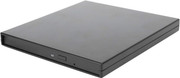
In case you're wondering, it's this case, you can find it under several different generic names on Amazon/eBay/etc. You only need to use the USB cable, the power connector is only necessary if you're burning.

Image
rsaotome
Posts: 20
Joined: Wed Apr 26, 2017 7:30 am

Re: LG BU40N enclosure

Post by rsaotome »

I'm curious, does anyone remove their original faceplates & use the faceplates included with whatever case they're using?
MartyMcNuts
Posts: 4771
Joined: Wed Nov 22, 2017 11:45 pm

Re: LG BU40N enclosure

Post by MartyMcNuts »

rsaotome wrote:
Sat Jan 31, 2026 3:42 pm
I'm curious, does anyone remove their original faceplates & use the faceplates included with whatever case they're using?
No, I prefer the drive's original faceplate.

I had 1 faulty TS14 out of about 80. The board in it was dead.
Cheers :D
----------------------------------------------------------------------------------------------------------------------------
For UHD enabled drives (AU/NZ/SG + Others) & DIY Single Drive Flasher (WW): https://uhdenableddrives.com
rsaotome
Posts: 20
Joined: Wed Apr 26, 2017 7:30 am

Re: LG BU40N enclosure

Post by rsaotome »

Just received 2 more SilverStone TS14's, from 2 different locations, none from China, and neither work properly with the LG BU40N. I guess I was just unlucky, since 4 out of 4 had the same problem. I'm guessing other drives will work just fine in this case, the 4x BU40N's I have were manufactured between OCT & NOV of 2025, don't know if that means anything, but there you go.

I mean, the TS14's work, but neither will let me eject the drive by hitting the button on the drive. If I want to eject, I need to use windows for that.

The case I mentioned a few posts prior, works perfectly, granted, I had to have 1 replaced, but the replacement worked, so I ordered 2 more.
rsaotome
Posts: 20
Joined: Wed Apr 26, 2017 7:30 am

Re: LG BU40N enclosure

Post by rsaotome »

Just ordered a few LG BU40N drives from eBay (Chinese seller), about a week ago, sold as new, after receiving them, I'm not sure I believe that, they work, sure, but the dates, two of them are from 2019-09 & the other 2020-04. They have this reflective gold sticker on the top right of each one, the firmware was listed as FR07 (flashed with DE_LG_BU40N_1.00, ripped a dozen or so UHD's so far with each one).

If anyone has an info, please share.
Last edited by rsaotome on Sun Mar 22, 2026 6:52 pm, edited 1 time in total.
rsaotome
Posts: 20
Joined: Wed Apr 26, 2017 7:30 am

Re: LG BU40N enclosure

Post by rsaotome »

Also, previously I mentioned the rather generic case (it's listed a few posts prior), got 7 of them now, all working, it's a been a solid case, I found myself using the faceplate that it comes with, it's just black, with no markings, but for some reason, it allows me to eject & re-insert the drive easier than the faceplates that the drives originally came with.

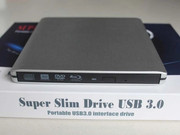
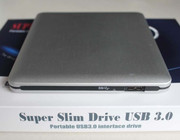
I did test another case that's readily available on eBay, was curious, it's listed as "Super Slim Drive USB 3.0", it uses a USB Micro B Super Speed connector, is made of pure plastic, but sadly it has a few problems.

1) ejecting a drive with the default faceplate, will get stuck on rim & you'll hear the drive ejecting, but the drive won't push out, replaced the faceplate with the generic one from another case & it works better.

2) heavy vibrations when reading, case becomes very warm.

3) no screws to secure drive in place, you need to eject the drive & carefully wiggle it while pulling on the tray until the drive pulls loose, it always feels like the drives tray is about to break.

Image Image
Post Reply