Ultimate UHD Drives Flashing Guide Updated 2025

Forum for discussions about UHD-capable dives
BlueRogue44
Posts: 1
Joined: Sat Dec 13, 2025 12:40 am

Re: Ultimate UHD Drives Flashing Guide Updated 2025

Post by BlueRogue44 »

Drive Information
OS device name: D:
Manufacturer: ASUS
Product: BW-16D1X-U
Revision: E113
Serial number: DHDL119818WL
Firmware date: 2020-07-21
Bus encryption flags: 1B

LibreDrive Information
Status: Enabled
Drive platform: RS8F00
Firmware name: PIONEER BDR-212T
Firmware type: Original (unpatched)
Firmware version: E113/ID76
DVD all regions: Yes
BD raw data read: Yes
BD raw metadata read: Yes
Unrestricted read speed: Yes
RONNIEAST
Posts: 2
Joined: Sat Dec 13, 2025 11:38 pm

Re: Ultimate UHD Drives Flashing Guide Updated 2025

Post by RONNIEAST »

My Drive says the following in MakeMKV

Drive Information
OS device name: F:
Manufacturer: ASUS
Product: SBW-06D2X-U
Revision: A102
Serial number:
Firmware date: 2121-06-28 13:41
Bus encryption flags: 1F

LibreDrive Information
Status: Possible, not yet enabled
Drive platform: MT1959

No disc inserted

Could you assist please?
Billycar11
Posts: 5145
Joined: Sun Aug 24, 2014 5:49 am

Re: Ultimate UHD Drives Flashing Guide Updated 2025

Post by Billycar11 »

RONNIEAST wrote:
Sat Dec 13, 2025 11:44 pm
My Drive says the following in MakeMKV

Drive Information
OS device name: F:
Manufacturer: ASUS
Product: SBW-06D2X-U
Revision: A102
Serial number:
Firmware date: 2121-06-28 13:41
Bus encryption flags: 1F

LibreDrive Information
Status: Possible, not yet enabled
Drive platform: MT1959

No disc inserted

Could you assist please?

email me or marty for a flash kit
BlueRogue44 wrote:
Sat Dec 13, 2025 2:19 am


Drive Information
OS device name: D:
Manufacturer: ASUS
Product: BW-16D1X-U
Revision: E113
Serial number: DHDL119818WL
Firmware date: 2020-07-21
Bus encryption flags: 1B

LibreDrive Information
Status: Enabled
Drive platform: RS8F00
Firmware name: PIONEER BDR-212T
Firmware type: Original (unpatched)
Firmware version: E113/ID76
DVD all regions: Yes
BD raw data read: Yes
BD raw metadata read: Yes
Unrestricted read speed: Yes
sure just email me your makemkv drive info section like that see below
Buy a UHD drive from the guide and how to video maker: https://www.makemkv.com/forum/viewtopic ... 20&t=17831
UHD Drives Guide: https://www.makemkv.com/forum/viewtopic ... 16&t=19634
Auto flash kit $25 Email me for one Billycar5924@gmail.com
RONNIEAST
Posts: 2
Joined: Sat Dec 13, 2025 11:38 pm

Re: Ultimate UHD Drives Flashing Guide Updated 2025

Post by RONNIEAST »

Thank you @billycar11 . Please check your email. I paid for the autoflash tool via Paypal.
crow.
Posts: 4
Joined: Sun Jun 22, 2025 11:54 pm

Re: Ultimate UHD Drives Flashing Guide Updated 2025

Post by crow. »

Hi would like confirmation before I purchase if this drive would work to 1) burn 4K discs out of the box 2) burn after being flashed 3) not work to burn 4K discs.

Appreciate all the feedback in advance

~Crow

Image
Billycar11
Posts: 5145
Joined: Sun Aug 24, 2014 5:49 am

Re: Ultimate UHD Drives Flashing Guide Updated 2025

Post by Billycar11 »

crow. wrote:
Mon Dec 15, 2025 11:59 pm
Hi would like confirmation before I purchase if this drive would work to 1) burn 4K discs out of the box 2) burn after being flashed 3) not work to burn 4K discs.

Appreciate all the feedback in advance

~Crow
it will rip UHD not burn
Buy a UHD drive from the guide and how to video maker: https://www.makemkv.com/forum/viewtopic ... 20&t=17831
UHD Drives Guide: https://www.makemkv.com/forum/viewtopic ... 16&t=19634
Auto flash kit $25 Email me for one Billycar5924@gmail.com
MartyMcNuts
Posts: 4293
Joined: Wed Nov 22, 2017 11:45 pm

Re: Ultimate UHD Drives Flashing Guide Updated 2025

Post by MartyMcNuts »

crow. wrote:
Mon Dec 15, 2025 11:59 pm
Hi would like confirmation before I purchase if this drive would work to 1) burn 4K discs out of the box 2) burn after being flashed 3) not work to burn 4K discs.

Appreciate all the feedback in advance

~Crow

Image
There's no such thing as "burn 4K discs" as there are no such thing as blank 4K discs.If you are referring to BDXL, they are just blu-ray discs with more writable space.

You can rip 4K UHD discs.
Cheers :D
----------------------------------------------------------------------------------------------------------------------------
For UHD enabled drives (AU/NZ/SG + Others) & DIY Single Drive Flasher (WW): https://uhdenableddrives.com
itsnotme
Posts: 2
Joined: Wed Dec 17, 2025 6:56 am

Re: Ultimate UHD Drives Flashing Guide Updated 2025

Post by itsnotme »

Hi,
very new to ripping - so please be kind and forgive my cluelessness ;-)

Got this BD-Reader from Amazon. However it can't read / open any DVD/BD with makemkv.
As soon as there's a disk inside and start makemkv, CPU goes through the roof and nothing else happens.
I suspect i might need to flash it somehow ? Can you help me? I'm on linux.
Thanks so much in advance.

Code: Select all

Drive Information
OS device name: /dev/sr0
Manufacturer: HL-DT-ST
Product: BD-RE BU40N
Revision: 1.05
Serial number: 
Firmware date: 2124-04-23 13:47
Bus encryption flags: 17

No disc inserted
Mr_Orange
Posts: 214
Joined: Sun Jul 14, 2019 6:11 am

Re: Ultimate UHD Drives Flashing Guide Updated 2025

Post by Mr_Orange »

itsnotme wrote:
Wed Dec 17, 2025 7:05 am
Hi,
very new to ripping - so please be kind and forgive my cluelessness ;-)

Got this BD-Reader from Amazon. However it can't read / open any DVD/BD with makemkv.
As soon as there's a disk inside and start makemkv, CPU goes through the roof and nothing else happens.
I suspect i might need to flash it somehow ? Can you help me? I'm on linux.
Thanks so much in advance.

Code: Select all

Drive Information
OS device name: /dev/sr0
Manufacturer: HL-DT-ST
Product: BD-RE BU40N
Revision: 1.05
Serial number: 
Firmware date: 2124-04-23 13:47
Bus encryption flags: 17

No disc inserted
You should post the full information from MakeMKV but it looks as though you have an LG BU40N which can be flashed to the 1.03MK firmware to enable Libredrive.
Last edited by Mr_Orange on Thu Dec 18, 2025 9:43 pm, edited 1 time in total.
itsnotme
Posts: 2
Joined: Wed Dec 17, 2025 6:56 am

Re: Ultimate UHD Drives Flashing Guide Updated 2025

Post by itsnotme »

Hey,

that was actually all that makemkv did output in the right-hand side window.
I don't know how to get more detailed output.

Details i forget to mention..
Its a Verbatim 43890 External Slimline Mobile USB 3.2 Blu-ray READER.

I noticed in the meantime, that there's a thread for the same model as a WRITER...
Should i just post in that ?

Another thing is - i tried the sdftool to dump the current firmware, but its not able to read
anything from the drive. Some info suggests that its not possible to flash to usb-connected drives, but only drives with sata-connection ?
I am a little lost with all the conflicting info i find about the topic. Any hints on how i should proceed ? (send the drive back, get another, or is there a way with this one ?)

Thanks so much in advance.
nicholfd
Posts: 148
Joined: Fri Aug 19, 2011 11:22 pm

Re: Ultimate UHD Drives Flashing Guide Updated 2025

Post by nicholfd »

itsnotme wrote:
Thu Dec 18, 2025 9:41 am
Hey,

that was actually all that makemkv did output in the right-hand side window.
I don't know how to get more detailed output.

Details i forget to mention..
Its a Verbatim 43890 External Slimline Mobile USB 3.2 Blu-ray READER.

I noticed in the meantime, that there's a thread for the same model as a WRITER...
Should i just post in that ?

Another thing is - i tried the sdftool to dump the current firmware, but its not able to read
anything from the drive. Some info suggests that its not possible to flash to usb-connected drives, but only drives with sata-connection ?
I am a little lost with all the conflicting info i find about the topic. Any hints on how i should proceed ? (send the drive back, get another, or is there a way with this one ?)

Thanks so much in advance.
In general, USB drives are SATA drives with internal (to the chassis) SATA -> USB adapters. Some internal SATA -> USB adapters are "broken" - they do not pass all SATA traffic, or necessarily follow all the SATA design specs. The "archgon Premium Aluminum External USB 3.0 UHD 4K Blu-Ray Writer Super Drive" available on Amazon is known to have a defective SATA -> USB internal adapter & the drive must be removed & attached to another SATA -> USB adapter to flash. I'm sure there are others.

I've not heard this issue with any of the Verbatim external slimline drives. If it's newer firmware, it's most likely encrypted & you may need to pass the encryption option.
For sale:
4K UHD Desktop LG Drives, 4K UHD Buffalo Branded Slim LG Drives, 4K UHD LG Branded Slim LG Drives,
drives@nicholasfamilycentral.com
Check first post of each For Sale thread for current/updated availability!
Coopervid
Posts: 3942
Joined: Tue Feb 19, 2019 10:32 pm

Re: Ultimate UHD Drives Flashing Guide Updated 2025

Post by Coopervid »

itsnotme wrote:
Thu Dec 18, 2025 9:41 am
Hey,

that was actually all that makemkv did output in the right-hand side window.
I don't know how to get more detailed output.

Details i forget to mention..
Its a Verbatim 43890 External Slimline Mobile USB 3.2 Blu-ray READER.

I noticed in the meantime, that there's a thread for the same model as a WRITER...
Should i just post in that ?

Another thing is - i tried the sdftool to dump the current firmware, but its not able to read
anything from the drive. Some info suggests that its not possible to flash to usb-connected drives, but only drives with sata-connection ?
I am a little lost with all the conflicting info i find about the topic. Any hints on how i should proceed ? (send the drive back, get another, or is there a way with this one ?)

Thanks so much in advance.
As a first: Post your Makemkv info. It could be a Pioneer drive inside.
whswede
Posts: 2
Joined: Mon Feb 03, 2025 3:16 pm

Re: Ultimate UHD Drives Flashing Guide Updated 2025

Post by whswede »

is there a patched firmware around for the Pioneer UD04 to make it fully libredrive compatible?

Code: Select all

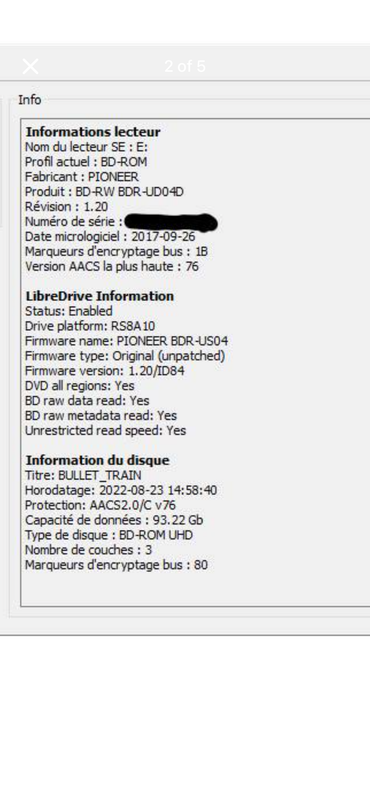
Drive Information
OS device name: \Device\CdRom0
Current profile: BD-ROM
Manufacturer: PIONEER
Product: BD-RW BDR-UD04
Revision: 1.14
Serial number: DHDL158984WL
Firmware date: 2020-06-15
Bus encryption flags: 1B
Highest AACS version: 82

LibreDrive Information
Status: Enabled
Drive platform: RS8A10
Firmware name: PIONEER BDR-US04
Firmware type: Original (unpatched)
Firmware version: 1.14
DVD all regions: Yes
BD raw data read: Yes
BD raw metadata read: Yes
Unrestricted read speed: Yes
Billycar11
Posts: 5145
Joined: Sun Aug 24, 2014 5:49 am

Re: Ultimate UHD Drives Flashing Guide Updated 2025

Post by Billycar11 »

whswede wrote:
Thu Dec 18, 2025 8:16 pm
is there a patched firmware around for the Pioneer UD04 to make it fully libredrive compatible?

Code: Select all

Drive Information
OS device name: \Device\CdRom0
Current profile: BD-ROM
Manufacturer: PIONEER
Product: BD-RW BDR-UD04
Revision: 1.14
Serial number: DHDL158984WL
Firmware date: 2020-06-15
Bus encryption flags: 1B
Highest AACS version: 82

LibreDrive Information
Status: Enabled
Drive platform: RS8A10
Firmware name: PIONEER BDR-US04
Firmware type: Original (unpatched)
Firmware version: 1.14
DVD all regions: Yes
BD raw data read: Yes
BD raw metadata read: Yes
Unrestricted read speed: Yes
Should work as is
Buy a UHD drive from the guide and how to video maker: https://www.makemkv.com/forum/viewtopic ... 20&t=17831
UHD Drives Guide: https://www.makemkv.com/forum/viewtopic ... 16&t=19634
Auto flash kit $25 Email me for one Billycar5924@gmail.com
noobinitas
Posts: 7
Joined: Wed Aug 21, 2024 11:01 pm

Re: Ultimate UHD Drives Flashing Guide Updated 2025

Post by noobinitas »

Just started ripping movies again since my physical collection has grown over the last 2 years and started adding to my server again. Not sure what has changed in the last 2 years, DVDs and Blu-Rays rip no problem but all of a sudden I can't rip any UHD movies, tried to rip movies I've already ripped and have on my server and they are also showing they are encrypted now and MakeMKV doesn't work now when it did before. I have my drive info here. Did I miss anything in the last 2 years? And also, the movies read and play in VLC no problem, just MakeMKV can't get past encryption which wasn't an issue before.

I updated the keydb.cfg file in the MakeMKV folder and that hasn't helped either. Any feedback would be appreciated as I'm sure it's something simple I'm overlooking.

Drive Information
OS device name: /dev/sr0
Current profile: BD-ROM
Manufacturer: HL-DT-ST
Product: BD-RE BU40N
Revision: 1.03
Serial number: MZFN9590329
Firmware date: 2118-10-24 19:34
Bus encryption flags: 17
Highest AACS version: 82

LibreDrive Information
Status: Enabled
Drive platform: MT1959
Firmware type: Patched (microcode access re-enabled)
Firmware version: 1.03
DVD all regions: Yes
BD raw data read: Yes
BD raw metadata read: Yes
Unrestricted read speed: Yes


Error 'Scsi error - ILLEGAL REQUEST:COPY PROTECTION KEY EXCHANGE FAILURE - KEY NOT PRESENT' occurred while issuing SCSI command A40..0020..07F to device 'SG:dev_21:2'
DEBUG: Code 1 at pKR,,<Y4`?)Y\ru%M^:213131686
Error 'Scsi error - ILLEGAL REQUEST:COPY PROTECTION KEY EXCHANGE FAILURE - KEY NOT PRESENT' occurred while issuing SCSI command A30..0020..0BF to device 'SG:dev_21:2'
DEBUG: Code 0 at PwH=#GLZH Fj*4D?{:213130766
DEBUG: Code 2 at pKR,,<Y4`?)Y\ru%M^:213131709
Error 'Scsi error - ILLEGAL REQUEST:COPY PROTECTION KEY EXCHANGE FAILURE - KEY NOT PRESENT' occurred while issuing SCSI command A40..0020..0BF to device 'SG:dev_21:2'
DEBUG: Code 2 at pKR,,<Y4`?)Y\ru%M^:213131686
Error 'Scsi error - ILLEGAL REQUEST:COPY PROTECTION KEY EXCHANGE FAILURE - KEY NOT PRESENT' occurred while issuing SCSI command A30..0020..0FF to device 'SG:dev_21:2'
DEBUG: Code 0 at PwH=#GLZH Fj*4D?{:213130766
DEBUG: Code 3 at pKR,,<Y4`?)Y\ru%M^:213131709
Error 'Scsi error - ILLEGAL REQUEST:COPY PROTECTION KEY EXCHANGE FAILURE - KEY NOT PRESENT' occurred while issuing SCSI command A40..0020..0FF to device 'SG:dev_21:2'
DEBUG: Code 3 at pKR,,<Y4`?)Y\ru%M^:213131686
Error 'Scsi error - ILLEGAL REQUEST:COPY PROTECTION KEY EXCHANGE FAILURE - KEY NOT PRESENT' occurred while issuing SCSI command A40..002000800 to device 'SG:dev_21:2'
Error 'Scsi error - ILLEGAL REQUEST:COPY PROTECTION KEY EXCHANGE FAILURE - KEY NOT ESTABLISHED' occurred while issuing SCSI command AD010..080002400 to device 'SG:dev_21:2'
DEBUG: Code 0 at pKR,,<Y4`?)Y\ru%M^:121264395
DEBUG: Code 4 at pKR,,<Y4`?)Y\ru%M^:213130789
Can't read AACS VID from disc - most likely current AACS host certificate is revoked by your drive
Saved AACS dump file as /home/noobinitas/.MakeMKV/MKB20_v77_Swordfish_B835.tgz
LibreDrive compatible drive is required to open this disc - video can't be decrypted.
DEBUG: Code 0 at &NfZVA4WMEFg;8=P:213132721
DEBUG: Code 0 at &NfZVA4WMEFg;8=P:213131341
Failed to open disc
Attachments
Screenshot_20251219_005521.png
Screenshot_20251219_005521.png (22.87 KiB) Viewed 52 times
Post Reply