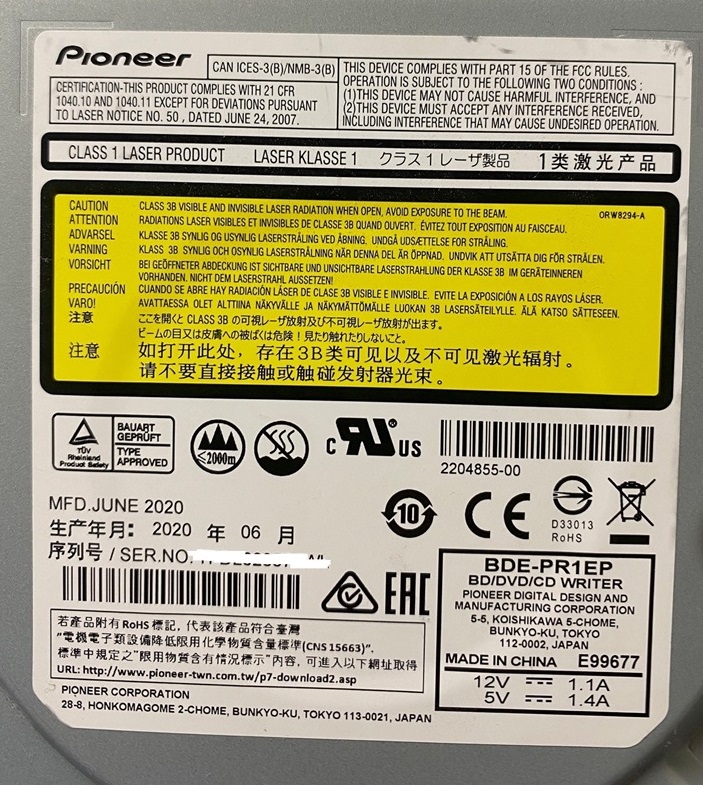
BDE-PR1EP what is it?

Forum for discussions about UHD-capable dives
thewallace
Posts: 13
Joined: Sat Mar 23, 2019 2:09 am

BDE-PR1EP what is it?

Post by thewallace »

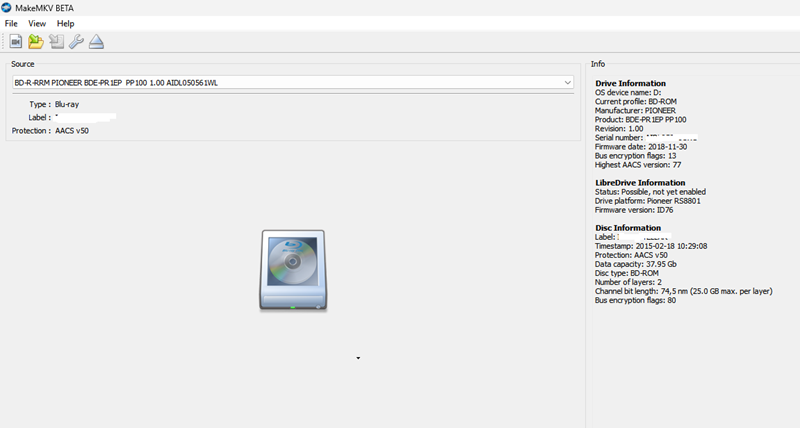
I picked up an interesting BD/DVD-RW drive out of a Epson disc publisher, a Pioneer BDE-PR1EP. The specs say: "These drives perform above the industry standard, offering extremely accurate publishing with an exceptionally low error rate." Its also said to have 'specific' firmware. The case is dated 2020 but there is nothing about MT1959 anywhere. The info below is on a BD, a 4K just makes seeking noise in the tray. I have two drives, I may just try to flash one and risk it to see what happens.

Image
Image
Last edited by thewallace on Thu Mar 20, 2025 1:26 pm, edited 2 times in total.
Coopervid
Posts: 4860
Joined: Tue Feb 19, 2019 10:32 pm

Re: BDE-PR1EP what is it?

Post by Coopervid »

This drive can't be flashed.
thewallace
Posts: 13
Joined: Sat Mar 23, 2019 2:09 am

Re: BDE-PR1EP what is it?

Post by thewallace »

Yeah, the SDF Tool said it had the wrong platform. I'll keep it as a pure BD player/writer. BTW, I just extracted the BD of Inter****r. At 39gb it took 29 minutes, this thing flies!
thewallace
Posts: 13
Joined: Sat Mar 23, 2019 2:09 am

Re: BDE-PR1EP what is it?

Post by thewallace »

I did some digging and under the surface this looks like a BDE-PR1ME-L. A "Cost-effective business Blu-ray recorder, suitable for loading into automated equipment. CD Printer/Recorder, CD library." Sounds like a durable workhorse. The specs rate BD Read Single and Dual both at 12x. Too bad it can't be flashed.
zittrig
Posts: 446
Joined: Sat Jan 09, 2021 5:45 pm

Re: BDE-PR1EP what is it?

Post by zittrig »

I've in my mind that these drives are unlabled BDR-S-Line. The sealed screws could be also a hint. But I can't find where I've read this. I'm probably wrong.
Nikilite
Posts: 1
Joined: Fri Apr 03, 2026 11:57 am

Re: BDE-PR1EP what is it?

Post by Nikilite »

there must be a way to flash it. i guess?

well they seem to have a specific firmware and probably it's better to leave the original there.
HSH1979
Posts: 21
Joined: Wed Jul 08, 2026 9:09 am

Re: BDE-PR1EP what is it?

Post by HSH1979 »

were you able to make it work?
mattjackson86
Posts: 17
Joined: Tue Jul 07, 2026 10:21 pm

Re: BDE-PR1EP what is it?

Post by mattjackson86 »

gwhitcombe71
Posts: 82
Joined: Fri Oct 23, 2026 2:41 am

Re: BDE-PR1EP what is it?

Post by gwhitcombe71 »

mattjackson86 wrote:It can be flashed to a 211M
mattjackson86 how did you get round the wrong platform error in SDF Tool then? thewallace said it wouldnt take it, so im wondering if you used a different tool or just a different firmware file... (and did the drive still read 4K discs afterwards, or is it still just seeking in the tray?)
mattjackson86
Posts: 17
Joined: Tue Jul 07, 2026 10:21 pm

Re: BDE-PR1EP what is it?

Post by mattjackson86 »

My flasher flashes the advertised crossflashes just fine. I can't say how other flashers work but I finding much more is flashable than anyone else right now and its being heavily tested by others in other forums. Just wanted to pass it along here as question came up

Generally older flashed were "dumb" with just hard coded A > B flashes approved. I take a different approach so list is huge. Something like 20k+ cross flash combos right now over versions and models.
0verdrive
Posts: 1
Joined: Tue Nov 17, 2026 11:08 pm

Re: BDE-PR1EP what is it?

Post by 0verdrive »

Hi everyone,

I’d like to chime in here with my problem. It concerns the same drive: the Pioneer BDE-PR1EP (OEM from the Epson PP-100III).
Is there a vendor SCSI command or a service tool to reset the tray/loading counter in LOG-SENSE page 0x30, offset 0x24? LOG SELECT (0x4C) returns “GOOD,” but doesn’t change the value. Does anyone know the service opcode or the official reset procedure?

These drives are becoming increasingly rare. I have several of them lying around that are all fully functional, but the tray counter prevents us from continuing to use them in the Epson DiscProducers. Planned obsolescence...

Best regards
cutprods
Posts: 2
Joined: Fri Nov 06, 2026 9:20 pm

Re: BDE-PR1EP what is it?

Post by cutprods »

0verdrive wrote: Tue Nov 17, 2026 11:14 pm I’d like to chime in here with my problem. It concerns the same drive: the Pioneer BDE-PR1EP (OEM from the Epson PP-100III).
Is there a vendor SCSI command or a service tool to reset the tray/loading counter in LOG-SENSE page 0x30, offset 0x24? LOG SELECT (0x4C) returns “GOOD,” but doesn’t change the value. Does anyone know the service opcode or the official reset procedure?
In Primera Disc publishers there is a counter reset, in the drive utlilities, does the Epson not have this? In any case if you intend to use these in the PP-100III, do not update the firmware with Pioneer consumer ones. The 'special firmware', was developed by Pioneer for the manufacturers of duplicators, to allow full tray extent and delay before closing, to enable the robot arm clearance and time, to place and pick up in sequence. The '...exceptionally low error rate.' was just touted for this model in general. This drive, EP, was made specifically for the Epson PP for that pupose, as mentioned - the OP's most likely has had a hard life. You may be able to reset them by reflashing them with the supplied Epson firmware, but they may be getting EOL. A DVD burner will be good for 10,000 burns but a Blu-ray can be only around 1000-2000 burns. Not necessarily calculated obsolescence on Epson's part.

There was another version of this drive, BDE-PR1CPD, that was developed to work with Fortium's Blu-Lock copy protection by recording in the read-only area. Blu-Lock worked in conjunction with Scenarist (the industry Blu-ray authoring software used for most releases) for burn copy protection, for screeners and such.
Last edited by cutprods on Wed Nov 18, 2026 6:51 am, edited 11 times in total.