yep, there's a difference in the signal...
see: https://discourse.coreelec.org/t/dolby- ... /24273/960
Dolby Vision now possible through MP4 Mux.
-
RESET_9999
- Posts: 2421
- Joined: Mon Aug 05, 2019 7:12 pm
-
sw5163
- Posts: 146
- Joined: Sat Jun 25, 2022 7:28 am
Re: Dolby Vision now possible through MP4 Mux.
You could try:Trees wrote: Sat Mar 30, 2024 10:08 pm Does anyone know of any software that can losslessly splice P5 DV HEVC streams while keeping the P5 DV metadata in tact? Splicing on I-frames, obviously.
Code: Select all
ffmpeg -f concat -i "filelist.txt" -c copy -strict -2 test.mp4
Code: Select all
file 1.mp4
file 2.mp4
Your command is redundant btw. To include all tracks and keep DV just use:Trees wrote: Fri Mar 29, 2024 8:17 pm Edit: Bonus question; does MP4 only support one subtitle track? I've remuxed numerous files however ffmpeg only seems to be copying over one subtitle track; is the subtitle part of the command incorrect or does MP4 just not support more than one subtitle track?
Code: Select all
ffmpeg -i dv.mkv -map 0 -c copy -c:s mov_text -strict -2 dv.mp4
Backward compatibility for Dolby RGB tunneling is really a mess.
-
Donpoku
- Posts: 66
- Joined: Wed Jul 03, 2019 3:43 pm
Re: Dolby Vision now possible through MP4 Mux.
Hi I have DV remux mkv, I want to test it on my lg c6 (old i know), what's the simplest way to do it? Thank you.RESET_9999 wrote:yep, there's a difference in the signal...
see: https://discourse.coreelec.org/t/dolby- ... /24273/960
Sent from my SM-F946B using Tapatalk
-
RESET_9999
- Posts: 2421
- Joined: Mon Aug 05, 2019 7:12 pm
Re: Dolby Vision now possible through MP4 Mux.
AFIAK, 2016-2017 TVs only support profile 5 and 7 so for an mkv remux , you want to convert it to dual-track dual-layer MP4. You can do that with my script workflow 4-3.Donpoku wrote: Mon Apr 01, 2024 12:34 pm Hi I have DV remux mkv, I want to test it on my lg c6 (old i know), what's the simplest way to do it? Thank you.
Sent from my SM-F946B using Tapatalk
I think the C6 internal player also have green screen issues with certain files, P3 MDL IIRC. It was discussed in this thread years ago.
-
Donpoku
- Posts: 66
- Joined: Wed Jul 03, 2019 3:43 pm
Re: Dolby Vision now possible through MP4 Mux.
Thanks buddy.RESET_9999 wrote:AFIAK, 2016-2017 TVs only support profile 5 and 7 so for an mkv remux , you want to convert it to dual-track dual-layer MP4. You can do that with my script workflow 4-3.Donpoku wrote: Mon Apr 01, 2024 12:34 pm Hi I have DV remux mkv, I want to test it on my lg c6 (old i know), what's the simplest way to do it? Thank you.
Sent from my SM-F946B using Tapatalk
I think the C6 internal player also have green screen issues with certain files, P3 MDL IIRC. It was discussed in this thread years ago.
Btw what are the steps and installs I need to do to use your scripts? Thanks I'm on Windows.
Sent from my SM-F946B using Tapatalk
-
RESET_9999
- Posts: 2421
- Joined: Mon Aug 05, 2019 7:12 pm
Re: Dolby Vision now possible through MP4 Mux.
If you just want to make DT-DL MP4, the installation is very easy... Create a folder without space or special characters and put it on a non-OS drive preferably.Donpoku wrote: Mon Apr 01, 2024 3:57 pm
Btw what are the steps and installs I need to do to use your scripts? Thanks I'm on Windows.
Sent from my SM-F946B using Tapatalk
Download the tools pack and MP4 bat file and put them in the folder you just created. Run the bat file, select 4-3, drag and drop input and that's it
-
Mrmorrison
- Posts: 33
- Joined: Thu Oct 20, 2022 2:13 pm
Re: Dolby Vision now possible through MP4 Mux.
Good evening everyone.
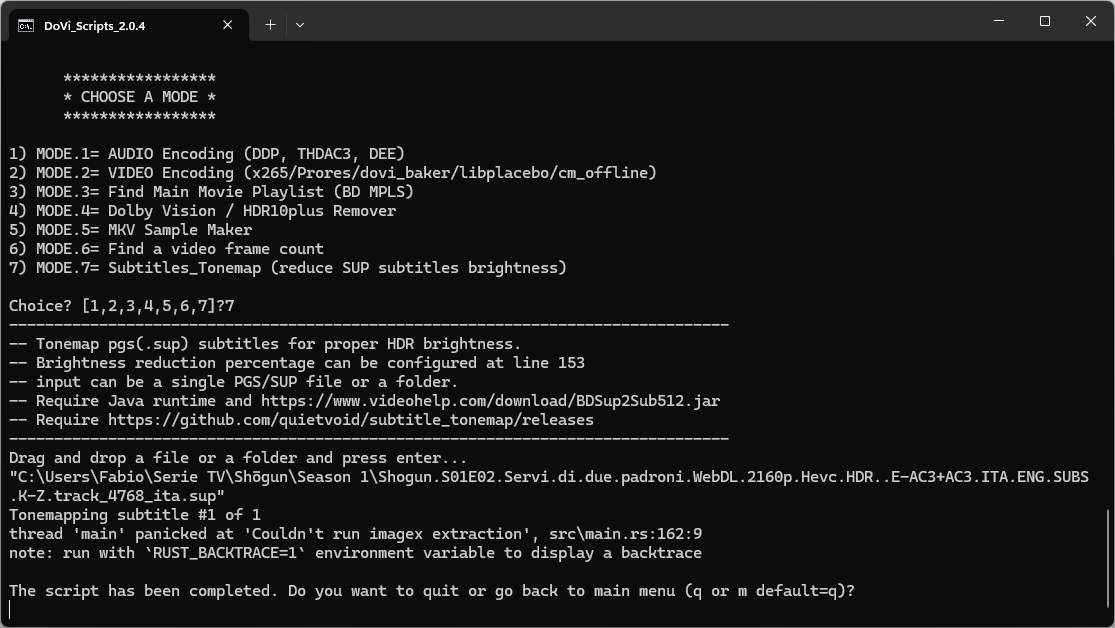
I'm going crazy trying to limit the brightness of the subtitles, as my x800m2 can't handle them well. (Any video app on my TV doesn't have this problem)
I'm trying to use the script but I'm getting this error.
What I did:
- Source file: mkv
- Mux in ts with tsmuxer which turns srt into pgs
- Demux the pgs file (either with tsmuxer or with subtilteEdit)
- DoviScript 8-7
Can someone help me?
I'm going crazy trying to limit the brightness of the subtitles, as my x800m2 can't handle them well. (Any video app on my TV doesn't have this problem)
I'm trying to use the script but I'm getting this error.
What I did:
- Source file: mkv
- Mux in ts with tsmuxer which turns srt into pgs
- Demux the pgs file (either with tsmuxer or with subtilteEdit)
- DoviScript 8-7
Can someone help me?
-
Donpoku
- Posts: 66
- Joined: Wed Jul 03, 2019 3:43 pm
Re: Dolby Vision now possible through MP4 Mux.
ThanksRESET_9999 wrote:If you just want to make DT-DL MP4, the installation is very easy... Create a folder without space or special characters and put it on a non-OS drive preferably.Donpoku wrote: Mon Apr 01, 2024 3:57 pm
Btw what are the steps and installs I need to do to use your scripts? Thanks I'm on Windows.
Sent from my SM-F946B using Tapatalk
Download the tools pack and MP4 bat file and put them in the folder you just created. Run the bat file, select 4-3, drag and drop input and that's it

Sent from my SM-F946B using Tapatalk
-
RESET_9999
- Posts: 2421
- Joined: Mon Aug 05, 2019 7:12 pm
Re: Dolby Vision now possible through MP4 Mux.
try to put the sup file in a folder and input that folder...Mrmorrison wrote: Mon Apr 01, 2024 5:55 pm Good evening everyone.
I'm going crazy trying to limit the brightness of the subtitles, as my x800m2 can't handle them well. (Any video app on my TV doesn't have this problem)
-
Mrmorrison
- Posts: 33
- Joined: Thu Oct 20, 2022 2:13 pm
Re: Dolby Vision now possible through MP4 Mux.
It worked! You are the best!RESET_9999 wrote: Mon Apr 01, 2024 6:10 pm
try to put the sup file in a folder and input that folder...
-
Donpoku
- Posts: 66
- Joined: Wed Jul 03, 2019 3:43 pm
Re: Dolby Vision now possible through MP4 Mux.
Hi it took 3.3hrs for 69gb mkv remux, is that right?Donpoku wrote:ThanksRESET_9999 wrote:If you just want to make DT-DL MP4, the installation is very easy... Create a folder without space or special characters and put it on a non-OS drive preferably.Donpoku wrote: Mon Apr 01, 2024 3:57 pm
Btw what are the steps and installs I need to do to use your scripts? Thanks I'm on Windows.
Sent from my SM-F946B using Tapatalk
Download the tools pack and MP4 bat file and put them in the folder you just created. Run the bat file, select 4-3, drag and drop input and that's it
Sent from my SM-F946B using Tapatalk
Sent from my SM-F946B using Tapatalk
-
RESET_9999
- Posts: 2421
- Joined: Mon Aug 05, 2019 7:12 pm
Re: Dolby Vision now possible through MP4 Mux.
Yeah, the speed depends on your HDD/SSD. Regular HDD can be very slow.
I use two NVME pci-e gen4 drives and it takes less than 15 minutes.
I use two NVME pci-e gen4 drives and it takes less than 15 minutes.
-
DylanValenti
- Posts: 36
- Joined: Sat Dec 19, 2020 9:42 pm
Re: Dolby Vision now possible through MP4 Mux.
How is the 1080p to 4K upcaling on the Ugoos? Seems that the only reason I would keep my ub9000 would be to play 1080p Blu-rays with panasonic's upscaling, but if the ugoos is comparable, I think I'll ditch my player.
-
RESET_9999
- Posts: 2421
- Joined: Mon Aug 05, 2019 7:12 pm
Re: Dolby Vision now possible through MP4 Mux.
I don't know. I think dmdreview tested upscaling but I'm not sure.. Ask him: https://www.avsforum.com/threads/pictur ... t-63232842DylanValenti wrote: Mon Apr 01, 2024 11:43 pm How is the 1080p to 4K upcaling on the Ugoos? Seems that the only reason I would keep my ub9000 would be to play 1080p Blu-rays with panasonic's upscaling, but if the ugoos is comparable, I think I'll ditch my player.
-
Kaan_
- Posts: 4
- Joined: Fri Mar 29, 2024 8:39 am
Re: Dolby Vision now possible through MP4 Mux.
By default Coreelec plays 1080p files in 1080p resolution, so the upscaling is handled by the tv.DylanValenti wrote: Mon Apr 01, 2024 11:43 pm How is the 1080p to 4K upcaling on the Ugoos? Seems that the only reason I would keep my ub9000 would be to play 1080p Blu-rays with panasonic's upscaling, but if the ugoos is comparable, I think I'll ditch my player.
I think it only does bilinear upscaling otherwise, but I haven't checked.