yep, I have the latest version but it doesnt work with the p5 to p8 files. at least on my end.quietvoid wrote: Sun Jul 25, 2021 5:01 pm You should be able to get Dolby Vision config when using MKVToolNix v58 or newer only.
And remuxing MakeMKV files was already copying the config a while ago..
Dolby Vision now possible through MP4 Mux.
-
RESET_9999
- Posts: 2421
- Joined: Mon Aug 05, 2019 7:12 pm
Re: Dolby Vision now possible through MP4 Mux.
-
Manixx2020beyound
- Posts: 127
- Joined: Thu Oct 08, 2020 5:19 pm
Re: Dolby Vision now possible through MP4 Mux.
Looks very close almost identical
Uploading test files
Uploading test files
You do not have the required permissions to view the files attached to this post.
-
staknhalo
- Posts: 178
- Joined: Sun Oct 11, 2020 12:05 am
Re: Dolby Vision now possible through MP4 Mux.
anyone have problems making a p8.1 of cloverfield from p7 with all the tools?
they all just hang and never complete or spit out a 0mb file on this movie even though they work with other movies
Edit: does anyone have the old version of dolby muxer version 1.0? maybe that's my problem with this file I can only find the current 1.0.1 to try
they all just hang and never complete or spit out a 0mb file on this movie even though they work with other movies
Edit: does anyone have the old version of dolby muxer version 1.0? maybe that's my problem with this file I can only find the current 1.0.1 to try
-
RESET_9999
- Posts: 2421
- Joined: Mon Aug 05, 2019 7:12 pm
Re: Dolby Vision now possible through MP4 Mux.
looks like you have madVR dynamic clipping active for those pictures manix ...Manixx2020beyound wrote: Sun Jul 25, 2021 6:40 pm Looks very close almost identical
Uploading test files
this frame is interesting though. You can see a small green tint on the building that clearly comes from the HBO p5 (or manix dv to hdr10 settings).
p5 vs p8 vs HDR10 HBO vs HDR10 bluray:
https://slow.pics/c/lTiFdsxj
https://slow.pics/c/IoBZjQMN
-
ragico
- Posts: 266
- Joined: Fri Feb 15, 2019 1:09 am
Re: Dolby Vision now possible through MP4 Mux.
Thank you for your help. Pls what is JSON and how to use it? And how I know about the frames to be removed/added etc. for a given a film?RESET_9999 wrote: Sun Jul 25, 2021 4:56 pmPerhaps this real content example will help you understand how to do it:ragico wrote: Sat Jul 24, 2021 11:45 am Hope that @quietvoid will make an easy tool to be used by ignorant people like me as @Yusesope did for his tools.
Thank you.
E.G. Disney+ movie Mulan DV web-dl metadata injected into bluray remux
1- extract both HDR10 and DV hevc stream
2- extract and convert profile 5 RPU to 8 with this command:3- Sync/edit the rpu to match the frame count of the HDR10 stream.Code: Select all
dovi_tool.exe -m 3 extract-rpu DV.hevc
For this movie, you have to remove 23 frames before the RPU and add 71 frames at the end
so the JSON file would look like this:
4- once the JSON is done, you edit the RPU with this cmd:Code: Select all
{ "remove": [ "0-22" ], "duplicate": [ { "source": 165632, "offset": 165632, "length": 71 } ] }5- inject the edited RPU into the HDR10 hevc stream with this cmd:Code: Select all
dovi_tool.exe editor -i RPU.bin -j edited.json --rpu-out RPU-edited.bin6- that's it, the injected_output.hevc contains Profile 8 DV metadataCode: Select all
dovi_tool.exe inject-rpu -i HDR10.hevc --rpu-in RPU-edited.bin
Code: Select all
Format                                   : MPEG-TS
File size                                : 50.9 GiB
Duration                                 : 1 h 55 min
Overall bit rate mode                    : Variable
Overall bit rate                         : 63.3 Mb/s
Maximum Overall bit rate                 : 35.5 Mb/s

Video
ID                                       : 4117 (0x1015)
Menu ID                                  : 1 (0x1)
Format                                   : HEVC
Format/Info                              : High Efficiency Video Coding
Format profile                           : Main 10@L5.1@High
HDR format                               : Dolby Vision, Version 1.0, dvhe.08.06, BL+RPU, HDR10 compatible / SMPTE ST 2086, HDR10 compatible
Codec ID                                 : 36
Duration                                 : 1 h 55 min
Bit rate                                 : 58.9 Mb/s
Width                                    : 3 840 pixels
Height                                   : 2 160 pixels
Display aspect ratio                     : 16:9
Frame rate                               : 23.976 (24000/1001) FPS
Color space                              : YUV
Chroma subsampling                       : 4:2:0 (Type 2)
Bit depth                                : 10 bits
Bits/(Pixel*Frame)                       : 0.296
Stream size                              : 47.4 GiB (93%)
Writing library                          : ATEME Titan File 3.9.6 (4.9.6.2)
Color range                              : Limited
Color primaries                          : BT.2020
Transfer characteristics                 : PQ
Matrix coefficients                      : BT.2020 non-constant
Mastering display color primaries        : Display P3
Mastering display luminance              : min: 0.0001 cd/m2, max: 1000 cd/m2

Audio #1
ID                                       : 4352 (0x1100)
Menu ID                                  : 1 (0x1)
Format                                   : MLP FBA AC-3 16-ch
Format/Info                              : Meridian Lossless Packing FBA with 16-channel presentation
Commercial name                          : Dolby TrueHD with Dolby Atmos
Muxing mode                              : Stream extension
Codec ID                                 : 131
Duration                                 : 1 h 55 min
Bit rate mode                            : Variable
Bit rate                                 : 640 kb/s
Maximum bit rate                         : 8 742 kb/s
Channel(s)                               : 8 channels
Channel layout                           : L R C LFE Ls Rs Lb Rb
Sampling rate                            : 48.0 kHz
Frame rate                               : 31.250 FPS (1536 SPF)
Compression mode                         : Lossless
Stream size                              : 527 MiB (1%)
Service kind                             : Complete Main
Number of dynamic objects                : 13
Bed channel count                        : 1 channel
Bed channel configuration                : LFE
-
RESET_9999
- Posts: 2421
- Joined: Mon Aug 05, 2019 7:12 pm
Re: Dolby Vision now possible through MP4 Mux.
the json file is a simple text file in which you copy/paste the script of step 3. ( you change the number according to the movies you're syncing)
first, you have to find the frame difference between the two videos. Personally, I use MPC-BE and find the same frame for both videos, press ''control-g'' and calculate the frame number difference. You can navigate frame by frame with ''control left/right arrow'' when the video is paused.
Another method that could be easier for you is to open both videos with staxrip ''video comparison'' (tool/advanced) and navigate to the same frame.
I prefer mpc because you don't have to load the video like you have to do with staxrip. if your pc/gpu is powerful enough you could open two instances of MPC.
then the framecount of both rpu and hdr10 video must match. so you calculate how many frames you have to remove or add at the end of the rpu. (include the frame you added or removed from the start of the rpu) ... just math at this point.
EDIT: it is no more needed to calculate the framecount since the latest update. You only need to calculate the frame difference so the rpu is in sync with the bluray remux.

this is the json for SOUL

first, you have to find the frame difference between the two videos. Personally, I use MPC-BE and find the same frame for both videos, press ''control-g'' and calculate the frame number difference. You can navigate frame by frame with ''control left/right arrow'' when the video is paused.
Another method that could be easier for you is to open both videos with staxrip ''video comparison'' (tool/advanced) and navigate to the same frame.
I prefer mpc because you don't have to load the video like you have to do with staxrip. if your pc/gpu is powerful enough you could open two instances of MPC.
EDIT: it is no more needed to calculate the framecount since the latest update. You only need to calculate the frame difference so the rpu is in sync with the bluray remux.
this is the json for SOUL
Last edited by RESET_9999 on Thu Aug 19, 2021 2:04 am, edited 8 times in total.
-
ragico
- Posts: 266
- Joined: Fri Feb 15, 2019 1:09 am
Re: Dolby Vision now possible through MP4 Mux.
Trying and got MPC-be follow your advise and found 39 frames difference between the movies .(Star wars- A new hope)RESET_9999 wrote: Sun Jul 25, 2021 9:48 pm the json file is a simple text file in which you copy/paste the script of step 3. ( you change the number according to the movies you're syncing)
first, you have to find the frame difference between the two videos. Personally, I use MPC-BE and find the same frame for both videos, press ''control-g'' and calculate the frame number difference. You can navigate frame by frame with ''control left/right arrow'' when the video is paused.
Another method that could be easier for you is to open both videos with staxrip ''video comparison'' (tool/advanced) and navigate to the same frame.
I prefer mpc because you don't have to load the video like you have to do with staxrip. if your pc/gpu is powerful enough you could open two instances of MPC.
then for the frame at the end, the framecount of both rpu and hdr10 video must match. so you find out the total number of frames and you match it with the dv video (include the frame you added or removed from the start) ... just math at this point.
hope you understand, I'm not very good at explaining things
Now what will be the JSON script for this? And what extension this file must have?
Thanks again for your patience with me.
-
RESET_9999
- Posts: 2421
- Joined: Mon Aug 05, 2019 7:12 pm
Re: Dolby Vision now possible through MP4 Mux.
the extension for a json file is....... .jsonragico wrote: Mon Jul 26, 2021 1:16 pm Trying and got MPC-be follow your advise and found 39 frames difference between the movies .(Star wars- A new hope)
Now what will be the JSON script for this? And what extension this file must have?
Thanks again for your patience with me.

open notepad++ and copy/paste the script. go to language / J and select json
this will remove 39 frames at the start and should add 39 after the last frame (adjust the source and offset if it doesnt):
Code: Select all
{
    "remove": [
        "0-38"
    ],
    "duplicate": [
        {
            "source": 179350,
            "offset": 179350,
            "length": 39
        }
    ]
}
@manix and I are doing more comparisons. We will test more movies and I want to test another appleTV+ file to see if there's the same color difference with red and blue.
but so far, IMO it looks like the conversion is working properly because the difference is not the same from one movie/show to another. Therefore the difference must come from the p5 DV grade since the atomos shogun and vertex capture settings are always the same. I'm pretty sure the dynamic metadata (luminance) part is synced properly to the hdr10 bl.
-
chros
- Posts: 102
- Joined: Sun Sep 20, 2020 8:36 am
Re: Dolby Vision now possible through MP4 Mux.
I'm not sure what you try to do is correct (injecting p5 RPU into hdr10 streams), and I don't even mean the color issue: it would be correct, if they would use the same mastering process for the streaming and the UHD-BD version. But I think that's not the case.
And if the UHD-BD is created in hdr10 (or hdr10+ recently) in mind, then the whole movie is graded with a static curve and the dynamic p5 rpu will modify the look the wrong way.
And if the UHD-BD is created in hdr10 (or hdr10+ recently) in mind, then the whole movie is graded with a static curve and the dynamic p5 rpu will modify the look the wrong way.
-
RESET_9999
- Posts: 2421
- Joined: Mon Aug 05, 2019 7:12 pm
Re: Dolby Vision now possible through MP4 Mux.
I think most movies are graded in single deliverable HDR workflow(DV or hdr10+ or both) and HDR10/SDR are just derived(trim pass) from the HDR master. so the static BL is the same, thats why it works (perfect brightness match with p5)...chros wrote: Mon Jul 26, 2021 6:30 pm I'm not sure what you try to do is correct (injecting p5 RPU into hdr10 streams), and I don't even mean the color issue: it would be correct, if they would use the same mastering process for the streaming and the UHD-BD version. But I think that's not the case.
And if the UHD-BD is created in hdr10 (or hdr10+ recently) in mind, then the whole movie is graded with a static curve and the dynamic p5 rpu will modify the look the wrong way.
Theaters get a different grade and that make sense because of the lower luminance of PJ. But 1 grade for streaming and 1 other grade for bluray releases? sounds like a waste of time and money when you can do it in just 1 grade.
https://www.youtube.com/watch?v=dhxORqncgJE
-
mulucy
- Posts: 145
- Joined: Tue Jan 07, 2020 7:08 pm
Re: Dolby Vision now possible through MP4 Mux.
Excellent video! Enjoyed every second of it! Thank you for sharing it!RESET_9999 wrote: Mon Jul 26, 2021 7:46 pmI think most movies are graded in single deliverable HDR workflow(DV or hdr10+ or both) and HDR10/SDR are just derived(trim pass) from the HDR master. so the static BL is the same, thats why it works (perfect brightness match with p5)...chros wrote: Mon Jul 26, 2021 6:30 pm I'm not sure what you try to do is correct (injecting p5 RPU into hdr10 streams), and I don't even mean the color issue: it would be correct, if they would use the same mastering process for the streaming and the UHD-BD version. But I think that's not the case.
And if the UHD-BD is created in hdr10 (or hdr10+ recently) in mind, then the whole movie is graded with a static curve and the dynamic p5 rpu will modify the look the wrong way.
Theaters get a different grade and that make sense because of the lower luminance of PJ. But 1 grade for streaming and 1 other grade for bluray releases? sounds like a waste of time and money when you can do it in just 1 grade.
https://www.youtube.com/watch?v=dhxORqncgJE
-
RESET_9999
- Posts: 2421
- Joined: Mon Aug 05, 2019 7:12 pm
Re: Dolby Vision now possible through MP4 Mux.
ok so we did more comparison with more content and it's clear in my mind that the conversion is done properly. Every movie we tried looks pretty much the same in p8 or p5 and they are slightly different than HDR10( LLDV bug ??).
When p5 and p8 doesnt match, it's clearly in the source. We tested another AppleTV+ title and got the same red shift as in ted lasso . Red turns orange so something is different with appletv encodes (cropping?), nothing surprising from apple though, their last two generations of appletv 4k players can't even output proper SDR color (green push) lmao. The brightness and shadow detail are the same as p5 and no brightness jump in all the samples we checked which pretty much confirms that the dynamic metadatas are correctly applied to the HDR10 BL (when synced properly of course).
p5 vs P8 vs HDR10
Mulan:
https://slow.pics/c/uxKywJ6r
https://slow.pics/c/WWu8Ysik
https://slow.pics/c/ar5Wqvqe
Onward:
https://slow.pics/c/W0fnx5TO
https://slow.pics/c/EtaiU1SV
https://slow.pics/c/PrePMVac
AppleTV+ home before dark (ignore the grey-black bars caused by the x700 with cropped content):
https://slow.pics/c/bs569a22
https://slow.pics/c/Ny8jC6GR
https://slow.pics/c/CapqIJlx
for fun, home before dark DV p5 tonemapped to SDR with movies and tv app win10 compared to madvr hdr to sdr:
https://screenshotcomparison.com/comparison/16129
AppleTV+ ted lasso:
https://slow.pics/c/8nVLCFVq
https://slow.pics/c/H6xrVpNu
https://slow.pics/c/CtyxwrRU
Batman v superman:
https://slow.pics/c/lTiFdsxj
https://slow.pics/c/IoBZjQMN
Star Wars new hope:
https://slow.pics/c/Nd423gGO
https://slow.pics/c/qA4L4HUk
https://slow.pics/c/cKSjjNSD
https://slow.pics/c/jKrPq1Vf
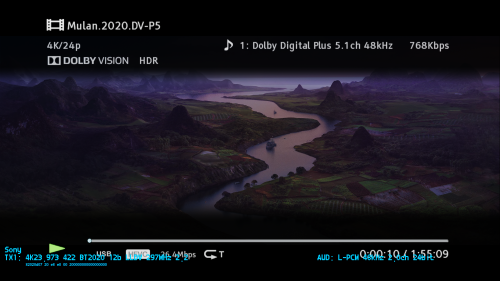
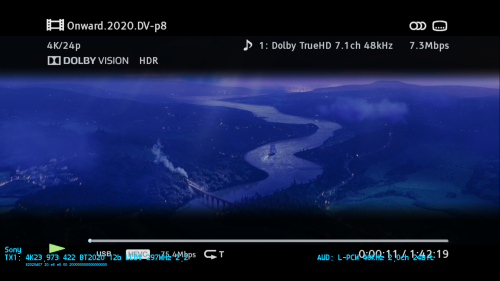
When p5 and p8 doesnt match, it's clearly in the source. We tested another AppleTV+ title and got the same red shift as in ted lasso . Red turns orange so something is different with appletv encodes (cropping?), nothing surprising from apple though, their last two generations of appletv 4k players can't even output proper SDR color (green push) lmao. The brightness and shadow detail are the same as p5 and no brightness jump in all the samples we checked which pretty much confirms that the dynamic metadatas are correctly applied to the HDR10 BL (when synced properly of course).
p5 vs P8 vs HDR10
Mulan:
https://slow.pics/c/uxKywJ6r
https://slow.pics/c/WWu8Ysik
https://slow.pics/c/ar5Wqvqe
Onward:
https://slow.pics/c/W0fnx5TO
https://slow.pics/c/EtaiU1SV
https://slow.pics/c/PrePMVac
AppleTV+ home before dark (ignore the grey-black bars caused by the x700 with cropped content):
https://slow.pics/c/bs569a22
https://slow.pics/c/Ny8jC6GR
https://slow.pics/c/CapqIJlx
for fun, home before dark DV p5 tonemapped to SDR with movies and tv app win10 compared to madvr hdr to sdr:
https://screenshotcomparison.com/comparison/16129
AppleTV+ ted lasso:
https://slow.pics/c/8nVLCFVq
https://slow.pics/c/H6xrVpNu
https://slow.pics/c/CtyxwrRU
Batman v superman:
https://slow.pics/c/lTiFdsxj
https://slow.pics/c/IoBZjQMN
Star Wars new hope:
https://slow.pics/c/Nd423gGO
https://slow.pics/c/qA4L4HUk
https://slow.pics/c/cKSjjNSD
https://slow.pics/c/jKrPq1Vf
Last edited by RESET_9999 on Mon Aug 02, 2021 11:56 pm, edited 1 time in total.
-
mattmarsden
- Posts: 88
- Joined: Mon Sep 03, 2018 10:36 am
Re: Dolby Vision now possible through MP4 Mux.
Can HDR10+ be converted to DV now?
-
ragico
- Posts: 266
- Joined: Fri Feb 15, 2019 1:09 am
Re: Dolby Vision now possible through MP4 Mux.
I want publicly thank @Reset_9999 for his precious help to let me understand and use the basics of this new tool
Thanks a lot also to @quietvoid whose hard work has allowed this to happen.

Thanks a lot also to @quietvoid whose hard work has allowed this to happen.
-
agentcny
- Posts: 1
- Joined: Tue Jul 27, 2021 11:20 pm
Re: Dolby Vision now possible through MP4 Mux.
Am I missing something, or is it not possible to simply re-use an "old" x265 encode and simply inject the rpu of the uhd (makemkv)?
RPU gets generated successfully, also the inject does not abort.
... No matter what settings I try in the end the hevc only shows HDR10 in mediainfo.
RPU gets generated successfully, also the inject does not abort.
... No matter what settings I try in the end the hevc only shows HDR10 in mediainfo.