The place to discuss Mac OS X version of MakeMKV
-
Tom Swyft
- Posts: 6
- Joined: Mon Nov 21, 2016 1:41 pm
Post
by Tom Swyft » Mon Nov 21, 2016 1:56 pm
I'm trying to use manual mode, but don't know how to access it.
I've read this:
http://makemkv.com/manualdvd/ which explains how manual mode works, but not how to turn it on.
I've read this:
http://www.makemkv.com/forum2/viewtopic ... 005#p51240 which say
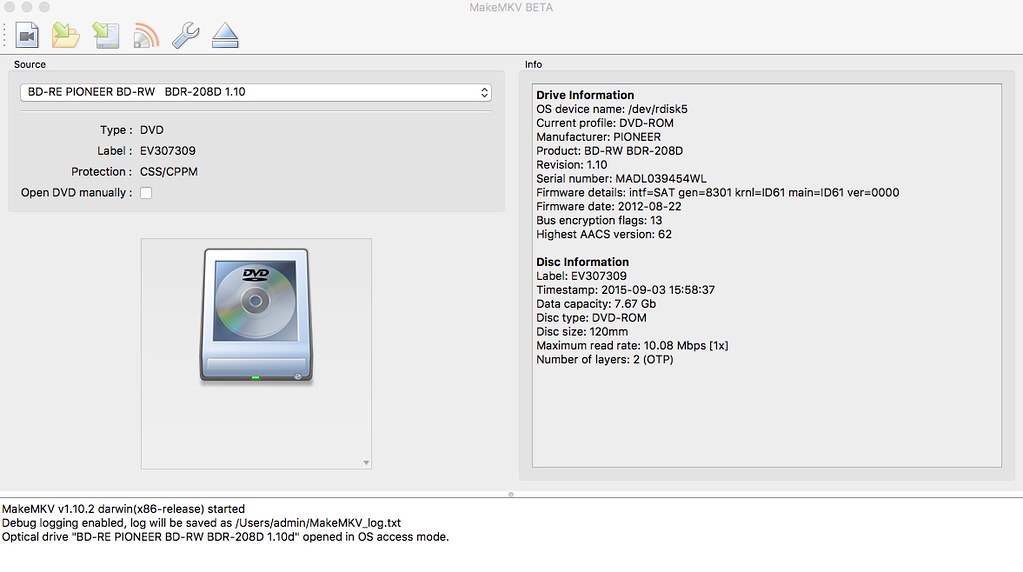
Launch MakeMKV, choose the right drive, and tick the "Open DVD manually" checkbox
But I don't see any checkbox on my GUI.
Can someone please explain how to access manual mode?
Many thanks, many apologies if I'm missing something completely obvious.
-
Woodstock
- Posts: 10975
- Joined: Sun Jul 24, 2011 11:21 pm
Post
by Woodstock » Mon Nov 21, 2016 5:18 pm
Are you trying to open a DVD or a Bluray?
The box won't exist if the disk isn't a DVD.
Backup mode only exists for Bluray, and Manual mode only exists for DVD.
-
Tom Swyft
- Posts: 6
- Joined: Mon Nov 21, 2016 1:41 pm
Post
by Tom Swyft » Mon Nov 21, 2016 5:47 pm
Yes, it's a DVD.
Type: DVD
Protection: CSS / CPPM
Disc type: DVD-ROM
Data Capacity: 5.80 Gb
Maximum read rate: 10.08 Mbps [1x]
Number of layers: 2 (OTP)
-
Woodstock
- Posts: 10975
- Joined: Sun Jul 24, 2011 11:21 pm
Post
by Woodstock » Mon Nov 21, 2016 8:56 pm
OK, I've confirmed the box appears for DVDs in the Windows GUI; someone else with a Mac will have to say whether it shows up for him or her on the Mac.
-
Lovely Rita
- Posts: 273
- Joined: Wed Apr 17, 2013 10:29 pm
Post
by Lovely Rita » Tue Nov 22, 2016 2:19 pm
-
Tom Swyft
- Posts: 6
- Joined: Mon Nov 21, 2016 1:41 pm
Post
by Tom Swyft » Tue Nov 22, 2016 3:10 pm
No manual mode box on mine for some reason. (I also can't seem to upload a screen shot proving as much; it says:
Sorry, the board attachment quota has been reached
Any thoughts?
MakeMKV v1.10.2
-
Woodstock
- Posts: 10975
- Joined: Sun Jul 24, 2011 11:21 pm
Post
by Woodstock » Tue Nov 22, 2016 3:25 pm
Attachments haven't worked for a long time. If you have access to any other server you can post a link to the picture inside of "img" tags.
Off-hand, the only thing that I know that could be an issue is if you are somehow running a version prior to manual mode being introduced, but that would mean it's at least two years old, and you would have noticed other new features not working, like opening recent BDs.
-
Tom Swyft
- Posts: 6
- Joined: Mon Nov 21, 2016 1:41 pm
Post
by Tom Swyft » Tue Nov 22, 2016 3:36 pm
Well, it's definitely the latest version for os x (just downloaded it), definitely a DVD, and definitely doesn't have the tick box to activate manual mode.
I know I sound crazy, but I'm definitely not.

Any other thoughts would be helpful. Thanks!
-
ShinyD
- Posts: 1
- Joined: Sat Nov 26, 2016 2:35 am
Post
by ShinyD » Sat Nov 26, 2016 2:50 am
I believe the step needed to have Manual mode available is to have Expert mode enabled in Preferences.
[Preferences > General (tab/button) > Expert mode (check box)]
You may need to restart MakeMKV.
Then your window should look similar to what Lovely Rita posted.
-
Tom Swyft
- Posts: 6
- Joined: Mon Nov 21, 2016 1:41 pm
Post
by Tom Swyft » Sat Nov 26, 2016 3:17 am
That did it! Thanks for the info!