Page 462 of 756
Re: Dolby Vision now possible through MP4 Mux.
Posted: Mon Jul 18, 2022 7:49 pm
by RESET_9999
sw5163 wrote: Mon Jul 18, 2022 7:34 pm
p8.dvh1 contrast is wrong on my iPad, if ATV can handle it, okay then.
oh indeed, that could be a problem... since your ipad output SDR, could you take screenshots that show the difference?
thanks
@ragico, could you compare the P5 and P8 version of the SM clip please?
Re: Dolby Vision now possible through MP4 Mux.
Posted: Mon Jul 18, 2022 8:19 pm
by ragico
RESET_9999 wrote: Mon Jul 18, 2022 7:49 pm
sw5163 wrote: Mon Jul 18, 2022 7:34 pm
p8.dvh1 contrast is wrong on my iPad, if ATV can handle it, okay then.
@ragico, could you compare the P5 and P8 version of the SM clip please?
To my eyes, P5 looks brighter and has more contrast.
Re: Dolby Vision now possible through MP4 Mux.
Posted: Mon Jul 18, 2022 8:21 pm
by sw5163
RESET_9999 wrote: Mon Jul 18, 2022 7:49 pm
sw5163 wrote: Mon Jul 18, 2022 7:34 pm
p8.dvh1 contrast is wrong on my iPad, if ATV can handle it, okay then.
oh indeed, that could be a problem... since your ipad output SDR, could you take screenshots that show the difference?
thanks
Sure.
From Apple screen saver: (left p8.dvh1 right p5.dvh1)
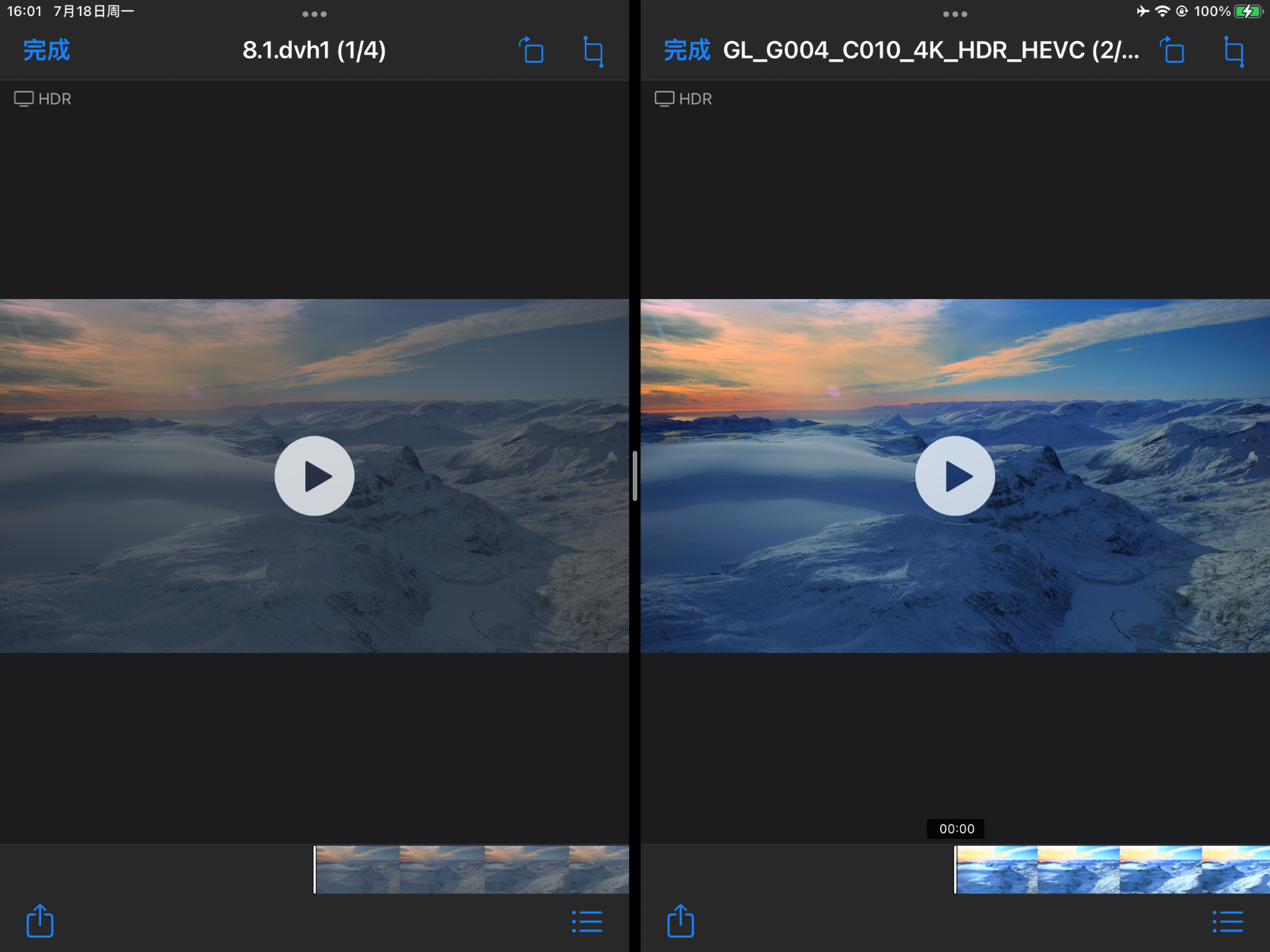
- 1.PNG (1.45 MiB) Viewed 21048 times
From your test sample: (left p8.dvh1 right p5.dvh1)
The attachment 2.PNG is no longer available
The attachment 3.PNG is no longer available
These screenshots can stand for what I'm seeing.
Left image has very low contrast, looks definitely wrong.
But RPU are working on both.
So I guess Apple treat p8.dvh1 as HLG BL as they were shot by iPhone.
Re: Dolby Vision now possible through MP4 Mux.
Posted: Mon Jul 18, 2022 8:24 pm
by RESET_9999
p8 clearly isn't tonemapped to SDR on those pic. (looks like PQ)
but since ragico report the same on the ATV, then I stand corrected.
Re: Dolby Vision now possible through MP4 Mux.
Posted: Mon Jul 18, 2022 8:32 pm
by sw5163
RESET_9999 wrote: Mon Jul 18, 2022 8:24 pm
p8 clearly isn't tonemapped to SDR on those pic. (looks like PQ)
I'm not sure but Apple recognize them as HDR, see top left corner.
sw5163 wrote: Mon Jul 18, 2022 8:21 pm
But RPU are working on both.
So I guess Apple treat p8.dvh1 as HLG BL as they were shot by iPhone.
You may also wanna answer sergonnn111's question? He's been asking a several times.
sergonnn111 wrote: Mon Jul 18, 2022 6:24 pm
Guys can i do ts file dolby vision with ts muxer nightly for native tv player LG OLED 2018 from blu ray bdmv dolby vision ?
Re: Dolby Vision now possible through MP4 Mux.
Posted: Mon Jul 18, 2022 8:39 pm
by RESET_9999
sw5163 wrote: Mon Jul 18, 2022 8:32 pm
You may also wanna answer sergonnn111's question? He's been asking a several times.
yeah I don't answer those questions anymore

All he has to do is to check the Playback Device sheet in my signature.
Re: Dolby Vision now possible through MP4 Mux.
Posted: Mon Jul 18, 2022 8:55 pm
by sw5163
RESET_9999 wrote: Mon Jul 18, 2022 8:39 pm
sw5163 wrote: Mon Jul 18, 2022 8:32 pm
You may also wanna answer sergonnn111's question? He's been asking a several times.
yeah I don't answer those questions anymore
All he has to do is to check the Playback Device sheet in my signature.
Right, @sergonnn111 maybe do more research before asking? I actually tested all profiles and codecs I could think of before posting the Apple MEL thing. I even tried to hybrid a p5.dvh1 and concat a FEL track to it to see if Apple indeed doesn't support FEL, LOL.
Re: Dolby Vision now possible through MP4 Mux.
Posted: Mon Jul 18, 2022 9:43 pm
by RESET_9999
sw5163 wrote: Mon Jul 18, 2022 8:55 pm
concat a FEL track to it to see if Apple indeed doesn't support FEL, LOL.
yep, i tried that too in the Windows 10 app LOL.
about mp4box, I wonder if we should use:
-brand mp43isom -ab dby1
I have no idea what it does but i always used it with mp4box. I got that from yusesope a long time ago i think.
Re: Dolby Vision now possible through MP4 Mux.
Posted: Mon Jul 18, 2022 9:58 pm
by sw5163
RESET_9999 wrote: Mon Jul 18, 2022 9:43 pm
about mp4box, I wonder if we should use:
-brand mp43isom -ab dby1
I have no idea what it does but i always used it with mp4box. I got that from yusesope a long time ago i think.
I don't know what that is either. I never used them, but seems everything is fine so far.
I like to use as few command as possible and left other things I don't know for the tool to decide.
I actually have tried yusesope's tool back in 2020. Back then there is no way to "remove_mapping" so I got green screen on iPad. But I knew DV on Apple is possible, it's just we didn't know how to modify RPU yet. Just like we just don't know how to do PCM/atmos now.
Look how far we've come from there.
update: they set the brand of file, so I don't think they will affect final image.

- 屏幕截图 2022-07-18 203947.png (19.5 KiB) Viewed 20439 times
Re: Dolby Vision now possible through MP4 Mux.
Posted: Tue Jul 19, 2022 12:46 am
by sw5163
RESET_9999 wrote: Mon Jul 18, 2022 12:45 am
i tried:
-map 0:AUDIO_STREAM_ID -c pcm_s24be -ar 48000 -rf64 auto \path\to\audio.mov
and
-map 0:AUDIO_STREAM_ID -c pcm_s24le -ar 48000 -rf64 auto \path\to\audio.mov
How do you decide what pcm encoder to use?
My logic here is ffmpeg show:
Stream #0:2[0x1100]: Audio: truehd (AC-3 / 0x332D4341), 48000 Hz, 7.1, s32 (24 bit)
s̶3̶2̶ ̶(̶2̶4̶ ̶b̶i̶t̶)̶ ̶I̶ ̶t̶a̶k̶e̶ ̶t̶h̶a̶t̶ ̶a̶s̶ ̶2̶4̶ ̶b̶i̶t̶ ̶a̶u̶d̶i̶o̶ ̶+̶ ̶8̶ ̶b̶i̶t̶ ̶a̶t̶m̶o̶s̶
S̶o̶ ̶w̶o̶u̶l̶d̶ ̶i̶t̶ ̶b̶e̶ ̶c̶o̶r̶r̶e̶c̶t̶ ̶t̶o̶ ̶u̶s̶e̶ ̶p̶c̶m̶_̶s̶2̶4̶l̶e̶ ̶o̶r̶ ̶p̶c̶m̶_̶s̶3̶2̶l̶e̶?
Use pcm_s24le (little endian for compatibility)
If we are going to lose atmos anyway.
If we don't set -ar 48000 manually, will it chose proper sample rate automatically?
Also may I ask what does -rf64 auto mean?
Okay, found it:
https://en.wikipedia.org/wiki/RF64
Re: Dolby Vision now possible through MP4 Mux.
Posted: Tue Jul 19, 2022 12:56 am
by RESET_9999
sw5163 wrote: Tue Jul 19, 2022 12:46 am
RESET_9999 wrote: Mon Jul 18, 2022 12:45 am
i tried:
-map 0:AUDIO_STREAM_ID -c pcm_s24be -ar 48000 -rf64 auto \path\to\audio.mov
and
-map 0:AUDIO_STREAM_ID -c pcm_s24le -ar 48000 -rf64 auto \path\to\audio.mov
How do you decide what pcm encoder to use?
My logic here is ffmpeg show:
Stream #0:2[0x1100]: Audio: truehd (AC-3 / 0x332D4341), 48000 Hz, 7.1, s32 (24 bit)
s32 (24 bit) I take that as 24 bit audio + 8 bit atmos
So would it be correct to use pcm_s24le or pcm_s32le? (little endian for compatibility I think)
If we are going to lose atmos anyway.
If we don't set -ar 48000 manually, will it chose proper sample rate automatically?
Also may I ask what does -rf64 auto mean?
I have no idea, I ended up using your command line in my script. I'm really not an expert with audio encoding.
I got those cmd lines from yusesope as well:
https://mrmc.tv/forum/viewtopic.php?f=1 ... &start=310
Re: Dolby Vision now possible through MP4 Mux.
Posted: Tue Jul 19, 2022 9:12 am
by Mithrandir
Hello, I've tried latest DoVI scripts (1.4.6).
Did the following:
1. Extracted all scripts and tools to C:\Temp\Dovi_Scripts
2. Commented out Dolby Encoder because I don't have it (line 59) ::set DEE_path=D:\other\DEE5.2.0\dee.exe
3. set tsmuxer.popup=YES and mkvtoolnix.popup=NO
4. Started .bat file and pointed it to network share
I did the following workflow 1-7-2-2
What happened is that whole TEMP folder was completely deleted.
This was an error message:
The process cannot access the file because it is being used by another process.
The system cannot find the path specified.
I didn't have anything critical in Temp folder so complete disaster was avoided (thank god I didn't run it from Program files).
But why it did delete the folder below where scripts are run (it also deleted scripts and folder itself).
Re: Dolby Vision now possible through MP4 Mux.
Posted: Tue Jul 19, 2022 1:00 pm
by RESET_9999
Mithrandir wrote: Tue Jul 19, 2022 9:12 am
Hello, I've tried latest DoVI scripts (1.4.6).
Did the following:
1. Extracted all scripts and tools to C:\Temp\Dovi_Scripts
2. Commented out Dolby Encoder because I don't have it (line 59) ::set DEE_path=D:\other\DEE5.2.0\dee.exe
3. set tsmuxer.popup=YES and mkvtoolnix.popup=NO
4. Started .bat file and pointed it to network share
I did the following workflow 1-7-2-2
What happened is that whole TEMP folder was completely deleted.
This was an error message:
The process cannot access the file because it is being used by another process.
The system cannot find the path specified.
I didn't have anything critical in Temp folder so complete disaster was avoided (thank god I didn't run it from Program files).
But why it did delete the folder below where scripts are run (it also deleted scripts and folder itself).
yeah do not place the dovi_scripts folder into a folder named TEMP because the script will always delete it. The script make a folder called TEMP for the temporary file in the same drive you place the doviscript folder and when the script is done, it delete the temp folder.
C:\Dovi_Scripts or C:\folder.not.named.temp\Dovi_Scripts
(thank god I didn't run it from Program files).
lol
Re: Dolby Vision now possible through MP4 Mux.
Posted: Tue Jul 19, 2022 1:04 pm
by Mithrandir
RESET_9999 wrote: Tue Jul 19, 2022 1:00 pm
yeah do not place the dovi_scripts folder into a folder named TEMP because the script will always delete it
I've read the source of the script and seen that it's hardcoded to temp folder for every workflow.
I think you should put disclaimer in the readme that temp folder will be erased.
And it would be great if temp folder could be parametrized like output folder
Re: Dolby Vision now possible through MP4 Mux.
Posted: Tue Jul 19, 2022 3:46 pm
by RESET_9999
Mithrandir wrote: Tue Jul 19, 2022 1:04 pm
And it would be great if temp folder could be parametrized like output folder
sure, i can do that.