Re: Dolby Vision now possible through MP4 Mux.
Posted: Sun Jul 25, 2021 1:01 am
Ok, makes sense.
MakeMKV support forum
https://forum.makemkv.com/forum/

both files are done the same way...shawnc22 wrote: Sun Jul 25, 2021 2:04 am In the case of Ted Lasso, are you just doing a straight P5 to P8 conversion? Then for star wars, you’re going throught the whole process of RPU extraction from P5 and applying it to the UHD HDR10 layer to get P8? If so, and I’m not sure if this has been asked already, but is quietvoid’s tool doing a colorspace conversion when going from P5 to P8? If not, that might be the reason why Ted Lasso looks so different. For the Star Wars scenario, it could be that the same RPU metadata can be applied to BL’s that’re in different colorspaces without issue.
Thanks, the .ts file plays back as DoVi with your Kodi build (it's installed as a separate package). (The mkv that I created by dragging the .ts file into recent mkvtoolnix still plays back as hdr10.)quietvoid wrote: Sat Jul 24, 2021 6:58 pmI'm not sure if it's going to be a different package, so backup first..
https://mega.nz/file/MdETXSAR#vPtlIY-nm ... NcRsZLlTyk
 )
)Or madvr?RESET_9999 wrote: Sun Jul 25, 2021 4:48 am but as you say, hard to tell if its the source or the conversion
Remuxing from TS is not supported, it won't copy the Dolby Vision config. Only MP4 or straight from the bitstream works currently.chros wrote: Sun Jul 25, 2021 10:43 am(The mkv that I created by dragging the .ts file into recent mkvtoolnix still plays back as hdr10.)
Thanks, I'll try to see if I can get anything different by playing with the metadata.RESET_9999 wrote: Sun Jul 25, 2021 4:48 amhere are the clips if you want to check them yourself:
https://drive.google.com/file/d/1Lh7zmo ... sp=sharing,
https://drive.google.com/file/d/1Oqkvmz ... sp=sharing
but as you say, hard to tell if its the source or the conversion
madVR?chros wrote: Sun Jul 25, 2021 10:51 amOr madvr?RESET_9999 wrote: Sun Jul 25, 2021 4:48 am but as you say, hard to tell if its the source or the conversion
So Im wondering the p5 funky colors are not created in post only the final stages of doblyvision encodingquietvoid wrote: Sun Jul 25, 2021 1:59 pmRemuxing from TS is not supported, it won't copy the Dolby Vision config. Only MP4 or straight from the bitstream works currently.chros wrote: Sun Jul 25, 2021 10:43 am(The mkv that I created by dragging the .ts file into recent mkvtoolnix still plays back as hdr10.)
Thanks, I'll try to see if I can get anything different by playing with the metadata.RESET_9999 wrote: Sun Jul 25, 2021 4:48 amhere are the clips if you want to check them yourself:
https://drive.google.com/file/d/1Lh7zmo ... sp=sharing,
https://drive.google.com/file/d/1Oqkvmz ... sp=sharing
but as you say, hard to tell if its the source or the conversion
i agreeManixx2020beyound wrote: Sun Jul 25, 2021 2:34 pm
We should test more uhd p8 conversion
To see what the consistency in the results are

on my end, the only way I can get a DV MKV with your p5 to p8 conversion is by using Makemkv.quietvoid wrote: Sun Jul 25, 2021 1:59 pm
Remuxing from TS is not supported, it won't copy the Dolby Vision config. Only MP4 or straight from the bitstream works currently.
Thanks, I'll try out with the raw streams then.quietvoid wrote: Sun Jul 25, 2021 1:59 pmRemuxing from TS is not supported, it won't copy the Dolby Vision config. Only MP4 or straight from the bitstream works currently.
Oh, I see, I missed that.RESET_9999 wrote: Sun Jul 25, 2021 2:20 pm madVR? ... the difference is NOT caused by madVR.. plus as i said, I'm seeing the same difference in tv-led...
Perhaps this real content example will help you understand how to do it:ragico wrote: Sat Jul 24, 2021 11:45 am Hope that @quietvoid will make an easy tool to be used by ignorant people like me as @Yusesope did for his tools.
Thank you.
Code: Select all
dovi_tool.exe -m 3 extract-rpu DV.hevcCode: Select all
{
    "remove": [
        "0-23"
    ]
}Code: Select all
{
	"duplicate": [
		{
			"source": 0,
			"offset": 0,
			"length": 23
		}
	]
}Code: Select all
dovi_tool.exe editor -i RPU.bin -j edited.json --rpu-out RPU-edited.binCode: Select all
dovi_tool.exe inject-rpu -i HDR10.hevc --rpu-in RPU-edited.binCode: Select all
Format                                   : MPEG-TS
File size                                : 50.9 GiB
Duration                                 : 1 h 55 min
Overall bit rate mode                    : Variable
Overall bit rate                         : 63.3 Mb/s
Maximum Overall bit rate                 : 35.5 Mb/s

Video
ID                                       : 4117 (0x1015)
Menu ID                                  : 1 (0x1)
Format                                   : HEVC
Format/Info                              : High Efficiency Video Coding
Format profile                           : Main 10@L5.1@High
HDR format                               : Dolby Vision, Version 1.0, dvhe.08.06, BL+RPU, HDR10 compatible / SMPTE ST 2086, HDR10 compatible
Codec ID                                 : 36
Duration                                 : 1 h 55 min
Bit rate                                 : 58.9 Mb/s
Width                                    : 3 840 pixels
Height                                   : 2 160 pixels
Display aspect ratio                     : 16:9
Frame rate                               : 23.976 (24000/1001) FPS
Color space                              : YUV
Chroma subsampling                       : 4:2:0 (Type 2)
Bit depth                                : 10 bits
Bits/(Pixel*Frame)                       : 0.296
Stream size                              : 47.4 GiB (93%)
Writing library                          : ATEME Titan File 3.9.6 (4.9.6.2)
Color range                              : Limited
Color primaries                          : BT.2020
Transfer characteristics                 : PQ
Matrix coefficients                      : BT.2020 non-constant
Mastering display color primaries        : Display P3
Mastering display luminance              : min: 0.0001 cd/m2, max: 1000 cd/m2

Audio #1
ID                                       : 4352 (0x1100)
Menu ID                                  : 1 (0x1)
Format                                   : MLP FBA AC-3 16-ch
Format/Info                              : Meridian Lossless Packing FBA with 16-channel presentation
Commercial name                          : Dolby TrueHD with Dolby Atmos
Muxing mode                              : Stream extension
Codec ID                                 : 131
Duration                                 : 1 h 55 min
Bit rate mode                            : Variable
Bit rate                                 : 640 kb/s
Maximum bit rate                         : 8 742 kb/s
Channel(s)                               : 8 channels
Channel layout                           : L R C LFE Ls Rs Lb Rb
Sampling rate                            : 48.0 kHz
Frame rate                               : 31.250 FPS (1536 SPF)
Compression mode                         : Lossless
Stream size                              : 527 MiB (1%)
Service kind                             : Complete Main
Number of dynamic objects                : 13
Bed channel count                        : 1 channel
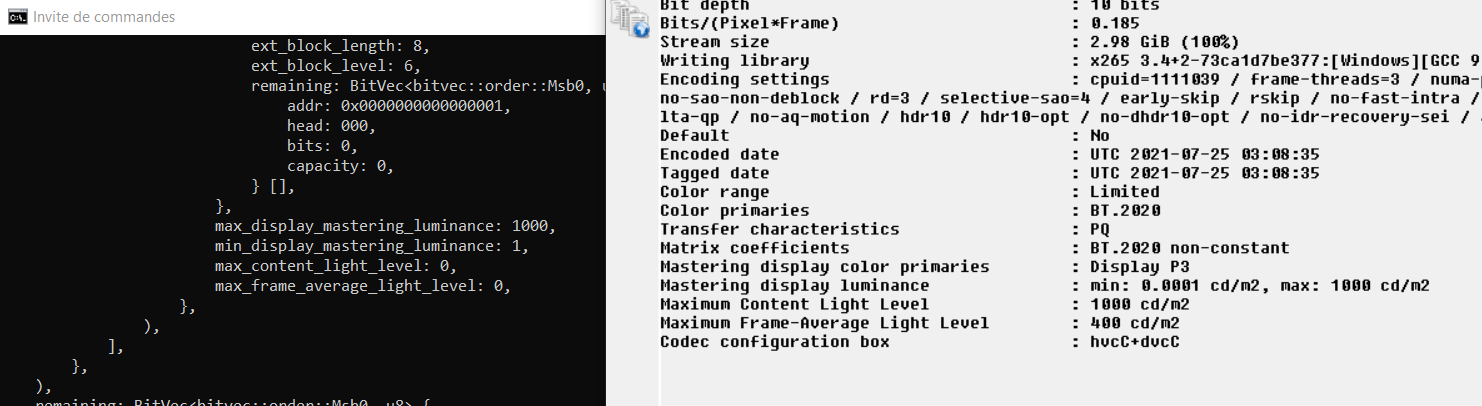
Bed channel configuration : LFENo, even in profile 7 metadata signal_full_range_flag is always set to 1.RESET_9999 wrote: Sun Jul 25, 2021 2:58 pm@quietvoid, i was looking at the rpu and i noticed this, shouldnt the p8 file set to 0 here ?
You should be able to get Dolby Vision config when using MKVToolNix v58 or newer only.RESET_9999 wrote: Sun Jul 25, 2021 2:58 pmon my end, the only way I can get a DV MKV with your p5 to p8 conversion is by using Makemkv.
raw hevc with mkvtoolnix = no DV
mp4 dv with mkvtoolnix = no DV
ts DVwith mkvtoolnix = no DV
even when I simply remux the makemkv DV file with mkvtoolnix, i still lose DV metadata.