Page 196 of 264
Re: Ultimate UHD Drives Flashing Guide Updated 2025
Posted: Thu May 08, 2025 11:49 pm
by nicholfd
I just realized I had two old drives in an old, 2010 cheese grater Mac Pro (non-operable). Both are the same model: WH16NS40. I pulled one & put it in a Windows machine:
Code: Select all
C:\Program Files (x86)\MakeMKV>makemkvcon64.exe f -l
Found 2 drives (s)
00: \Device\CdRom0, \Device\CdRom0, D:
  HL-DT-ST_BD-RE__WH16NS40_1.00_211304041441_K9AE5983418
  .
  .
MakeMKV Info:
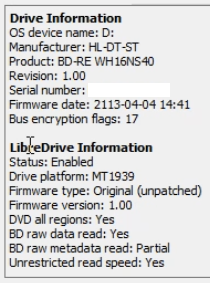
- Drive Info.png (88.06 KiB) Viewed 31230 times
I thought I would be able to flash it to read UHD discs & tried with this:
Code: Select all
C:\Program Files (x86)\MakeMKV\makemkvcon64.exe f --all-yes -d E: rawflash -i c:\Users\nicholfd\Desktop\HL-DT-ST-BD-RE_WH16NS60-1.02-NM00100-211810291936. bin
No drive tool logic found in SDF.bin
Internal error 0x8d000000
-------- PROGRESS --------
Wrong drive letter in the flash command (I know - details matter). Tried again. Did something, but eventually failed (after long delay):
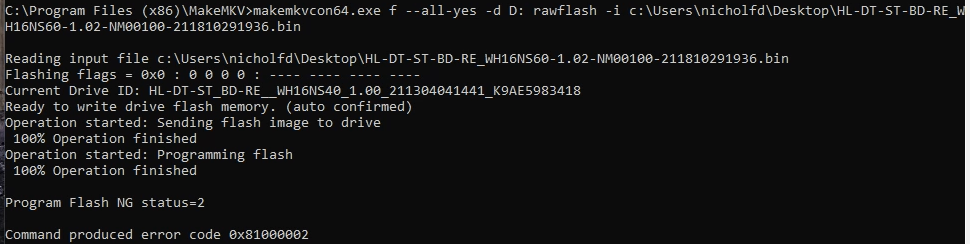
- Drive Flash Failure.png (173.52 KiB) Viewed 31212 times
Shutdown, removed power, reapplied power & turned back on. MakeMKV now shows:
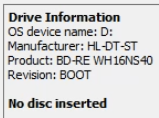
- Drive Info After Failed Flash.png (29.13 KiB) Viewed 31212 times
Have I FUBAR'd this drive? I still have the 2nd one...
Thanks!
Re: Ultimate UHD Drives Flashing Guide Updated 2025
Posted: Fri May 09, 2025 12:53 am
by Billycar11
nicholfd wrote: Thu May 08, 2025 11:49 pm
I just realized I had two old drives in an old, 2010 cheese grater Mac Pro (non-operable). Both are the same model: WH16NS40. I pulled one & put it in a Windows machine:
Code: Select all
C:\Program Files (x86)\MakeMKV>makemkvcon64.exe f -l
Found 2 drives (s)
00: \Device\CdRom0, \Device\CdRom0, D:
  HL-DT-ST_BD-RE__WH16NS40_1.00_211304041441_K9AE5983418
  .
  .
MakeMKV Info:
Drive Info.png
I thought I would be able to flash it to read UHD discs & tried with this:
Code: Select all
C:\Program Files (x86)\MakeMKV\makemkvcon64.exe f --all-yes -d E: rawflash -i c:\Users\nicholfd\Desktop\HL-DT-ST-BD-RE_WH16NS60-1.02-NM00100-211810291936. bin
No drive tool logic found in SDF.bin
Internal error 0x8d000000
Is this drive not flash-able? Did I miss step or option?
Thanks!
do not flash it
Re: Ultimate UHD Drives Flashing Guide Updated 2025
Posted: Fri May 09, 2025 12:59 am
by nicholfd
Billycar11 wrote: Fri May 09, 2025 12:53 am
nicholfd wrote: Thu May 08, 2025 11:49 pm
Is this drive not flash-able? Did I miss step or option?
Thanks!
do not flash it
Thanks - too late. I found
an issue & tried again. Thought I made progress. I updated my original message before you posted this one or they crossed. Is it hosed?
Thanks!
Re: Ultimate UHD Drives Flashing Guide Updated 2025
Posted: Fri May 09, 2025 1:07 am
by Billycar11
nicholfd wrote: Fri May 09, 2025 12:59 am
Billycar11 wrote: Fri May 09, 2025 12:53 am
nicholfd wrote: Thu May 08, 2025 11:49 pm
Is this drive not flash-able? Did I miss step or option?
Thanks!
do not flash it
Thanks - too late. I found
an issue & tried again. Thought I made progress. I updated my original message before you posted this one or they crossed. Is it hosed?
Thanks!
dead unless you have a pc with sata ide mode and a 32bit os
see recovery section in guide
i no longer give out kits for these was way to much trouble as know one tells the truth about their pcs
Re: Ultimate UHD Drives Flashing Guide Updated 2025
Posted: Fri May 09, 2025 1:26 am
by nicholfd
Billycar11 wrote: Fri May 09, 2025 1:07 am
nicholfd wrote: Fri May 09, 2025 12:59 am
Billycar11 wrote: Fri May 09, 2025 12:53 am
do not flash it
Thanks - too late. I found
an issue & tried again. Thought I made progress. I updated my original message before you posted this one or they crossed. Is it hosed?
Thanks!
dead unless you have a pc with sata ide mode and a 32bit os
see recovery section in guide
i no longer give out kits for these was way to much trouble as know one tells the truth about their pcs
Thanks - the PC I moved the drive to is a "utility" PC, and to flash the drive I installed fresh Windows 10 64-bit (left unlicensed). I have a MSDN subscription & it looks like the 32-bit version of Windows 10 is still available (downloading now). What do I need to look for/at in the BIOS, or what information can I share to find out if the motherboard supports "SATA IDE mode"? I'm not sure I've ever heard of that.
Looking for the recover guide section now...
Or, is this drive not worth trying to recover (your time - I don't mind wasting my time playing with it)? I only wanted to mess with it as a backup for UHD discs. If it can be recovered & flashed to read UHD discs, I'm glad to make a PayPal donation. I'm sure I used it many years ago for DVD/BR. I probably abandoned it when/if it could not manage UHD (at the time). The Mac Pro it's been in has been out of use for probably 10 years...
Re: Ultimate UHD Drives Flashing Guide Updated 2025
Posted: Fri May 09, 2025 2:13 am
by nicholfd
Motherboard supports IDE mode
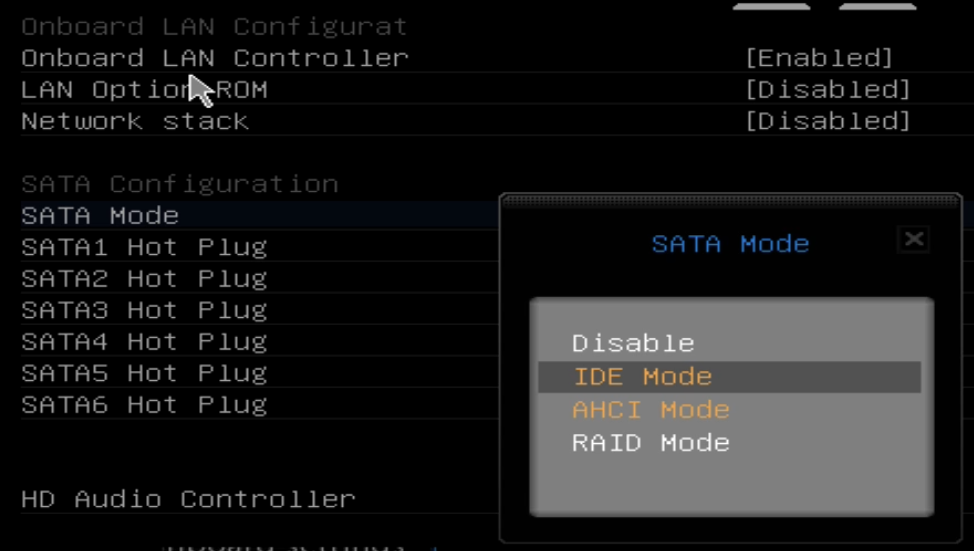
- MB BIOS.png (113.95 KiB) Viewed 31178 times
Windows 10 x86 (32-bit) installed, with BIOS set to SATA IDE mode.

- Win 10 Info.png (9.65 KiB) Viewed 31164 times
Re: Ultimate UHD Drives Flashing Guide Updated 2025
Posted: Fri May 09, 2025 5:26 am
by MartyMcNuts
jatenk wrote: Thu May 08, 2025 3:41 am
2Close wrote: Mon May 05, 2025 5:06 pm
Hey Guys,
iam new to saving blurays and got a new verbatim 43888 from amazon:
Drive Information
OS device name: F:
Current profile: BD-ROM
Manufacturer: HL-DT-ST
Product: BD-RE BU40N
Revision: 1.05
Serial number: ...
Firmware date: 2124-04-23 13:47
Bus encryption flags: 17
Highest AACS version: 36
LibreDrive Information
Status: Possible, not yet enabled
Drive platform: MT1959
I've read the Ultimate UHD Drive Falsing Guide 2025 and downloaded the firmware files but am unsure what are the correct files for enabling libredrive.
Thanks very much for your help

I just got the same drive with most information the same, except "Highest AACS version" saying 81 in my case (and I'm using macOS, so OS device name corresponds to that). I also can't find the mentioned file HL-DT-ST-BD-RE_BU40N-1.03-NM00000-211810241934.bin in the current pack. What should I use? I'm sorry if this is supposed to be obvious.
It's in the MK/old folder in the firmware pack.
Re: Ultimate UHD Drives Flashing Guide Updated 2025
Posted: Fri May 09, 2025 10:15 am
by Billycar11
nicholfd wrote: Fri May 09, 2025 2:13 am
Motherboard supports IDE mode
MB BIOS.png
Windows 10 x86 (32-bit) installed, with BIOS set to SATA IDE mode.
Win 10 Info.png
follow the recovery section and my dosflash video do the recovery stuff first make sure to do the steps exactly or dos flash wont work
as i said i dont do kits for this anymore more time than its worth everything you need is in the guide and my old dosflash video from 2019
Re: Ultimate UHD Drives Flashing Guide Updated 2025
Posted: Fri May 09, 2025 11:11 pm
by jatenk
MartyMcNuts wrote: Fri May 09, 2025 5:26 am
It's in the MK/old folder in the firmware pack.
Oh yeah, that's right, thanks! Can I use it safely to flash the drive though? What's the significance in the AACS-version difference?
Re: Ultimate UHD Drives Flashing Guide Updated 2025
Posted: Fri May 09, 2025 11:40 pm
by MartyMcNuts
jatenk wrote: Fri May 09, 2025 11:11 pm
MartyMcNuts wrote: Fri May 09, 2025 5:26 am
It's in the MK/old folder in the firmware pack.
Oh yeah, that's right, thanks! Can I use it safely to flash the drive though? What's the significance in the AACS-version difference?
The firmware has absolutley nothing at all to do with the AACS version of the drive.
When you insert a BD disc that has a higher AACS revision (happens on some new releases), it will automatically update the drive's revocation lists and you will notice the highest AACS version change to that of the BD disc.
Re: Ultimate UHD Drives Flashing Guide Updated 2025
Posted: Sat May 10, 2025 12:03 am
by jatenk
MartyMcNuts wrote: Fri May 09, 2025 11:40 pm
jatenk wrote: Fri May 09, 2025 11:11 pm
MartyMcNuts wrote: Fri May 09, 2025 5:26 am
It's in the MK/old folder in the firmware pack.
Oh yeah, that's right, thanks! Can I use it safely to flash the drive though? What's the significance in the AACS-version difference?
The firmware has absolutley nothing at all to do with the AACS version of the drive.
When you insert a BD disc that has a higher AACS revision (happens on some new releases), it will automatically update the drive's revocation lists and you will notice the highest AACS version change to that of the BD disc.
Alright, so just to make sure I got this correctly, I sidegrade my Verbatim drive to BU40N 1.03 in MK/old, and then enc-flash according to step 7 in the top post manual, correct?
Re: Ultimate UHD Drives Flashing Guide Updated 2025
Posted: Sat May 10, 2025 1:52 am
by MartyMcNuts
jatenk wrote: Sat May 10, 2025 12:03 am
MartyMcNuts wrote: Fri May 09, 2025 11:40 pm
jatenk wrote: Fri May 09, 2025 11:11 pm
Oh yeah, that's right, thanks! Can I use it safely to flash the drive though? What's the significance in the AACS-version difference?
The firmware has absolutley nothing at all to do with the AACS version of the drive.
When you insert a BD disc that has a higher AACS revision (happens on some new releases), it will automatically update the drive's revocation lists and you will notice the highest AACS version change to that of the BD disc.
Alright, so just to make sure I got this correctly, I sidegrade my Verbatim drive to BU40N 1.03 in MK/old, and then enc-flash according to step 7 in the top post manual, correct?
What?!?
Your Verbatim should be a BU40N drive with 1.05 on it. There's no trick to flashing it. Just use SDFTool flasher and flash it directly to BU40N 1.03-MK (we call all firmware in the pack "MK" as it's far easier than NM000343.....) first, which will remove the firmware encryption and the drive is now ready for use with MakeMKV. If you also want to use other ripping software such as DVDFab etc, then you can flash it to DE BU40N 1.00.
Re: Ultimate UHD Drives Flashing Guide Updated 2025
Posted: Sat May 10, 2025 2:02 am
by jatenk
MartyMcNuts wrote: Sat May 10, 2025 1:52 am
jatenk wrote: Sat May 10, 2025 12:03 am
MartyMcNuts wrote: Fri May 09, 2025 11:40 pm
The firmware has absolutley nothing at all to do with the AACS version of the drive.
When you insert a BD disc that has a higher AACS revision (happens on some new releases), it will automatically update the drive's revocation lists and you will notice the highest AACS version change to that of the BD disc.
Alright, so just to make sure I got this correctly, I sidegrade my Verbatim drive to BU40N 1.03 in MK/old, and then enc-flash according to step 7 in the top post manual, correct?
What?!?
Your Verbatim should be a BU40N drive with 1.05 on it. There's no trick to flashing it. Just use SDFTool flasher and flash it directly to BU40N 1.03-MK (we call all firmware in the pack "MK" as it's far easier than NM000343.....) first, which will remove the firmware encryption and the drive is now ready for use with MakeMKV. If you also want to use other ripping software such as DVDFab etc, then you can flash it to DE BU40N 1.00.
I can't use the GUI SDFTool since I'm on macOS, but I'm okey with using Terminal. So just side-grading it to 1.03 (from MK/old) will be enough to make it usable and able to rip UHD movies already? Sorry for my slow uptake - english isn't my first language.
Re: Ultimate UHD Drives Flashing Guide Updated 2025
Posted: Sat May 10, 2025 2:06 am
by MartyMcNuts
jatenk wrote: Sat May 10, 2025 2:02 am
MartyMcNuts wrote: Sat May 10, 2025 1:52 am
jatenk wrote: Sat May 10, 2025 12:03 am
Alright, so just to make sure I got this correctly, I sidegrade my Verbatim drive to BU40N 1.03 in MK/old, and then enc-flash according to step 7 in the top post manual, correct?
What?!?
Your Verbatim should be a BU40N drive with 1.05 on it. There's no trick to flashing it. Just use SDFTool flasher and flash it directly to BU40N 1.03-MK (we call all firmware in the pack "MK" as it's far easier than NM000343.....) first, which will remove the firmware encryption and the drive is now ready for use with MakeMKV. If you also want to use other ripping software such as DVDFab etc, then you can flash it to DE BU40N 1.00.
I can't use the GUI SDFTool since I'm on macOS, but I'm okey with using Terminal. So just side-grading it to 1.03 (from MK/old) will be enough to make it usable and able to rip UHD movies already? Sorry for my slow uptake - english isn't my first language.
ah, ok. there's no side-grade. You are using the same model firmware at all times.
Yes, use firmware BU40N 1.03-MK from the MK/old folder and make sure you have
rawflash enc in your command. Once the drive has been flashed and shows as firmware BU40N 1.03 you are done and can start using it to rip your UHD discs.
Re: Ultimate UHD Drives Flashing Guide Updated 2025
Posted: Sat May 10, 2025 2:19 am
by jatenk
MartyMcNuts wrote: Sat May 10, 2025 2:06 am
jatenk wrote: Sat May 10, 2025 2:02 am
MartyMcNuts wrote: Sat May 10, 2025 1:52 am
What?!?
Your Verbatim should be a BU40N drive with 1.05 on it. There's no trick to flashing it. Just use SDFTool flasher and flash it directly to BU40N 1.03-MK (we call all firmware in the pack "MK" as it's far easier than NM000343.....) first, which will remove the firmware encryption and the drive is now ready for use with MakeMKV. If you also want to use other ripping software such as DVDFab etc, then you can flash it to DE BU40N 1.00.
I can't use the GUI SDFTool since I'm on macOS, but I'm okey with using Terminal. So just side-grading it to 1.03 (from MK/old) will be enough to make it usable and able to rip UHD movies already? Sorry for my slow uptake - english isn't my first language.
ah, ok. there's no side-grade. You are using the same model firmware at all times.
Yes, use firmware BU40N 1.03-MK from the MK/old folder and make sure you have
rawflash enc in your command. Once the drive has been flashed and shows as firmware BU40N 1.03 you are done and can start using it to rip your UHD discs.
Wow, that was exceedingly simple. Thanks a bunch, it seems to be working! Does this mean I should never update my driver's firmware from here on out? Since I sent my 1.05 firmware dump to MakeMKV's support email, will it be flashed/flashable soon?