Page 187 of 262
Re: Ultimate UHD Drives Flashing Guide Updated 2025
Posted: Mon Mar 03, 2025 11:47 pm
by mm13579
I now got the disc to load for about 1 seconds. It now says it supports AACS 77, but no matter what I try I can't get a disc to load that is above 68. See screenshot it says it supports it but spins then says no disc.
Re: Ultimate UHD Drives Flashing Guide Updated 2025
Posted: Tue Mar 04, 2025 12:34 am
by mm13579
This is what I get loading then no disc unless it's AACS 68 then it loads after 20-30 seconds no errors.
Re: Ultimate UHD Drives Flashing Guide Updated 2025
Posted: Tue Mar 04, 2025 1:53 am
by gunslingerfry
So I'm pretty sure my WP50NB40 is a paperweight but I just wanted to check if anyone had any ideas on if this can be fixed.
I flashed the MK 1.02 build which it showed on MakeMKV and then I proceeded to do the cross flash to BU40N. In a moment of monumentally poor judgement I unplugged the drive when I mistakenly thought it was finished flashing. Now the drive reports its Revision as BOOT does not respond to the button press and the flasher GUI reports it is not an MT1959 and makemkv flasher just sits there.
I tried creating the bootable USB for the DOS flasher but it does not boot so I have not been able to try that yet.
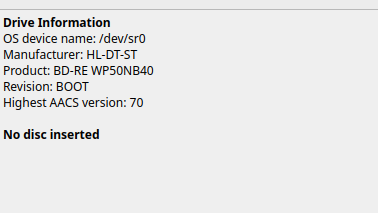
- 20250303_18h48m53s_grim.png (14.86 KiB) Viewed 12652 times
Re: Ultimate UHD Drives Flashing Guide Updated 2025
Posted: Tue Mar 04, 2025 3:09 am
by Billycar11
gunslingerfry wrote: Tue Mar 04, 2025 1:53 am
So I'm pretty sure my WP50NB40 is a paperweight but I just wanted to check if anyone had any ideas on if this can be fixed.
I flashed the MK 1.02 build which it showed on MakeMKV and then I proceeded to do the cross flash to BU40N. In a moment of monumentally poor judgement I unplugged the drive when I mistakenly thought it was finished flashing. Now the drive reports its Revision as BOOT does not respond to the button press and the flasher GUI reports it is not an MT1959 and makemkv flasher just sits there.
I tried creating the bootable USB for the DOS flasher but it does not boot so I have not been able to try that yet.
20250303_18h48m53s_grim.png
flash it with the official LG updater sometimes they can unbrick it
Re: Ultimate UHD Drives Flashing Guide Updated 2025
Posted: Tue Mar 04, 2025 11:50 pm
by mm13579
Has anyone successfully done
Ashoka Season 1 UHD
Loki Season 2 UHD
Mandalorian Season 3 UHD
Hawkeye Season 1 UHD
Thank you
Re: Ultimate UHD Drives Flashing Guide Updated 2025
Posted: Wed Mar 05, 2025 12:17 am
by Mr_Orange
mm13579 wrote: Tue Mar 04, 2025 11:50 pm
Has anyone successfully done
Ashoka Season 1 UHD
Loki Season 2 UHD
Mandalorian Season 3 UHD
Hawkeye Season 1 UHD
Thank you
By 'done', I assume you mean ripped? In which case, yes, to Ashoka and The Mandalorian.
Re: Ultimate UHD Drives Flashing Guide Updated 2025
Posted: Wed Mar 05, 2025 12:55 am
by mm13579
I get it to load the disc and then it just says no disc?
Re: Ultimate UHD Drives Flashing Guide Updated 2025
Posted: Wed Mar 05, 2025 12:56 am
by mm13579
I get it to load the disc and then it just says no disc?
It loads the disc and then nothing it spins forever to fail
Re: Ultimate UHD Drives Flashing Guide Updated 2025
Posted: Wed Mar 05, 2025 3:41 am
by dcoke22
You could try gently cleaning the disc.
Re: Ultimate UHD Drives Flashing Guide Updated 2025
Posted: Wed Mar 05, 2025 6:02 am
by bohmchri@isu.edu
I have this BDR-XS07U that I got because it was on the list of Pioneer drives here. I've had about 50% success rate with it out of 10 BDs. Would a firmware update be helpful?
Re: Ultimate UHD Drives Flashing Guide Updated 2025
Posted: Wed Mar 05, 2025 6:11 am
by bohmchri@isu.edu
Hey, thank you for the list of drives here. I've referred to it so very often in the past weeks while tryin to purchase the correct pioneer BD drive. You all are awesome!
Re: Ultimate UHD Drives Flashing Guide Updated 2025
Posted: Wed Mar 05, 2025 2:44 pm
by dcoke22
bohmchri@isu.edu wrote: Wed Mar 05, 2025 6:11 am
Hey, thank you for the list of drives here. I've referred to it so very often in the past weeks while tryin to purchase the correct pioneer BD drive. You all are awesome!
Did you read about recent Pioneer firmware updates preventing the drives from being
LibreDrive compatible and therefore unable to rip 4K UHDs?
Pioneer firmware update February 2023
Re: Ultimate UHD Drives Flashing Guide Updated 2025
Posted: Fri Mar 07, 2025 3:57 am
by TylerS
I'm so confused by the pioneer drives. I want to buy one to see if it helps with some disks that are giving me io errors. However there are multiple conflicting statements, even in this main thread. What is the current status with Pioneer drives? Are the green highlights (pioneer works, w/ drive list) accurate, or the yellow highlights accurate / must buy from re-seller?
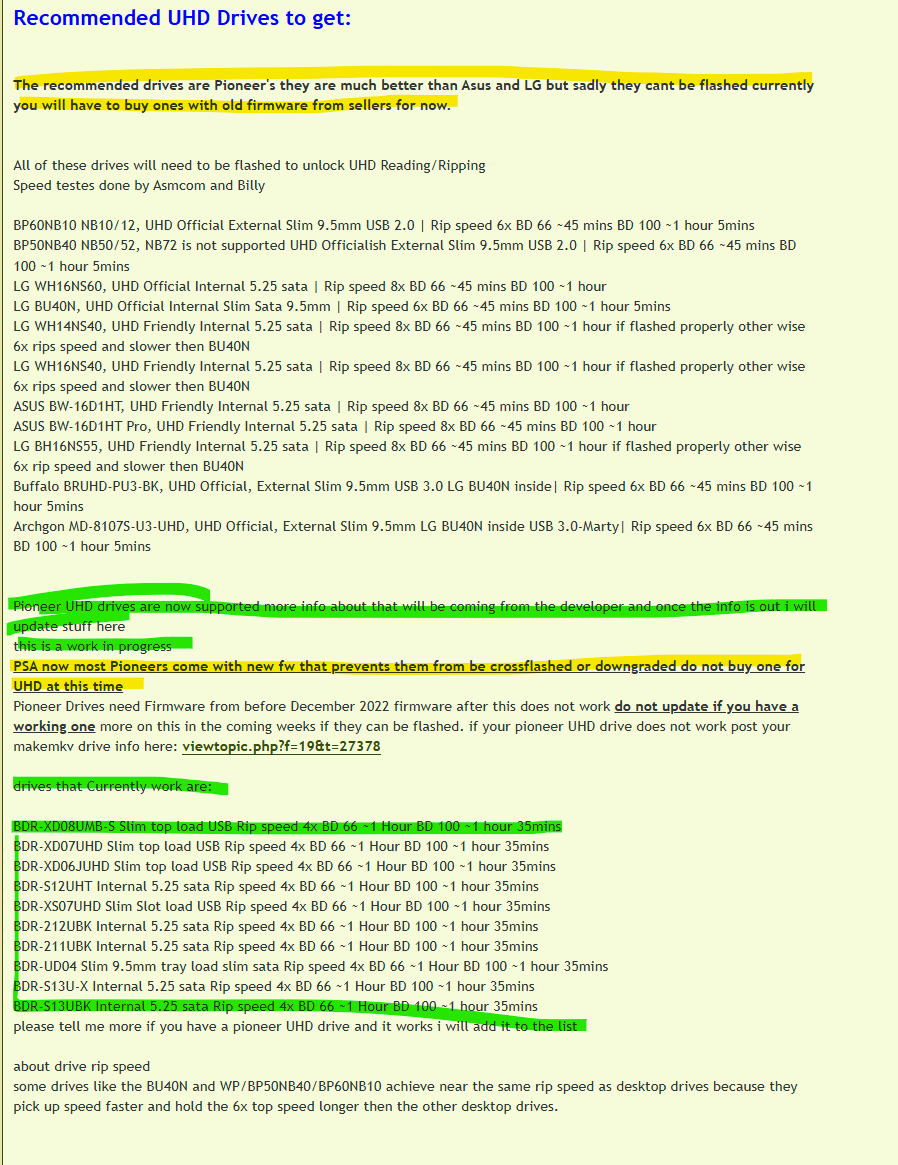
- Pioneer_Drives.png (192.06 KiB) Viewed 12116 times
Re: Ultimate UHD Drives Flashing Guide Updated 2025
Posted: Fri Mar 07, 2025 4:19 am
by Billycar11
TylerS wrote: Fri Mar 07, 2025 3:57 am
I'm so confused by the pioneer drives. I want to buy one to see if it helps with some disks that are giving me io errors. However there are multiple conflicting statements, even in this main thread. What is the current status with Pioneer drives? Are the green highlights (pioneer works, w/ drive list) accurate, or the yellow highlights accurate / must buy from re-seller?
Pioneer_Drives.png
the yellow you need one from a seller unless you fine one with fw before 12/22
Re: Ultimate UHD Drives Flashing Guide Updated 2025
Posted: Fri Mar 07, 2025 6:08 am
by gunslingerfry
Billycar11 wrote: Tue Mar 04, 2025 3:09 am
gunslingerfry wrote: Tue Mar 04, 2025 1:53 am
So I'm pretty sure my WP50NB40 is a paperweight but I just wanted to check if anyone had any ideas on if this can be fixed.
I flashed the MK 1.02 build which it showed on MakeMKV and then I proceeded to do the cross flash to BU40N. In a moment of monumentally poor judgement I unplugged the drive when I mistakenly thought it was finished flashing. Now the drive reports its Revision as BOOT does not respond to the button press and the flasher GUI reports it is not an MT1959 and makemkv flasher just sits there.
I tried creating the bootable USB for the DOS flasher but it does not boot so I have not been able to try that yet.
20250303_18h48m53s_grim.png
flash it with the official LG updater sometimes they can unbrick it
No dice. It also recognizes it and marks the rev as BOOT but I immediately get a WRITE DRAM NG 05/26/03. Thank you!