Page 174 of 266
Re: Ultimate UHD Drives Flashing Guide Updated 2024
Posted: Wed Dec 18, 2024 12:06 pm
by Coopervid
Gedred wrote: Tue Dec 17, 2024 6:45 pm
I have sent it back, as it was supposed to work straight out of the box, it didn't! I spent too long messing with settings in VLC Media but could not get it to read from the drive.
Either it was defective or underpowered. The Verbatim enclosure is very power hungry and should be connected via USB3. USB2 might not deliver enough.
Re: Ultimate UHD Drives Flashing Guide Updated 2024
Posted: Thu Dec 19, 2024 3:09 pm
by Emulgator
And to add to that: An external slimline burner drive can easily draw 1.5Amps.
Taken from a Pioneer BDC-TD03 Slimline BD-ROM drive's datasheet:
"BD-ROM Full-stroke Seek 1.790A @5V (peak maximum), power consumption 8.95W"
Each USB2.0 Type A socket can only supply 500mA at best.
(Historically USB1.0/1.1 supplies 100mA max, the unit load, barely supporting a USB keyboard or mouse,
and a USB2.0 host may accommodate up to 5 such unit loads)
There are Y-Cables which splice DC from a second USB-A socket in, but the result might not be 2x max. current.
Not safe for anything HDD, SSD, let alone an external DiscWriter ! Some very slow power-saving HDDs might just run, but...
Each USB3.0 Type A socket can only supply 900mA.
(A USB3.x unit load is 150mA, up to 6 unit loads might be accommodated by the host)
Just ok for anything HDD, SSD, and some slower power-saving slimline drives might just read, but...
Each USB3.1 Type C socket can supply 1.5A, some 3Amps.
From here on it is safe to connect anything HDD, SSD, NVMe SSD and power-hungry slimline writers up to 6x speed.
So if USB3.0 I suggest a Y-cable USB-A||USB-A -> USB3 Micro-B,
which should be able to draw just the needed 1.8A DC peak from 2 USB3.0 A Outlets.
The Vantec NST-510S3 Slimline enclosures (USB3 Micro-B, no DC barrel socket) are delivered with such cable.
If Slimline enclosure has a DC barrel socket, use an external PSU, 5V/2A.
Re: Ultimate UHD Drives Flashing Guide Updated 2024
Posted: Thu Dec 19, 2024 7:07 pm
by DarkSkull
Hello, looking at getting into ripping UHD disks and I had a few questions hopefully someone can help me with.
I am looking at the Pioneer Electronics BDR-212DBK (from amazon -
https://www.amazon.ca/gp/product/B081R5 ... 52WR&psc=1).
From my understanding unless it has firmware from before ~2022 I'll need to get it flashed to rip UHD disks? And that this flashing software isn't public so I'll need to pay someone (like Billycar11) to flash it for me?
Second question, do I need to worry about region locks? Or is that something the firmware can get past?
Much thanks.
Re: Ultimate UHD Drives Flashing Guide Updated 2024
Posted: Thu Dec 19, 2024 9:11 pm
by Woodstock
If it is a Pioneer drive and has firmware dated on or after 12/22/2022, it won't work and cannot be flashed. Prior to that date, it can work. But Amazon hasn't had older drives for some time.
Re: Ultimate UHD Drives Flashing Guide Updated 2024
Posted: Sat Dec 21, 2024 12:51 am
by dcoke22
DarkSkull wrote: Thu Dec 19, 2024 7:07 pm
Second question, do I need to worry about region locks? Or is that something the firmware can get past?
4K UHDs don't have region locking. If you have a
LibreDrive capable drive, you can generally always get past any region lock on a DVD or regular blu-ray. If you don't have a LibreDrive, then maybe you can get past region locks; it depends on the drive.
Re: Ultimate UHD Drives Flashing Guide Updated 2024
Posted: Tue Dec 24, 2024 1:22 am
by bluesky
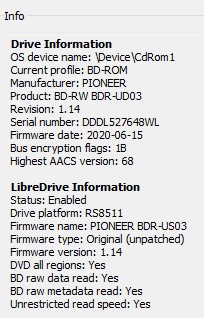
Hello - new user here. I've just acquired the drive shown below and I would be grateful for assistance in flashing this to support UHD drives. I've been reading for a while here and it seems possible, unless I'm missing something. Thanks in advance for any help with this!
- Verbatim drive.jpg (30.89 KiB) Viewed 14350 times
Re: Ultimate UHD Drives Flashing Guide Updated 2024
Posted: Tue Dec 24, 2024 5:18 pm
by Coopervid
bluesky wrote: Tue Dec 24, 2024 1:22 am
Hello - new user here. I've just acquired the drive shown below and I would be grateful for assistance in flashing this to support UHD drives. I've been reading for a while here and it seems possible, unless I'm missing something. Thanks in advance for any help with this!
Verbatim drive.jpg
PM is coming.
Re: Ultimate UHD Drives Flashing Guide Updated 2024
Posted: Tue Dec 24, 2024 9:41 pm
by bluesky
Thank you so much! It works perfectly! I appreciate you!
Re: Ultimate UHD Drives Flashing Guide Updated 2024
Posted: Wed Dec 25, 2024 11:36 pm
by Karlemagne
Good evening everyone,
I recently switched from Windows to Linux Mint. While my BD-RU BU40N player worked fine for BDs under Windows, it seems to be stuck under Linux. When I put a disc in the player, I then launch MakeMKV, the disc loads but it does nothing more....
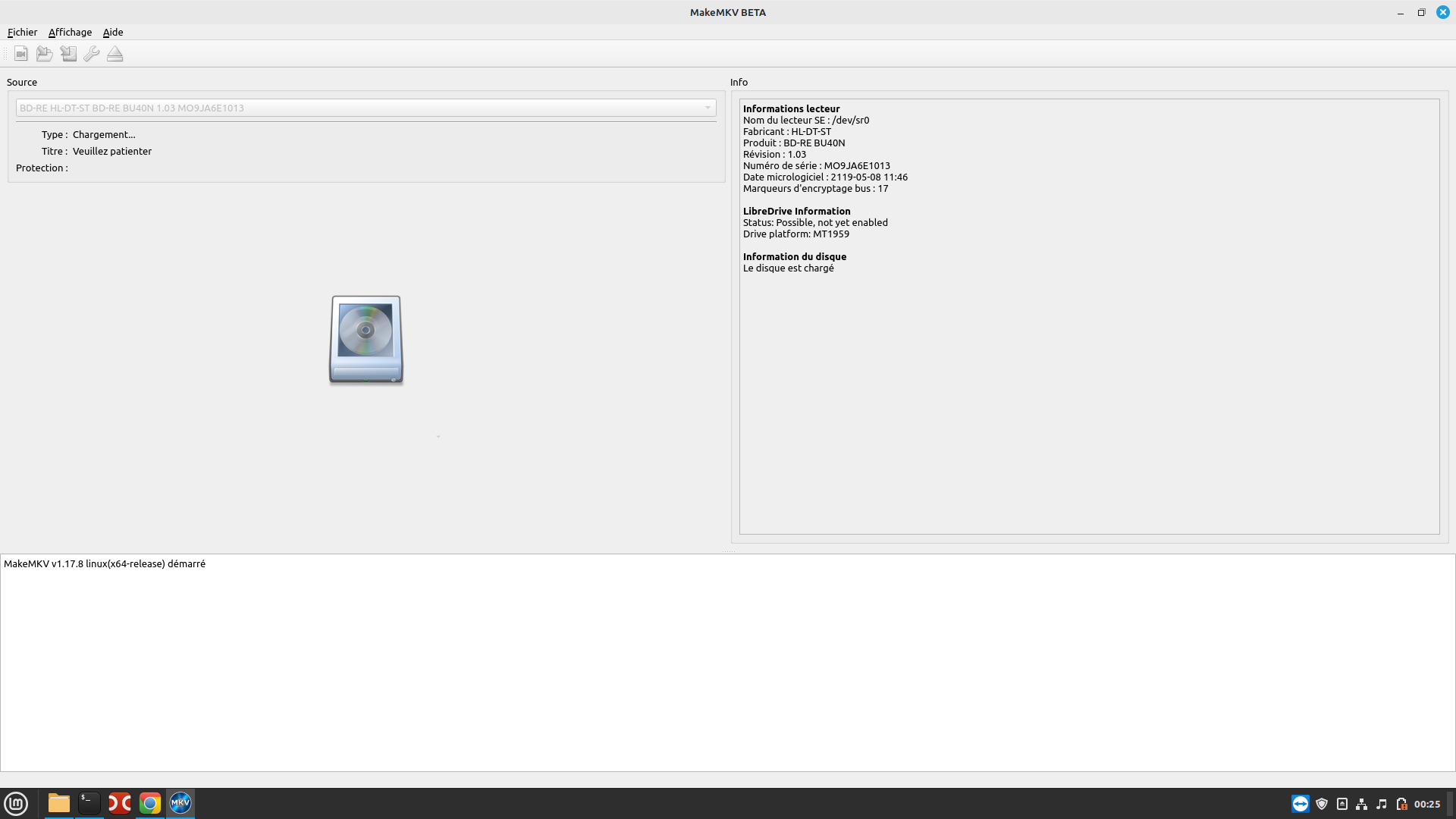
- Capture d’écran du 2024-12-26 00-25-57.png (86.58 KiB) Viewed 14130 times
Without much hope I tried the reverse operation, but as I expected it did not change anything.
In the image above, we see that LibreDrive is possible, but not activated. Could my problem come from there?
I am a beginner in this area, so thank you for being understanding enough.
Thank you in advance.
Re: Ultimate UHD Drives Flashing Guide Updated 2024
Posted: Thu Dec 26, 2024 5:56 am
by Billycar11
Karlemagne wrote: Wed Dec 25, 2024 11:36 pm
Good evening everyone,
I recently switched from Windows to Linux Mint. While my BD-RU BU40N player worked fine for BDs under Windows, it seems to be stuck under Linux. When I put a disc in the player, I then launch MakeMKV, the disc loads but it does nothing more....
Capture d’écran du 2024-12-26 00-25-57.png
Without much hope I tried the reverse operation, but as I expected it did not change anything.
In the image above, we see that LibreDrive is possible, but not activated. Could my problem come from there?
I am a beginner in this area, so thank you for being understanding enough.
Thank you in advance.
for linux you need to be on DE fw for some drives not sure why or if this can be fixed i have reported this many times
go to BU40N 1.00
Re: Ultimate UHD Drives Flashing Guide Updated 2024
Posted: Thu Dec 26, 2024 9:58 am
by Karlemagne
Good morning,
My player is natively in 1.03, so I have to downgrade it to 1.00?
I got version 1.00, is there a tutorial for downgrading under Linux Mint? The one indicated in the first post of this topic is only for Mac. I specify that I am a complete beginner in command line....
Thanks for your feedback.
Re: Ultimate UHD Drives Flashing Guide Updated 2024
Posted: Thu Dec 26, 2024 9:35 pm
by Fuschy
Hey everyone. I have flashed my BD Drive today and ever since that, the ripping process sometimes take a stop. Like it does 5 minutes and then it just stops for another 5 minutes before starting to finish ripping.
I went from:
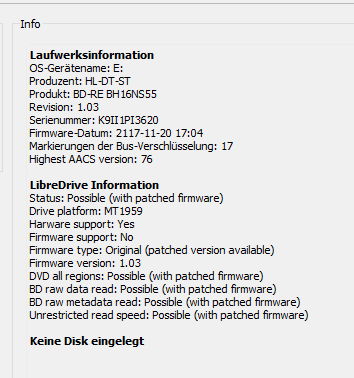
- makemkv_lKt4CPv5HY.png (13.24 KiB) Viewed 14032 times
to this
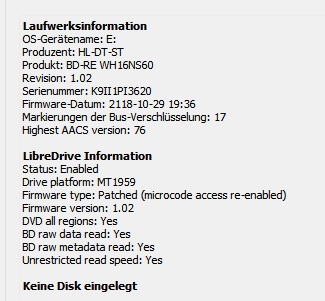
- makemkv_W8GZq9zzqU.png (10.09 KiB) Viewed 14032 times
Did I break anything or is this something known? Couldnt find anything on the quick search besides that sleep bug, but that doenst quite describe whats happening for me.
Re: Ultimate UHD Drives Flashing Guide Updated 2024
Posted: Thu Dec 26, 2024 11:55 pm
by MartyMcNuts
Fuschy wrote: Thu Dec 26, 2024 9:35 pm
Hey everyone. I have flashed my BD Drive today and ever since that, the ripping process sometimes take a stop. Like it does 5 minutes and then it just stops for another 5 minutes before starting to finish ripping.
I went from: makemkv_W8GZq9zzqU.png to this makemkv_lKt4CPv5HY.png
Did I break anything or is this something known? Couldnt find anything on the quick search besides that sleep bug, but that doenst quite describe whats happening for me.
Why would you do that???!?!??!!??
WH16NS60 1.02-MK is the recommended firmware. It is faster and removes the sleep bug. You've just given yourself a slower, buggy firmware that also has the sleep bug.
Re: Ultimate UHD Drives Flashing Guide Updated 2024
Posted: Fri Dec 27, 2024 9:44 am
by Fuschy
MartyMcNuts wrote: Thu Dec 26, 2024 11:55 pm
Why would you do that???!?!??!!??
WH16NS60 1.02-MK is the recommended firmware. It is faster and removes the sleep bug. You've just given yourself a slower, buggy firmware that also has the sleep bug.
My bad. I accidentally swapped the pictures. I went from the stock BH16NS55 1.03 to WH16NS60 1.02.
And since the flashing this bug happens.
Re: Ultimate UHD Drives Flashing Guide Updated 2024
Posted: Fri Dec 27, 2024 10:24 pm
by Karlemagne
Karlemagne wrote: Thu Dec 26, 2024 9:58 am
Good morning,
My player is natively in 1.03, so I have to downgrade it to 1.00?
I got version 1.00, is there a tutorial for downgrading under Linux Mint? The one indicated in the first post of this topic is only for Mac. I specify that I am a complete beginner in command line....
Thanks for your feedback.
Good evening,
After much research and testing, I finally managed to flash my player. I retrieved the file "_private_data.tar" available at the end of the 1st post of this topic to put it in place of the one created when launching MakeMKV. After flashing, LibreDrive is finally activated and I find normal operation of the software. However, now I have an error message that appears when I try to rip a DVD:
Erreur 'Erreur SCSI - ILLEGAL REQUEST:READ OF SCRAMBLED SECTOR WITHOUT AUTHENTICATION' survenue à la lecture de 'BD-RE HL-DT-ST BD-RE BU40N 1.00 MO9JA6E1013' à l'offset '1048576'
I tried firmware 1.03MK, 1.04MK, and finally DE 1.00, but it doesn't change anything.
However, when I switch to the Lord of the Rings Blue-Ray I don't have an error, so maybe it's the DVD that has a problem.
Thanks anyway for the answers I got.