Page 141 of 263
Re: Ultimate UHD Drives Flashing Guide Updated 2023
Posted: Sat Jan 13, 2024 5:17 am
by ELLEGARDEN777
Re: Ultimate UHD Drives Flashing Guide Updated 2023
Posted: Mon Jan 15, 2024 3:58 pm
by dcoke22
What happens if you unplug your drive, let it power down, wait for a couple minutes, then plug it back in?
Re: Ultimate UHD Drives Flashing Guide Updated 2023
Posted: Mon Jan 15, 2024 4:47 pm
by Nucleus
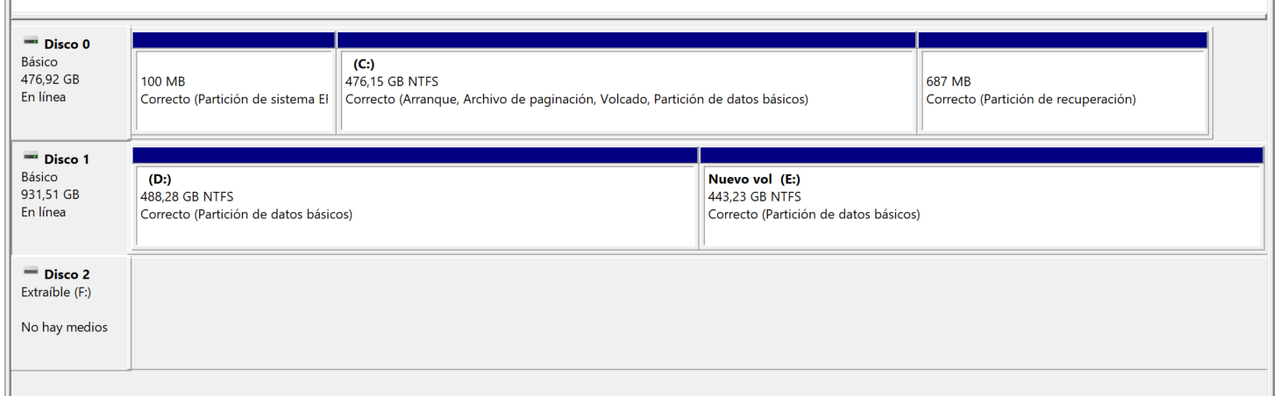
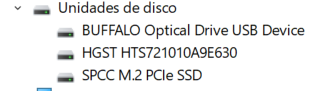
ELLEGARDEN777 wrote: Sat Jan 13, 2024 5:17 amI have tried to solve it in every possible way but I have not been successful. I don't know if the device broke due to hardware failure or maybe it was something.
Wild guess, this may be worth a shot. Disconnect the drive from USB, clear
Not Connected USB devices using Nirsoft USBDeview (little portable app - no install),
then reboot and reconnect the drive, see if that may help. You have to run USBDeview with admin rights (right-click USBDeview.exe and Run as administrator), then right click and "Uninstall Selected Device" on
Not Connected USB devices. Not Connected USB Devices will be listed at the bottom of the shown USB history.
Nirsoft USBDeview: (Scroll right down for download links)
Code: Select all
https://www.nirsoft.net/utils/usb_devices_view.html
Can I flash my BluRay Drive?
Posted: Mon Jan 15, 2024 9:04 pm
by Hyperion_GB
Hello,
I have just been looking around and noticed that some BluRay drives are capable of being flashed to support 4K Ultra HD Disks. However, I am unsure if mine is compatible and if it is worth flashing or just buying a new drive that supports 4K disks. I am currently only using BluRay disks. However, if I can flash it would save me going out of my way to purchase a new drive.
Information that shows up in MakeMKV -
Drive Information:
Manufacturer: PIONEER
Product: BD-RW BDR-TD05
Revision: 3.00
Firmware Date: 2012-11-14
Bus Encryption flags: 1B
Highest AACS version: 66
LibreDrive Information:
Status: Possible, not yet enabled
Drive platform: Pioneer RS8211
Firmware version: ID74
If you have any insight and are able to assist me that would be great. I do not have high hopes of this working. However, it would be awesome if it did.
Thank you in advance!
Re: Ultimate UHD Drives Flashing Guide Updated 2023
Posted: Tue Jan 16, 2024 12:52 am
by Woodstock
Firmware Date: 2012-11-14
That drive was built over three years before the specification for UHD
existed, so it is "highly doubtful" it could be modified.
Re: Ultimate UHD Drives Flashing Guide Updated 2023
Posted: Tue Jan 16, 2024 10:33 am
by Coopervid
Woodstock wrote: Tue Jan 16, 2024 12:52 am
Firmware Date: 2012-11-14
That drive was built over three years before the specification for UHD
existed, so it is "highly doubtful" it could be modified.
No. Not able to be flashed for UHDs.
Re: Ultimate UHD Drives Flashing Guide Updated 2023
Posted: Tue Jan 16, 2024 12:01 pm
by Micky12
Hi
I can prove this.
Fully working.
This retail is sold as a drive with the cable, adapter, cable, a 25GB BD-R and with burning sw.
Bought in in Germany in a store today.
Verbatim 43888, source as displayed: BD-Re PIONEER BD-RW BDR-UD04 with FW 1,14
Re: Ultimate UHD Drives Flashing Guide Updated 2023 - Confirming Steps for BRUHD-PU3-BK
Posted: Tue Jan 16, 2024 11:21 pm
by lordbatwing
Hello!
I've been reading through the forums, and I purchased a drive per the
guide.
I've drafted a plan for flashing my Buffalo BRUHD-PU3-BK. I would appreciate any corrections or validation before proceeding, particularly regarding the SDFtool values referenced at the bottom of the post (boot loader and firmware version). I've found the forums extremely helpful overall and really appreciate those who've contributed. Thanks in advance for the advice!
Plan:
1. Install MakeMKV and identify drive:
Code: Select all
Drive Information
OS device name: E:
Manufacturer: BUFFALO
Product: Optical Drive
Revision: BU14
Serial number: MO2N5DA3110
Firmware date: 2121-06-21 13:30
Bus encryption flags: 1F
LibreDrive Information
Status: Possible, not yet enabled
Drive platform: MT1959
2. Download and extract
SDFtool Flasher executable, updating for 4K screen per thread.
3. Download and extract firmware files per
SDFtool Flasher thread.
4. Configure SDFtool Flasher with the following settings:
- Drive: `{path}: BUFFALO_Optical_Drive_BU14...`
- Drive metadata: MT1959 Platform ✔ | Encrypted Firmware ✔ | Include boot loader (?)
- Firmware: TBD (?)
(?) Seeking Clarity:
* I am unsure whether to include the boot loader per the
SDFtool Flasher - UPDATE - 21/12/2021]
The latest version of the SDFtool Flasher has a checkbox option to flash the boot loader with the main firmware to the drive. This is useful for the newer BP50NB40 with SVC: NB52. It's also possible that other newer models may require this option later on. We will all work it out together as we go!!
** I am unsure which firmware to choose based on
Re: SDFtool Flasher and
Re: BRUHD-PU3-PK BU12 to BU10?
BU40N 1.03-MK is the firmware to flash to first. If you want to flash another after that, such as BU40N 1.00 (for more software compatibility) you can.
1. HL-DT-ST-BD-RE_BU40N-BU12-OM01001-211902230922.bin
2. DE_Buffalo_BRUHD-PU3_BU10 OR DE_LG_BU40N_1.00
Re: Ultimate UHD Drives Flashing Guide Updated 2023 - Confirming Steps for BRUHD-PU3-BK
Posted: Wed Jan 17, 2024 3:26 am
by MartyMcNuts
lordbatwing wrote: Tue Jan 16, 2024 11:21 pm
Hello!
I've been reading through the forums, and I purchased a drive per the
guide.
I've drafted a plan for flashing my Buffalo BRUHD-PU3-BK. I would appreciate any corrections or validation before proceeding, particularly regarding the SDFtool values referenced at the bottom of the post (boot loader and firmware version). I've found the forums extremely helpful overall and really appreciate those who've contributed. Thanks in advance for the advice!
Plan:
1. Install MakeMKV and identify drive:
Code: Select all
Drive Information
OS device name: E:
Manufacturer: BUFFALO
Product: Optical Drive
Revision: BU14
Serial number: MO2N5DA3110
Firmware date: 2121-06-21 13:30
Bus encryption flags: 1F
LibreDrive Information
Status: Possible, not yet enabled
Drive platform: MT1959
2. Download and extract
SDFtool Flasher executable, updating for 4K screen per thread.
3. Download and extract firmware files per
SDFtool Flasher thread.
4. Configure SDFtool Flasher with the following settings:
- Drive: `{path}: BUFFALO_Optical_Drive_BU14...`
- Drive metadata: MT1959 Platform ✔ | Encrypted Firmware ✔ | Include boot loader (?)
- Firmware: TBD (?)
(?) Seeking Clarity:
* I am unsure whether to include the boot loader per the
SDFtool Flasher - UPDATE - 21/12/2021]
The latest version of the SDFtool Flasher has a checkbox option to flash the boot loader with the main firmware to the drive. This is useful for the newer BP50NB40 with SVC: NB52. It's also possible that other newer models may require this option later on. We will all work it out together as we go!!
** I am unsure which firmware to choose based on
Re: SDFtool Flasher and
Re: BRUHD-PU3-PK BU12 to BU10?
BU40N 1.03-MK is the firmware to flash to first. If you want to flash another after that, such as BU40N 1.00 (for more software compatibility) you can.
1. HL-DT-ST-BD-RE_BU40N-BU12-OM01001-211902230922.bin
2. DE_Buffalo_BRUHD-PU3_BU10 OR DE_LG_BU40N_1.00
There's really no need to ever include the boot loader unless you've royally screwed up a flash.
Re: Ultimate UHD Drives Flashing Guide Updated 2023 - Confirming Steps for BRUHD-PU3-BK
Posted: Wed Jan 17, 2024 4:48 am
by lordbatwing
MartyMcNuts wrote: Wed Jan 17, 2024 3:26 am
There's really no need to ever include the boot loader unless you've royally screwed up a flash.
Thank you @MartyMcNuts. I also went ahead and flashed it to `BU40N 1.03-MK` using the guidance in
this post.
Thanks for the help!
Old Specs:
Code: Select all
Drive Information
OS device name: E:
Manufacturer: BUFFALO
Product: Optical Drive
Revision: BU14
Serial number: MO2N5DA3110
Firmware date: 2121-06-21 13:30
Bus encryption flags: 1F

LibreDrive Information
Status: Possible, not yet enabled
Drive platform: MT1959
Code: Select all
Drive Information
OS device name: E:
Manufacturer: BUFFALO
Product: Optical Drive
Revision: 1.03
Serial number: MO2N5DA3110
Firmware date: 2118-10-24 19:34
Bus encryption flags: 17

LibreDrive Information
Status: Enabled
Drive platform: MT1959
Firmware type: Patched (microcode access re-enabled)
Firmware version: 1.03
DVD all regions: Yes
BD raw data read: Yes
BD raw metadata read: Yes
Unrestricted read speed: Yes
Re: Ultimate UHD Drives Flashing Guide Updated 2023
Posted: Wed Jan 17, 2024 11:41 am
by T-Bird
Hello
Is it possible to flash this one if the firmware is older than December 2022? Pioneer BDR-212EBK.
What tools and software do i need, if so?
Greetings
Re: Ultimate UHD Drives Flashing Guide Updated 2023
Posted: Fri Jan 19, 2024 1:51 am
by joshrogers117
Code: Select all
Drive Information
Manufacturer: PIONEER
Product: BD-RW BDR-XS07U
Revision: 1.00
Serial number: SJDL003667JP
Firmware date: 2019-01-07
Bus encryption flags: 1B

LibreDrive Information
Status: Possible, not yet enabled
Drive platform: Pioneer RS8E21
Firmware version: ID69

No disc inserted
I have this older version Pioneer slim drive that I was hoping would work due to older firmware...does it need to be updated to 1.01 or 1.02 to enable LibreDrive...if so, how do I do this as I don't see any Pioneer FW in the "All You Need FW Pack"
Thanks!
Re: Ultimate UHD Drives Flashing Guide Updated 2023
Posted: Fri Jan 19, 2024 7:20 pm
by kapqa
hello ,
this has probably been asked already,
is there a good slot-in 9.5mm bluray drive that can do UHD or be made UHD friendly?
Re: Ultimate UHD Drives Flashing Guide Updated 2023
Posted: Sat Jan 20, 2024 10:30 pm
by Jedi_Bolden
Hi All,
I'm a bit new here but I'm trying to flash a drive using my Mac. I thought I had successfully flashed a drive. See text from the terminal session I ran.
boldenamt@Allens-Mac-mini MacOS % ./makemkvcon f -d '/IOBDServices/72B3EF48' -f ~/Desktop/sdf.bin rawflash main -i ~/Desktop/HL-DT-ST-BD-RE_BU40N-1.03-NM00000-211810241934.bin
Reading input file /Users/boldenamt/Desktop/HL-DT-ST-BD-RE_BU40N-1.03-NM00000-211810241934.bin
Flashing flags = 0x0 : 0 0 0 0 : ---- ---- ---- ----
Current Drive ID: HL-DT-ST_BD-RE_BU40N_1.02_212012011716_MZFN1SJ4219
Ready to write drive flash memory.
Type "yes" to continue, "no" to abort
yes
Operation started: Sending flash image to drive
100% Operation finished
Operation started: Programming flash
100% Operation finished
Done successfully
After running this operation and opening MakeKKV, it still shows the drive is on Revision 1.02. Does anyone have any idea where I went wrong?
Any help appreciated. I'm using a archon MD-8107X-U3YC-UHD.
Thank you!!!!
Re: Ultimate UHD Drives Flashing Guide Updated 2023
Posted: Sun Jan 21, 2024 1:27 am
by Billycar11
Jedi_Bolden wrote: Sat Jan 20, 2024 10:30 pm
Hi All,
I'm a bit new here but I'm trying to flash a drive using my Mac. I thought I had successfully flashed a drive. See text from the terminal session I ran.
boldenamt@Allens-Mac-mini MacOS % ./makemkvcon f -d '/IOBDServices/72B3EF48' -f ~/Desktop/sdf.bin rawflash main -i ~/Desktop/HL-DT-ST-BD-RE_BU40N-1.03-NM00000-211810241934.bin
Reading input file /Users/boldenamt/Desktop/HL-DT-ST-BD-RE_BU40N-1.03-NM00000-211810241934.bin
Flashing flags = 0x0 : 0 0 0 0 : ---- ---- ---- ----
Current Drive ID: HL-DT-ST_BD-RE_BU40N_1.02_212012011716_MZFN1SJ4219
Ready to write drive flash memory.
Type "yes" to continue, "no" to abort
yes
Operation started: Sending flash image to drive
100% Operation finished
Operation started: Programming flash
100% Operation finished
Done successfully
After running this operation and opening MakeKKV, it still shows the drive is on Revision 1.02. Does anyone have any idea where I went wrong?
Any help appreciated. I'm using a archon MD-8107X-U3YC-UHD.
Thank you!!!!
enc