Besides the focusRESET_9999 wrote: Sun Mar 08, 2020 8:58 pm DL MP4 vs SL BL+EL+RPU Sony x700:
https://slow.pics/c/HDpNH5cC
Dolby Vision now possible through MP4 Mux.
-
Angryunibrow
- Posts: 104
- Joined: Wed Nov 06, 2019 11:26 pm
Re: Dolby Vision now possible through MP4 Mux.
-
ragico
- Posts: 266
- Joined: Fri Feb 15, 2019 1:09 am
Re: Dolby Vision now possible through MP4 Mux.
Any help from somebody?ragico wrote: Sun Mar 08, 2020 6:01 pm I also own the firestick 4k. How can I make this kind of file (BL + RPU)?
Last edited by ragico on Sun Mar 08, 2020 10:21 pm, edited 1 time in total.
-
baker99
- Posts: 84
- Joined: Wed Oct 30, 2019 7:05 pm
Re: Dolby Vision now possible through MP4 Mux.
ImpressiveRESET_9999 wrote: Sun Mar 08, 2020 8:58 pm DL MP4 vs SL BL+EL+RPU Sony x700:
https://slow.pics/c/HDpNH5cC
-
RESET_9999
- Posts: 2421
- Joined: Mon Aug 05, 2019 7:12 pm
Re: Dolby Vision now possible through MP4 Mux.
yeah, I think yusesope did it.Angryunibrow wrote: Sun Mar 08, 2020 9:52 pmBesides the focusRESET_9999 wrote: Sun Mar 08, 2020 8:58 pm DL MP4 vs SL BL+EL+RPU Sony x700:
https://slow.pics/c/HDpNH5cC(kidding) looks pretty identical to me
this is great work yusesope. DVDFAB is now useless
-
Arbigator
- Posts: 32
- Joined: Fri Feb 28, 2020 9:16 pm
Re: Dolby Vision now possible through MP4 Mux.
Which version of tsMuxer should be used for yusesope's tool? Also, can tsMuxer be used to demux the individual streams and the audio? or do we have to use ffmpeg for that?
-
RESET_9999
- Posts: 2421
- Joined: Mon Aug 05, 2019 7:12 pm
Re: Dolby Vision now possible through MP4 Mux.
I've been using tsmuxer for demuxing. It works great.
not sure if the newest one works but the one from this post work:
https://www.makemkv.com/forum/viewtopic ... 485#p85786
not sure if the newest one works but the one from this post work:
https://www.makemkv.com/forum/viewtopic ... 485#p85786
-
Arbigator
- Posts: 32
- Joined: Fri Feb 28, 2020 9:16 pm
-
yusesope
- Posts: 221
- Joined: Sun Jul 28, 2019 3:34 am
Re: Dolby Vision now possible through MP4 Mux.
They are identicalRESET_9999 wrote: Sun Mar 08, 2020 8:58 pm DL MP4 vs SL BL+EL+RPU Sony x700:
https://slow.pics/c/HDpNH5cC
Right click on the "start_bl_el_rpu_builder.bat" file.
Left click on the "Edit" item.
In the newly opened text file there is this string:
Code: Select all
python-3.7.6.amd64\python src\bl_el_rpu_builder.pyCode: Select all
python-3.7.6.amd64\python src\bl_el_rpu_builder.py -mode 2The file that will be created will always have the name "BL_EL_RPU.hevc" but in reality it will be a single track single layer file (BL + RPU)
-
shawnc22
- Posts: 637
- Joined: Tue Jan 21, 2020 7:40 am
Re: Dolby Vision now possible through MP4 Mux.
Just tested with the full black panther movie as well and both DV and Atmos looks good on plex with shield. Steps I took for reference:
1) Demux the original mpls file from decrypted uhd into 2 hevc tracks with tsmuxer version from here: https://www.makemkv.com/forum/viewtopic ... 485#p85786
2) Merge both hevc tracks with latest version of yusesope's tool
3) Remux the now merged hevc file with the original mpls file again (only atmos track selected this time) in same tsmuxer version from step 1.
I know it's not a big deal or priority at this point, but just to wanted to double check that subtitles and chapters currently aren't working, right? I selected all the PGS tracks when remuxing the final TS file, but if I select any of them on playback in plex, the video refuses to play.
Thanks for the all hard work everyone!
1) Demux the original mpls file from decrypted uhd into 2 hevc tracks with tsmuxer version from here: https://www.makemkv.com/forum/viewtopic ... 485#p85786
2) Merge both hevc tracks with latest version of yusesope's tool
3) Remux the now merged hevc file with the original mpls file again (only atmos track selected this time) in same tsmuxer version from step 1.
I know it's not a big deal or priority at this point, but just to wanted to double check that subtitles and chapters currently aren't working, right? I selected all the PGS tracks when remuxing the final TS file, but if I select any of them on playback in plex, the video refuses to play.
Thanks for the all hard work everyone!
-
ragico
- Posts: 266
- Joined: Fri Feb 15, 2019 1:09 am
Re: Dolby Vision now possible through MP4 Mux.
Thank you masteryusesope wrote: Sun Mar 08, 2020 10:39 pmThey are identicalRESET_9999 wrote: Sun Mar 08, 2020 8:58 pm DL MP4 vs SL BL+EL+RPU Sony x700:
https://slow.pics/c/HDpNH5cC![]()
Right click on the "start_bl_el_rpu_builder.bat" file.
Left click on the "Edit" item.
In the newly opened text file there is this string:Modify it as followsCode: Select all
python-3.7.6.amd64\python src\bl_el_rpu_builder.pySave your changes and try again by double clicking on the "start_bl_el_rpu_builder.bat" file.Code: Select all
python-3.7.6.amd64\python src\bl_el_rpu_builder.py -mode 2
The file that will be created will always have the name "BL_EL_RPU.hevc" but in reality it will be a single track single layer file (BL + RPU)
Last edited by ragico on Thu Mar 12, 2020 2:18 pm, edited 2 times in total.
-
Arbigator
- Posts: 32
- Joined: Fri Feb 28, 2020 9:16 pm
Re: Dolby Vision now possible through MP4 Mux.
Whenever I add the second HEVC file and hit enter the tool just closes instantly. I have tried multiple computers, all with the same result. Anyone know a fix? I'm on Windows 10
-
PapitaHD
- Posts: 26
- Joined: Sun Mar 01, 2020 10:31 am
Re: Dolby Vision now possible through MP4 Mux.
I tried yusesope's tool (v 0.02) with "The Meg" but for some reason it didn't work. Process finished and asked me to exit with "EL analysis" being at 99% and the resulting hevc file has the exact same size as the base layer. I can play the file but it's just HDR10.
Ehat could be the problem?
-
DaMacFunkin
- Posts: 314
- Joined: Tue Oct 30, 2018 4:17 pm
Re: Dolby Vision now possible through MP4 Mux.
Use external srt with Plex, I know it’s an extra step but well worth it, chapters cant be added to a TS file, Plex should automatically download chapters for titles from its database but it’s extremely hot and miss on the new player, they are aware.shawnc22 wrote: Sun Mar 08, 2020 10:47 pm Just tested with the full black panther movie as well and both DV and Atmos looks good on plex with shield. Steps I took for reference:
1) Demux the original mpls file from decrypted uhd into 2 hevc tracks with tsmuxer version from here: https://www.makemkv.com/forum/viewtopic ... 485#p85786
2) Merge both hevc tracks with latest version of yusesope's tool
3) Remux the now merged hevc file with the original mpls file again (only atmos track selected this time) in same tsmuxer version from step 1.
I know it's not a big deal or priority at this point, but just to wanted to double check that subtitles and chapters currently aren't working, right? I selected all the PGS tracks when remuxing the final TS file, but if I select any of them on playback in plex, the video refuses to play.
Thanks for the all hard work everyone!
-
JonathanX64
- Posts: 3
- Joined: Sun Feb 09, 2020 7:13 pm
- Contact:
Re: Dolby Vision now possible through MP4 Mux.
At this point, what is the best way to prepare DV movie for LG B8?
What I currently try to do:
Any advice would be appreciated, thanks.
What I currently try to do:
- Rip 4K Blu-ray Disc as a file folder
- Open biggest .m2ts file from STREAM folder with usual latest tsMuxer, extract two .hevc files from it — one at ~60 gig, other is at ~6 gig
- Use Dolby's mp4muxer to create profile 7 .mp4 file
Any advice would be appreciated, thanks.
-
yusesope
- Posts: 221
- Joined: Sun Jul 28, 2019 3:34 am
Re: Dolby Vision now possible through MP4 Mux.
To understand what the problem is, you should run the program from the command line and post the error returned here.Arbigator wrote: Mon Mar 09, 2020 5:56 am Whenever I add the second HEVC file and hit enter the tool just closes instantly. I have tried multiple computers, all with the same result. Anyone know a fix? I'm on Windows 10
Simply, when you are inside the folder of my program:
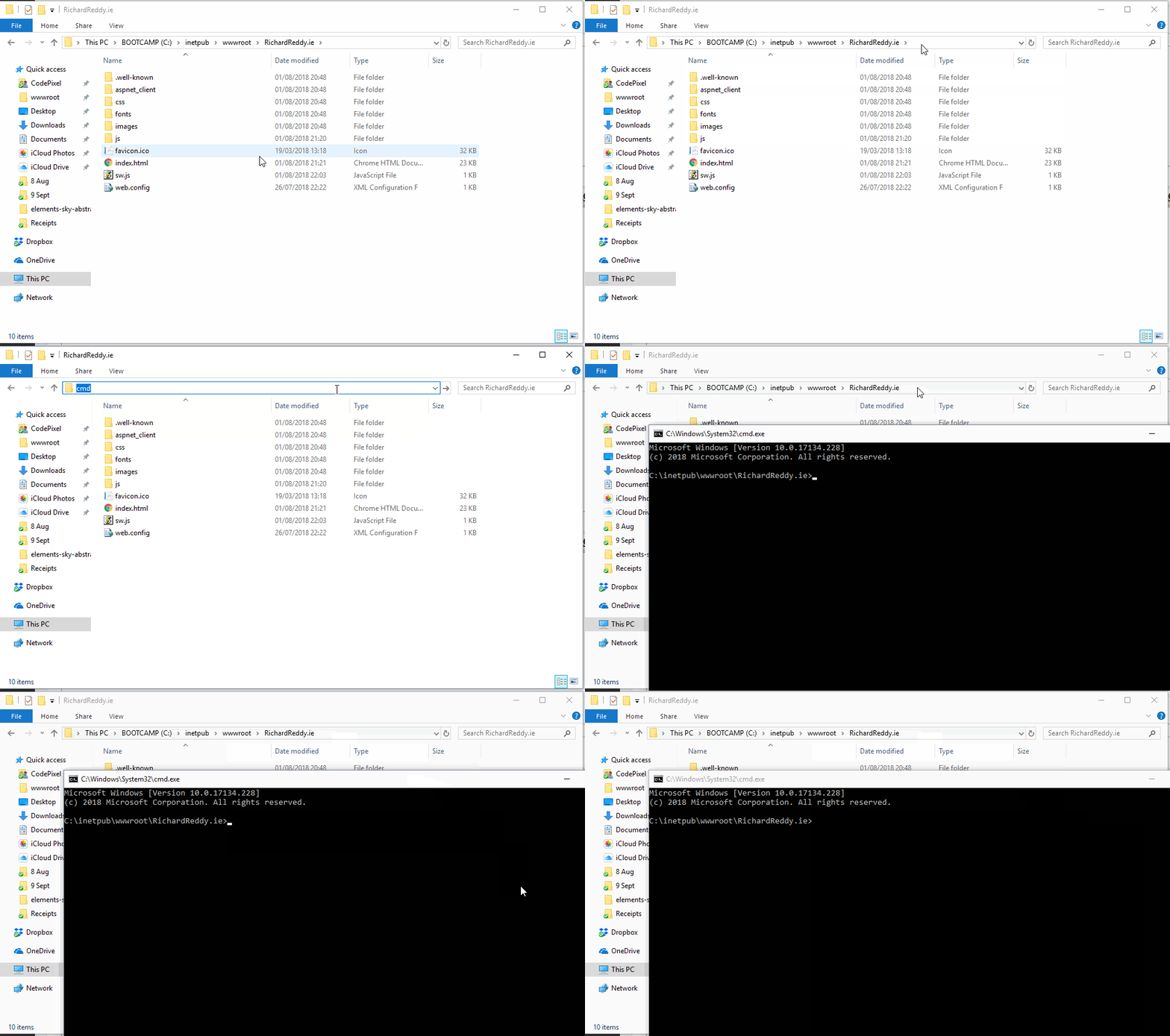
- open a Command Prompt window by typing "cmd" in the address bar of File Explorer (help yourself with the image at the bottom)
- In the new window, paste the string
and hit enter.
Code: Select all
python-3.7.6.amd64\python src\bl_el_rpu_builder.py
- Follow the instructions on the screen and if the program gives an error, post here the message that is returned to you.
