Page 87 of 116
Re: SDFtool Flasher
Posted: Sat May 03, 2025 2:12 am
by KAIJUKACZ25
I opened up MKV with my 4k movie in it, and tick'd the Upp'r Right tab of the MKV, it said I did not have a folder in "J:" drive, and would it wish me to make one, I said Yes, and then, I got the Blue Screen of Death.. I will do some cleaning out of that 2TB drive, but can I also use an SSD in one of the (2) 3.0 USB slots (I newly upgraded to with..) will that work also?
I also tick'd the 'internet use' box.

Re: SDFtool Flasher
Posted: Sat May 03, 2025 2:20 am
by KAIJUKACZ25
When You said to "try a UHD disc" did you mean an 'Unused SONY BD-RXL 2-4X 128GB' disc (That I just bought, not opened yet..), or the 4k GODZILLA movie UHD disc, when in the 'KMKV' prog??
I can <<Feel>> the tension swelling up over there>>! See how Green I am>?
Re: SDFtool Flasher
Posted: Sat May 03, 2025 2:29 am
by MartyMcNuts
KAIJUKACZ25 wrote: Sat May 03, 2025 1:51 am
With using the 'CYBERLINK Power Dvd program',(Is there a prefferable one that You use?) I tried to play the '"GODZILLA -1.0" 4k movie in it, and it says: "There is a disc with unsupported format.." Is there another program to use, to get it to read the disc?? Can I play it through the MKV prog without any upgrading or firmware? I checked the Online intyyernet box..
No, don't use Cyberlink PowerDVD! To use that software, your PC must meet very stringent requirements for UHD playback amd also use an older verison of PowerDVD as they removed UHD playback functionality from the newer releases.
The only way to playback UHD discs is via an unofficial player such as VLC, MPC-HC among others. You must also integrate this player with MakeMKV (preferences/integration tab) as it is used as the on-the-fly decrypter for UHD discs.
By the way, direct UHD disc playback is not recommended as it will wear out your drive a lot faster. It is far better to rip a UHD disc first then playback your ripped files/folder.
Re: SDFtool Flasher
Posted: Sat May 03, 2025 2:36 am
by MartyMcNuts
KAIJUKACZ25 wrote: Sat May 03, 2025 2:20 am
When You said to "try a UHD disc" did you mean an 'Unused SONY BD-RXL 2-4X 128GB' disc (That I just bought, not opened yet..), or the 4k GODZILLA movie UHD disc, when in the 'KMKV' prog??
I can <<Feel>> the tension swelling up over there>>! See how Green I am>?
I mean insert the UHD movie disc then once Windows has initialised the disc, open up MakeMKV and it should appear there. You now have 2 options:
1. To rip the entire disc, click the little folder (second from left) in the menu at the top. In the next window, ensure the decrypt checkbox is checked.
2. You can just rip the main movie to a MKV file if you don't want all of the disc content. Click the big drive icon. Now after a few moments, the disc will be opened and you will be able to choose which playlists/files/tracks you want to extract to a MKV file.
I won't say any more here as I know you will have more questions.
Re: SDFtool Flasher
Posted: Sat May 03, 2025 2:42 am
by KAIJUKACZ25
So... should I check' all boxes> or just the VLC?
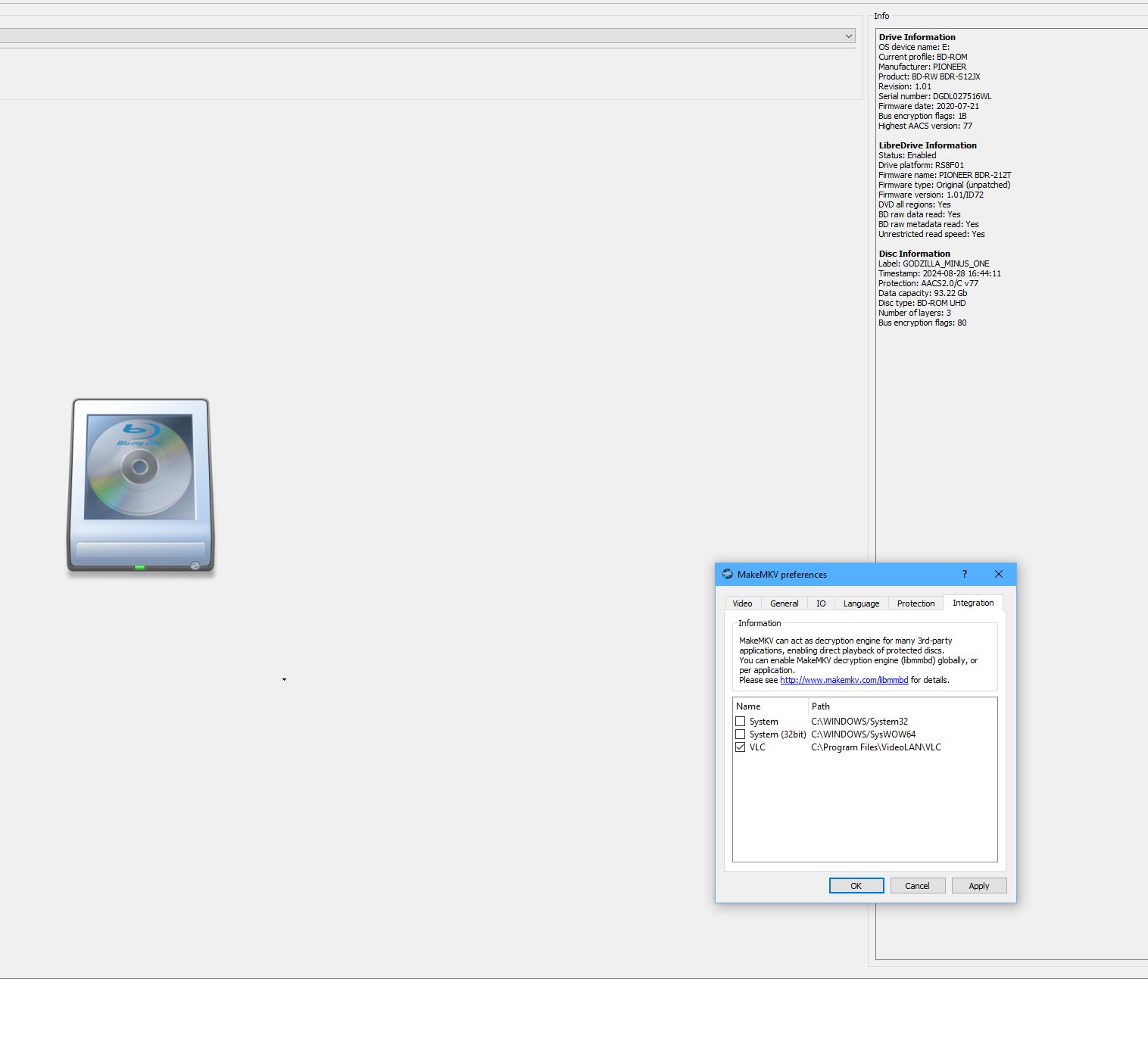
- MKV INTERG settinz.jpg (91.34 KiB) Viewed 11397 times
![Image]()
Re: SDFtool Flasher
Posted: Sat May 03, 2025 2:51 am
by KAIJUKACZ25
How Big (2TB+) do I need to Capture All of the Disc?> Can I use that SSD (waiting on..) 3.0 USB slot to plug it in, to to use for doing the MakeMKV process? Is it better I have a physical 3TB+ Drive to use for the 'Make MKV' actions?
Re: SDFtool Flasher
Posted: Sat May 03, 2025 3:13 am
by MartyMcNuts
KAIJUKACZ25 wrote: Sat May 03, 2025 2:42 am
So... should I check' all boxes> or just the VLC?
MKV INTERG settinz.jpg
![Image]()
You can check all of them. That's what I did. That way, any other unofficial player you install can also work.
Re: SDFtool Flasher
Posted: Sat May 03, 2025 3:16 am
by MartyMcNuts
KAIJUKACZ25 wrote: Sat May 03, 2025 2:51 am
How Big (2TB+) do I need to Capture All of the Disc?> Can I use that SSD (waiting on..) 3.0 USB slot to plug it in, to to use for doing the MakeMKV process? Is it better I have a physical 3TB+ Drive to use for the 'Make MKV' actions?
Well, according to MakeMKv, that UHD disc is 93.22Gb in size. So you will need at least 100Gb of space on whatever hard drive you plan to use. It shouldn't really matter whether you use an internal or external drive. If external, ensure you use a USB 3 or USB-C port. SSD's are even better!
Re: SDFtool Flasher
Posted: Sat May 03, 2025 4:19 am
by KAIJUKACZ25
How Many Moons have Passed on Your knowledge of This MKV Scene<> ?
I really Appreciate Your Help with all of This.

So do You Think This Pioneer Drive is worthy of being used for All my Private Pictures, videos,.cbr Comics, Data, etc., Archived, and to Watch copied
MKV Movies, as good as the Original 4 K flick, huh>? I paid quite a bit for it ($200+) but I was told it would play orig 4km movies, but after you said it would Burn up my drive faster, I like Your Way Much better! Thanks for ALL Your HELP!!!
ROCK ON, IN THE MKV WORLD BRO!!

Re: SDFtool Flasher
Posted: Sat May 03, 2025 4:33 am
by MartyMcNuts
KAIJUKACZ25 wrote: Sat May 03, 2025 4:19 am
How Many Moons have Passed on Your knowledge of This MKV Scene<> ?
I really Appreciate Your Help with all of This.
So do You Think This Pioneer Drive is worthy of being used for All my Private Pictures, videos,.cbr Comics, Data, etc., Archived, and to Watch copied
MKV Movies, as good as the Original 4 K flick, huh>? I paid quite a bit for it ($200+) but I was told it would play orig 4km movies, but after you said it would Burn up my drive faster, I like Your Way Much better! Thanks for ALL Your HELP!!!
ROCK ON, IN THE MKV WORLD BRO!!
Yes, I've been at this for many years, since DVD was a new thing back in the late 90's!!
Yes, you can use the drive for all of your ripping and burning needs.
Enjoy...
Re: SDFtool Flasher
Posted: Sat May 03, 2025 4:46 am
by KAIJUKACZ25
Ok..
Well, I thought I was doing all you said to do, correctly:
I put in the 4k Godz movie in 1st, and then opened MKV, hit the "BACKUP" tab, and 1/2 way through, I get the "BWoD" 'Blue Windows of Death'!!
What am I doing wrong>? I have, now, 1.8 TB on the "J:" drive. Do I need more space?
Really 'confused-as-all-Hell'
Re: SDFtool Flasher
Posted: Sat May 03, 2025 5:09 am
by KAIJUKACZ25
Do I need to Check the "BD+ Dumps Check box & should I Get a JAVA Exe on My comp (What Version?..lost.. I am.

Re: SDFtool Flasher
Posted: Sat May 03, 2025 5:12 am
by KAIJUKACZ25
RATZ!! Sorry So Late Bro!! I did Not know how late it was, with me being engrossed in all of this interesting, substance matter
Re: SDFtool Flasher
Posted: Sat May 03, 2025 5:13 am
by KAIJUKACZ25
..subject matter..
Re: SDFtool Flasher
Posted: Sat May 03, 2025 5:23 am
by jwelker9
Hey all! So do we have any list somewhere of dvd players out there on Amazon that would rip 4k movies? I'm seeing a few listed, but people mentioning that recent updates have removed the capability. I'm still relatively new to this game so anything that is "plug and play" would be great for me. Thanks all!