Page 77 of 122
Re: SDFtool Flasher Problem
Posted: Fri Nov 15, 2024 5:02 am
by Ekontos
My drive info. It is an LG BP60NB10. It looks like it flashed successfully. I used this bin: DE_LG_BP60NB10-NB12_1.02-MK.bin
Drive Information
OS device name: \Device\CdRom0
Current profile: BD-ROM
Manufacturer: HL-DT-ST
Product: BD-RE BP60NB10
Revision: 1.02
Serial number:
Firmware date: 2121-07-08 15:56
Bus encryption flags: 17
Highest AACS version: 76
LibreDrive Information
Status: Enabled
Drive platform: MT1959
Firmware type: Patched (microcode access re-enabled)
Firmware version: 1.02
DVD all regions: Yes
BD raw data read: Yes
BD raw metadata read: Yes
Unrestricted read speed: Yes
Disc Information
Label: SNATCH
Timestamp: 2021-04-22 18:17:18
Protection: AACS2.0/C v76
Data capacity: 89.95 Gb
Disc type: BD-ROM UHD
Number of layers: 3
Bus encryption flags: 80
I still get errors when trying to Rip a blu-ray disk. Here is a summary:
Error 'Scsi error - ILLEGAL REQUEST:COPY PROTECTION KEY EXCHANGE FAILURE - KEY NOT PRESENT' occurred while issuing SCSI command A30..0020..03F to device 'SPTI:\Device\CdRom0'
Error 'Scsi error - ILLEGAL REQUEST:COPY PROTECTION KEY EXCHANGE FAILURE - KEY NOT PRESENT' occurred while issuing SCSI command A40..0020..03F to device 'SPTI:\Device\CdRom0'
Error 'Scsi error - ILLEGAL REQUEST:COPY PROTECTION KEY EXCHANGE FAILURE - KEY NOT PRESENT' occurred while issuing SCSI command A30..0020..07F to device 'SPTI:\Device\CdRom0'
Error 'Scsi error - ILLEGAL REQUEST:COPY PROTECTION KEY EXCHANGE FAILURE - KEY NOT PRESENT' occurred while issuing SCSI command A40..0020..07F to device 'SPTI:\Device\CdRom0'
Error 'Scsi error - ILLEGAL REQUEST:COPY PROTECTION KEY EXCHANGE FAILURE - KEY NOT PRESENT' occurred while issuing SCSI command A30..0020..0BF to device 'SPTI:\Device\CdRom0'
Error 'Scsi error - ILLEGAL REQUEST:COPY PROTECTION KEY EXCHANGE FAILURE - KEY NOT PRESENT' occurred while issuing SCSI command A40..0020..0BF to device 'SPTI:\Device\CdRom0'
Any suggestions on how to get past this? thanks.
Re: SDFtool Flasher
Posted: Fri Nov 15, 2024 6:03 am
by Billycar11
likly a power issue use both usb cable direct to motherboard or get a 35+ watt powered usb hub
Re: SDFtool Flasher
Posted: Fri Nov 15, 2024 4:29 pm
by Ekontos
I am using both cables into USB ports
Re: SDFtool Flasher
Posted: Fri Nov 15, 2024 4:48 pm
by Coopervid
Ekontos wrote: Fri Nov 15, 2024 4:29 pm
I am using both cables into USB ports
Then option 2 is what you want to go for.
Re: SDFtool Flasher
Posted: Sun Nov 17, 2024 1:52 am
by esaus_antagonist
Was able to create a firmware backup and flash a LG WH16NS40 from 1.05 (encrypted) to WH16NS60 1.02MK. Thank you for putting this guide together.
Re: SDFtool Flasher
Posted: Fri Nov 22, 2024 11:15 pm
by CrashOveride
Hello, for some reason the flasher is crashing on bootup. The drive I'm trying to use is the ASUS BW-16D1X-U. I have MakeMKV installed to the default location and am on Win10 64bit.
MakeMKV report:
Code: Select all
Drive Information
OS device name: \Device\CdRom0
Current profile: BD-ROM
Manufacturer: ASUS
Product: BW-16D1X-U
Revision: A105
Serial number: [redacted]
Firmware date: 2120-12-02 11:14
Bus encryption flags: 1F
Highest AACS version: 81

LibreDrive Information
Status: Possible, not yet enabled
Drive platform: MT1959
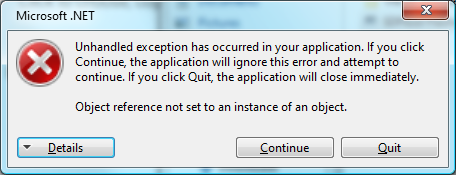
Details log:
https://pastebin.com/KapLGmCj
Re: SDFtool Flasher
Posted: Sat Nov 23, 2024 1:55 am
by MartyMcNuts
CrashOveride wrote: Fri Nov 22, 2024 11:15 pm
Hello, for some reason the flasher is crashing on bootup. The drive I'm trying to use is the ASUS BW-16D1X-U. I have MakeMKV installed to the default location and am on Win10 64bit.
MakeMKV report:
Code: Select all
Drive Information
OS device name: \Device\CdRom0
Current profile: BD-ROM
Manufacturer: ASUS
Product: BW-16D1X-U
Revision: A105
Serial number: [redacted]
Firmware date: 2120-12-02 11:14
Bus encryption flags: 1F
Highest AACS version: 81

LibreDrive Information
Status: Possible, not yet enabled
Drive platform: MT1959
Details log:
https://pastebin.com/KapLGmCj
Which version of MakeMKV are you using? Is it a fresh install? If so, you may need to insert a standard blu-ray disc first and open it in MakeMKV so that the latest SDF can be downloaded.
Also, your drive is not one of the common models so the GUI may not work with it. You may have to use the command line instead.
Re: SDFtool Flasher
Posted: Sun Nov 24, 2024 10:44 am
by Payti
Hi everybody.
Please help crossflash info for two drives.
1. I have a Pioneer BDR-S09XLT with firmware version 1.54 -> Extra info 20/07/21 PIONEER. Can this be crossflashed to make it UHD friendly?
2. I Have a LG BH16NS40 crosflashed to WH16NS48 firmware 1.D3. Can this be crossflashed to make it UHD friendly?
Many thanks in advance.
Tom
Re: SDFtool Flasher
Posted: Sun Nov 24, 2024 6:22 pm
by zittrig
1. Wait for another response. The BDR-S09 should be able for flashing 4k friendly. But another members can help you with this.
2. Flash with the SDF-Flasher to WH16NS60 1.03-MK and after this downgrade to WH16NS60 1.02-MK. This 1.02 ist the recommended one.
Re: SDFtool Flasher
Posted: Sun Nov 24, 2024 6:42 pm
by Payti
For point 2 I must use this files FW MK:
Code: Select all
FW 1.03
\mk-firmware-pack-20200720\MK\HL-DT-ST\WH16NS60\HL-DT-ST-BD-RE_WH16NS60-1.03-NM00600-212005081010.bin
FW 1.02
\mk-firmware-pack-20200720\MK\old\HL-DT-ST-BD-RE_WH16NS60-1.02-NM00100-211810291936.bin
And I should use SDFtool Flasher
v1.3.5 ?
Please confirm.
I try flash HL-DT-ST-BD-RE_WH16NS60-1.03-NM00600-212005081010.bin with SDFtool Flasher v1.3.5 but I have platform error: "The drive you have selected does not have correct drive platform (MT1959) and cannot be flashed"
How may correct this? Or use other flasher eg. makemkvcon64.exe or other tool patched LG?
My drive in MakeMKV presents:
Code: Select all
Drive Information
OS device name: G:
Manufacturer: HL-DT-ST
Product: BD-RE WH16NS48
Revision: 1.D3
Serial number: K9AE5LAxxxx
Firmware date: 2116-02-04 11:03
Bus encryption flags: 17

LibreDrive Information
Status: Enabled
Drive platform: MT1939
Firmware type: Original (unpatched)
Firmware version: 1.D3
DVD all regions: Yes
BD raw data read: Yes
BD raw metadata read: Partial
Unrestricted read speed: Yes

No disc inserted
THX for help.
Regards,
Tom
Re: SDFtool Flasher
Posted: Sun Nov 24, 2024 9:19 pm
by MartyMcNuts
Payti wrote: Sun Nov 24, 2024 6:42 pm
For point 2 I must use this files FW MK:
Code: Select all
FW 1.03
\mk-firmware-pack-20200720\MK\HL-DT-ST\WH16NS60\HL-DT-ST-BD-RE_WH16NS60-1.03-NM00600-212005081010.bin
FW 1.02
\mk-firmware-pack-20200720\MK\old\HL-DT-ST-BD-RE_WH16NS60-1.02-NM00100-211810291936.bin
And I should use SDFtool Flasher
v1.3.5 ?
Please confirm.
I try flash HL-DT-ST-BD-RE_WH16NS60-1.03-NM00600-212005081010.bin with SDFtool Flasher v1.3.5 but I have platform error: "The drive you have selected does not have correct drive platform (MT1959) and cannot be flashed"
How may correct this? Or use other flasher eg. makemkvcon64.exe or other tool patched LG?
My drive in MakeMKV presents:
Code: Select all
Drive Information
OS device name: G:
Manufacturer: HL-DT-ST
Product: BD-RE WH16NS48
Revision: 1.D3
Serial number: K9AE5LAxxxx
Firmware date: 2116-02-04 11:03
Bus encryption flags: 17

LibreDrive Information
Status: Enabled
Drive platform: MT1939
Firmware type: Original (unpatched)
Firmware version: 1.D3
DVD all regions: Yes
BD raw data read: Yes
BD raw metadata read: Partial
Unrestricted read speed: Yes

No disc inserted
THX for help.
Regards,
Tom
Your LG is the wrong drive platform and should not be flashed. It can't be made to read UHD discs.
Also SDFtool flasher doesn't work for Pioneer drives.
Re: SDFtool Flasher
Posted: Wed Nov 27, 2024 1:17 am
by Commo
I am having an issue. I can not get my drive to flash at all.
Here is from MakeMKV:
Code: Select all
Drive Information
OS device name: H:
Manufacturer: HL-DT-ST
Product: BD-RE WP50NB40
Revision: 1.03
Serial number: [redacted]
Firmware date: 2121-07-08 16:09
Bus encryption flags: 17

LibreDrive Information
Status: Possible, not yet enabled
Drive platform: MT1959

No disc inserted

Re: SDFtool Flasher
Posted: Wed Nov 27, 2024 6:35 am
by bcm00re
Billycar11 wrote: Sun Sep 01, 2024 4:46 pm
Myluckyday wrote: Sun Sep 01, 2024 5:45 am
Hello Billycar11,
Here's my LG firmware information from MakeMKV:
Drive Information
OS device name: D:
Manufacturer: HL-DT-ST
Product: BD-RE
WH16NS40
Revision: 1.05
Serial number: [redacted]
Firmware date: 2120-05-06 14:40
Bus encryption flags: 17
LibreDrive Information
Status: Possible (with patched firmware)
Drive platform: MT1959
Harware support: Yes
Firmware support: No
Firmware type: Original (patched version available)
Firmware version: 1.05
DVD all regions: Possible (with patched firmware)
BD raw data read: Possible (with patched firmware)
BD raw metadata read: Possible (with patched firmware)
Unrestricted read speed: Possible (with patched firmware)
I am trying to flash the firmware using SDFtool Flasher to replace the current firmware version (1.05) on this drive to a new "DE_LG_WH16NS40-NS50_1.02.bin" that I downloaded from this website in the Zipped folder "All You Need Firmware Pack (MartyMcNuts)". Did I miss any step or do anything wrong here? Please kindly advise! Thank you for your time!
See the downgrade flow chart in my guide it does not recommend that fw flash to
wh16ns60 1.02mk
I am confused because I follow the Guide link in your signature and the post it took me to says:
Recommended Firmware to flash for MakeMKV:
...
WH16NS40 on any Firmware directly to > WH16NS60 1.02MK
So I must be missing something...
Re: SDFtool Flasher
Posted: Wed Nov 27, 2024 9:10 pm
by Billycar11
bcm00re wrote: Wed Nov 27, 2024 6:35 am
Billycar11 wrote: Sun Sep 01, 2024 4:46 pm
Myluckyday wrote: Sun Sep 01, 2024 5:45 am
Hello Billycar11,
Here's my LG firmware information from MakeMKV:
Drive Information
OS device name: D:
Manufacturer: HL-DT-ST
Product: BD-RE
WH16NS40
Revision: 1.05
Serial number: [redacted]
Firmware date: 2120-05-06 14:40
Bus encryption flags: 17
LibreDrive Information
Status: Possible (with patched firmware)
Drive platform: MT1959
Harware support: Yes
Firmware support: No
Firmware type: Original (patched version available)
Firmware version: 1.05
DVD all regions: Possible (with patched firmware)
BD raw data read: Possible (with patched firmware)
BD raw metadata read: Possible (with patched firmware)
Unrestricted read speed: Possible (with patched firmware)
I am trying to flash the firmware using SDFtool Flasher to replace the current firmware version (1.05) on this drive to a new "DE_LG_WH16NS40-NS50_1.02.bin" that I downloaded from this website in the Zipped folder "All You Need Firmware Pack (MartyMcNuts)". Did I miss any step or do anything wrong here? Please kindly advise! Thank you for your time!
See the downgrade flow chart in my guide it does not recommend that fw flash to
wh16ns60 1.02mk
I am confused because I follow the Guide link in your signature and the post it took me to says:
Recommended Firmware to flash for MakeMKV:
...
WH16NS40 on any Firmware directly to > WH16NS60 1.02MK
So I must be missing something...
I'm saying the fw he's is trying to flash is wrong he's trying wh16ns40 1.02 de he should be doing wh16ns60 1.02mk
Re: SDFtool Flasher
Posted: Wed Nov 27, 2024 9:13 pm
by Mr_Orange
You are talking about two different firmware versions.
The guide says to wh16ns60 1.02mk and you said you were trying to flash wh16ns40-ns50_1.02.bin, which is not the same firmware.