Page 733 of 756
Re: Dolby Vision now possible through MP4 Mux.
Posted: Sat May 17, 2025 9:53 am
by foxbat
kazuma wrote: Fri May 16, 2025 10:36 pm
i want to know if the profile playback is correctly of the DV metadata?
That's going to depend on the device you're playing it on. On an Ugoos AM6B Plus running CPM build of CoreELEC with the Jellyfin Kodi addin, DV playback is correct.
Re: Dolby Vision now possible through MP4 Mux.
Posted: Mon May 26, 2025 10:23 am
by bbeny123
@RESET_9999, I have questions regarding HDR to Dolby Vision conversion and proxy encoding.
1. cm_analyze vs. Resolve for DV conversion: which produces better (more accurate) RPU?
I've generated RPU XML files using both
DaVinci Resolve (following your tutorial) and
cm_analyze, and noticed differences in the Level 1 metadata. The ColorEncoding sections also differ significantly:
Resolve output:
Code: Select all
<ColorEncoding>
  <Primaries>
    <Red>0.68 0.32</Red>
    <Green>0.265 0.69</Green>
    <Blue>0.15 0.06</Blue>
  </Primaries>
  <ColorSpace>rgb</ColorSpace>
  <SignalRange>computer</SignalRange>
</ColorEncoding>
Code: Select all
<ColorEncoding>
  <Primaries>
    <Red>0.708 0.292</Red>
    <Green>0.17 0.797</Green>
    <Blue>0.131 0.046</Blue>
  </Primaries>
  <ColorSpace>ycbcr_bt2020</ColorSpace>
  <SignalRange>video</SignalRange>
</ColorEncoding>
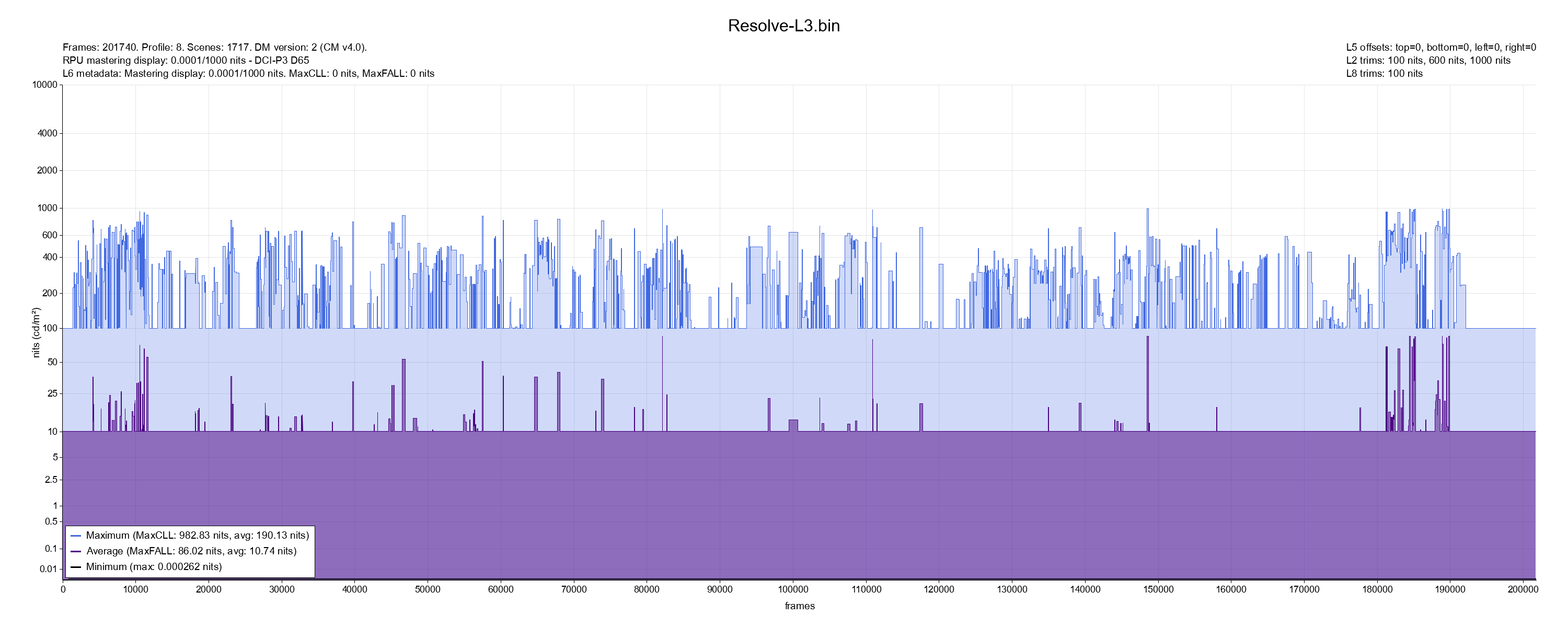
- L1_Resolve-L3.png (176.52 KiB) Viewed 10883 times

Based on this and the plots below, which RPU would you consider more accurate or "better"? I've included XMLs for reference.
2. Can ProRes Profile 1 or 2 (Apple HW) be used as a proxy instead of Profile 3 with q=4 (SW)?
From my tests,
Profile 2 (Apple HW) seems to have higher fidelity to the original source than
Profile 3 with q=4 (SW). Even
Profile 1 (Apple HW) performs surprisingly well and is quite close.
Does the profile number carry any real-world implication beyond bitrate?
Would
Profile 1 (Apple HW) be good enough for proxy use, or would you still recommend suffering through
Profile 2's higher bitrate and file size?
Here are some PSNR results and encoding stats:
Code: Select all
Profile     | Encoder                | PSNR (avg) | PSNR (min) | Size    | Bitrate
------------|------------------------|------------|------------|---------|---------
P3 Q4       | SW: prores_ks          | 58.95      | 56.69      | 27.4 GB | 196 Mb/s
P1          | SW: prores_ks          | 58.96      | 53.15      | 34.3 GB | 246 Mb/s
P2 (Apple)  | HW: prores_videotoolbox| 62.82      | 58.26      | 48.8 GB | 350 Mb/s
P1 (Apple)  | HW: prores_videotoolbox| 59.05      | 55.45      | 28.9 GB | 207 Mb/s
Code: Select all
- P3 (Q4): ffmpeg -i test.mkv -c:v prores_ks -profile:v 3 -vendor apl0 -qscale:v 4 -color_primaries bt2020 -color_trc smpte2084 -colorspace bt2020nc -pix_fmt yuv422p10le test_p3-q4.mov
- P1 (QX): ffmpeg -i test.mkv -c:v prores_ks -profile:v 1 -vendor apl0 -color_primaries bt2020 -color_trc smpte2084 -colorspace bt2020nc -pix_fmt yuv422p10le test_p1-qx.mov
- P2 (HW): ffmpeg -i test.mkv -c:v prores_videotoolbox -profile:v 2 -color_primaries bt2020 -color_trc smpte2084 -colorspace bt2020nc test_p2-hw.mov
- P1 (HW): ffmpeg -i test.mkv -c:v prores_videotoolbox -profile:v 1 -color_primaries bt2020 -color_trc smpte2084 -colorspace bt2020nc test_p1-hw.mov
Code: Select all
- P3 (Q4): ffmpeg -r 24000/1001 -i test.mkv -r 24000/1001 -i test_p3-q4.mov -lavfi psnr="stats_file=test_p3-q4.log" -f null -
- P1 (QX): ffmpeg -r 24000/1001 -i test.mkv -r 24000/1001 -i test_p1-qx.mov -lavfi psnr="stats_file=test_p1-qx.log" -f null -
- P2 (HW): ffmpeg -r 24000/1001 -i test.mkv -r 24000/1001 -i test_p2-hw.mov -lavfi psnr="stats_file=test_p2-hw.log" -f null -
- P1 (HW): ffmpeg -r 24000/1001 -i test.mkv -r 24000/1001 -i test_p1-hw.mov -lavfi psnr="stats_file=test_p1-hw.log" -f null -
Code: Select all
- P3 (Q4): PSNR y:57.830199 u:61.702542 v:64.312729 average:58.951441 min:56.685113 max:inf
- P1 (QX): PSNR y:57.672183 u:62.738864 v:65.896872 average:58.958489 min:53.148347 max:inf
- P2 (HW): PSNR y:62.149857 u:63.255604 v:66.544010 average:62.822763 min:58.255157 max:inf
- P1 (HW): PSNR y:57.895307 u:61.791684 v:65.122727 average:59.052011 min:55.453200 max:inf
Would love to hear your take on both these questions.
Thanks in advance!
Re: Dolby Vision now possible through MP4 Mux.
Posted: Mon May 26, 2025 5:50 pm
by RESET_9999
I dont think the difference is big enough to have a noticeable difference in playback but if I had to guess, I would say CM might be more accurate because other things can interfere in resolve.
FYI, I did new and better test file for L1 and it seems that the average_pq has no effect at all in cmv4.0, not even high values way above my TV ABL. DV dims the image only when L1 max_pq reaches your TV target.
In cmv2.9, a 150nits max/avg_pq dims the image even on my 2500nits G5, which doesn't make much sense since the TV can do 2500 peak / 400nits full field, and this is exactly why the generated L2 trims brightens the image so much in 2.9. see:
https://docs.google.com/spreadsheets/d/ ... 1289366200
So I'm no longer watching 2.9 retail movies. CMv4.0 for everything!
As for the XML header primaries, unless you encode in DEE, it doesn't matter.
As for the ProRes profile, as long as the brightness and colors remain the same, I don't think it matters much.
PS: The CM warning msg are gone in the latest version. It also fixed my Windows 11 crashes.
Re: Dolby Vision now possible through MP4 Mux.
Posted: Tue May 27, 2025 4:49 am
by coopzr
RESET_9999 wrote: Mon May 26, 2025 5:50 pm
FYI, I did new and better test file for L1
Is it
these files last modified 8th May 2025?
RESET_9999 wrote: Mon May 26, 2025 5:50 pm
So I'm no longer watching 2.9 retail movies. CMv4.0 for everything!
I've only just started avoiding cmv2.9 with a 4000 nits MDL due to the broken behaviour on my LG C4.
Are you saying there is more broken behaviour at other MDL's?
Re: Dolby Vision now possible through MP4 Mux.
Posted: Tue May 27, 2025 10:45 am
by RESET_9999
yes
I've only just started avoiding cmv2.9 with a 4000 nits MDL due to the broken behaviour on my LG C4.
Are you saying there is more broken behaviour at other MDL's?
1000 mdl doesn't dim too early like 4000mdl but it is slightly crushed.
Re: Dolby Vision now possible through MP4 Mux.
Posted: Tue May 27, 2025 12:25 pm
by foxbat
RESET_9999 wrote: Mon May 26, 2025 5:50 pm
So I'm no longer watching 2.9 retail movies. CMv4.0 for everything!
I apologize if I have missed some developments, but, are we now able to convert retail CMv2.9 to CMv4.0? If so how involved is that process?
Re: Dolby Vision now possible through MP4 Mux.
Posted: Tue May 27, 2025 12:32 pm
by RESET_9999
foxbat wrote: Tue May 27, 2025 12:25 pm
RESET_9999 wrote: Mon May 26, 2025 5:50 pm
So I'm no longer watching 2.9 retail movies. CMv4.0 for everything!
I apologize if I have missed some developments, but, are we now able to convert retail CMv2.9 to CMv4.0? If so how involved is that process?
You can restore cmv4.0 on a P7 rip with the metadata from web streaming. If no cmv4.0 source is available, then I will just generate it.
https://www.youtube.com/watch?v=RI_e-MPIPlw
Re: Dolby Vision now possible through MP4 Mux.
Posted: Tue May 27, 2025 1:45 pm
by bbeny123
RESET_9999 wrote: Tue May 27, 2025 12:32 pm
You can restore cmv4.0 on a P7 rip with the metadata from web streaming. If no cmv4.0 source is available, then I will just generate it.
But wouldn’t generating CMv4.0 metadata mean losing the original manual L2 trims? In that case, wouldn’t it be better to just stick with CMv2.9 if those trims were carefully tuned?
Re: Dolby Vision now possible through MP4 Mux.
Posted: Tue May 27, 2025 2:14 pm
by RESET_9999
bbeny123 wrote: Tue May 27, 2025 1:45 pm
But wouldn’t generating CMv4.0 metadata mean losing the original manual L2 trims? In that case, wouldn’t it be better to just stick with CMv2.9 if those trims were carefully tuned?
My 2500nits G5 rarely needs tone mapping, so this doesn't really affect me, and all the 1000nits MDL trims are already ignored anyway on this TV.
For 4000nits MDL RPU, even in movies that have a lot of modification in the cmv2.9 trims like Mad Max, DV still dims a lot of 200-500nits shots on my G5.
Re: Dolby Vision now possible through MP4 Mux.
Posted: Tue May 27, 2025 2:50 pm
by daffie
RESET_9999 wrote: Tue May 27, 2025 2:14 pm
bbeny123 wrote: Tue May 27, 2025 1:45 pm
But wouldn’t generating CMv4.0 metadata mean losing the original manual L2 trims? In that case, wouldn’t it be better to just stick with CMv2.9 if those trims were carefully tuned?
My 2500nits G5 rarely needs tone mapping, so this doesn't really affect me, and all the 1000nits MDL trims are already ignored anyway on this TV.
For 4000nits MDL RPU, even in movies that have a lot of modification in the cmv2.9 trims like Mad Max, DV still dims a lot of 200-500nits shots on my G5.
And for us people with G1/G2 for example?
Re: Dolby Vision now possible through MP4 Mux.
Posted: Tue May 27, 2025 3:18 pm
by RESET_9999
daffie wrote: Tue May 27, 2025 2:50 pm
And for us people with G1/G2 for example?
I would generate cmv4.0 for movies made in the old/original cmv2.9 algo (the ones with no automatic trims, no cmv4.0 to 2.9 conversion).
For the cmv2.9 rpu with automatic L2 trims from the cmv4.0 workflow master, I guess it's fine(minus black crush).
PS: Dolby knows that cmv2.9 is not very good, see their QC recommendations:
https://www.youtube.com/watch?v=t7mlzQNSdOw&t=3718s
Re: Dolby Vision now possible through MP4 Mux.
Posted: Tue May 27, 2025 3:32 pm
by bbeny123
RESET_9999 wrote: Tue May 27, 2025 3:18 pm
I would generate cmv4.0 for movies made in the old/original cmv2.9 algo (the ones with no automatic trims, no cmv4.0 to 2.9 conversion).
For the cmv2.9 rpu with automatic L2 trims from the cmv4.0 workflow master, I guess it's fine(minus black crush).
I ran some tests on my Sony A95L, and it seems tone mapping starts at:
- avg_pq 600, MDL 1000, CM v2.9: 1150 nits
- avg_pq 600, MDL 1000, CM v4.0: 1150 nits
- avg_pq 600, MDL 4000, CM v2.9: 150 nits!
- avg_pq 600, MDL 4000, CM v4.0: 1150 nits
How can one be sure that the old algorithm is being used?
Does having empty L2 trims guarantee the use of the legacy algorithm, or is there another way to confirm it?
Re: Dolby Vision now possible through MP4 Mux.
Posted: Tue May 27, 2025 3:47 pm
by RESET_9999
bbeny123 wrote: Tue May 27, 2025 3:32 pm
I ran some tests on my Sony A95L, and it seems tone mapping starts at:
- avg_pq 600, MDL 1000, CM v2.9: 1150 nits
- avg_pq 600, MDL 1000, CM v4.0: 1150 nits
- avg_pq 600, MDL 4000, CM v2.9: 150 nits!
- avg_pq 600, MDL 4000, CM v4.0: 1150 nits
How can one be sure that the old algorithm is being used?
Does having empty L2 trims guarantee the use of the legacy algorithm, or is there another way to confirm it?
thanks, I will add your TV to the chart. hard clipping point 1100nits?
Any cmv2.9 rpu made from a cmv4.0 workflow will always have an avg_pq floor of 10nits with L2 trims at 100,600,1000nits.
see this comparison, I've compared all the Dolby algo version:
https://slow.pics/c/OA0pupEN
Re: Dolby Vision now possible through MP4 Mux.
Posted: Tue May 27, 2025 4:05 pm
by bbeny123
RESET_9999 wrote: Tue May 27, 2025 3:47 pm
thanks, I will add your TV to the chart. hard clipping point 1100nits?
yep, 1100nits.
Damn, now I’m really torn about whether to generate DV for
The Return of the King...
The original DV was already created using the new algorithm, with an MDL of 4000 nits, and it actually has really rich L2 trims.
Unfortunately, it seems the original CM v4.0 version isn’t available anywhere online.
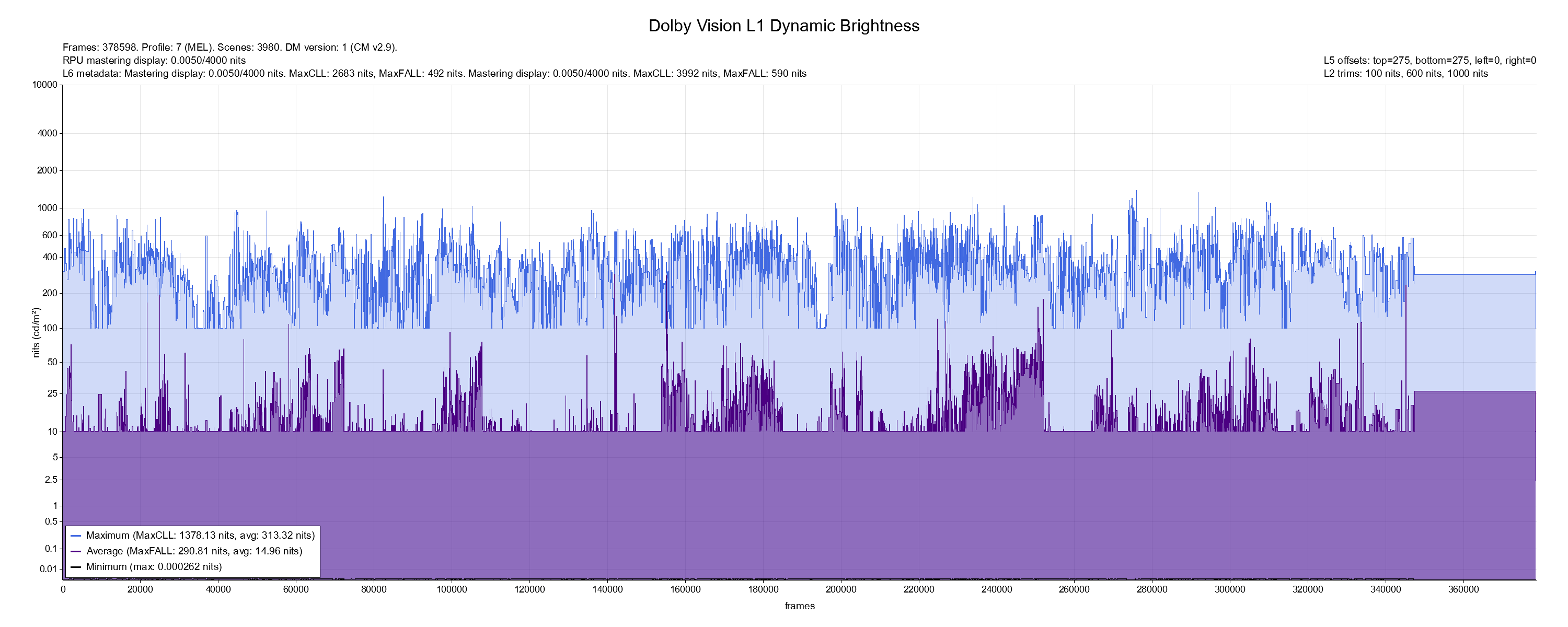
- L1_plot.png (227.42 KiB) Viewed 8511 times
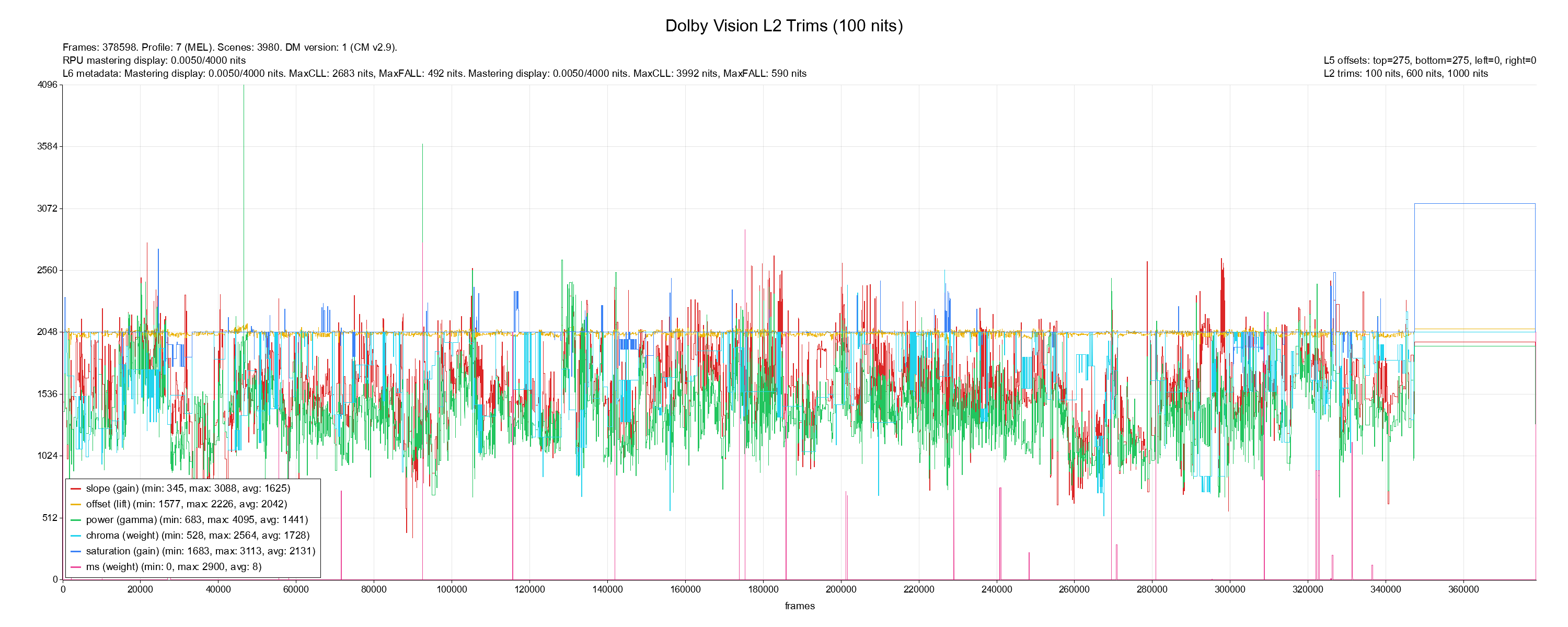
- L2_plot-100.png (270.99 KiB) Viewed 8511 times
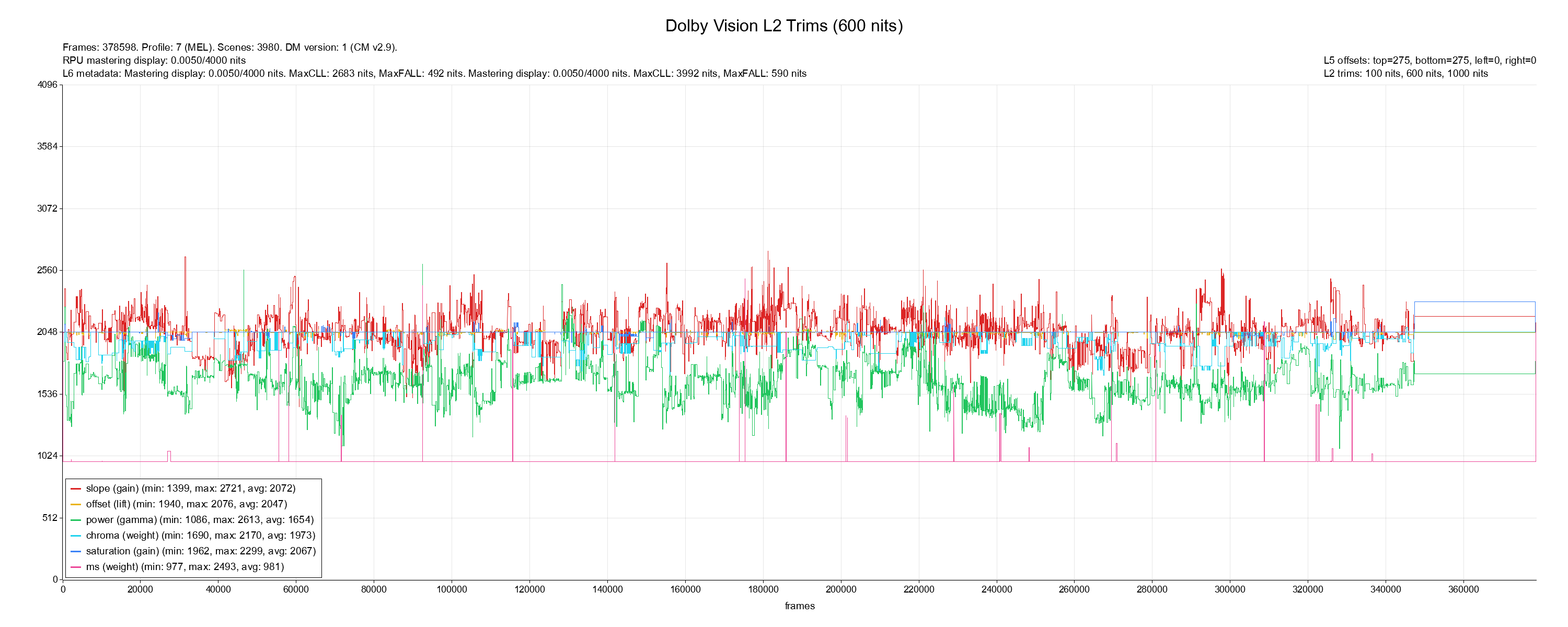
- L2_plot-600.png (255.4 KiB) Viewed 8511 times

Re: Dolby Vision now possible through MP4 Mux.
Posted: Tue May 27, 2025 4:16 pm
by RESET_9999
I would generate cmv4.0. The whole movie L1 is under your TV tone mapping target nits.
It doesn't matter how much editing they did in the trims... Unless they deliver a trim, the HDR10 layer always has the original HDR master brightness/grade and should be the reference, the intended representation.