Please post here for issues related to Blu-ray discs
-
meanstreak
- Posts: 5
- Joined: Wed Mar 04, 2020 5:40 am
#31
Post
by meanstreak » Thu Mar 05, 2020 3:07 am
retail3 wrote: Mon Feb 24, 2020 4:16 am
Title information
Name: Midway
Source file name: 00539.mpls
Duration: 2:18:24
Chapters count: 16
Size: 36.3 GB
Segment count: 10
Segment map: 504,510,501,507,502,505,506,509,503,508
File name: Midway_t119.mkv
This worked for me!
Blu-Ray-DVD from Amazon
I have the retail Blu-Ray/DVD/Digital Copy I got from a local Walmart and this one appears to have worked correctly. Not had a chance to watch the entire thing yet but a check of the beginning and end credits plus a quick skip thorough looks like it's OK.
-
Krawk
- Posts: 284
- Joined: Thu Jul 02, 2015 12:10 am
#32
Post
by Krawk » Thu Mar 05, 2020 8:56 pm
asr101 wrote: Sat Feb 15, 2020 4:54 pm
Thanks - this is just what I needed - MakeMKV Java routine picked the wrong source file.
Does Mike view such threads/fix this issue in new releases?
I always fear that no matter how old the disc is, unless he does, it will be the wrong playlist. (LionsGate eat a dick)
-
tinkerer
- Posts: 1
- Joined: Sun Apr 12, 2020 2:41 am
#33
Post
by tinkerer » Sun Apr 12, 2020 2:49 am
ChrisCaPWN wrote: Mon Feb 17, 2020 12:00 am
I manually went through to find the correct playlist for rental discs. I found it to be 00741.mpls.
Enjoy.
This was my experience with Redbox...same mpls and track 158, however, the segments were: 507,501,509,502,504,510,508,506,503,505
Thanks for the input!
-
kfreeb
- Posts: 113
- Joined: Mon Aug 16, 2010 3:43 pm
#34
Post
by kfreeb » Sat Apr 18, 2020 8:08 pm
Here's what I found on the Retail disc I purchased:
UPC code: 3139831414
-
Attachments
-
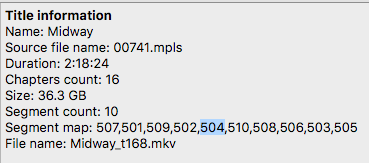
- Screen Shot 2020-04-18 at 2.06.25 PM.png (26.31 KiB) Viewed 58612 times
Mac Studio M3 Ultra
96GB Memory
GPU 80 Core
CPU 24 Core
Sequoia 15.7.4
-
chicken007
- Posts: 4
- Joined: Mon Apr 25, 2016 5:35 pm
#35
Post
by chicken007 » Tue May 12, 2020 12:31 pm
Hi am running v1.15.1 and trying to rip Midway UK version, but it skips all the various files showing segment maps and assumes it is a file...
shows this message
Title 00998.mpls is equal to title 00000.mpls and was skipped
Title 00998.mpls(1) is equal to title 00000.mpls and was skipped
Title 00998.mpls(9) is equal to title 00000.mpls(10) and was skipped
Title 00998.mpls(15) is equal to title 00000.mpls and was skipped
What is happening anyone know?
-
Jeddia
- Posts: 4
- Joined: Wed Jun 16, 2010 2:10 pm
#36
Post
by Jeddia » Tue Jun 30, 2020 12:16 am
Current build is tagging 00093 as Main Feature on the Netflix disc. Someone earlier stated 00741. Just wondering if anyone can confirm?
-
zelmo73
- Posts: 1
- Joined: Thu Jul 02, 2020 6:15 am
#37
Post
by zelmo73 » Thu Jul 02, 2020 6:20 am
I just bought the 4K UHD version and I'm making a backup copy of the 1080p blu ray that came with Midway on my external hard drive that is plugged into my TV. This is the tag that I'm getting on the blu ray in MakeMKV:
Title information
Name: Midway
Comment: FPL_MainFeature
Source file name: 00724.mpls
Duration: 2:18:24
Chapters count: 16
Size: 36.3 GB
Segment count: 10
Segment map: 506,507,509,505,502,501,504,510,503,508
File name: Midway-FPL_MainFeature_t12.mkv
Should I go with the Main Feature or has anybody else come across this and had it not work for them?
-
Hoss713
- Posts: 1
- Joined: Sat Jul 04, 2020 9:28 pm
#38
Post
by Hoss713 » Sat Jul 04, 2020 9:35 pm
Jeddia wrote: Tue Jun 30, 2020 12:16 am
Current build is tagging 00093 as Main Feature on the Netflix disc. Someone earlier stated 00741. Just wondering if anyone can confirm?
I don't think it's correct. I got the same tagging as you, but the resulting video does not start at the correct scene. 00741 appears to be the correct.
-
brian163
- Posts: 8
- Joined: Fri Mar 26, 2010 7:25 pm
#39
Post
by brian163 » Fri Jul 10, 2020 7:00 pm
Just got bit by the "MakeMKV Java routine" issue myself. I should have double checked it but it did not label the correct main feature segment.


Thanks @Hoss713 for the additional info.
-
catter959er
- Posts: 3
- Joined: Sun Jun 28, 2020 9:48 pm
#40
Post
by catter959er » Sat Aug 01, 2020 7:56 pm
I have a Bluray/Digital from Walmart 03139831413 (and itty bitty numbers are 4 80). 00741 isn't the correct one for this disc. Please help. Thank you.
-
meanstreak
- Posts: 5
- Joined: Wed Mar 04, 2020 5:40 am
#41
Post
by meanstreak » Sun Aug 23, 2020 11:25 am
catter959er wrote: Sat Aug 01, 2020 7:56 pm
I have a Bluray/Digital from Walmart 03139831413 (and itty bitty numbers are 4 80). 00741 isn't the correct one for this disc. Please help. Thank you.
Did you ever get it to work? I was good with a Walmart disc -
meanstreak wrote: Thu Mar 05, 2020 3:07 am
retail3 wrote: Mon Feb 24, 2020 4:16 am
Title information
Name: Midway
Source file name: 00539.mpls
Duration: 2:18:24
Chapters count: 16
Size: 36.3 GB
Segment count: 10
Segment map: 504,510,501,507,502,505,506,509,503,508
File name: Midway_t119.mkv
This worked for me!
Blu-Ray-DVD from Amazon
I have the retail Blu-Ray/DVD/Digital Copy I got from a local Walmart and this one appears to have worked correctly. Not had a chance to watch the entire thing yet but a check of the beginning and end credits plus a quick skip thorough looks like it's OK.
-
cortez
- Posts: 1
- Joined: Sun Nov 01, 2020 4:32 pm
#42
Post
by cortez » Tue Nov 03, 2020 3:56 pm
Bump. Rented Midway from local library with UPC 03139831413 (and itty bitty numbers are 4 80). Ripped using makeMKV 1.15.3. FPL_MainFeature was not correct. Confirm source file name: 00539.mpls Midway_t119.mkv is correct file.
Name: Midway (English)
Source file name: 00539.mpls
Duration: 2:18:24
Chapters count: 16
Size: 36.3 GB
Segment count: 10
Segment map: 504,510,501,507,502,505,506,509,503,508
File name: Midway_t119.mkv
-
Krawk
- Posts: 284
- Joined: Thu Jul 02, 2015 12:10 am
#43
Post
by Krawk » Tue Nov 03, 2020 9:14 pm
Here we are, November 3 2020 and MakeMKV is still referencing the incorrect play list.
Is this something that gets fixed eventually? I hate to think I could assume by this date that sticking in the disc would yield a proper rip.
-
Woodstock
- Posts: 10958
- Joined: Sun Jul 24, 2011 11:21 pm
#44
Post
by Woodstock » Wed Nov 04, 2020 3:37 am
Considering that it doesn't appear that anyone has volunteered to send the information Mike would need to fix it, it will probably continue to not choose correctly.
-
catter959er
- Posts: 3
- Joined: Sun Jun 28, 2020 9:48 pm
#45
Post
by catter959er » Fri Nov 06, 2020 3:06 am
Hello. No, I never did find the proper one.
meanstreak wrote: Sun Aug 23, 2020 11:25 am
catter959er wrote: Sat Aug 01, 2020 7:56 pm
I have a Bluray/Digital from Walmart 03139831413 (and itty bitty numbers are 4 80). 00741 isn't the correct one for this disc. Please help. Thank you.
Did you ever get it to work? I was good with a Walmart disc -
meanstreak wrote: Thu Mar 05, 2020 3:07 am
retail3 wrote: Mon Feb 24, 2020 4:16 am
Title information
Name: Midway
Source file name: 00539.mpls
Duration: 2:18:24
Chapters count: 16
Size: 36.3 GB
Segment count: 10
Segment map: 504,510,501,507,502,505,506,509,503,508
File name: Midway_t119.mkv
This worked for me!
Blu-Ray-DVD from Amazon
I have the retail Blu-Ray/DVD/Digital Copy I got from a local Walmart and this one appears to have worked correctly. Not had a chance to watch the entire thing yet but a check of the beginning and end credits plus a quick skip thorough looks like it's OK.