Dolby Vision now possible through MP4 Mux.

Please post here for issues related to UHD discs
lexyz
Posts: 120
Joined: Fri May 08, 2020 5:32 am

Re: Dolby Vision now possible through MP4 Mux.

Post by lexyz »

btw how do you like this demo on shield in comparison to x700?
Can you notice any odd thing?
Because I clearly see some problems
Bravia XF90, Shield TV Pro'19, UBP-X700
RESET_9999
Posts: 2410
Joined: Mon Aug 05, 2019 7:12 pm

Re: Dolby Vision now possible through MP4 Mux.

Post by RESET_9999 »

lexyz wrote:
Tue Sep 29, 2020 5:04 pm
btw how do you like this demo on shield in comparison to x700?
Can you notice any odd thing?
Because I clearly see some problems
yep, I see problems too. oversaturated.
Sorry for my English.
G5 / AM6B+ / Denon 7.2.4
DoVi_Scripts
DoVi Playback Devices
DaMacFunkin
Posts: 312
Joined: Tue Oct 30, 2018 4:17 pm

Re: Dolby Vision now possible through MP4 Mux.

Post by DaMacFunkin »

In the testing I have done on Shield the colours are off on most DV titles, with the limited testing I have done with Z9X that has red push with converted files also.
lexyz
Posts: 120
Joined: Fri May 08, 2020 5:32 am

Re: Dolby Vision now possible through MP4 Mux.

Post by lexyz »

RESET_9999 wrote:
Tue Sep 29, 2020 5:13 pm
yep, I see problems too. oversaturated.
Oversaturated, yes
also:
Few frames flickering in transition from paint to "Storytelling" scene
Artefacts on white "Senses" letters
DV logo flickers in boxer scene

Since this demo is unmodified EL it could be a key to fix Shield problem.
I'm going to send report to Nvidia and suggest all shield owners to the same thing.
Start to play this demo - pause - open Shield Settings - Device Preference - About - Send Feedback to Nvidia
Set topic like: Artifacts DV playback
Comments: Oversaturation, flickering, artifacts on white
Send it
Last edited by lexyz on Tue Sep 29, 2020 6:12 pm, edited 1 time in total.
Bravia XF90, Shield TV Pro'19, UBP-X700
Decidueye
Posts: 9
Joined: Sun Sep 27, 2020 9:47 am

Re: Dolby Vision now possible through MP4 Mux.

Post by Decidueye »

Decidueye wrote:
Sun Sep 27, 2020 9:52 am
Hello everyone first post here complete newbie. I wanted to try if Dolby Vision playback with Mission Impossible movies is possible with my LG C9

First tried with Ghost Protocol. I followed the instructions on the first post and double checked, the new mp4 is successfully created but it doesn't work. The TV cannot read the file and says it is not supported.

Is there something I did incorrectly or is it because of the file or my TV?
Still can't get it to work even with other m2ts files (tried Black Panther and Justice League). I have Visual Studio 2019 installed and not 2010 though. Would that matter?

First input file is the bigger file, second one is the DV layer, third one is ac3 audio. The rest I copied from OP. Doesn't work. Any suggestions on what I most likely might have missed?
RESET_9999
Posts: 2410
Joined: Mon Aug 05, 2019 7:12 pm

Re: Dolby Vision now possible through MP4 Mux.

Post by RESET_9999 »

that demo file is FEL though. So they might just say that it's not supposed to be supported in the first place.

Also, the BL is SDR. not sure if that change anything
Sorry for my English.
G5 / AM6B+ / Denon 7.2.4
DoVi_Scripts
DoVi Playback Devices
shawnc22
Posts: 637
Joined: Tue Jan 21, 2020 7:40 am

Re: Dolby Vision now possible through MP4 Mux.

Post by shawnc22 »

lexyz wrote:
Tue Sep 29, 2020 4:09 pm
iamTa wrote:
Mon Sep 28, 2020 11:49 am
Extract hevc streams with ffmpeg: ffmpeg.exe -i X:\BDMV\STREAM\XXXXX.m2ts -map 0:0 -c copy X:\BL.hevc -map 0:1 -c copy X:\EL.hevc
Is it ok to demux m2ts by tsmuxer to avoid ffmpeg?
Should be no difference in what you use to demux (ffmpeg, tsmuxer, eac3to). Although, ffmpeg and eac3to will tell you if there are any imperfections in the original files. It's rare, but if one is encountered, the files will still demux but you might encounter av sync issues upon remuxing.
RESET_9999 wrote:
Tue Sep 29, 2020 6:10 pm
that demo file is FEL though. So they might just say that it's not supposed to be supported in the first place.

Also, the BL is SDR. not sure if that change anything
BL being SDR shouldn't change anything, but this is actually what a properly specced profile 4 video should be (without an HDR BL).
Tomas
Posts: 46
Joined: Tue Aug 11, 2020 7:47 pm

Re: Dolby Vision now possible through MP4 Mux.

Post by Tomas »

iamTa wrote:
Mon Sep 28, 2020 11:49 am
Tomas wrote:
Sun Sep 27, 2020 5:39 pm
Everything played perfectly. May I ask how did you convert from FEL to MEL?
thank you very much
So these are the steps I take to convert FEL to MEL and remux with TrueHD/Atmos into an MKV:
  • Extract hevc streams with ffmpeg: ffmpeg.exe -i X:\BDMV\STREAM\XXXXX.m2ts -map 0:0 -c copy X:\BL.hevc -map 0:1 -c copy X:\EL.hevc
  • Feed both hevc files from step 1 into MUX_AND_CONVERT_TO_MEL.bat
  • Feed single hevc file from step 2 into DEMUX.bat
  • Use latest tsMuxeR nightly, add both hevc files from step 3 into input along with X:\BDMV\STREAM\XXXXX.m2ts from step 1, remove duplicate video tracks and output to ISO
  • Use MakeMKV to convert ISO to MKV
These MKVs can then be played back using the modded ExoPlayer and potentially the latest Emby beta (I've not tested Emby).

I've converted and tested a few full length movies and the above method works flawlessly.

Thank you yusesope for all your hard work.
Please, why is it throwing me such a bug in DEMUX.
It stops at the beginning. Thank you very much.
https://ibb.co/FqPw2jw
Decidueye
Posts: 9
Joined: Sun Sep 27, 2020 9:47 am

Re: Dolby Vision now possible through MP4 Mux.

Post by Decidueye »

Decidueye wrote:
Tue Sep 29, 2020 6:10 pm
Still can't get it to work even with other m2ts files (tried Black Panther and Justice League). I have Visual Studio 2019 installed and not 2010 though. Would that matter?

First input file is the bigger file, second one is the DV layer, third one is ac3 audio. The rest I copied from OP. Doesn't work. Any suggestions on what I most likely might have missed?
Got it to work. I used the mp4muxer linked on page 200-201 with the 64 bit one. Everything worked from there.
yusesope wrote:
Thu Sep 17, 2020 5:54 pm
Yes you are right. Your Windows needs THESE libraries (unpack the archive and place the two dll files where there are the files MUX.bat, DEMUX.bat, etc ...). It's not an elegant solution but it should at least work for these days of testing.
Let me know!
Links expired. Any new links for this? Will be trying this method now that I got the first step working!
RESET_9999
Posts: 2410
Joined: Mon Aug 05, 2019 7:12 pm

Re: Dolby Vision now possible through MP4 Mux.

Post by RESET_9999 »

no problem on the x700 for the single track FEL or MEL profile 4
FEL:
https://screenshotcomparison.com/comparison/6715
https://screenshotcomparison.com/comparison/6727
MEL:
https://screenshotcomparison.com/comparison/6724

I'm not capturing any difference between FEL and MEL on the Shield suggesting it's ''maybe'' treating all the DV files as MEL.
London Has Fallen: https://screenshotcomparison.com/comparison/6723
Spears and Munsil: https://screenshotcomparison.com/comparison/6721
Sorry for my English.
G5 / AM6B+ / Denon 7.2.4
DoVi_Scripts
DoVi Playback Devices
lexyz
Posts: 120
Joined: Fri May 08, 2020 5:32 am

Re: Dolby Vision now possible through MP4 Mux.

Post by lexyz »

RESET_9999 wrote:
Tue Sep 29, 2020 11:42 pm
I'm not capturing any difference between FEL and MEL on the Shield suggesting it's ''maybe'' treating all the DV files as MEL.
Spears and Munsil: https://screenshotcomparison.com/comparison/6721
Please check "tulip field" scene :)
Bravia XF90, Shield TV Pro'19, UBP-X700
ghostshadow
Posts: 55
Joined: Sun Sep 13, 2020 10:25 am

Re: Dolby Vision now possible through MP4 Mux.

Post by ghostshadow »

yusesope wrote:
Sat Sep 26, 2020 8:21 am

ghostshadow wrote:
Thu Sep 24, 2020 5:39 pm
Good evening yusesope, how do you get the RPU out of the EL? it is to be able to encode afterwards in x265
thank you
x265 does not need a parser for RPU. It simply accepts a file containing the RPUs (I presume sorted according to each access unit present in the Base Layer). Look HERE.

What's the problem? If you proceed with an encoding of the Base Layer then you must also change the parameters of the RPU. At the moment, however, we do not know the algorithm that allows to generate new RPUs!
Hello yusesope.
Well, I want to encode my uhd blu-ray in x265
It is Dual Track Dual Layer :

Code: Select all

Général
ID                                       : 0 (0x0)
Nom complet                              : MIDWAY\FullDisc\MIDWAY\BDMV\STREAM\00002.m2ts
Format                                   : BDAV
Format/Info                              : Blu-ray Video
Taille du fichier                        : 81,2 Gio
Durée                                    : 2 h 18 min
Type de débit global                     : Variable
Débit global moyen                       : 84,0 Mb/s
Débit global maximum                     : 109 Mb/s

Vidéo #1
ID                                       : 4113 (0x1011)
ID de menu                               : 1 (0x1)
Format                                   : HEVC
Format/Info                              : High Efficiency Video Coding
Profil du format                         : Main 10@L5.1@High
HDR format                               : SMPTE ST 2086, HDR10 compatible
Identifiant du codec                     : 36
Durée                                    : 2 h 18 min
Largeur                                  : 3 840 pixels
Hauteur                                  : 2 160 pixels
Format à l'écran                         : 16/9
Images par seconde                       : 23,976 (24000/1001) Im/s
Espace de couleurs                       : YUV
Sous-échantillonnage de la chrominance   : 4:2:0 (Type 2)
Profondeur des couleurs                  : 10 bits
Gamme de couleurs                        : Limited
Coordonnées de chromaticité              : BT.2020
Caractéristiques du transfert            : PQ
Coefficients de la matrice               : BT.2020 non-constant
Mastering display color primaries        : Display P3
Mastering display luminance              : min: 0.0001 cd/m2, max: 1000 cd/m2
Maximum Content Light Level              : 570 cd/m2
Maximum Frame-Average Light Level        : 1504 cd/m2

Vidéo #2
ID                                       : 4117 (0x1015)
ID de menu                               : 1 (0x1)
Format                                   : HEVC
Format/Info                              : High Efficiency Video Coding
Profil du format                         : Main 10@L5.1@High
HDR format                               : SMPTE ST 2086, HDR10 compatible
Identifiant du codec                     : 36
Durée                                    : 2 h 18 min
Largeur                                  : 1 920 pixels
Hauteur                                  : 1 080 pixels
Format à l'écran                         : 16/9
Images par seconde                       : 23,976 (24000/1001) Im/s
Espace de couleurs                       : YUV
Sous-échantillonnage de la chrominance   : 4:2:0 (Type 2)
Profondeur des couleurs                  : 10 bits
Gamme de couleurs                        : Limited
Coordonnées de chromaticité              : BT.2020
Caractéristiques du transfert            : PQ
Coefficients de la matrice               : BT.2020 non-constant
Mastering display color primaries        : Display P3
Mastering display luminance              : min: 0.0001 cd/m2, max: 1000 cd/m2

Audio #1
ID                                       : 4352 (0x1100)
ID de menu                               : 1 (0x1)
Format                                   : DTS XLL
Format/Info                              : Digital Theater Systems
Nom commercial                           : DTS-HD Master Audio
Type de muxing                           : Stream extension
Identifiant du codec                     : 134
Durée                                    : 2 h 18 min
Type de débit                            : Variable
Canaux                                   : 8 canaux
Channel layout                           : C L R LFE Lb Rb Lss Rss
Echantillonnage                          : 48,0 kHz
Images par seconde                       : 93,750 Im/s (512 SPF)
Profondeur des couleurs                  : 24 bits
Mode de compression                      : Sans perte
Délai par rapport Vidéo                  : 6s 6 ms

Audio #2
ID                                       : 4353 (0x1101)
ID de menu                               : 1 (0x1)
Format                                   : DTS XLL
Format/Info                              : Digital Theater Systems
Nom commercial                           : DTS-HD Master Audio
Type de muxing                           : Stream extension
Identifiant du codec                     : 134
Durée                                    : 2 h 18 min
Type de débit                            : Variable
Canaux                                   : 8 canaux
Channel layout                           : C L R LFE Lb Rb Lss Rss
Echantillonnage                          : 48,0 kHz
Images par seconde                       : 93,750 Im/s (512 SPF)
Profondeur des couleurs                  : 24 bits
Mode de compression                      : Sans perte
Délai par rapport Vidéo                  : 6s 6 ms

Audio #3
ID                                       : 4354 (0x1102)
ID de menu                               : 1 (0x1)
Format                                   : DTS
Format/Info                              : Digital Theater Systems
Identifiant du codec                     : 130
Durée                                    : 2 h 18 min
Type de débit                            : Constant
Débit                                    : 768 kb/s
Canaux                                   : 2 canaux
Channel layout                           : Lt Rt
Echantillonnage                          : 48,0 kHz
Images par seconde                       : 93,750 Im/s (512 SPF)
Profondeur des couleurs                  : 16 bits
Mode de compression                      : Avec perte
Délai par rapport Vidéo                  : 6s 6 ms
Taille du flux                           : 759 Mio (1%)

Audio #4
ID                                       : 4355 (0x1103)
ID de menu                               : 1 (0x1)
Format                                   : DTS
Format/Info                              : Digital Theater Systems
Identifiant du codec                     : 130
Durée                                    : 2 h 18 min
Type de débit                            : Constant
Débit                                    : 255 kb/s
Canaux                                   : 2 canaux
Channel layout                           : Lt Rt
Echantillonnage                          : 48,0 kHz
Images par seconde                       : 93,750 Im/s (512 SPF)
Profondeur des couleurs                  : 16 bits
Mode de compression                      : Avec perte
Délai par rapport Vidéo                  : 6s 6 ms
Taille du flux                           : 252 Mio (0%)

Texte #1
ID                                       : 4768 (0x12A0)
ID de menu                               : 1 (0x1)
Format                                   : PGS
Identifiant du codec                     : 144

Texte #2
ID                                       : 4769 (0x12A1)
ID de menu                               : 1 (0x1)
Format                                   : PGS
Identifiant du codec                     : 144

Texte #3
ID                                       : 4770 (0x12A2)
ID de menu                               : 1 (0x1)
Format                                   : PGS
Identifiant du codec                     : 144
Délai par rapport Vidéo                  : 8s 133 ms

Image
So if I understood everything correctly :

I am using FFMPEG to extract the base layer :
ffmpeg -i path\to\the\file.m2ts -map 0:0 -c copy path\to\BL.hevc

I am using FFMPEG to extract the EL layer :
ffmpeg -i path\to\the\file.m2ts -map 0:1 -c copy path\to\EL.hevc

Is it this base layer (BL.hevc) that I encode with x265 ?
So I get BL.x265.hevc

After I mux with tsMuxeR EL.hevc and BL.hevc + path \\ to \\ the \\ file.m2ts remove duplicate video tracks and output to ISO
I use MakeMKV to convert iso to MKV

thank you in advance
yusesope
Posts: 221
Joined: Sun Jul 28, 2019 3:34 am

Re: Dolby Vision now possible through MP4 Mux.

Post by yusesope »

lexyz wrote:
Tue Sep 29, 2020 4:09 pm
Is it ok to demux m2ts by tsmuxer to avoid ffmpeg?
You can choose the program you prefer. The beauty of the command line is that, in addition to providing you great flexibility, it allows you to concatenate the various programs (in windows just use "&&", Google is your friend if you want to learn more) without waiting for the first one to finish and then start the second, etc., etc.

Code: Select all

ffmpeg && mytool && tsmuxer
In the folder I've put the "SHOW_HELP" file in the hope that someone will open it and start using the command line.

Tomas wrote:
Tue Sep 29, 2020 8:07 pm
Please, why is it throwing me such a bug in DEMUX.
It stops at the beginning. Thank you very much.
https://ibb.co/FqPw2jw
Please, list the steps you took before getting to use "DEMUX.bat"
Decidueye wrote:
Tue Sep 29, 2020 8:33 pm
Links expired. Any new links for this? Will be trying this method now that I got the first step working!
I've already solved that problem: you don't need those libraries anymore.

RESET_9999 wrote:
Tue Sep 29, 2020 11:42 pm
no problem on the x700 for the single track FEL or MEL profile 4
.........................
I'm not capturing any difference between FEL and MEL on the Shield suggesting it's ''maybe'' treating all the DV files as MEL.
I'm on my cell phone at the moment and I honestly don't see any difference between the files tested on the Shield and those tested on the X700 (I'm referring to London Has Fallen).
What do you gentlemen think about it?
Maybe it's not the best material for this kind of comparison?

ghostshadow wrote:
Wed Sep 30, 2020 7:47 am
Well, I want to encode my uhd blu-ray in x265
All seems right (in TsMuxeR you have to load BL.x265.hevc and not BL.hevc).
However, I repeat that the encoding of the Base Layer (BL) involves a complete reorganization of its internal structure.
The RPUs present in EL are no longer good.
From my point of view, the procedure is completely wrong!
Feel free to experiment...
Tomas
Posts: 46
Joined: Tue Aug 11, 2020 7:47 pm

Re: Dolby Vision now possible through MP4 Mux.

Post by Tomas »

Tomas wrote:
Tue Sep 29, 2020 8:07 pm
Please, why is it throwing me such a bug in DEMUX.
It stops at the beginning. Thank you very much.
https://ibb.co/FqPw2jw
Please, list the steps you took before getting to use "DEMUX.bat"


I extracted M2ts files. Then I inserted the HEVC files into MUX_AND_CONVERT_TO_MEL.bat which went well and I have the file. I open DEMUX.bat, insert the file, the program starts and stops for a while as you can see on the screen.
ghostshadow
Posts: 55
Joined: Sun Sep 13, 2020 10:25 am

Re: Dolby Vision now possible through MP4 Mux.

Post by ghostshadow »

yusesope wrote:
Wed Sep 30, 2020 8:48 am


ghostshadow wrote:
Wed Sep 30, 2020 7:47 am
Well, I want to encode my uhd blu-ray in x265
All seems right (in TsMuxeR you have to load BL.x265.hevc and not BL.hevc).
However, I repeat that the encoding of the Base Layer (BL) involves a complete reorganization of its internal structure.
The RPUs present in EL are no longer good.
From my point of view, the procedure is completely wrong!
Feel free to experiment...
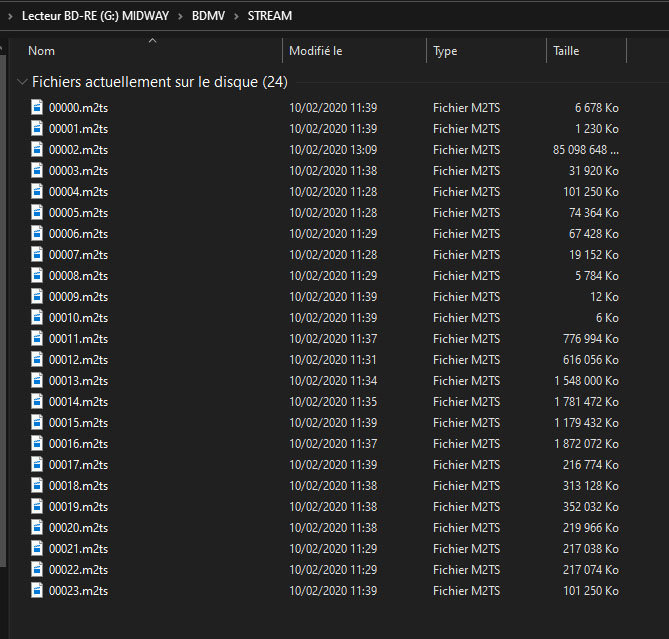
ok I understand, well I think.
Donc et si je mux avec votre procédure avant :

Code: Select all

Extract the base layer and the enhancement layer

Code: Select all

ffmpeg -i path\to\the\file.m2ts  -map 0:0 -c copy path\to\BL.hevc
ffmpeg -i path\to\the\file.m2ts  -map 0:1 -c copy path\to\EL.hevc

Using my tool, double click on the MUX_AND_CONVERT_TO_MEL.bat file and follow the instructions on the screen.
You will get a BL_EL_RPU.hevc file
And I encode the BL_EL_RPU.hevc. So logically the complete reorganization of its internal structure will be done on the BL and EL not?

Or you have to encode the BL.hevc and the EL.hevc separately.
I ask you what you think of it, because yes I am testing but if I can be pointed in the right direction I would save time, because the encoding takes me 32 hours per tests in x265. I prefer not to cut pieces and do the entire coding of the film to be sure not to distort the results.

Then I have another lead to extract the RPU from a dolby vision UHD. I was able to make a dolby vision RPU Trim file, in xml, but I crashed somewhere in the software because apparently it extracted me only the metadata of an image, I had to select an image in the Trim.
Post Reply