deadchip12 wrote: Mon Sep 28, 2020 12:10 pm
Does this have any benefit versus the original method in the first page if I own a c9 oled tv? Sorry haven't followed this thread for a while.
Yes, HD audio.
Tomas wrote: Mon Sep 28, 2020 12:43 pm
Can I ask for the ffmpeg download link?
yusesope wrote: Sun Sep 27, 2020 9:12 am
During decoding, the image generated by the data present in EL represents a residue (difference) of the original video content compared to the image obtained by processing the data present in BL.
EL is a 10-bit video bitstream that carries the residual between the mezzanine source and the base layer and the dynamic metadata for Dolby Vision.
By modifying the RPU the idea is to tell the decoder that the residual signal is equal to zero and that it should not bother to "read" the content.
The rest of the information, both static (eg, MaxFALL and MaxCLL) and dynamic (eg, min, max and avg luminance of each shot) remain unchanged.
By giving up the process of decoding the data in EL, I think it is normal that it is no longer possible to generate the 12bit signal as it was mastered by the creators (using monitors up to 10000 nits).
Keep also in mind that current consumer displays rarely exceed 2000 nits (LCD). OLEDs peak at 600-700 nits, and few home projectors are lucky enough to hit 150 nits. When the signal exceeds the capability of the TV, tone mapping is activated by reducing the luminance as the signal approaches the clipping point of the display (following a Perceptual Quantizer (PQ) curve, remaps luminance from the source values to the lower values the display can support)
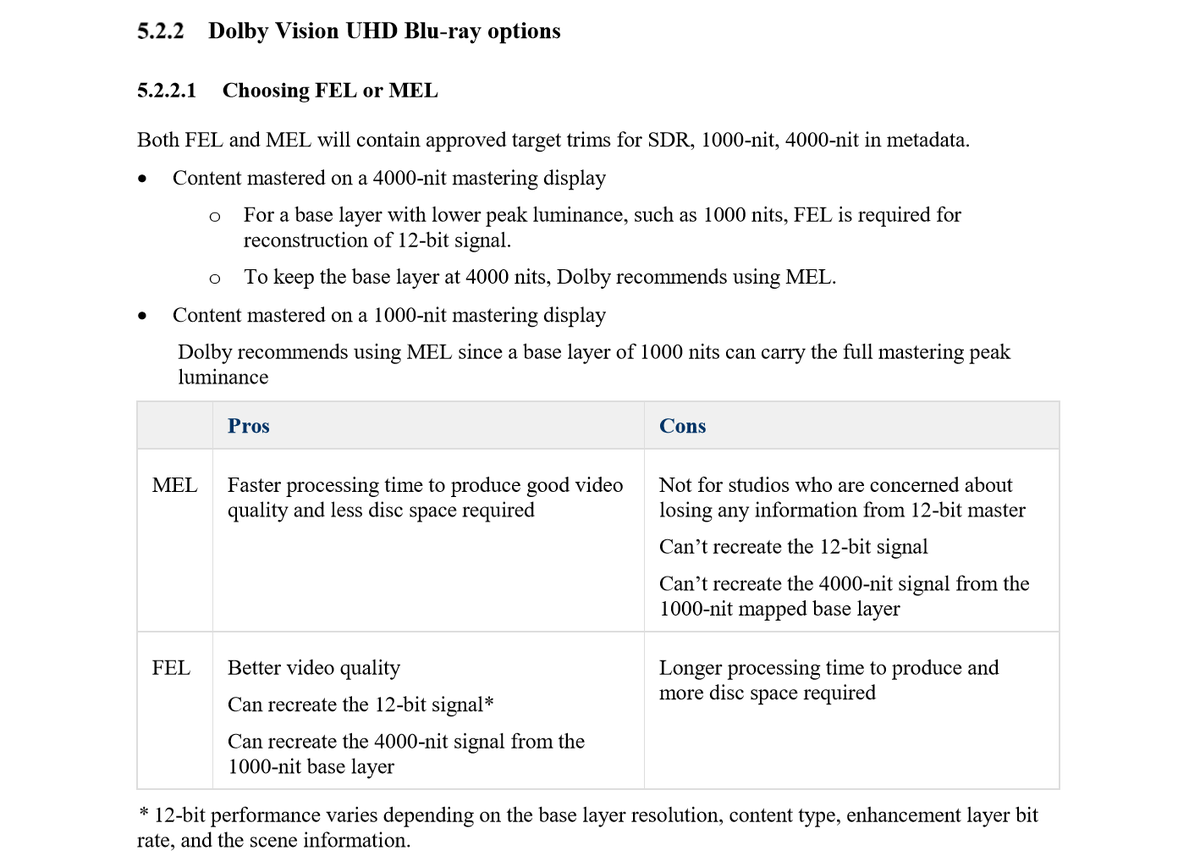
Appreciate the explanation as always. From that snippet of the dolby docs again (https://pbs.twimg.com/media/D9_hnb9XkAEIsF5.png) and if I'm reading it correctly, it seems like when some content is mastered on a 4000-nit display, the creator has a choice of either using FEL (1000-nit base layer + differential data in the EL to reconstruct the original 12bit signal) or MEL (4000-nit base layer + metadata only and accept the information lost of not being able to rebuild the 12bit signal). I guess what I'm wondering is if it may eventually be possible to use the differential data in the FEL's EL to build that high luminance base layer and pretend that the creator had chosen to go the MEL route in the first place. Agreed that it's probably not a big deal with the limitations of today's displays, but just curious nonetheless .
deadchip12 wrote: Mon Sep 28, 2020 12:10 pm
Does this have any benefit versus the original method in the first page if I own a c9 oled tv? Sorry haven't followed this thread for a while.
Yes, HD audio.
If you're playing off of the C9's internal player, then no. The C9 cannot playback truehd audio tracks and it also cannot play mkvs.
shawnc22 wrote: Mon Sep 28, 2020 5:51 pm
If you're playing off of the C9's internal player, then no. The C9 cannot playback truehd audio tracks and it also cannot play mkvs.
True, although you could use one of the Plex/Emby apps in the LG app store for HD audio but I assume they won't be able to render DoVi at this point.
For HD audio and DoVi MKVs you'll need a Shield/Fire Stick etc with the modded ExoPlayer.
shawnc22 wrote: Mon Sep 28, 2020 5:51 pm
If you're playing off of the C9's internal player, then no. The C9 cannot playback truehd audio tracks and it also cannot play mkvs.
True, although you could use one of the Plex/Emby apps in the LG app store for HD audio but I assume they won't be able to render DoVi at this point.
For HD audio and DoVi MKVs you'll need a Shield/Fire Stick etc with the modded ExoPlayer.
No, it's a hardware limitation, not a software one. LG OLEDs cannot process truehd audio, regardless of the app. If you try to use Plex at least, it will try to transcode. If you have to play files off of your TV, stick with mp4.
deadchip12 wrote: Mon Sep 28, 2020 12:10 pm
Does this have any benefit versus the original method in the first page if I own a c9 oled tv?
userr wrote: Mon Sep 28, 2020 12:58 pm
...and im wondering, would there be benefits of doing it differently / with newer tools?
No, no benefit! Unless you buy a high quality sound system.
Keep using mp4.
shawnc22 wrote: Mon Sep 28, 2020 5:51 pm
I guess what I'm wondering is if it may eventually be possible to use the differential data in the FEL's EL to build that high luminance base layer and pretend that the creator had chosen to go the MEL route in the first place.
Basically you are asking for a DoVi software decoder ...
There would no longer be a need for a hardware decoder (and relative license).
Any device (powerful enough) could play DV content.
I'm sorry, I don't think I'm capable of it
shawnc22 wrote: Mon Sep 28, 2020 6:27 pm
No, it's a hardware limitation, not a software one. LG OLEDs cannot process truehd audio, regardless of the app. If you try to use Plex at least, it will try to transcode. If you have to play files off of your TV, stick with mp4.
Just tested this using Xplay and you're absolutely right. The last time I used these LG app store apps I didn't have my 5.1.4 setup and wrongly assumed they would be able to bitstream HD audio.
PapitaHD wrote: Sat Sep 26, 2020 12:55 pm
I've created a few mkv's with the method yusesope described (converting to MEL with method2, creating ISO with tsMuxeR then remux it with MakeMKV), so others can test them, unfortunately I don't own a device which would be able to play DV-mkv.
Saving Private Ryan is among them, would be interesting to see whether it flickers in an mkv container too or not.
Gladiator & Kick-Ass: https://we.tl/t-eDu4zjnQj0
Apocalypse Now: https://we.tl/t-SJaD5a4ExL
Transformers 4: https://we.tl/t-z6Oos2hHxy
Saving Private Ryan: https://we.tl/t-IgV2cbcSuY
I checked all of them and only Saving Private Ryan flickers.
yusesope wrote: Sun Sep 27, 2020 9:12 am
During decoding, the image generated by the data present in EL represents a residue (difference) of the original video content compared to the image obtained by processing the data present in BL.
EL is a 10-bit video bitstream that carries the residual between the mezzanine source and the base layer and the dynamic metadata for Dolby Vision.
By modifying the RPU the idea is to tell the decoder that the residual signal is equal to zero and that it should not bother to "read" the content.
The rest of the information, both static (eg, MaxFALL and MaxCLL) and dynamic (eg, min, max and avg luminance of each shot) remain unchanged.
By giving up the process of decoding the data in EL, I think it is normal that it is no longer possible to generate the 12bit signal as it was mastered by the creators (using monitors up to 10000 nits).
Keep also in mind that current consumer displays rarely exceed 2000 nits (LCD). OLEDs peak at 600-700 nits, and few home projectors are lucky enough to hit 150 nits. When the signal exceeds the capability of the TV, tone mapping is activated by reducing the luminance as the signal approaches the clipping point of the display (following a Perceptual Quantizer (PQ) curve, remaps luminance from the source values to the lower values the display can support)
Appreciate the explanation as always. From that snippet of the dolby docs again (https://pbs.twimg.com/media/D9_hnb9XkAEIsF5.png) and if I'm reading it correctly, it seems like when some content is mastered on a 4000-nit display, the creator has a choice of either using FEL (1000-nit base layer + differential data in the EL to reconstruct the original 12bit signal) or MEL (4000-nit base layer + metadata only and accept the information lost of not being able to rebuild the 12bit signal). I guess what I'm wondering is if it may eventually be possible to use the differential data in the FEL's EL to build that high luminance base layer and pretend that the creator had chosen to go the MEL route in the first place. Agreed that it's probably not a big deal with the limitations of today's displays, but just curious nonetheless .
deadchip12 wrote: Mon Sep 28, 2020 12:10 pm
Does this have any benefit versus the original method in the first page if I own a c9 oled tv? Sorry haven't followed this thread for a while.
Yes, HD audio.
If you're playing off of the C9's internal player, then no. The C9 cannot playback truehd audio tracks and it also cannot play mkvs.
So when I try to play this file via external hdd connected to the c9, it won't play at all? Or just the pictures will appear and the audio is muted? If it is the latter, I think this method still benefits me in a way. I won't have to keep both the dolby vision mp4 file with no atmos track and the mkv hdr10 file with atmos track; instead I will just keep this dolby vision mkv file with atmos track.
yusesope wrote: Mon Sep 28, 2020 7:09 pm
Basically you are asking for a DoVi software decoder ...
There would no longer be a need for a hardware decoder (and relative license).
Any device (powerful enough) could play DV content.
I'm sorry, I don't think I'm capable of it
one can hope
deadchip12 wrote: Tue Sep 29, 2020 2:24 am
So when I try to play this file via external hdd connected to the c9, it won't play at all? Or just the pictures will appear and the audio is muted? If it is the latter, I think this method still benefits me in a way. I won't have to keep both the dolby vision mp4 file with no atmos track and the mkv hdr10 file with atmos track; instead I will just keep this dolby vision mkv file with atmos track.
The TV will not recognize the mkv as a playable file.
Feed both hevc files from step 1 into MUX_AND_CONVERT_TO_MEL.bat
Feed single hevc file from step 2 into DEMUX.bat
Use latest tsMuxeR nightly, add both hevc files from step 3 into input along with X:\BDMV\STREAM\XXXXX.m2ts from step 1, remove duplicate video tracks and output to ISO
Use MakeMKV to convert ISO to MKV
These MKVs can then be played back using the modded ExoPlayer and potentially the latest Emby beta (I've not tested Emby).
I've converted and tested a few full length movies and the above method works flawlessly.
Thank you yusesope for all your hard work.
Fantastic. Quick question though. If I play any FEL->MEL mkv made using this workflow, directly in Kodi without exoplayer, will it fall back to HDR10?
Also how to retain pgs subtitles using this workflow?
yusesope wrote: Mon Sep 28, 2020 7:09 pm
Basically you are asking for a DoVi software decoder ...
There would no longer be a need for a hardware decoder (and relative license).
Any device (powerful enough) could play DV content.
I'm sorry, I don't think I'm capable of it
one can hope
deadchip12 wrote: Tue Sep 29, 2020 2:24 am
So when I try to play this file via external hdd connected to the c9, it won't play at all? Or just the pictures will appear and the audio is muted? If it is the latter, I think this method still benefits me in a way. I won't have to keep both the dolby vision mp4 file with no atmos track and the mkv hdr10 file with atmos track; instead I will just keep this dolby vision mkv file with atmos track.
The TV will not recognize the mkv as a playable file.
Dang it! Back to the original method then. Thanks for answering.
Yeah a dovi software decoder would be nice. Dolby should release their own media player software. They already got it under the form of the media player inside their dolby app on pc. I'm willing to pay for a full fledged version that supports dolby vision and dolby atmos decoding for headphone in windows.
mirror88 wrote: Mon Sep 28, 2020 10:20 am
Thank you for your great works. If you like, I can provide a zidoo z9x media player for your test. It does not require a special version of exoplayer to be installed. DV Mel MKV files can be played directly.
Hi Mirror, i already have the Z9X, if you can fix the problems with LG OLED then I will be able to test FEL to MEL and also do Color space comparisons against true Dolby Vision profile 7 players.
 .
.  ...
...
 one can hope