Dolby Vision now possible through MP4 Mux.
-
kws53
- Posts: 49
- Joined: Sun May 04, 2014 9:09 pm
Re: Dolby Vision now possible through MP4 Mux.
With Plex client on HTPC, should I use the TS dual layer or single layer method? Dual layer being easiest...
-
yusesope
- Posts: 221
- Joined: Sun Jul 28, 2019 3:34 am
Re: Dolby Vision now possible through MP4 Mux.
I agree on everything except on these statements:
Regardless of the type of EL (fEL or mEL), in the case of a dvhe.04 or dvhe.07 profile, the Dolby Vision Composer accepts synchronized decoded BL and EL video frames and metadata information and uses metadata to reconstruct 12bit Dolby Vision video.
In support of this hypothesis, I took a look at the data in the header of a NAL RPU:
The vdr_bit_depth parameter specifies the bit depth of the reconstructed Dolby Vision video signal.
This is derived by vdr_bit_depth = vdr_bit_depth_minus8 + 8
vdr_bit_depth_minus8 is equal to 4 in both fEL and mEL stream (so vdr_bit_depth = 12)
I leave you the code to analyze the header of an RPU (HERE)
I have not converted the raw HEVC stream to m2ts because I have not followed the events related to tsMuxeR (I have not yet understood why a BL + EL + RPU stream is flagged as dvhe.08).
If someone wants to take care of it, find everything you need at the previous link.
My Dolby Vision are a series of hexadecimal codes that scroll across the screen
I believe that it is not possible to discard anything.mike admin wrote: Tue Mar 10, 2020 8:16 pm DV streams may have different profiles and configurations.
Single layer: Video + RPU stream
Double layer: Video (base) layer + Video (extension) layer (difference between 12bit and 10bit picture) + RPU stream.
Profile 7 is always double-layer and may be authored in FEL (full EL) or MEL configuration (minimal EL). In MEL configuration the video extension layer contains all zero pictures (no 12-bit data) and could be safely discarded.
Regardless of the type of EL (fEL or mEL), in the case of a dvhe.04 or dvhe.07 profile, the Dolby Vision Composer accepts synchronized decoded BL and EL video frames and metadata information and uses metadata to reconstruct 12bit Dolby Vision video.
In support of this hypothesis, I took a look at the data in the header of a NAL RPU:
Code: Select all
############### MEL RPU ###############

forbidden_zero_bit: 0
nal_unit_type: 62
nuh_layer_id: 0
nuh_temporal_id_plus1: 1
rpu_type: 2
rpu_format: 18
vdr_rpu_profile: 1
vdr_rpu_level: 0
vdr_seq_info_present_flag: 1
chroma_resampling_explicit_filter_flag: 0
coefficient_data_type: 0
coefficient_log2_denom: 23
vdr_rpu_normalized_idc: 1
BL_video_full_range_flag: 0
BL_bit_depth_minus8: 2
EL_bit_depth_minus8: 2
vdr_bit_depth_minus_8: 4
spatial_resampling_filter_flag: 0
reserved_zero_3bits: 0
el_spatial_resampling_filter_flag: 1
disable_residual_flag: 0
vdr_dm_metadata_present_flag: 1
use_prev_vdr_rpu_flag: 0
vdr_rpu_id: 0
mapping_color_space: 0
mapping_chroma_format_idc: 0
num_pivots_minus_2: [0, 0, 0]
pred_pivot_value: [[0, 1023], [0, 1023], [0, 1023]]
nlq_method_idc: 0
num_x_partitions_minus1: 2046
num_y_partitions_minus1: 0


############### FEL RPU ###############

forbidden_zero_bit: 0
nal_unit_type: 62
nuh_layer_id: 0
nuh_temporal_id_plus1: 1
rpu_type: 2
rpu_format: 18
vdr_rpu_profile: 1
vdr_rpu_level: 0
vdr_seq_info_present_flag: 1
chroma_resampling_explicit_filter_flag: 0
coefficient_data_type: 0
coefficient_log2_denom: 23
vdr_rpu_normalized_idc: 1
BL_video_full_range_flag: 0
BL_bit_depth_minus8: 2
EL_bit_depth_minus8: 2
vdr_bit_depth_minus_8: 4
spatial_resampling_filter_flag: 0
reserved_zero_3bits: 0
el_spatial_resampling_filter_flag: 1
disable_residual_flag: 0
vdr_dm_metadata_present_flag: 1
use_prev_vdr_rpu_flag: 0
vdr_rpu_id: 0
mapping_color_space: 0
mapping_chroma_format_idc: 0
num_pivots_minus_2: [7, 0, 0]
pred_pivot_value: [[0, 128, 128, 128, 128, 128, 128, 128, 127], [0, 1023], [0, 1023]]
nlq_method_idc: 0
num_x_partitions_minus1: 2046
num_y_partitions_minus1: 0This is derived by vdr_bit_depth = vdr_bit_depth_minus8 + 8
vdr_bit_depth_minus8 is equal to 4 in both fEL and mEL stream (so vdr_bit_depth = 12)
I leave you the code to analyze the header of an RPU (HERE)
I made two Terminator clips (fEL). I had difficulty cutting the movie so, for safety, I made two clips one of 20sec and one of 40 sec. Find everything HEREmike admin wrote: Tue Mar 10, 2020 8:16 pm Also, can anyone find a good sample for FEL stream of roughly the same duration - 23 seconds, about 100 MB? Please PM/email me if you have M2TS and I'll produce MKV out of it.
I have not converted the raw HEVC stream to m2ts because I have not followed the events related to tsMuxeR (I have not yet understood why a BL + EL + RPU stream is flagged as dvhe.08).
If someone wants to take care of it, find everything you need at the previous link.
At the moment I can't test anything because I don't have any device that supports Dolby Vision.
My Dolby Vision are a series of hexadecimal codes that scroll across the screen
-
shawnc22
- Posts: 637
- Joined: Tue Jan 21, 2020 7:40 am
Re: Dolby Vision now possible through MP4 Mux.
Is it possible that because it's being flagged as dvhe.08, the EL is being ignored on playback even though the DV flag is triggered? This could explain why somebody previously reported that the credit scene in power rangers did not look like it was in DV even though DV was on. Unfortunately can't do any eye comparison tests on my own as I don't have a DV-capable UHD player eitheryusesope wrote: Wed Mar 11, 2020 3:33 pm I have not converted the raw HEVC stream to m2ts because I have not followed the events related to tsMuxeR (I have not yet understood why a BL + EL + RPU stream is flagged as dvhe.08).
-
yusesope
- Posts: 221
- Joined: Sun Jul 28, 2019 3:34 am
Re: Dolby Vision now possible through MP4 Mux.
Could be.shawnc22 wrote: Wed Mar 11, 2020 3:55 pm Is it possible that because it's being flagged as dvhe.08, the EL is being ignored on playback even though the DV flag is triggered? This could explain why somebody previously reported that the credit scene in power rangers did not look like it was in DV even though DV was on.
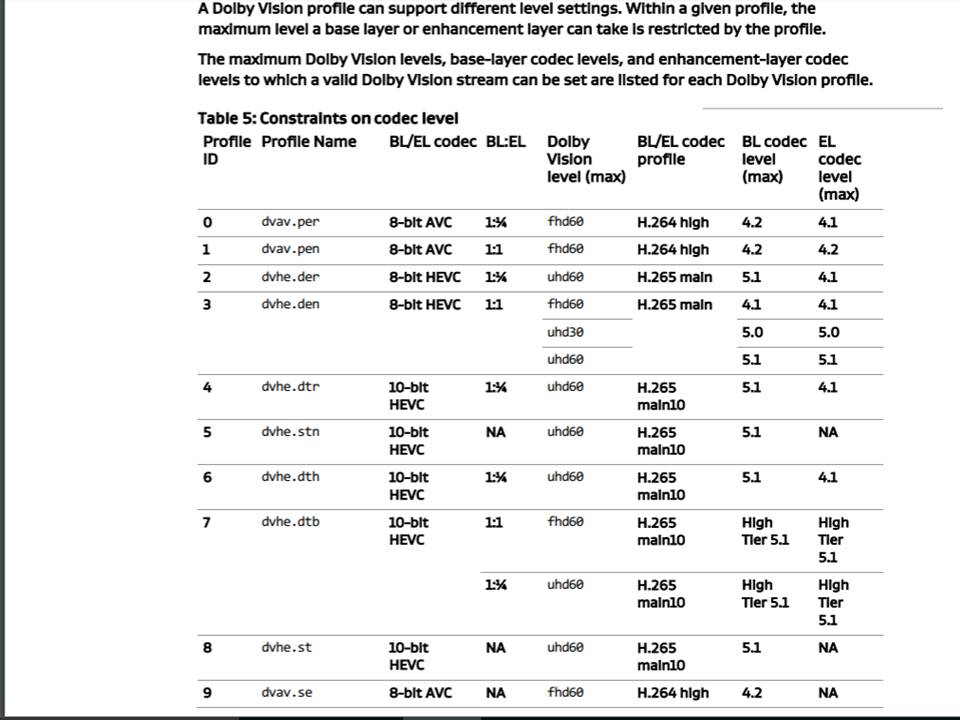
The only profiles that support BL + EL + RPU are 4 and 7 (6 is no longer in use).
mp4muxer should be used for testing purposes.
-
jkatchy2
- Posts: 16
- Joined: Tue Mar 10, 2020 2:13 am
Re: Dolby Vision now possible through MP4 Mux.
I am trying to use your tool to create BL + EL + RPU, i have extracted BL & EL hevc streams from my mkv using ffmpeg but the tool always exists out atyusesope wrote: Wed Mar 11, 2020 4:08 pm Could be.
The only profiles that support BL + EL + RPU are 4 and 7 (6 is no longer in use).
mp4muxer should be used for testing purposes.
BL ANALYSYS: 100.0% EL ANALYSYS 0.0% BL_EL_RPU WRITING 89.8%
i tried demuxing with tsMuxer same result .With eac3to it worked , but the playback after muxing with mp4muxer is very dark and colors are washed out .
Using HDD via USB on B9
-
mattmarsden
- Posts: 88
- Joined: Mon Sep 03, 2018 10:36 am
Re: Dolby Vision now possible through MP4 Mux.
Same with Power RangersArbigator wrote: Wed Mar 11, 2020 12:07 amThat's interesting, I didn't realize it's in HDR10+, though that explains the descriptor in mediainfo. The file did not give any errors in the tool, and it did finish to 100%.shawnc22 wrote: Tue Mar 10, 2020 11:40 pmI was going to give that a try, too, when I got home, but I can try First Man also. I'm wondering if it might be because the Doctor Sleep disc is also in HDR10+. The EL might be a little different in that case?RESET_9999 wrote: Tue Mar 10, 2020 11:14 pm
yep, I think Doctor Sleep EL is not processed. It gives me an error with V1 tool and with V2 tool , EL analyzing stays at 0%.

-
thetoad
- Posts: 256
- Joined: Thu Jul 28, 2016 4:18 am
Re: Dolby Vision now possible through MP4 Mux.
the mkv files mike posted when played on my oppo to my sony x940e, they only comes up as hdr10, not dolby vision.
when I play the dolby vision ts files on LG's website (https://4kmedia.org/lg-amaze-dolby-vision-uhd-4k-demo/) they come up as dolby vision
when I play the dolby vision ts files on LG's website (https://4kmedia.org/lg-amaze-dolby-vision-uhd-4k-demo/) they come up as dolby vision
-
mike admin
- Posts: 4108
- Joined: Wed Nov 26, 2008 2:26 am
Re: Dolby Vision now possible through MP4 Mux.
Ok, I'm reading the Dolby "profiles and levels" spec:yusesope wrote: Wed Mar 11, 2020 3:33 pm I believe that it is not possible to discard anything.
Regardless of the type of EL (fEL or mEL), in the case of a dvhe.04 or dvhe.07 profile, the Dolby Vision Composer accepts synchronized decoded BL and EL video frames and metadata information and uses metadata to reconstruct 12bit Dolby Vision video.
Code: Select all
2.1.1 Notes to profiles
For profile 4:
A new Dolby Vision certified device is able to decode a profile 4 MEL bitstream without instantiating a secondary HEVC decoder for the enhancement layer.

For profile 7:
The MEL can be used for profile 7 to minimize the processing requirements for the enhancement layer and therefore ensure broader use among UltraHD Blu-ray SoCs.

6.2 Annex II: Differentiating MEL and non-MEL bitstreams
Pictures contained in a Dolby Vision bitstream can be encoded as either MEL or non-MEL, not both.

If a Dolby Vision playback device supports Dolby Vision profile 4 and chooses not to instantiate a second HEVC decoder, then it must check for these values in the
reference processing unit of a Dolby Vision bitstream.

If a Dolby Vision playback device supports Dolby Vision profile 7, it can check for these values in the reference processing unit of a Dolby Vision bitstream.
Profile 4 - the doc explicitly states that the whole secondary decoder may be not instantiated at all (EL data discarded).
Profile 7 - the vague note that knowing about MEL can "minimize the processing requirements for the enhancement layer". I assume the same - no need to instantiate a second HEVC decoder, just generate same gray pictures as in profile 4.
And the fact that "dvdfab method" (BL+MEL RPU only, EL discarded) works, kind of proves that. Am I wrong?
Of course, EL is always 12 bit on blu-ray. The question is what exactly is in these 2 extra bits. My hypothesis - in MEL stream all pictures in EL are filled with the same value (zeroes). This is easy to verify though - one just has to decode entire EL from any MEL disc (Joker) and confirm that ALL frames in EL are indeed dark zero pictures. From the sizes of slice NALU it looks that way.yusesope wrote: Wed Mar 11, 2020 3:33 pm vdr_bit_depth_minus8 is equal to 4 in both fEL and mEL stream (so vdr_bit_depth = 12)
-
mike admin
- Posts: 4108
- Joined: Wed Nov 26, 2008 2:26 am
Re: Dolby Vision now possible through MP4 Mux.
This could be an explicit container check. Can you please try converting MKV file to TS and see if it changes anything at all.thetoad wrote: Wed Mar 11, 2020 5:30 pm the mkv files mike posted when played on my oppo to my sony x940e, they only comes up as hdr10, not dolby vision.
when I play the dolby vision ts files on LG's website (https://4kmedia.org/lg-amaze-dolby-vision-uhd-4k-demo/) they come up as dolby vision
Code: Select all
ffmpeg -i Joker_BL_EL_RPU.mkv -c copy Joker_BL_EL_RPU.ts-
Arbigator
- Posts: 32
- Joined: Fri Feb 28, 2020 9:16 pm
Re: Dolby Vision now possible through MP4 Mux.
I converted the mkv files you posted to ts with tsMuxer, and they both playback correctly triggering Dolby Vision on the 2019 Shield.mike admin wrote: Wed Mar 11, 2020 6:26 pmThis could be an explicit container check. Can you please try converting MKV file to TS and see if it changes anything at all.thetoad wrote: Wed Mar 11, 2020 5:30 pm the mkv files mike posted when played on my oppo to my sony x940e, they only comes up as hdr10, not dolby vision.
when I play the dolby vision ts files on LG's website (https://4kmedia.org/lg-amaze-dolby-vision-uhd-4k-demo/) they come up as dolby visionCode: Select all
ffmpeg -i Joker_BL_EL_RPU.mkv -c copy Joker_BL_EL_RPU.ts
-
ragico
- Posts: 266
- Joined: Fri Feb 15, 2019 1:09 am
Re: Dolby Vision now possible through MP4 Mux.
I too converted your files with tsmuxer. In firestick 4k both files trigger Dolby Vision via Plex app (beta)mike admin wrote: Wed Mar 11, 2020 6:26 pmThis could be an explicit container check. Can you please try converting MKV file to TS and see if it changes anything at all.thetoad wrote: Wed Mar 11, 2020 5:30 pm the mkv files mike posted when played on my oppo to my sony x940e, they only comes up as hdr10, not dolby vision.
when I play the dolby vision ts files on LG's website (https://4kmedia.org/lg-amaze-dolby-vision-uhd-4k-demo/) they come up as dolby visionCode: Select all
ffmpeg -i Joker_BL_EL_RPU.mkv -c copy Joker_BL_EL_RPU.ts
In emby app they trigger hdr
-
mike admin
- Posts: 4108
- Joined: Wed Nov 26, 2008 2:26 am
Re: Dolby Vision now possible through MP4 Mux.
So this IS just a container check, and hardware can use this encoding method. We're good!Arbigator wrote: Wed Mar 11, 2020 9:41 pm I converted the mkv files you posted to ts with tsMuxer, and they both playback correctly triggering Dolby Vision on the 2019 Shield.
Guys, please make sure to use the very latest tsmuxer from doom9 (the one that supports EL NALUs) or any version of ffmpeg with "-c copy", in order to preserve all data during container conversion.ragico wrote: Wed Mar 11, 2020 10:50 pm I too converted your files with tsmuxer. In firestick 4k both files trigger Dolby Vision via Plex app (beta). In emby app they trigger hdr
Code: Select all
ffmpeg -i Joker_BL_EL_RPU.mkv -c copy Joker_BL_EL_RPU.ts-
Angryunibrow
- Posts: 104
- Joined: Wed Nov 06, 2019 11:26 pm
Re: Dolby Vision now possible through MP4 Mux.
So what does all this mean exactlymike admin wrote: Wed Mar 11, 2020 11:11 pmSo this IS just a container check, and hardware can use this encoding method. We're good!Arbigator wrote: Wed Mar 11, 2020 9:41 pm I converted the mkv files you posted to ts with tsMuxer, and they both playback correctly triggering Dolby Vision on the 2019 Shield.
Guys, please make sure to use the very latest tsmuxer from doom9 (the one that supports EL NALUs) or any version of ffmpeg with "-c copy", in order to preserve all data during container conversion.ragico wrote: Wed Mar 11, 2020 10:50 pm I too converted your files with tsmuxer. In firestick 4k both files trigger Dolby Vision via Plex app (beta). In emby app they trigger hdrCode: Select all
ffmpeg -i Joker_BL_EL_RPU.mkv -c copy Joker_BL_EL_RPU.ts
Are we going to be able to make DV files in Makemkv and convert them to .TS?
-
mike admin
- Posts: 4108
- Joined: Wed Nov 26, 2008 2:26 am
Re: Dolby Vision now possible through MP4 Mux.
Yes, in the next version.Angryunibrow wrote: Wed Mar 11, 2020 11:19 pm So what does all this mean exactly
Are we going to be able to make DV files in Makemkv and convert them to .TS?
But, hopefully, even with current MKV samples we will be able to bug and poke firmware and playback software authors, so they add support for MKV container when they check for the possible DV data. Plex looks like a first candidate to me...
-
Angryunibrow
- Posts: 104
- Joined: Wed Nov 06, 2019 11:26 pm
Re: Dolby Vision now possible through MP4 Mux.
Keeping HD Audio (Atmos) in tact I presume?mike admin wrote: Wed Mar 11, 2020 11:30 pmYes, in the next version.Angryunibrow wrote: Wed Mar 11, 2020 11:19 pm So what does all this mean exactly
Are we going to be able to make DV files in Makemkv and convert them to .TS?
But, hopefully, even with current MKV samples we will be able to bug and poke firmware and playback software authors, so they add support for MKV container when they check for the possible DV data. Plex looks like a first candidate to me...