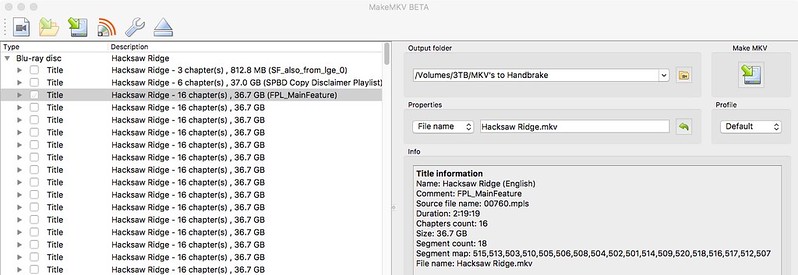
theonegod wrote:In my copy of MakeMKV it lists all of the versions yes, but at the top it shows the ones it has identified as the feature as well as the trailers and other things. In this case yes, the Redbox version was 760 as the other poster stated. But MakeMKV showed me this without me having to do anything.
760 does not work even though it says main feature.
Based on what? Seems to work for me.
Based on trying it and it saying it has corrupted files
Based on trying it and it saying it has corrupted files
I just selected it, ripped it to MKV, and then played it back all without error. I didn't watch it straight through but it played, the beginning was right, the credits were right, and the middle skipped through ok. I have not come across this ":corrupted files" notice in the past. When is this happening for you? During playback? Can you be more specific? It doesn't sound like you are saying the sequence is out of order but rather something else and it may have nothing whatsoever to do with what we are talking about.
You can watch the ripped file in proper cinematic order? Are you watching the MKV on something like KODI or did you transcribe? (Suppose it wouldn't make a difference, though.)
EDIT: Sorry. Missed page 2 when I refreshed. Thanks for your help; I am trying 760 right now.
I have not sat and watched it all the way through yet not. But the beginning, middle and end are correct. I will watch it tonight or something. I watched it on my Macbook Pro using VLC. The sequences being out of order isn't what the person I was replying to was complaining about in any case.
Here's what makemkv shows (RB version) and what others have made reference to in earlier posts.
In my opinion the javascript that Mike developed has become more accurate over time. The last few Lionsgate discs have been on the nose.
Not sure what is going on but I just shut down my DVD burner and restarted everything and it has ripped with no error. Looks like it may work. Currently encoding 760
Ok, so I'm ripping 760 per the above advice. Now I'd really love to know about this JS plugin that someone mentioned. I'm not seeing the "Comment" field in my list of possible playlists....
Papa007 wrote:Ok, so I'm ripping 760 per the above advice. Now I'd really love to know about this JS plugin that someone mentioned. I'm not seeing the "Comment" field in my list of possible playlists....
I had the same issue. However, I also hadn't installed Java JRE on my HTPC. After installing JRE, I rescanned Hacksaw, and got (FPL_MainFeature) listed at the end of 760, and 760 title was pulled to the top.
If you don't have Java installed, try installing the basic runtime and rescan. I'm curious to see if it can be confirmed
hvnphoto wrote:Retail Version
Title information
Name: Hacksaw Ridge
Source file name: 00001.mpls
Duration: 2:19:19
Chapters count: 16
Size: 33.2 GB
Segment count: 20
Segment map: 509,513,502,514,520,517,508,505,515,501,506,503,516,519,512,504,507,518,510,511
File name: Hacksaw_Ridge_t00.mkv
Might be 00411.mpls for another version. The segment map is correct.
The segment map lines up for me on "_t11.mkv" or "00894.mpls." I'm ripping it at this moment, but as I said, the segment map is identical. Keeping fingers crossed that this is truly in the right order.