75th Trombone wrote: Thu Jun 11, 2026 9:23 pm
Disregard the above. The device I received (from a Newegg seller) is counterfeit.
Glad I came across this post -- I have a feeling I ordered from the same 3rd party seller that shipped out of China (RIGX). Thought I was going crazy encountering the error with SDFtool and tried flashing via Powershell and even via Mac terminal since MakeMKV kept showing LibreDrive status enabled, but I encountered the same issue trying to use SDFtool and, regardless of how many times or what firmware I flashed, all the info in MakeMKV looked the same after each attempt.
Luckily I snagged the same model drive from Best Buy that's arriving soon -- showed as being a sold/shipped by them and not a 3rd party seller, so fingers crossed that one works, since I bought a few used UHD titles that apparently are 100GB UHDs that my Series X isn't able to read and just need to confirm they're actually UHDs and not counterfit lol
The current theory on the VGPC Discord is that the fake drive I got is the correct internal drive in a fake/incompatible enclosure. (Because MakeMKV does say it is the correct platform.) They suggested I try a cheapo enclosure from Aliexpress that they say has a good success rate when a valid drive is put inside it. We’ll see!
75th Trombone wrote: Fri Jun 12, 2026 7:22 pm
The current theory on the VGPC Discord is that the fake drive I got is the correct internal drive in a fake/incompatible enclosure. (Because MakeMKV does say it is the correct platform.) They suggested I try a cheapo enclosure from Aliexpress that they say has a good success rate when a valid drive is put inside it. We’ll see!
I have a BP50NB40 SVC 52 (manufactured in March 2024 if that matters) and it seems like I've flashed it to a UHD-enabled firmware (it's recognized in MakeMKV), but the drive will not read UHD discs. I've followed the steps a bunch of times and no matter what I do, the drive refuses to recognize UHD discs. I confirmed that it does work with Blu-Rays (so I've ruled out a bricked device) and the disc works in my PS5 (so I've ruled out a faulty disc), I've tried on both version 1.3.5 and 1.3.6 of SDFtool Flasher, I've tried to use a powered USB hub, but nothing works - any ideas why I can't get my drive to read UHDs?
Last edited by subduedcarrot on Mon Jun 22, 2026 10:05 pm, edited 3 times in total.
subduedcarrot wrote: Mon Jun 22, 2026 9:55 pm
I have a BP50NB40 SVC 52 (manufactured in March 2024 if that matters) and it seems like I've flashed it to a UHD-enabled firmware (it's recognized in MakeMKV), but the drive will not read UHD discs. I've followed the steps a bunch of times and no matter what I do, the drive refuses to recognize UHD discs. I confirmed that it does work with Blu-Rays (so I've ruled out a bricked device) and the disc works in my PS5 (so I've ruled out a faulty disc), I've tried on both version 1.3.5 and 1.3.6 of SDFtool Flasher, I've tried to use a powered USB hub, but nothing works - any ideas why I can't get my drive to read UHDs?
You probably aren't doing the cross-flash correctly. You use the RECOVER option to do this as per the instructions and gif in the first post of this thread. It might actually help if you copy and paste the MakeMKV drive info and libredrive info sections text so we can see what you have done.
Cheers
----------------------------------------------------------------------------------------------------------------------------
** NEW Single Drive Flasher ** available worldwide! https://payhip.com/b/MyeJ9
Email: martymcnuts@outlook.com
subduedcarrot wrote: Mon Jun 22, 2026 9:55 pm
I have a BP50NB40 SVC 52 (manufactured in March 2024 if that matters) and it seems like I've flashed it to a UHD-enabled firmware (it's recognized in MakeMKV), but the drive will not read UHD discs. I've followed the steps a bunch of times and no matter what I do, the drive refuses to recognize UHD discs. I confirmed that it does work with Blu-Rays (so I've ruled out a bricked device) and the disc works in my PS5 (so I've ruled out a faulty disc), I've tried on both version 1.3.5 and 1.3.6 of SDFtool Flasher, I've tried to use a powered USB hub, but nothing works - any ideas why I can't get my drive to read UHDs?
You probably aren't doing the cross-flash correctly. You use the RECOVER option to do this as per the instructions and gif in the first post of this thread. It might actually help if you copy and paste the MakeMKV drive info and libredrive info sections text so we can see what you have done.
Sorry, I thought I had added a screenshot to my post but I guess it didn't work.
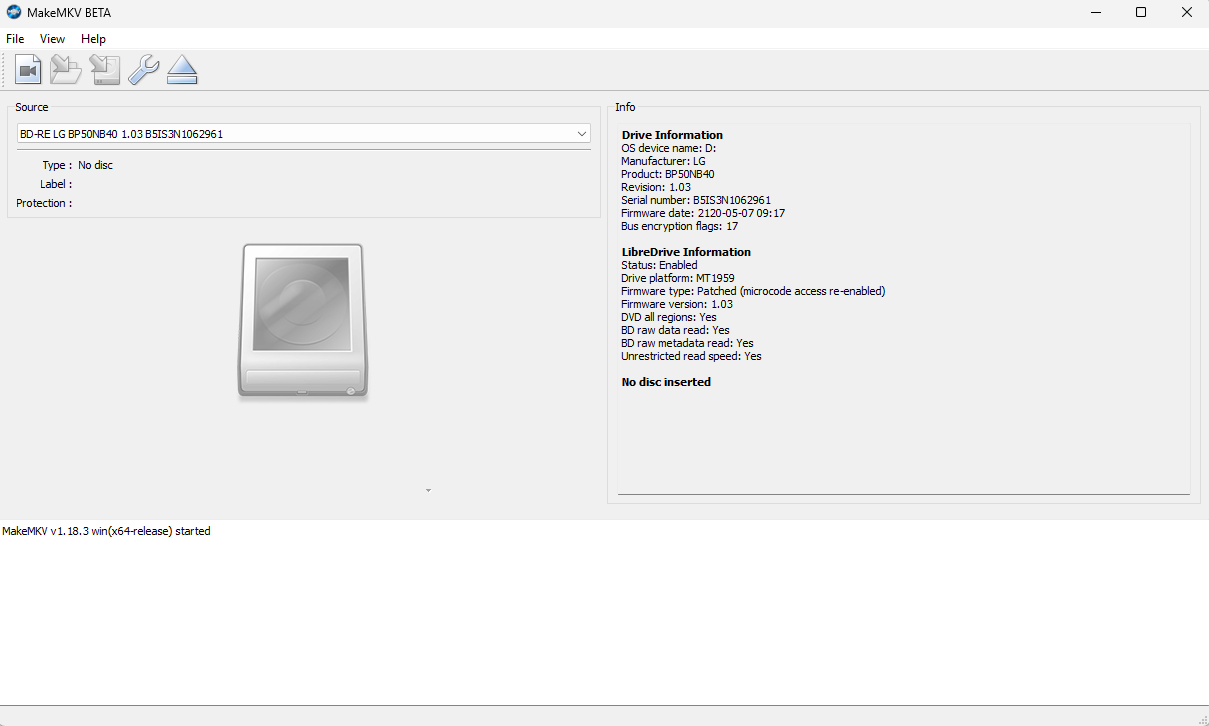
I did use the RECOVER option to crossflash. Here's what I see in MakeMKV:
Drive Information
OS device name: D:
Manufacturer: HL-DT-ST
Product: BD-RE BU40N
Revision: 1.03
Serial number: *************
Firmware date: 2118-10-24 19:34
Bus encryption flags: 17
Highest AACS version: 82
LibreDrive Information
Status: Enabled
Drive platform: MT1959
Firmware type: Patched (microcode access re-enabled)
Firmware version: 1.03
DVD all regions: Yes
BD raw data read: Yes
BD raw metadata read: Yes
Unrestricted read speed: Yes
subduedcarrot wrote: Mon Jun 22, 2026 9:55 pm
I have a BP50NB40 SVC 52 (manufactured in March 2024 if that matters) and it seems like I've flashed it to a UHD-enabled firmware (it's recognized in MakeMKV), but the drive will not read UHD discs. I've followed the steps a bunch of times and no matter what I do, the drive refuses to recognize UHD discs. I confirmed that it does work with Blu-Rays (so I've ruled out a bricked device) and the disc works in my PS5 (so I've ruled out a faulty disc), I've tried on both version 1.3.5 and 1.3.6 of SDFtool Flasher, I've tried to use a powered USB hub, but nothing works - any ideas why I can't get my drive to read UHDs?
You probably aren't doing the cross-flash correctly. You use the RECOVER option to do this as per the instructions and gif in the first post of this thread. It might actually help if you copy and paste the MakeMKV drive info and libredrive info sections text so we can see what you have done.
Sorry, I thought I had added a screenshot to my post but I guess it didn't work.
I did use the RECOVER option to crossflash. Here's what I see in MakeMKV:
Drive Information
OS device name: D:
Manufacturer: HL-DT-ST
Product: BD-RE BU40N
Revision: 1.03
Serial number: *************
Firmware date: 2118-10-24 19:34
Bus encryption flags: 17
Highest AACS version: 82
LibreDrive Information
Status: Enabled
Drive platform: MT1959
Firmware type: Patched (microcode access re-enabled)
Firmware version: 1.03
DVD all regions: Yes
BD raw data read: Yes
BD raw metadata read: Yes
Unrestricted read speed: Yes
No disc inserted
Ok, so you have flashed it correctly by the look of it. Have you power cycled the drive? Are you using the original USB-A y-cable? If so, have you ensured both USB plugs are connected to USB 3+ ports directly on the motherboard or an AC self-powered USB hub of at least 24w? If using a USB-C cable, ensure it is connected to a USB-C port on the motherboard (or the powered USB hub). Do not use case ports.
Once you have ensured the above is correct, what exactly happens when you:
1. Insert a UHD disc
2. Let Windows initialise it (you should see it in explorer)
3. Then open the MakeMKV application.
Cheers
----------------------------------------------------------------------------------------------------------------------------
** NEW Single Drive Flasher ** available worldwide! https://payhip.com/b/MyeJ9
Email: martymcnuts@outlook.com
Thanks for the reply - yes, I've been trying using the original USB-A y-cable. I've tried plugging it into two USB 3.0 ports on my laptop and I even tried plugging both cables into this powered USB hub and it still wouldn't read.
When I put in the UHD disc, the drive will make a click/honk/skid sound every ~6 seconds or so for about 2 minutes before stopping. During this time in MakeMKV, it will just say "Loading" until it stops and says "No disc inserted". Same thing as when I click on the drive in This PC - it will try for about 2 minutes before ejecting the disc tray.
Last edited by subduedcarrot on Tue Jun 23, 2026 3:03 am, edited 2 times in total.
I just purchased the BP50NB40 NB52 model this month and have exact same behavior as @subduedcarrot after the upgrade. His screen shot info is also identical to mine. Only difference is the mfr date on my device is April 2026.
I had followed the initial firmware update steps very carefully, then retried various options to try to get it to succeed. But, no go. Win11 device status says the device is working properly.
I don't have a powered USB hub to try to see if that would make any difference. I do have the OEM Y cables plugged into the front case of my Dell PC.
Just chiming in, I was able to successfully flash a BP50NB40 NB52 using the exact same steps shown the visual aid (ended on BU40N 1.00 firmware). I bought a used drive manufactured in Oct. 2021; not sure if that matters. It abruptly lost power on first try after flashing, but on 2nd try it loaded my UHD disc and MakeMKV showed the titles. Definitely a panic buy given the price but glad I have a working one just in case.
subduedcarrot wrote: Tue Jun 23, 2026 2:24 am
Thanks for the reply - yes, I've been trying using the original USB-A y-cable. I've tried plugging it into two USB 3.0 ports on my laptop and I even tried plugging both cables into this powered USB hub and it still wouldn't read.
When I put in the UHD disc, the drive will make a click/honk/skid sound every ~6 seconds or so for about 2 minutes before stopping. During this time in MakeMKV, it will just say "Loading" until it stops and says "No disc inserted". Same thing as when I click on the drive in This PC - it will try for about 2 minutes before ejecting the disc tray.
Most laptop USB ports do not provide enough, consistent, constant power for an optical drive. I also don't think your hub is powerful enough. It's ok for charging and using USB sticks but I doubt it can provide enough juice for an optical drive. It "might" if the USB-C ports can be used for something other than charging. There are only a few compatible AC powered hub models that are recommended in the Ultimate UHD Drive Guide 2026.
Cheers
----------------------------------------------------------------------------------------------------------------------------
** NEW Single Drive Flasher ** available worldwide! https://payhip.com/b/MyeJ9
Email: martymcnuts@outlook.com