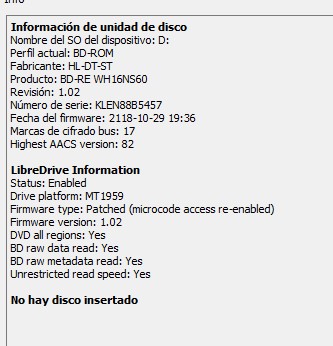
After doing some investigation on Reddit in regards to flashing a 4K firmware onto my ASUS BW-16D1-XU drive, a user said I could use a firmware for what seems to be an LG drive (DE_LG_WH16NS60_1.02_MK) and it worked for that user. Trying to flash it onto my drive and it spits out an error, screenshots attached. I'm super new to this so any advice would be greatly appreciated!
Take the disc out of the drive!
Thank you for that! I didn’t think there was a disk in there but the flash did work! I tried putting in Ballerina and it still didn’t recognize the media. I didn’t have the chance to try another disk before I had to head out so is it a chance the media is just too new or something?
Balleriina has been out for months so doubt it. Have you made sure MakeMKV has internet access? It is required so that MakeMKV's internal Hashed Keys database can be downloaed and updated as required.
You can also copy and paste the MakeMKV drive info & libredrive info sections so we can ensure the flash worked.
Copy and paste the log window text when you get an error or what not so that we can help further.
Cheers
----------------------------------------------------------------------------------------------------------------------------
** NEW Single Drive Flasher ** available worldwide! https://payhip.com/b/MyeJ9
Email: martymcnuts@outlook.com
Please disregard my prior comment; I reflashed the firmware, and it now reads "enabled" under the status. Guess I screwed something up! As a sanity check, I threw in my 4K copy of Ballerina and it worked. Thank you guys for the excellent help and patience!
I have an Asus drive (WH16NS60) flashed with 1.02 version (LG)...I am having problems to rip some discs (sean connery 6 films and tried with 2 different copies)...I saw there is a 1.03 version...should it flash it with the most new one? Where I can find the last version? In the firts page I download the zip with all bin but I only see 1.02
I have an Asus drive (WH16NS60) flashed with 1.02 version (LG)...I am having problems to rip some discs (sean connery 6 films and tried with 2 different copies)...I saw there is a 1.03 version...should it flash it with the most new one? Where I can find the last version? In the firts page I download the zip with all bin but I only see 1.02
most likely not a fw issue
we need to know the error to help could be a key download issue or dirty disc's or laser or a failing drive
I have an Asus drive (WH16NS60) flashed with 1.02 version (LG)...I am having problems to rip some discs (sean connery 6 films and tried with 2 different copies)...I saw there is a 1.03 version...should it flash it with the most new one? Where I can find the last version? In the firts page I download the zip with all bin but I only see 1.02
most likely not a fw issue
we need to know the error to help could be a key download issue or dirty disc's or laser or a failing drive
This is the second pack I have, so I discard problems with discs. Some of them I was able to rip, like From Russia with Love, Goldfinger, Thunderball...the rest impossible. Now I made a backup with makemkv of Diamonds are Forever and I receive this error:
I just downloaded the tool but does not show up correctly on my windows 11 machine. It appears that the windows is too small and I can not see the check marks and the text is cutoff. Windows will not let me make the window bigger.
You do not have the required permissions to view the files attached to this post.
sgibbers17 wrote: Wed Mar 18, 2026 10:39 pm
I just downloaded the tool but does not show up correctly on my windows 11 machine. It appears that the windows is too small and I can not see the check marks and the text is cutoff. Windows will not let me make the window bigger.
From the first post.
NOTE: If the GUI looks a bit deformed (happens on a 4k monitor), you can right click the exe and select properties. In the compatibility tab, click "Change high DPI settings" then under "High DPI scaling override" tick the box and select "System (Enhanced)" in the dropbox.
Cheers
----------------------------------------------------------------------------------------------------------------------------
** NEW Single Drive Flasher ** available worldwide! https://payhip.com/b/MyeJ9
Email: martymcnuts@outlook.com
sgibbers17 wrote: Wed Mar 18, 2026 10:39 pm
I just downloaded the tool but does not show up correctly on my windows 11 machine. It appears that the windows is too small and I can not see the check marks and the text is cutoff. Windows will not let me make the window bigger.
From the first post.
NOTE: If the GUI looks a bit deformed (happens on a 4k monitor), you can right click the exe and select properties. In the compatibility tab, click "Change high DPI settings" then under "High DPI scaling override" tick the box and select "System (Enhanced)" in the dropbox.
sgibbers17 wrote: Wed Mar 18, 2026 10:39 pm
I just downloaded the tool but does not show up correctly on my windows 11 machine. It appears that the windows is too small and I can not see the check marks and the text is cutoff. Windows will not let me make the window bigger.
From the first post.
NOTE: If the GUI looks a bit deformed (happens on a 4k monitor), you can right click the exe and select properties. In the compatibility tab, click "Change high DPI settings" then under "High DPI scaling override" tick the box and select "System (Enhanced)" in the dropbox.
that didn't work the app will not even show up.
What?!?
1. right click the exe
2. select properties
3. In the compatibility tab, click "Change high DPI settings"
4. under "High DPI scaling override" tick the box and select "System (Enhanced)"
5. click apply and close this window
6. Now run the exe.
Cheers
----------------------------------------------------------------------------------------------------------------------------
** NEW Single Drive Flasher ** available worldwide! https://payhip.com/b/MyeJ9
Email: martymcnuts@outlook.com
NOTE: If the GUI looks a bit deformed (happens on a 4k monitor), you can right click the exe and select properties. In the compatibility tab, click "Change high DPI settings" then under "High DPI scaling override" tick the box and select "System (Enhanced)" in the dropbox.
that didn't work the app will not even show up.
What?!?
1. right click the exe
2. select properties
3. In the compatibility tab, click "Change high DPI settings"
4. under "High DPI scaling override" tick the box and select "System (Enhanced)"
5. click apply and close this window
6. Now run the exe.
This is a screenshot of before settings are changed.
Screenshot 2026-03-18 182549.png
Screenshot of my settings
Screenshot 2026-03-18 182705.png
what it looks like with the new settings.
You do not have the required permissions to view the files attached to this post.
1. right click the exe
2. select properties
3. In the compatibility tab, click "Change high DPI settings"
4. under "High DPI scaling override" tick the box and select "System (Enhanced)"
5. click apply and close this window
6. Now run the exe.
This is a screenshot of before settings are changed.
Screenshot 2026-03-18 182549.png
Screenshot of my settings
Screenshot 2026-03-18 182705.png
what it looks like with the new settings.
Wow, never seen that happen before! Just download the old original from the first post and use that. It should look correct.
Cheers
----------------------------------------------------------------------------------------------------------------------------
** NEW Single Drive Flasher ** available worldwide! https://payhip.com/b/MyeJ9
Email: martymcnuts@outlook.com
I am unable to use SDFtool Flasher on VMware Fusion (Windows 11 Home Arm) via my ARM-based M2 Mac. Here's the drive info from makemkv running on my mac:
Drive Information
Manufacturer: HL-DT-ST
Product: BD-RE BP50NB40
Revision: 1.03
Serial number: SIK05Q91B1943
Firmware date: 2121-07-08 16:03
Bus encryption flags: 17
Highest AACS version: 82

LibreDrive Information
Status: Possible (with patched firmware)
Drive platform: MT1959
Harware support: Yes
Firmware support: No
Firmware type: Original (patched version available)
Firmware version: 1.03
DVD all regions: Possible (with patched firmware)
BD raw data read: Possible (with patched firmware)
BD raw metadata read: Possible (with patched firmware)
Unrestricted read speed: Possible (with patched firmware)

No disc inserted
Here's the same info as reported by makemkv running in my VMware Windows VM:
Drive Information
OS device name: E:
Manufacturer: NECVMWar
Product: VMware SATA CD00
Revision: 1.00
Serial number: SIK05Q91B1943
Firmware date: 2121-07-08 16:03
Bus encryption flags: 17

LibreDrive Information
Status: Possible (with patched firmware)
Drive platform: MT1959
Harware support: Yes
Firmware support: No
Firmware type: Original (patched version available)
Firmware version: 1.03
DVD all regions: Possible (with patched firmware)
BD raw data read: Possible (with patched firmware)
BD raw metadata read: Possible (with patched firmware)
Unrestricted read speed: Possible (with patched firmware)

No disc inserted
When I load the SDFtool (v1.3.6) and select the drive I get the following error: