I was cleaning out a closet and found a brand new retail boxed bluray burner. I installed it today to test it with MakeMKV, and it says this:
Drive Information
OS device name: H:
Current profile: BD-ROM
Manufacturer: ASUS
Product: BW-12B1ST a
Revision: 1.00
Serial number: K********
Firmware date: 2113-04-23 11:47
Bus encryption flags: 1F
Highest AACS version: 81
LibreDrive Information
Status: Enabled
Drive platform: MT1939
Firmware type: Original (unpatched)
Firmware version: 1.00
DVD all regions: Yes
BD raw data read: Yes
BD raw metadata read: Partial
Unrestricted read speed: Yes
-----------------------------------------------------
So.... if LibreDrive is Enabled, shouldn't it work? It works okay with blurays but it can't seem to see 4K discs. I know it can 100GB discs since I inserted a 100GB burned data bluray disc. I was able to copy the files off the disc onto my hard drive. So.... Not sure what to do. It came with a CDROM that has a firmware flasher on it, but it says it will connect to the internet to check for newer firmware. I was afraid to do anything with that yet. There is a similar BC-12B1ST (BC instead of BW) drive that seems to have newer firmware, but even the ASUS website doesn't even list my BW-12B1STa drive despite it being retail boxed...? I don't get it. Anyone have any advice?
ASUS BW-12B1ST a
-
Billycar11
- Posts: 6300
- Joined: Sun Aug 24, 2014 5:49 am
Re: ASUS BW-12B1ST a
way to old to do 4K leave it alone it can only do regular BD
do not flash it
it will die
do not flash it
it will die
Buy a drive from the guide and video maker: viewtopic.php?t=17831
UHD Drive Guide: viewtopic.php?t=19634
Auto flash kit $40 Email Billycar5924@gmail.com No attachments
UHD Drive Guide: viewtopic.php?t=19634
Auto flash kit $40 Email Billycar5924@gmail.com No attachments
-
MartyMcNuts
- Posts: 5108
- Joined: Wed Nov 22, 2017 11:45 pm
Re: ASUS BW-12B1ST a
Firmware date: 2113-04-23 11:47MusicMan wrote: Sun Jan 25, 2026 4:59 am I was cleaning out a closet and found a brand new retail boxed bluray burner. I installed it today to test it with MakeMKV, and it says this:
Drive Information
OS device name: H:
Current profile: BD-ROM
Manufacturer: ASUS
Product: BW-12B1ST a
Revision: 1.00
Serial number: K********
Firmware date: 2113-04-23 11:47
Bus encryption flags: 1F
Highest AACS version: 81
LibreDrive Information
Status: Enabled
Drive platform: MT1939
Firmware type: Original (unpatched)
Firmware version: 1.00
DVD all regions: Yes
BD raw data read: Yes
BD raw metadata read: Partial
Unrestricted read speed: Yes
-----------------------------------------------------
So.... if LibreDrive is Enabled, shouldn't it work? It works okay with blurays but it can't seem to see 4K discs. I know it can 100GB discs since I inserted a 100GB burned data bluray disc. I was able to copy the files off the disc onto my hard drive. So.... Not sure what to do. It came with a CDROM that has a firmware flasher on it, but it says it will connect to the internet to check for newer firmware. I was afraid to do anything with that yet. There is a similar BC-12B1ST (BC instead of BW) drive that seems to have newer firmware, but even the ASUS website doesn't even list my BW-12B1STa drive despite it being retail boxed...? I don't get it. Anyone have any advice?
Drive platform: MT1939
Your drive is too old! It is pre 2016 and has the old MT1939 drive platform. It's hardware is simply too old. Must be MT1959 and 2016+ (or late 2015) for UHD compatibility.
Also BDXL does not equal UHD.
Cheers 
----------------------------------------------------------------------------------------------------------------------------
** NEW Single Drive Flasher ** available worldwide! https://payhip.com/b/MyeJ9
Email: martymcnuts@outlook.com
----------------------------------------------------------------------------------------------------------------------------
** NEW Single Drive Flasher ** available worldwide! https://payhip.com/b/MyeJ9
Email: martymcnuts@outlook.com
-
MusicMan
- Posts: 27
- Joined: Sat Jan 17, 2026 3:42 am
Re: ASUS BW-12B1ST a
Yeah, RIP ASUS drive. It's very slow compared to the newer drives. Guess I'll have to trash it and get a new LG drive before they stop making them if they haven't already. They are going out of stock everywhere it seems. Thanks for the advice. I didn't realize how old the drive was.Billycar11 wrote: Sun Jan 25, 2026 5:17 am way to old to do 4K leave it alone it can only do regular BD
do not flash it
it will die
-
MusicMan
- Posts: 27
- Joined: Sat Jan 17, 2026 3:42 am
Re: ASUS BW-12B1ST a
Year 2113 sounds quite modern.MartyMcNuts wrote: Sun Jan 25, 2026 6:22 amFirmware date: 2113-04-23 11:47MusicMan wrote: Sun Jan 25, 2026 4:59 am I was cleaning out a closet and found a brand new retail boxed bluray burner. I installed it today to test it with MakeMKV, and it says this:
Drive Information
OS device name: H:
Current profile: BD-ROM
Manufacturer: ASUS
Product: BW-12B1ST a
Revision: 1.00
Serial number: K********
Firmware date: 2113-04-23 11:47
Bus encryption flags: 1F
Highest AACS version: 81
LibreDrive Information
Status: Enabled
Drive platform: MT1939
Firmware type: Original (unpatched)
Firmware version: 1.00
DVD all regions: Yes
BD raw data read: Yes
BD raw metadata read: Partial
Unrestricted read speed: Yes
-----------------------------------------------------
So.... if LibreDrive is Enabled, shouldn't it work? It works okay with blurays but it can't seem to see 4K discs. I know it can 100GB discs since I inserted a 100GB burned data bluray disc. I was able to copy the files off the disc onto my hard drive. So.... Not sure what to do. It came with a CDROM that has a firmware flasher on it, but it says it will connect to the internet to check for newer firmware. I was afraid to do anything with that yet. There is a similar BC-12B1ST (BC instead of BW) drive that seems to have newer firmware, but even the ASUS website doesn't even list my BW-12B1STa drive despite it being retail boxed...? I don't get it. Anyone have any advice?

-
Billycar11
- Posts: 6300
- Joined: Sun Aug 24, 2014 5:49 am
Re: ASUS BW-12B1ST a
i would not trash it even those are going for $100+ nowMusicMan wrote: Sun Jan 25, 2026 7:18 am
Yeah, RIP ASUS drive. It's very slow compared to the newer drives. Guess I'll have to trash it and get a new LG drive before they stop making them if they haven't already. They are going out of stock everywhere it seems. Thanks for the advice. I didn't realize how old the drive was.
are they worth that no but they are
Buy a drive from the guide and video maker: viewtopic.php?t=17831
UHD Drive Guide: viewtopic.php?t=19634
Auto flash kit $40 Email Billycar5924@gmail.com No attachments
UHD Drive Guide: viewtopic.php?t=19634
Auto flash kit $40 Email Billycar5924@gmail.com No attachments
-
MusicMan
- Posts: 27
- Joined: Sat Jan 17, 2026 3:42 am
Re: ASUS BW-12B1ST a
That's shocking! If I'm being completely honest, it doesn't seem like a high quality drive. The motor seems to labor just opening the tray. It sounds weak. This case has 3 optical drive spaces, and I also have an ancient Plextor DVD burner in there. It's WAY older, but it sounds better when working if that make sense. The ASUS just sounds like it's laboring to work. I'm not exactly sure what to do. USB drives are more convenient, but the internal drives do seem more robust in general. I have 4 10TB SATA hard drives to backup all my media, so I'm out of SATA ports. I'd be happy to just get $50 out of the ASUS drive if I could sell it.Billycar11 wrote: Sun Jan 25, 2026 8:05 ami would not trash it even those are going for $100+ nowMusicMan wrote: Sun Jan 25, 2026 7:18 am
Yeah, RIP ASUS drive. It's very slow compared to the newer drives. Guess I'll have to trash it and get a new LG drive before they stop making them if they haven't already. They are going out of stock everywhere it seems. Thanks for the advice. I didn't realize how old the drive was.
are they worth that no but they are


-
RibShark
- Posts: 26
- Joined: Mon Apr 29, 2019 6:27 pm
Re: ASUS BW-12B1ST a
These "a" drives as well as other drives from China seem to often (but not always) be the JB7-board (MT1939) even if the date on the sticker is >=2016. Here is an example of a BW-16D1HT from China that was manufactured December 2023 and yet is JB7/MT1939:
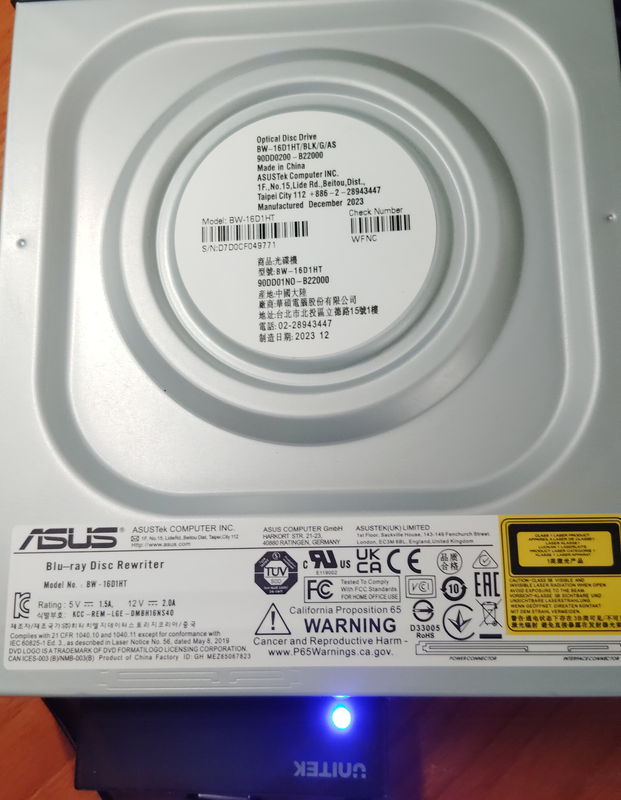

You can recognise these drives by looking at the casing around the label, for the JB7 board there is a rounded square indent around the entire label where the JB8 has four small diagonal indents around the label.
You can recognise these drives by looking at the casing around the label, for the JB7 board there is a rounded square indent around the entire label where the JB8 has four small diagonal indents around the label.
-
Billycar11
- Posts: 6300
- Joined: Sun Aug 24, 2014 5:49 am
Re: ASUS BW-12B1ST a
But it's not made in 2023 it's re stickered they stopped making those in 2015RibShark wrote: Mon Jan 26, 2026 1:00 pm These "a" drives as well as other drives from China seem to often (but not always) be the JB7-board (MT1939) even if the date on the sticker is >=2016. Here is an example of a BW-16D1HT from China that was manufactured December 2023 and yet is JB7/MT1939:
You can recognise these drives by looking at the casing around the label, for the JB7 board there is a rounded square indent around the entire label where the JB8 has four small diagonal indents around the label.
Buy a drive from the guide and video maker: viewtopic.php?t=17831
UHD Drive Guide: viewtopic.php?t=19634
Auto flash kit $40 Email Billycar5924@gmail.com No attachments
UHD Drive Guide: viewtopic.php?t=19634
Auto flash kit $40 Email Billycar5924@gmail.com No attachments
-
RibShark
- Posts: 26
- Joined: Mon Apr 29, 2019 6:27 pm
Re: ASUS BW-12B1ST a
The pre-2016 JB7s use the same casing as the JB8 drives, this new casing that is seen on these 2023-dated JB7 drives suggests they are new, and I doubt the effort would be taken to resticker a whole bunch of drives. Perhaps they found some leftover boards they needed to use up?Billycar11 wrote: Mon Jan 26, 2026 2:47 pm But it's not made in 2023 it's re stickered they stopped making those in 2015
-
Billycar11
- Posts: 6300
- Joined: Sun Aug 24, 2014 5:49 am
Re: ASUS BW-12B1ST a
Officially production stopped of mt1939 drives in 2015RibShark wrote: Mon Jan 26, 2026 5:41 pmThe pre-2016 JB7s use the same casing as the JB8 drives, this new casing that is seen on these 2023-dated JB7 drives suggests they are new, and I doubt the effort would be taken to resticker a whole bunch of drives. Perhaps they found some leftover boards they needed to use up?Billycar11 wrote: Mon Jan 26, 2026 2:47 pm But it's not made in 2023 it's re stickered they stopped making those in 2015
I think they are just recasing them not sure why I guess to sell used stuff as new
Buy a drive from the guide and video maker: viewtopic.php?t=17831
UHD Drive Guide: viewtopic.php?t=19634
Auto flash kit $40 Email Billycar5924@gmail.com No attachments
UHD Drive Guide: viewtopic.php?t=19634
Auto flash kit $40 Email Billycar5924@gmail.com No attachments
-
Stingray
- Posts: 24
- Joined: Tue Mar 19, 2024 3:36 pm
Re: ASUS BW-12B1ST a
The Chinese take a DVD case and put in a BDR drive of unknown quality. These aren't new drives, they're essentially fakesRibShark wrote: Mon Jan 26, 2026 5:41 pm this new casing that is seen on these 2023-dated JB7 drives suggests they are new
-
zkennedy137
- Posts: 2
- Joined: Thu Apr 09, 2026 2:11 am
Re: ASUS BW-12B1ST a
I found a way to recover a drive similar BW-12B1ST-23. If i use dosflash and try to flash my stock backup it says "wrong flash state" however for whatever reason if when i type the commands and then it says erasing after i started to flash it if i keep pressing the enter key repeatedly it flashes the backup no problem (once the text "Writing Bank 0" comes up i stop pressing it) then to finishes and the drive comes to life again!!!!.