Under the Whitelist setting, I see you select all the 4k option. What does that mean? Will it affect 1080p contents?

Also, what should I set for the Audio Output Device if I have a receiver?

noWill it affect 1080p contents?
https://justpaste.it/divn9Also, what should I set for the Audio Output Device if I have a receiver?
What exactly does that whitelist setting do? I did not select any of the options in there and didn't notice anything unusual.RESET_9999 wrote: Sat Jan 03, 2026 3:03 amnoWill it affect 1080p contents?
https://justpaste.it/divn9Also, what should I set for the Audio Output Device if I have a receiver?

Thanks for the tip,I installed python in the Store but unfortunately it doesn't seem to solve this problem. The source file only has one audio track, dts-hd ma, 5.1., it should be easily covertable to ddp, right?RESET_9999 wrote: Fri Jan 02, 2026 7:41 pm install python from the windows store
https://apps.microsoft.com/detail/9pnrb ... n-US&gl=US
Code: Select all
-------------------------------------------------------------------------------------
--This workflow will mux any P7 source (BDMV or mkv rip) to DT-DL
-------------------------------------------------------------------------------------

  Drag and drop a P7 DV file (BDMV folder/ mpls / or mkv/m2ts/ts) and press enter...
E:\Movies\Pulp.Fiction.1994.mkv

Reading input tracks format/id/language...
Done.


       ====================
       -    DEMUXING     -
       ====================

Extracting track 0 with the CodecID 'V_MPEGH/ISO/HEVC' to the file 'D:\DoVi.Scripts\temp.folder18\hdr.hevc'. Container format: HEVC/H.265 elementary stream
Extracting track 1 with the CodecID 'A_DTS' to the file 'D:\DoVi.Scripts\temp.folder18\Pulp.Fiction.1994.track_2_eng.dts'. Container format: Digital Theater System (DTS)
Extracting track 2 with the CodecID 'S_TEXT/UTF8' to the file 'D:\DoVi.Scripts\temp.folder18\Pulp.Fiction.1994.track_3_eng.srt'. Container format: SRT text subtitles
Progress: 100%

        =================
        - MUXING TO MP4 -
        =================

ffmpeg version 2024-02-22-git-76b2bb96b4-full_build-www.gyan.dev Copyright (c) 2000-2024 the FFmpeg developers
  built with gcc 12.2.0 (Rev10, Built by MSYS2 project)
  configuration: --enable-gpl --enable-version3 --enable-static --pkg-config=pkgconf --disable-w32threads --disable-autodetect --enable-fontconfig --enable-iconv --enable-gnutls --enable-libxml2 --enable-gmp --enable-bzlib --enable-lzma --enable-libsnappy --enable-zlib --enable-librist --enable-libsrt --enable-libssh --enable-libzmq --enable-avisynth --enable-libbluray --enable-libcaca --enable-sdl2 --enable-libaribb24 --enable-libaribcaption --enable-libdav1d --enable-libdavs2 --enable-libuavs3d --enable-libzvbi --enable-librav1e --enable-libsvtav1 --enable-libwebp --enable-libx264 --enable-libx265 --enable-libxavs2 --enable-libxvid --enable-libaom --enable-libjxl --enable-libopenjpeg --enable-libvpx --enable-mediafoundation --enable-libass --enable-frei0r --enable-libfreetype --enable-libfribidi --enable-libharfbuzz --enable-liblensfun --enable-libvidstab --enable-libvmaf --enable-libzimg --enable-amf --enable-cuda-llvm --enable-cuvid --enable-ffnvcodec --enable-nvdec --enable-nvenc --enable-dxva2 --enable-d3d11va --enable-libvpl --enable-libshaderc --enable-vulkan --enable-libplacebo --enable-opencl --enable-libcdio --enable-libgme --enable-libmodplug --enable-libopenmpt --enable-libopencore-amrwb --enable-libmp3lame --enable-libshine --enable-libtheora --enable-libtwolame --enable-libvo-amrwbenc --enable-libcodec2 --enable-libilbc --enable-libgsm --enable-libopencore-amrnb --enable-libopus --enable-libspeex --enable-libvorbis --enable-ladspa --enable-libbs2b --enable-libflite --enable-libmysofa --enable-librubberband --enable-libsoxr --enable-chromaprint
  libavutil      58. 39.100 / 58. 39.100
  libavcodec     60. 40.100 / 60. 40.100
  libavformat    60. 21.101 / 60. 21.101
  libavdevice    60.  4.100 / 60.  4.100
  libavfilter     9. 17.100 /  9. 17.100
  libswscale      7.  6.100 /  7.  6.100
  libswresample   4. 13.100 /  4. 13.100
  libpostproc    57.  4.100 / 57.  4.100
Input #0, dts, from 'D:\DoVi.Scripts\temp.folder18\Pulp.Fiction.1994.track_2_eng.dts':
  Duration: N/A, start: 0.000000, bitrate: N/A
  Stream #0:0: Audio: dts (dca) (DTS-HD MA), 48000 Hz, 5.1(side), s32p (24 bit)
Stream mapping:
  Stream #0:0 -> #0:0 (dts (dca) -> eac3 (native))
Press [q] to stop, [?] for help
Output #0, matroska, to 'D:\DoVi.Scripts\temp.folder18\EC32.mkv':
  Metadata:
    encoder         : Lavf60.21.101
  Stream #0:0: Audio: eac3 ([0] [0][0] / 0x2000), 48000 Hz, 5.1(side), fltp, 1024 kb/s
      Metadata:
        encoder         : Lavc60.40.100 eac3
[out#0/matroska @ 00000197933e39c0] video:0KiB audio:1158836KiB subtitle:0KiB other streams:0KiB global headers:0KiB muxing overhead: 0.177044%
size= 1160888KiB time=02:34:30.68 bitrate=1025.8kbits/s speed= 118x
Extracting track 0 with the CodecID 'A_EAC3' to the file 'D:\DoVi.Scripts\temp.folder18\lossy2.ec3'. Container format: Dolby Digital Plus (E-AC-3)
Progress: 100%
ffmpeg version 2024-02-22-git-76b2bb96b4-full_build-www.gyan.dev Copyright (c) 2000-2024 the FFmpeg developers
  built with gcc 12.2.0 (Rev10, Built by MSYS2 project)
  configuration: --enable-gpl --enable-version3 --enable-static --pkg-config=pkgconf --disable-w32threads --disable-autodetect --enable-fontconfig --enable-iconv --enable-gnutls --enable-libxml2 --enable-gmp --enable-bzlib --enable-lzma --enable-libsnappy --enable-zlib --enable-librist --enable-libsrt --enable-libssh --enable-libzmq --enable-avisynth --enable-libbluray --enable-libcaca --enable-sdl2 --enable-libaribb24 --enable-libaribcaption --enable-libdav1d --enable-libdavs2 --enable-libuavs3d --enable-libzvbi --enable-librav1e --enable-libsvtav1 --enable-libwebp --enable-libx264 --enable-libx265 --enable-libxavs2 --enable-libxvid --enable-libaom --enable-libjxl --enable-libopenjpeg --enable-libvpx --enable-mediafoundation --enable-libass --enable-frei0r --enable-libfreetype --enable-libfribidi --enable-libharfbuzz --enable-liblensfun --enable-libvidstab --enable-libvmaf --enable-libzimg --enable-amf --enable-cuda-llvm --enable-cuvid --enable-ffnvcodec --enable-nvdec --enable-nvenc --enable-dxva2 --enable-d3d11va --enable-libvpl --enable-libshaderc --enable-vulkan --enable-libplacebo --enable-opencl --enable-libcdio --enable-libgme --enable-libmodplug --enable-libopenmpt --enable-libopencore-amrwb --enable-libmp3lame --enable-libshine --enable-libtheora --enable-libtwolame --enable-libvo-amrwbenc --enable-libcodec2 --enable-libilbc --enable-libgsm --enable-libopencore-amrnb --enable-libopus --enable-libspeex --enable-libvorbis --enable-ladspa --enable-libbs2b --enable-libflite --enable-libmysofa --enable-librubberband --enable-libsoxr --enable-chromaprint
  libavutil      58. 39.100 / 58. 39.100
  libavcodec     60. 40.100 / 60. 40.100
  libavformat    60. 21.101 / 60. 21.101
  libavdevice    60.  4.100 / 60.  4.100
  libavfilter     9. 17.100 /  9. 17.100
  libswscale      7.  6.100 /  7.  6.100
  libswresample   4. 13.100 /  4. 13.100
  libpostproc    57.  4.100 / 57.  4.100
Input #0, dts, from 'D:\DoVi.Scripts\temp.folder18\Pulp.Fiction.1994.track_2_eng.dts':
  Duration: N/A, start: 0.000000, bitrate: N/A
  Stream #0:0: Audio: dts (dca) (DTS-HD MA), 48000 Hz, 5.1(side), s32p (24 bit)
Stream mapping:
  Stream #0:0 -> #0:0 (copy)
[mp4 @ 00000209af09ea00] track 0: codec frame size is not set
Output #0, mp4, to 'D:\DoVi.Scripts\temp.folder18\lossless2.mp4':
  Metadata:
    encoder         : Lavf60.21.101
  Stream #0:0: Audio: dts (DTS-HD MA) (mp4a / 0x6134706D), 48000 Hz, 5.1(side), s32p (24 bit)
Press [q] to stop, [?] for help
[out#0/mp4 @ 00000209af0956c0] video:0KiB audio:4391975KiB subtitle:0KiB other streams:0KiB global headers:0KiB muxing overhead: 0.079083%
size= 4395448KiB time=02:34:30.68 bitrate=3884.0kbits/s speed= 524x
 Muxing into a DoVi MP4 file. Be patient, it can take a while. 40min+ on slow HDD
[1/3] Parsing track "F:\Filmy\Pulp.Fiction.1994_BL.hevc"...
hevc: ******************** 100%
[2/3] Parsing track "F:\Filmy\Pulp.Fiction.1994_EL.hevc"...
hevc: ******************** 100%
[3/3] Saving output file(s) "D:\DoVi.Scripts\temp.folder18\temp.mp4"...
written: ******************** 100%
[iso file] dvcC reserved bytes are not zero
IsoMedia import temp.mp4 - track ID 1 - Video (size 3840 x 2160)
IsoMedia import temp.mp4 - track ID 2 - Video (size 1920 x 1080)
[H263Dmx] garbage before first frame!
Cannot find track ID matching fragment #audio
Error importing D:\DoVi.Scripts\temp.folder18\lossy2.ec3#audio:lang=eng:name=DDP: At least one required element has not been found
Deleting TEMP folder...


Start time: 13:43:41,11
End time: 14:04:12,59
Time taken: 0:20:31

The script has been completed. Do you want to quit or go back to main menu (q or m default=q)?
what it does is written in the image you postedWhat exactly does that whitelist setting do?
yes it does. look againthe link you posted does not mention what should be set for this option:
I don't know , works fine here. There might be something wrong with your ripDjObama wrote: Sat Jan 03, 2026 1:11 pm Thanks for the tip,I installed python in the Store but unfortunately it doesn't seem to solve this problem. The source file only has one audio track, dts-hd ma, 5.1., it should be easily covertable to ddp, right?


I read that but don't know what that means. If I only choose the 4k options then the 1080p display mode wont be allowed to be used?RESET_9999 wrote: Sat Jan 03, 2026 2:00 pmwhat it does is written in the image you postedWhat exactly does that whitelist setting do?
It only mentions "Passthrough output device", not "Audio output device". Two separate settings.RESET_9999 wrote: Sat Jan 03, 2026 2:00 pmyes it does. look againthe link you posted does not mention what should be set for this option:
If you want 1080p content to be upscaled by the TV, you must set the Kodi GUI to 1080p. The whitelist does not override this behavior; it only informs the player which display modes your TV supports.If I only choose the 4k options then the 1080p display mode wont be allowed to be used?
That's the setting you're asking...It only mentions "Passthrough output device", not "Audio output device". Two separate settings.
What happens if I don't choose anything in that whitelist? That's what I did before.RESET_9999 wrote: Sun Jan 04, 2026 3:55 amIf you want 1080p content to be upscaled by the TV, you must set the Kodi GUI to 1080p. The whitelist does not override this behavior; it only informs the player which display modes your TV supports.If I only choose the 4k options then the 1080p display mode wont be allowed to be used?
They are 2 separate settings. This is "Audio output device":RESET_9999 wrote: Sun Jan 04, 2026 3:55 amThat's the setting you're asking...It only mentions "Passthrough output device", not "Audio output device". Two separate settings.
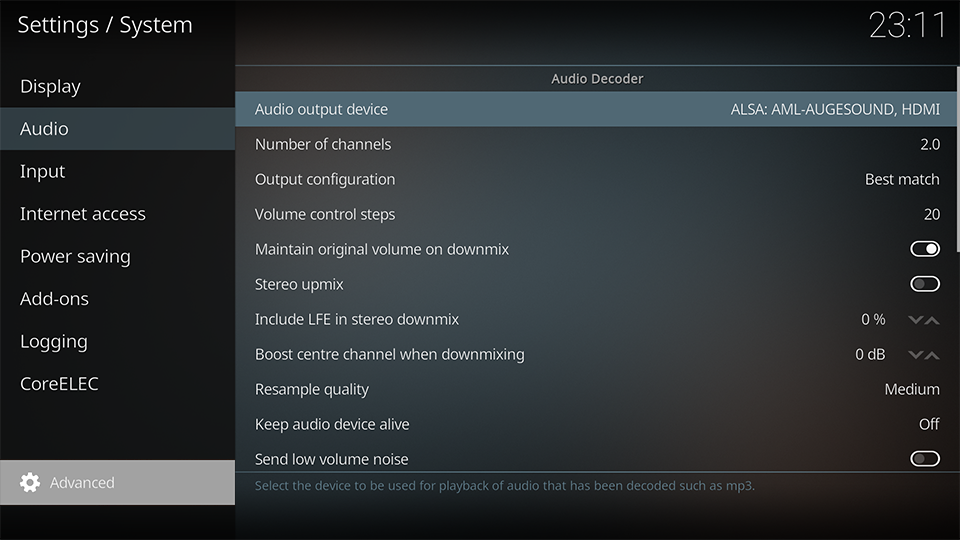
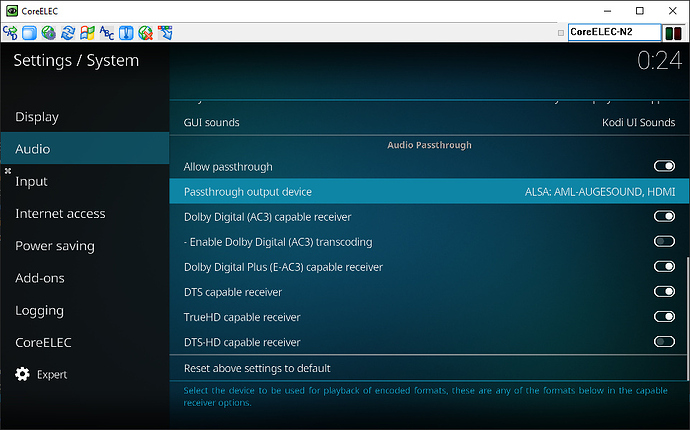
I use the same for bothThey are 2 separate settings.
try playing 25fps content and find out if your TV switches to 50Hz instead of 25HzWhat happens if I don't choose anything in that whitelist?
Well that's unfortunate, might have to look at Sony rather than LG for my next OLED (C8 getting a bit outdated for my liking)RESET_9999 wrote: Thu Jan 01, 2026 12:15 am
they can but they wont.Can LG resolve these G5 issues you've pointed out through firmware updates at all?
Code: Select all
ffprobe -v error -select_streams v:0 -show_entries stream=color_space,color_transfer,color_primaries,pix_fmt -of default=nw=1 video.mkvCode: Select all
pix_fmt=yuv420p10le
color_space=bt2020nc
color_transfer=smpte2084
color_primaries=bt2020Code: Select all
pix_fmt=yuv420p10le
color_space=unknown
color_transfer=unknown
color_primaries=unknown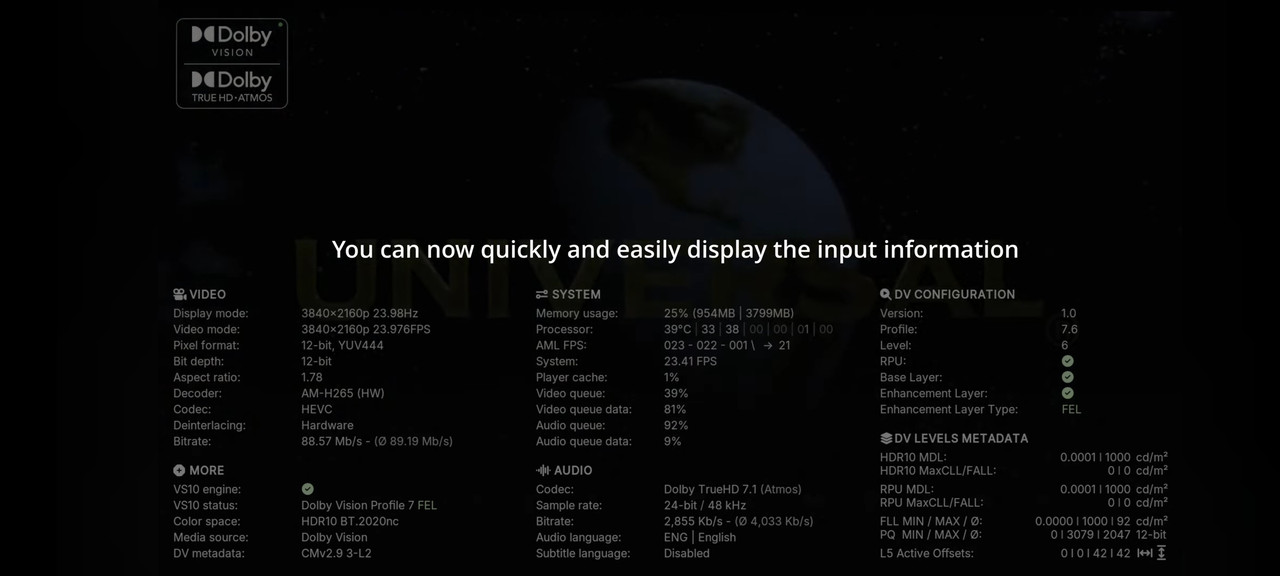
Thank you. Damn, all of the links seem to be dead, are there any other live links that you know of, specifically for Arctic Zephyr?RESET_9999 wrote: Thu Jan 15, 2026 2:14 am you need one of the custom skins
https://discourse.coreelec.org/t/severa ... ilds/53514