Please post here for issues related to UHD discs
-
RESET_9999
- Posts: 2421
- Joined: Mon Aug 05, 2019 7:12 pm
Post
by RESET_9999 » Fri Feb 21, 2025 2:53 am
the public A13 build doesnt have the option to have L5 set to 0, it's either L5 or no L5.
I don't know when he will release A14 but in the private builds, the UI now has all the options for L5. There's an option to use the original L5 values and when the OSD is triggered, it switches to 0 so it doesn't mask anything. No we don't need the autostart.sh anymore.

-
Donpoku
- Posts: 66
- Joined: Wed Jul 03, 2019 3:43 pm
Post
by Donpoku » Fri Feb 21, 2025 5:16 am
RESET_9999 wrote: Fri Feb 21, 2025 2:53 am
the public A13 build doesnt have the option to have L5 set to 0, it's either L5 or no L5.
I don't know when he will release A14 but in the private builds, the UI now has all the options for L5. There's an option to use the original L5 values and when the OSD is triggered, it switches to 0 so it doesn't mask anything. No we don't need the autostart.sh anymore.
Thank you, sent you a pm.
-
kazuma
- Posts: 186
- Joined: Fri Nov 08, 2019 9:51 pm
Post
by kazuma » Sat Feb 22, 2025 3:28 pm
what is better? a good 2160p DV webrip or 1080P remux file? Which one you guys will prefer?
-
quietvoid
- Posts: 377
- Joined: Sun Apr 19, 2020 4:15 pm
Post
by quietvoid » Sat Feb 22, 2025 6:37 pm
kazuma wrote: Sat Feb 22, 2025 3:28 pm
what is better? a good 2160p DV webrip or 1080P remux file? Which one you guys will prefer?
Whichever is HDR.
-
daffie
- Posts: 76
- Joined: Sun Apr 16, 2023 6:10 pm
Post
by daffie » Mon Feb 24, 2025 10:05 am
kazuma wrote: Sat Feb 22, 2025 3:28 pm
what is better? a good 2160p DV webrip or 1080P remux file? Which one you guys will prefer?
If the webrip is DV I would prefer it over a 1080p remux. But only because of the DV. In terms of resolution/compression I would take a 1080p remux over a 2160 webrip every time.
LG OLED65G1RLA / Samsung HW-Q990D / Panasonic UB820 / Ugoos AM6B+ (CE with avdvplus Build)
-
darrrkmanxxx
- Posts: 95
- Joined: Mon Apr 13, 2020 9:55 am
Post
by darrrkmanxxx » Mon Feb 24, 2025 12:36 pm
with RPU L1 Like this and having only l2 trim for 100nits:
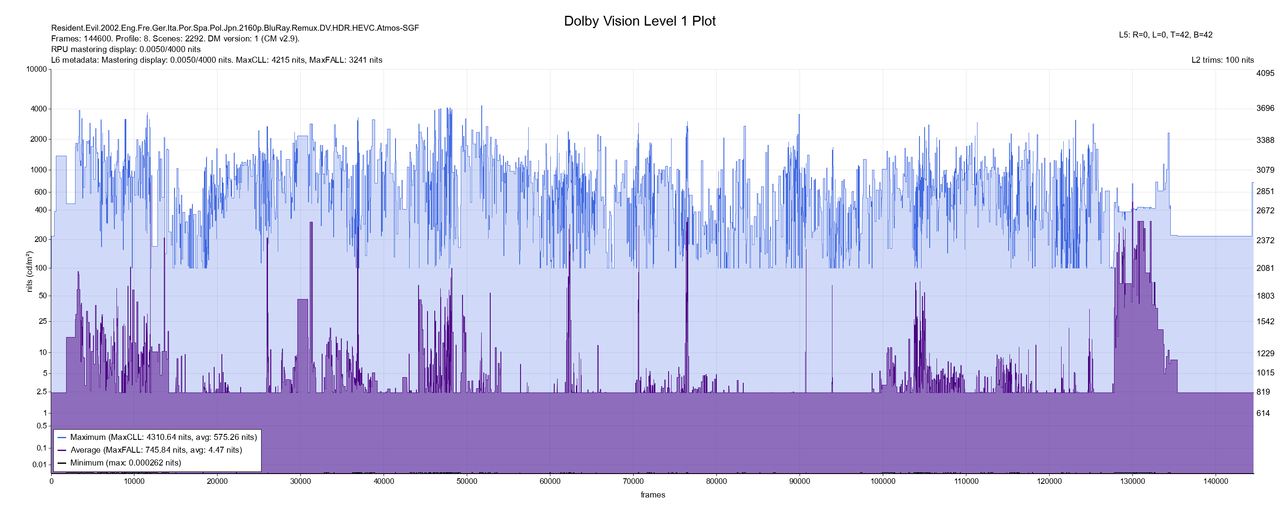
Will it clip on a 600-900 nit device?
Should I go for cm_analyze in this case and just transfer over L1 from this RPU?
-
RESET_9999
- Posts: 2421
- Joined: Mon Aug 05, 2019 7:12 pm
Post
by RESET_9999 » Mon Feb 24, 2025 1:11 pm
No, it won't clip. Why do you think it would?
L1 and MDL are ok, L2 100nits will get extrapolated to your TV target
Will it clip on a 600-900 nit device?
-
RESET_9999
- Posts: 2421
- Joined: Mon Aug 05, 2019 7:12 pm
Post
by RESET_9999 » Mon Feb 24, 2025 11:14 pm
speaking of clipping on bluray players because they alter the RPU, I found a very good example: Dredd 2012 FEL BD is a very bright grade but the RPU MDL is 1000nits so clipping is visible on bluray players.
The ugoos with CPM A13+, and Shield do not clip...
did some samples
https://drive.google.com/drive/u/1/fold ... MU3KAisiAm
-
daffie
- Posts: 76
- Joined: Sun Apr 16, 2023 6:10 pm
Post
by daffie » Tue Feb 25, 2025 9:22 am
RESET_9999 wrote: Mon Feb 24, 2025 11:14 pm
speaking of clipping on bluray players because they alter the RPU, I found a very good example: Dredd 2012 FEL BD is a very bright grade but the RPU MDL is 1000nits so clipping is visible on bluray players.
The ugoos with CPM A13+, and Shield do not clip...
did some samples
https://drive.google.com/drive/u/1/fold ... MU3KAisiAm
Dredd 2012 is only HDR10, no ? See here
https://www.blu-ray.com/movies/Dredd-4K ... ay/176582/
Do you have a link to a FEL BD for this movie? I don't think this was ever released in Dolby Vision on BD.
EDIT : sorry, there are Dolby Vision versions in the German and Italian releases

LG OLED65G1RLA / Samsung HW-Q990D / Panasonic UB820 / Ugoos AM6B+ (CE with avdvplus Build)
-
deadchip12
- Posts: 385
- Joined: Thu May 02, 2019 2:49 am
Post
by deadchip12 » Wed Feb 26, 2025 2:38 am
@RESET_9999
In your RPU folder, the file named "Pearl.2022.BD_Generated_OSC" is Bluray rpu with cmv 4.0 already transferred? What does OSC mean?
-
skull88
- Posts: 69
- Joined: Mon Mar 27, 2023 3:08 pm
Post
by skull88 » Wed Feb 26, 2025 3:52 am
OSC = Original Scene/Shot Cuts i.e. not generated but retailed sourced, whether WEB-DL or UHD BD.
-
deadchip12
- Posts: 385
- Joined: Thu May 02, 2019 2:49 am
Post
by deadchip12 » Wed Feb 26, 2025 5:17 am
skull88 wrote: Wed Feb 26, 2025 3:52 am
OSC = Original Scene/Shot Cuts i.e. not generated but retailed sourced, whether WEB-DL or UHD BD.
So Pearl.2022.BD_Generated_OSC means it's the original rpu from UHD BD? How come it's cmv 4.0?
-
RESET_9999
- Posts: 2421
- Joined: Mon Aug 05, 2019 7:12 pm
Post
by RESET_9999 » Wed Feb 26, 2025 11:59 am
Generated means Generated in resolve. Only the scene cuts are original
-
deadchip12
- Posts: 385
- Joined: Thu May 02, 2019 2:49 am
Post
by deadchip12 » Wed Feb 26, 2025 3:43 pm
RESET_9999 wrote: Wed Feb 26, 2025 11:59 am
Generated means Generated in resolve. Only the scene cuts are original
So it's ready to be injected into the original bluray mkv file?
-
RESET_9999
- Posts: 2421
- Joined: Mon Aug 05, 2019 7:12 pm
Post
by RESET_9999 » Wed Feb 26, 2025 3:45 pm
Yes, but the original MEL RPU is probably fine. I don't know why there's a generated RPU for that movie on my GD.
EDIT: Ok I generated new metadata because the bd is cmv2.9 without an active/dynamic trim