Dolby Vision now possible through MP4 Mux.

Please post here for issues related to UHD discs
RESET_9999
Posts: 2411
Joined: Mon Aug 05, 2019 7:12 pm

Re: Dolby Vision now possible through MP4 Mux.

Post by RESET_9999 »

darrrkmanxxx wrote:
Fri Jan 10, 2025 10:48 pm
so if there are no CW trims (flat line) at 1000nits and my device has 1000nits peak brightness, will it still be tone mapped because of the 100nit trim?
If there's a blank 1000nits trim, the 100nits trim gets ignored if your target brightness is 1000+
If there's a blank 600nits trim, the 100nits trim gets ignored if your target brightness is 600+

if there's just a 100-nits trim, yes the metadata gets extrapolated to any brightness but the higher your TV target is the less effect the trims have.
if you're using LLDV, and if you use an edid of 1000+ then the trims are 100% ignored if the RPU MDL is 1000nits (tested on shield, ATV, ugoos, x800m2 x700).

@powdeau confirmed to me that the trims are not ignored in TV-LED on the LG G4 with 1000nits RPU, so the behavior is different than LLDV because that TV must have a target higher than 1000nits.
I see the same behavior with my 2000nits Hisense TV, the trims always work regardless of the RPU MDL. So the trims not working in LLDV with 1000nits edid might be another DV bug.

He also confirmed that Chroma Weight doesn't work in cmv2.9 on the G4, same as my C2 and hisense TV. So dolby cmv4.0 fixed the Chroma Weight bug in LLDV and broke it in TV-LED for cmv2.9... typical Dolby...
Sorry for my English.
G5 / AM6B+ / Denon 7.2.4
DoVi_Scripts
DoVi Playback Devices
powdeau
Posts: 57
Joined: Sat Jan 12, 2019 1:01 am

Re: Dolby Vision now possible through MP4 Mux.

Post by powdeau »

@RESET_9999 I have tried your metadata comparison for Kill Bill 1 and Smile 2 on my G4 and I don't see any changes with Kill Bill but I do se them with Smile.
Is it because Kill Bill has almost no trims in 1000nits or because Smile is mastered for 4000 nits?
RESET_9999
Posts: 2411
Joined: Mon Aug 05, 2019 7:12 pm

Re: Dolby Vision now possible through MP4 Mux.

Post by RESET_9999 »

By the look of the L2 trims and the content brightness, it sounds normal.

Smile 2 is graded at SDR level but in some shot, the trims have very strong brightening values. So you probably see no change with L1, but a brighter image with L1+L2
kill bill is a bit brighter but still only 400nits and the trims don't brighten as much as Smile 2.

And yes, the RPU also has more effect when it's 4000nits MDL.
Sorry for my English.
G5 / AM6B+ / Denon 7.2.4
DoVi_Scripts
DoVi Playback Devices
powfu
Posts: 3
Joined: Sat Jan 18, 2025 12:57 am

Re: Dolby Vision now possible through MP4 Mux.

Post by powfu »

RESET_9999 wrote:
Tue Nov 26, 2024 3:55 pm
RESET_9999 wrote:
Sat Nov 09, 2024 1:50 pm
anyway the problem is the EL and german discs
I wonder if all the French UHD-BD should be verified now. It looks like Blade 1998 FEL FRA BD has the same issue :(

https://slow.pics/c/YzYgHn4x
Hi, I'm just curious. I checked the FraMeSToR version which used the FRA UHD BD and MakeMKV. ffmpeg counts 172,927 frames and dovi_tool also counts 172,927 in the RPU as well. I've attached the plot. Is this release unaffected?

Parsing RPU file...

Summary:
Frames: 172927
Profile: 7 (FEL)
DM version: 1 (CM v2.9)
Scene/shot count: 2533
RPU mastering display: 0.0001/1000 nits
RPU content light level (L1): MaxCLL: 996.13 nits, MaxFALL: 427.95 nits
L6 metadata: Mastering display: 0.0001/1000 nits. MaxCLL: 1217 nits, MaxFALL: 884 nits
L2 trims: 100 nits, 600 nits, 1000 nits
Attachments
L1_plot.png
L1_plot.png (202.29 KiB) Viewed 7552 times
skull88
Posts: 69
Joined: Mon Mar 27, 2023 3:08 pm

Re: Dolby Vision now possible through MP4 Mux.

Post by skull88 »

AFAIK, it might matter which version of makeMKV is used, no? Could be how their encode wasn't affected. It does seem that it is worth verifying all EUR discs if using current version though.
RESET_9999
Posts: 2411
Joined: Mon Aug 05, 2019 7:12 pm

Re: Dolby Vision now possible through MP4 Mux.

Post by RESET_9999 »

powfu wrote:
Sat Jan 18, 2025 1:06 am
Hi, I'm just curious. I checked the FraMeSToR version which used the FRA UHD BD and MakeMKV. ffmpeg counts 172,927 frames and dovi_tool also counts 172,927 in the RPU as well. I've attached the plot. Is this release unaffected?
I don't know, I'll check it out.
Sorry for my English.
G5 / AM6B+ / Denon 7.2.4
DoVi_Scripts
DoVi Playback Devices
powfu
Posts: 3
Joined: Sat Jan 18, 2025 12:57 am

Re: Dolby Vision now possible through MP4 Mux.

Post by powfu »

RESET_9999 wrote:
Sat Jan 18, 2025 4:51 am
powfu wrote:
Sat Jan 18, 2025 1:06 am
Hi, I'm just curious. I checked the FraMeSToR version which used the FRA UHD BD and MakeMKV. ffmpeg counts 172,927 frames and dovi_tool also counts 172,927 in the RPU as well. I've attached the plot. Is this release unaffected?
I don't know, I'll check it out.
Using the Zapax FRA UHD BD and MakeMKV 1.17.8, I get the same results.

Code: Select all

Parsing RPU file...

Summary:
  Frames: 172927
  Profile: 7 (FEL)
  DM version: 1 (CM v2.9)
  Scene/shot count: 2533
  RPU mastering display: 0.0001/1000 nits
  RPU content light level (L1): MaxCLL: 996.13 nits, MaxFALL: 427.95 nits
  L6 metadata: Mastering display: 0.0001/1000 nits. MaxCLL: 1217 nits, MaxFALL: 884 nits
  L2 trims: 100 nits, 600 nits, 1000 nits
Code: Select all

Disc Title:     Blade.1998.2160p.FRA.UHD.Blu-ray.HEVC.TrueHD.Atmos.7.1-Zapax
Disc Size:      90,487,440,940 bytes
Protection:     AACS2
Extras:         Ultra HD
BDInfo:         0.7.5.9 (compatible layout created by DVDFab 12.0.7.0)

PLAYLIST REPORT:

Name:                   00006.MPLS  
Length:                 2:00:12.496 (h:m:s.ms)
Size:                   88,383,080,448 bytes
Total Bitrate:          98.03 Mbps

(*) Indicates included stream hidden by this playlist.

VIDEO:

Codec                   Bitrate             Description    
-----                   -------             -----------    
MPEG-H HEVC Video       77400 kbps          2160p / 23.976 fps / 16:9 / Main 10 @ Level 5.1 @ High / 4:2:0 / 10 bits / 1000nits / HDR10 / BT.2020
* MPEG-H HEVC Video     8644 kbps (10.05%)  1080p / 23.976 fps / 16:9 / Main 10 @ Level 5.1 @ High / 4:2:0 / 10 bits / 1000nits / Dolby Vision FEL / BT.2020

AUDIO:

Codec                           Language        Bitrate         Description    
-----                           --------        -------         -----------    
DTS-HD Master Audio             French          2576 kbps       5.1 / 48 kHz / 2576 kbps / 24-bit (DTS Core: 5.1 / 48 kHz / 1509 kbps / 24-bit)
Dolby TrueHD/Atmos Audio        English         4024 kbps       7.1+11 objects / 48 kHz / 3576 kbps / 24-bit (AC3 Core: 5.1-EX / 48 kHz / 448 kbps)

SUBTITLES:

Codec                           Language        Bitrate         Description    
-----                           --------        -------         -----------    
Presentation Graphics           French          0.272 kbps                      
Presentation Graphics           French          14.43 kbps
Attachments
L1_plot-Zapax.png
L1_plot-Zapax.png (202.29 KiB) Viewed 7395 times
RESET_9999
Posts: 2411
Joined: Mon Aug 05, 2019 7:12 pm

Re: Dolby Vision now possible through MP4 Mux.

Post by RESET_9999 »

I dont know, I had an old rip so I assumed it was muxed with makemkv. Maybe not after all.
Some of my ST P7 rips were muxed with mkvtoolnix from DT P7 TS so that might be the reason.
Sorry for my English.
G5 / AM6B+ / Denon 7.2.4
DoVi_Scripts
DoVi Playback Devices
powfu
Posts: 3
Joined: Sat Jan 18, 2025 12:57 am

Re: Dolby Vision now possible through MP4 Mux.

Post by powfu »

Alright, thank you. I guess this disc does not suffer from those issues then.

Just for posterity and completeness, using the Zapax FRA UHD BD and mkvmerge v89.0, the result is the same as above.
nekno
Posts: 68
Joined: Tue Jun 23, 2020 4:40 am

Re: Dolby Vision now possible through MP4 Mux.

Post by nekno »

RESET_9999 wrote:
Sun Jan 05, 2025 1:54 am
Yes, I tested hevc decoding not a long time ago and it still drops frames.
Try the Spears and Munsil demo clip, it drops frames almost instantly with the mkv container. If you remux it to mp4, the SM clip will work but it is still not 100% reliable.
How do you test for dropped frames, what are the telltale signs?

When using an mkv container I see a lot of "Media Offline" scenes when scrubbing through the timeline, and I didn't see that with an mp4 container. So I'm wondering how I know if the mp4 container is indeed dropping frames.

Is Media Offline what you're looking for?

When using an mp4 container to generate my own Balanced content mappings, I will diff them against your T3 generated mappings, and see one-frame differences in the duration of scenes, or differences in trims that match to the tenths or hundredths, but are different by thousandths+.

Are those a result of dropped frames in the HEVC decoding, or perhaps something else?

I could see different versions of Resolve perhaps including changes in the DV algo or tuning that would result in different trims, but the differences in scene duration is a problem that could result in a lot of light/dark flashing between bright/dim scenes.
RESET_9999
Posts: 2411
Joined: Mon Aug 05, 2019 7:12 pm

Re: Dolby Vision now possible through MP4 Mux.

Post by RESET_9999 »

nekno wrote:
Wed Jan 22, 2025 8:50 pm
When using an mp4 container to generate my own Balanced content mappings, I will diff them against your T3 generated mappings, and see one-frame differences in the duration of scenes, or differences in trims that match to the tenths or hundredths, but are different by thousandths+.

Are those a result of dropped frames in the HEVC decoding, or perhaps something else?

I could see different versions of Resolve perhaps including changes in the DV algo or tuning that would result in different trims, but the differences in scene duration is a problem that could result in a lot of light/dark flashing between bright/dim scenes.
Yes, I guess the scene cut detection could be less accurate than a lossless codec with only i-frames.
How do you test for dropped frames, what are the telltale signs?
Your L1 plot will show 10 000nits spikes when there are dropped frames
Is Media Offline what you're looking for?
yes
When using an mkv container I see a lot of "Media Offline" scenes when scrubbing through the timeline, and I didn't see that with an mp4 container. So I'm wondering how I know if the mp4 container is indeed dropping frames.
MP4 works a lot better but I've seen 2-3 times ''media offline'' clip in the test I did. So it still can drop frame.
Sorry for my English.
G5 / AM6B+ / Denon 7.2.4
DoVi_Scripts
DoVi Playback Devices
jayper
Posts: 331
Joined: Sat Sep 29, 2012 5:57 pm

Re: Dolby Vision now possible through MP4 Mux.

Post by jayper »

RESET_9999 wrote:
Sun Jan 05, 2025 2:12 am
PS, to those who generate DV...

I said a couple of times that I selected the mastering display luminance based on the content's actual brightness(measured in 6-2).
I said to use 1000nits MDL if 90%+ of the shots have highlights under 1000nits.

Well, this is not longer the right thing to do because I recently discovered that some players like the Ugoos, Oppo, x700, X800m2 will clip highlights if the content is brighter than the RPU mastering display luminance, regardless of the metadata. So it may not be a good idea after all to use 1000nits MDL even if there are only a few highlights brighter than 1000nits because they will be clipped if your TV is not capable of displaying this brightness.

Interestingly, the Shield, the AppleTV, C2-C1-C9 internal player and Hisense internal player do not have this behavior and will tone map the image correctly without clipping regardless of the MDL (as long as L1 is right). This finally explains the RPU response differences between TV-LED devices that we noticed a long time ago (years ago?).

I did some test files that clearly show what I'm talking about: https://drive.google.com/drive/u/1/fold ... URFcibN6X-
Specifically: ''Dolby Vision 1000nits RPU Harry 2848nits scene P8.mp4''

*** This is about TV-LED. LLDV seems to work properly. Confirmed on oppo, ugoos, C9 C1 C2 Hisense... I no longer have the x700 x800m2 but it is most likely the same as the oppo, they have the same soc
Apologies if this is a silly question, but is has been a while since I generated DV.

If I am using 3-1 to generate, do I not just select what the source file reports in MediaInfo? Or do we need to run 6-2, before running 3-1?

If there is a good and up-to-date tutorial for this, please feel free to direct me there. Thanks!
RESET_9999
Posts: 2411
Joined: Mon Aug 05, 2019 7:12 pm

Re: Dolby Vision now possible through MP4 Mux.

Post by RESET_9999 »

The best is to use an MDL based on the measurement from 6-2 but the mediainfo metadata is ok.
Sorry for my English.
G5 / AM6B+ / Denon 7.2.4
DoVi_Scripts
DoVi Playback Devices
nekno
Posts: 68
Joined: Tue Jun 23, 2020 4:40 am

Re: Dolby Vision now possible through MP4 Mux.

Post by nekno »

RESET_9999 wrote:
Wed Jan 22, 2025 9:49 pm
Your L1 plot will show 10 000nits spikes when there are dropped frames
...
MP4 works a lot better but I've seen 2-3 times ''media offline'' clip in the test I did. So it still can drop frame.
This is great info, as always. Thanks!

I plan to do a little testing with different containers across macOS and Windows.

One downside with the mp4 container is that Resolve keeps incorrectly detecting 23.976 fps content as 24 fps, so I have to be sure to manually set the project fps.
darrrkmanxxx
Posts: 93
Joined: Mon Apr 13, 2020 9:55 am

Re: Dolby Vision now possible through MP4 Mux.

Post by darrrkmanxxx »

@RESET_9999

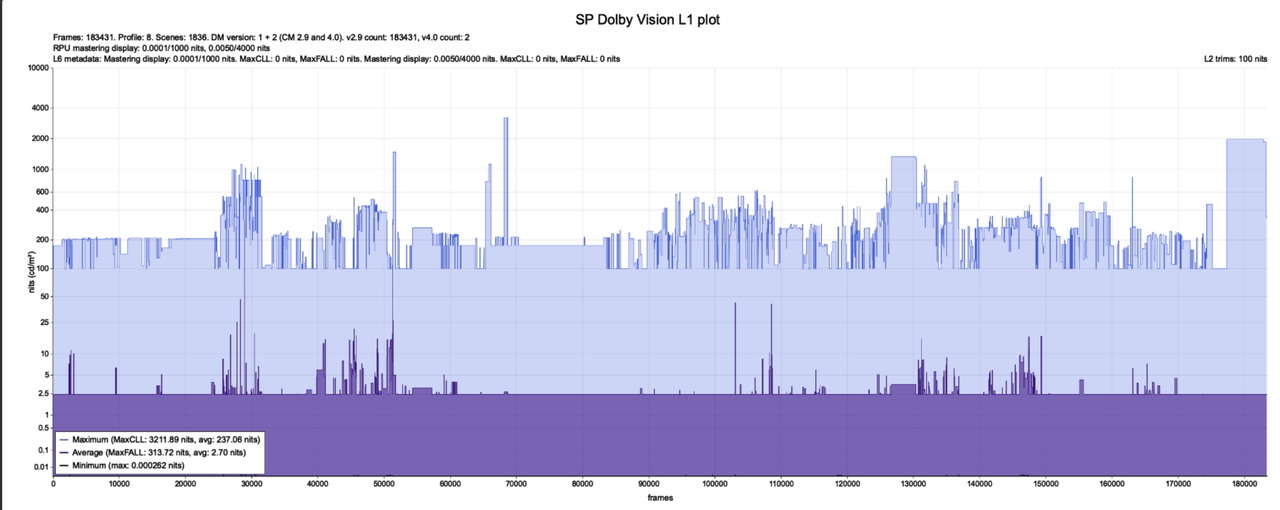
I have a weird RPU which look slike this
Image

CMV2.9 and CMV4.0? Only one l2 trim.
Should I go for cm_analyze in such case?
Post Reply