Dolby Vision now possible through MP4 Mux.
-
RESET_9999
- Posts: 2421
- Joined: Mon Aug 05, 2019 7:12 pm
Re: Dolby Vision now possible through MP4 Mux.
because 7-3 and 7-2 dont care about metadata, they only process the base layer of P8 P7 P5
Re: Dolby Vision now possible through MP4 Mux.
Is this lossless?
-
RESET_9999
- Posts: 2421
- Joined: Mon Aug 05, 2019 7:12 pm
Re: Dolby Vision now possible through MP4 Mux.
Thanks ... Also, is it possible to check if a disc is FEL or MEL using MediaInfo?
I thought the FEL/MEL is encoded as a separate video track but I've checked tons of full remux rips and all of them only have a single video track? (for example, Back To The Future)
I thought the FEL/MEL is encoded as a separate video track but I've checked tons of full remux rips and all of them only have a single video track? (for example, Back To The Future)
-
RESET_9999
- Posts: 2421
- Joined: Mon Aug 05, 2019 7:12 pm
Re: Dolby Vision now possible through MP4 Mux.
not with mediainfo but you can use workflow 2-2 with dovi_scripts
Re: Dolby Vision now possible through MP4 Mux.
I thought the enhancement layer was stored as a separate video track though?
-
RESET_9999
- Posts: 2421
- Joined: Mon Aug 05, 2019 7:12 pm
Re: Dolby Vision now possible through MP4 Mux.
P7 is a dual-layer format that can be Single or Dual track.
Re: Dolby Vision now possible through MP4 Mux.
Ahh! I never knew what that meant but now I think I do. Single layer means it's embedded into the base layer (?) video track and dual layer means it has a separate video track?
Does MakeMKV automatically convert the dual layer into a single layer?
For example, Back To The Future appears to be dual layer (according to caps-a-holic.com) but the rips are only single layer?
Does MakeMKV automatically convert the dual layer into a single layer?
For example, Back To The Future appears to be dual layer (according to caps-a-holic.com) but the rips are only single layer?
-
RESET_9999
- Posts: 2421
- Joined: Mon Aug 05, 2019 7:12 pm
Re: Dolby Vision now possible through MP4 Mux.
P7 is always dual layers.
Single track Dual layer means that the BL + EL are interleaved which is what MakeMKV does
Dual track Dual layer is the Bluray original format.
Single track Dual layer means that the BL + EL are interleaved which is what MakeMKV does
Dual track Dual layer is the Bluray original format.
Re: Dolby Vision now possible through MP4 Mux.
Got. Thanks for the explanation!
Re: Dolby Vision now possible through MP4 Mux.
The process is fairly simple and intuitive, you only have to get used to working with hex code editors in order to identify the proper segments to change.skull88 wrote: Sun Jun 23, 2024 10:42 pmThey don't matter for DV playback for sure, and possibly not in some contexts even for HDR fallback, as Paramount for example continues to not add MDL metadata for their UHD BDs. Curious what the method you figured out is, regardless, please share if you're willing to. Thank you kindly. Cheers.LV8HD wrote: Sun Jun 23, 2024 5:11 pm Hi everyone, some time ago I asked if anybody here knew how to change maxcll and maxfall values within the hevc stream itslef without the need to re-encode it. Well ,I've finally figured it out.
Thus, a question comes to my mind: how important are these values in the actual playblack? I've seen many movies having those values wrong and sometimes not having them at all.
Here's an example:
Let's say I want to change MDL and MaxCLL and MaxFALL values of this hevc stream:
Code: Select all
Video
Format                                   : HEVC
Format/Info                              : High Efficiency Video Coding
Format profile                           : Main 10@L5@Main
HDR format                               : SMPTE ST 2094 App 4, Version 1, HDR10+ Profile B compatible
Width                                    : 3 840 pixels
Height                                   : 1 600 pixels
Display aspect ratio                     : 2.40:1
Frame rate                               : 23.976 (24000/1001) FPS
Color space                              : YUV
Chroma subsampling                       : 4:2:0
Bit depth                                : 10 bits
Color range                              : Limited
Color primaries                          : BT.2020
Transfer characteristics                 : PQ
Matrix coefficients                      : BT.2020 non-constant
Mastering display color primaries        : Display P3
Mastering display luminance              : min: 0.0001 cd/m2, max: 1000 cd/m2
Maximum Content Light Level              : 763 cd/m2
Maximum Frame-Average Light Level : 218 cd/m2MDL: 4000
MaxCLL: 1653
MaxFALL: 614
1) Open up your file with https://github.com/virinext/hevcesbrowser
MDL, MaxCLL and MaxFALL values are stored as SEI NALs within the hevc stream and that's what we are looking for.
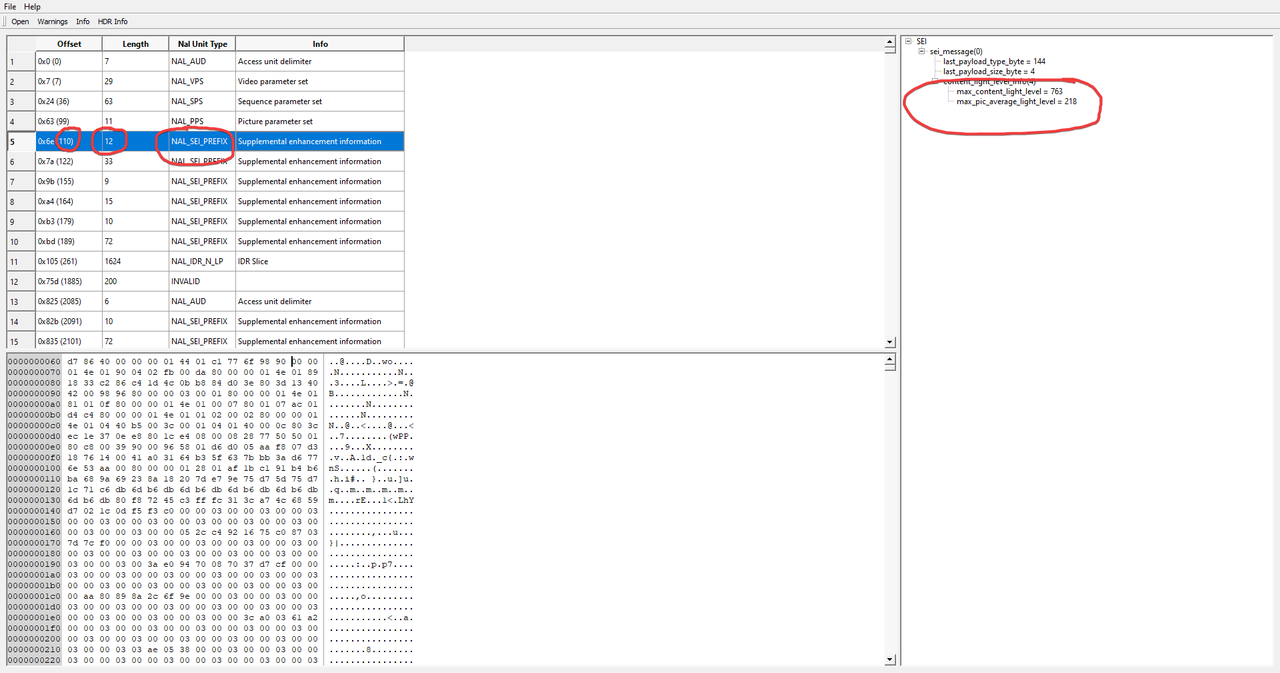
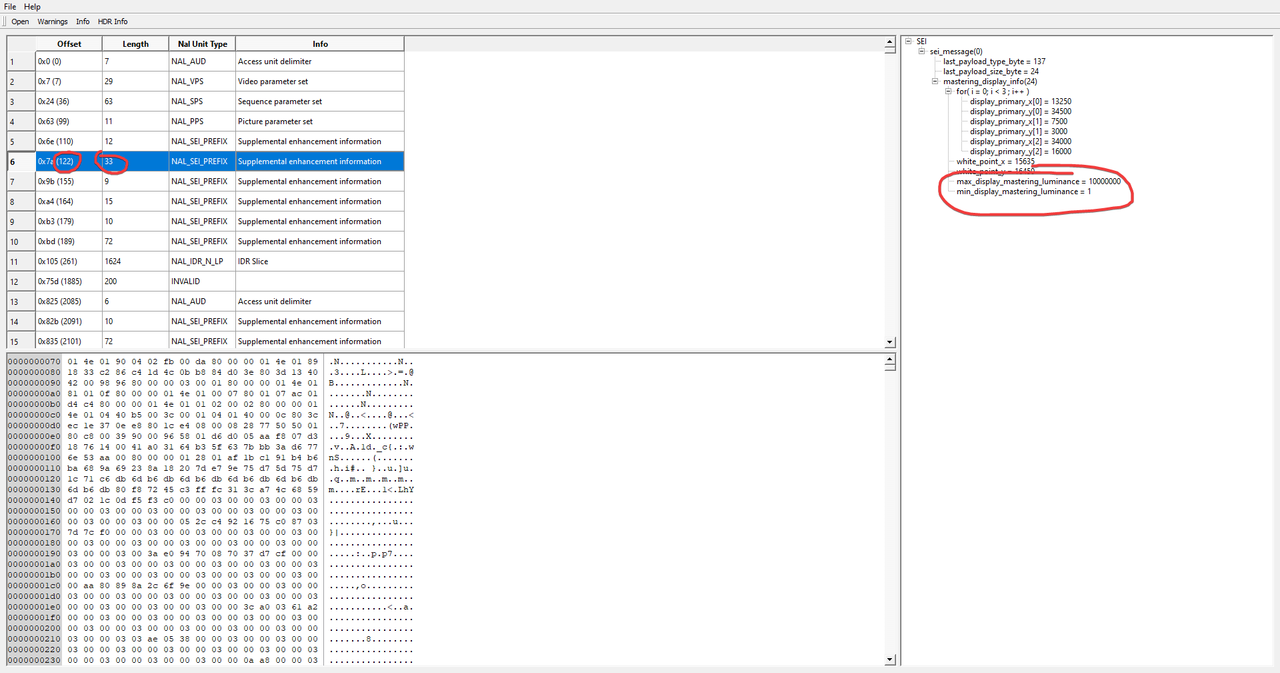
For every SEI keep in mind its position and lenght, we will need those values later in the editor.
MaxCLL and MaxFALL:
MDL:
2) Now that we have identified MDL, MaxCLL and MaxFALL positions we can open up the stream with a Hex Editor. I'll be using https://freehexeditorneo.com/ but it's just a matter of personal preference.
We will first change the MDL: go to Select -> Select Range. Swap from Hexadecimal to decimal. Now, 122 is the offset and 33 is its size.
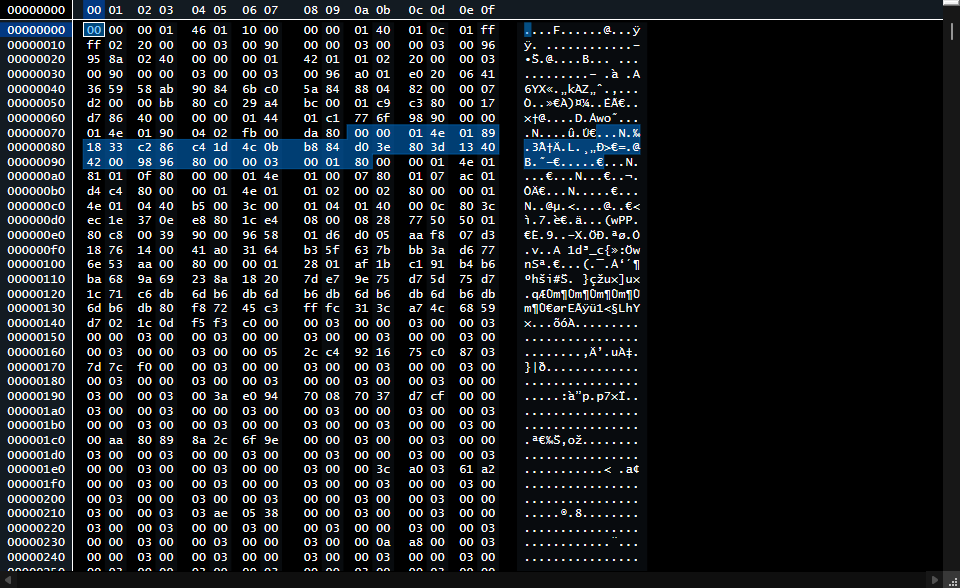
These lines of code contain the MDL values somewhere. To actually understand where and what to change whe first have to convert the decimal value for the max_display_mastering_luminance to hexadecimal using a converter https://www.rapidtables.com/convert/num ... o-hex.html. 10000000 is the decimal value and 00989680 is the hexadecimal value we have to identify and swap.
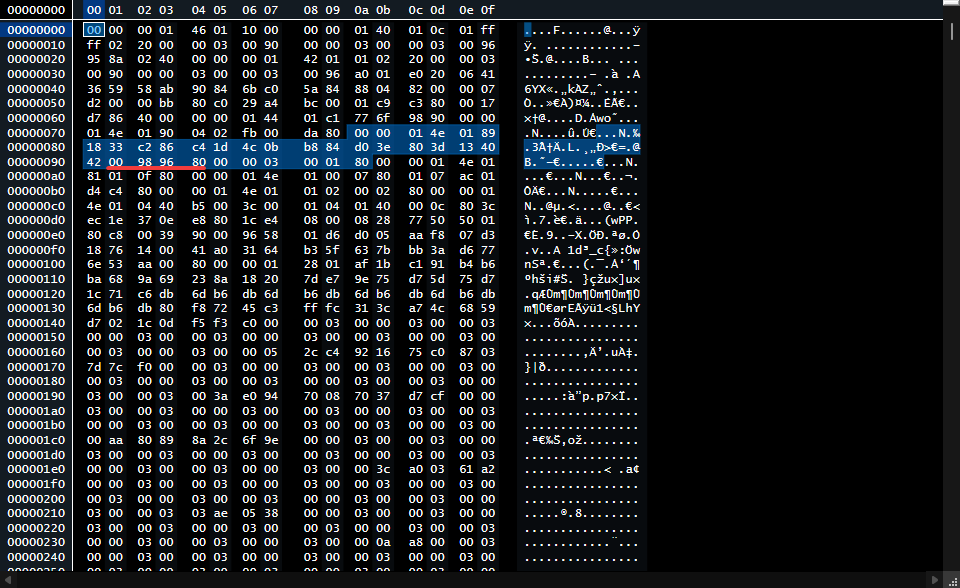
The Hexadecimal value for 40000000 is 02625A00: this is what we have to swap 00989680 for.

Changing MaxCLL and MaxFALL works the same.
When you're finished just save as .hevc and you're done.
New file:
Code: Select all
Video
Format                                   : HEVC
Format/Info                              : High Efficiency Video Coding
Format profile                           : Main 10@L5@Main
HDR format                               : SMPTE ST 2094 App 4, Version 1, HDR10+ Profile B compatible
Width                                    : 3 840 pixels
Height                                   : 1 600 pixels
Display aspect ratio                     : 2.40:1
Frame rate                               : 23.976 (24000/1001) FPS
Color space                              : YUV
Chroma subsampling                       : 4:2:0
Bit depth                                : 10 bits
Color range                              : Limited
Color primaries                          : BT.2020
Transfer characteristics                 : PQ
Matrix coefficients                      : BT.2020 non-constant
Mastering display color primaries        : Display P3
Mastering display luminance              : min: 0.0001 cd/m2, max: 4000 cd/m2
Maximum Content Light Level              : 1653 cd/m2
Maximum Frame-Average Light Level : 614 cd/m2When muxed to MKV mediainfo shows this error:
Code: Select all
Video
ID                                       : 1
Format                                   : HEVC
Format/Info                              : High Efficiency Video Coding
Format profile                           : Main 10@L5@Main
HDR format                               : Dolby Vision, Version 1.0, Profile 8.1, dvhe.08.06, BL+RPU, no metadata compression, HDR10 compatible / SMPTE ST 2094 App 4, Version HDR10+ Profile B, HDR10+ Profile B compatible
Codec ID                                 : V_MPEGH/ISO/HEVC
Duration                                 : 5 min 0 s
Bit rate                                 : 13.7 Mb/s
Width                                    : 3 840 pixels
Height                                   : 1 600 pixels
Display aspect ratio                     : 2.40:1
Frame rate mode                          : Constant
Frame rate                               : 23.976 (24000/1001) FPS
Color space                              : YUV
Chroma subsampling                       : 4:2:0
Bit depth                                : 10 bits
Bits/(Pixel*Frame)                       : 0.093
Stream size                              : 489 MiB (100%)
Default                                  : Yes
Forced                                   : No
Color range                              : Limited
Color primaries                          : BT.2020
Transfer characteristics                 : PQ
Matrix coefficients                      : BT.2020 non-constant
Mastering display color primaries        : R: x=0.129280 y=0.005360, G: x=0.000060 y=0.358420, B: x=0.081920 y=0.000000, White point: x=0.010220 y=1.305640
Mastering display luminance              : min: 0.0000 cd/m2, max: 53687 cd/m2
Maximum Content Light Level              : 1653 cd/m2
Maximum Frame-Average Light Level        : 614 cd/m2
SEI_rbsp_stop_one_bit                    : Missing
Conformance errors                       : 1
 HEVC                                    : Yes
General compliance : Bitstream parsing ran out of data to read before the end of the syntax was reached, most probably the bitstream is malformed (frame 0, time 00:00:00.000, offset 0x1D86)Re: Dolby Vision now possible through MP4 Mux.
Wow, so it does involve hex editing, that's what I was curious about, or if someone developed some tool open source or something. I really appreciate the detailed explanation sir. Thanks LV8HD. <3
-
Rororororo
- Posts: 28
- Joined: Tue May 12, 2020 1:23 am
Re: Dolby Vision now possible through MP4 Mux.
@RESET_9999
Where'd you get CMv4.0 bloc for Batman 2022?
I've got P5 and P8 WEBs, both of which are 2.9 blocs with only two 4.0 shots and no L3L8L9 metadata
Where'd you get CMv4.0 bloc for Batman 2022?
I've got P5 and P8 WEBs, both of which are 2.9 blocs with only two 4.0 shots and no L3L8L9 metadata
Last edited by Rororororo on Thu Jul 04, 2024 5:42 pm, edited 1 time in total.
ASUS BW-16D1HT 3.10
Ugoos AM6B Plus
Ugoos AM6B Plus
-
RESET_9999
- Posts: 2421
- Joined: Mon Aug 05, 2019 7:12 pm
-
Rororororo
- Posts: 28
- Joined: Tue May 12, 2020 1:23 am
Re: Dolby Vision now possible through MP4 Mux.
I got MAX WEB-DL and it's just CMv2.9, could you tell me the release name?
Code: Select all
Summary:
  Frames: 253474
  Profile: 5
  DM version: 1 (CM v2.9)
  Scene/shot count: 2427
  RPU mastering display: 0.0001/1000 nits
  RPU content light level (L1): MaxCLL: 440.77 nits, MaxFALL: 50.13 nits
  L6 metadata: Mastering display: 0.0001/1000 nits. MaxCLL: 413 nits, MaxFALL: 65 nits
  L2 trims: 100 nits, 600 nits, 1000 nits
  L2 Trim Count (TargetID, count): (1, 2427) (27, 2427) (48, 2427)"
  L5 Left=0 Right=0 Top=275 Bottom=276
  HDR10 BL MDL: N.A.
  HDR10 BL MDP: N.A.
  Resolution: 3840 x 2160
  FrameRate: 23.976fps
  Duration: 10571.978seconds
ASUS BW-16D1HT 3.10
Ugoos AM6B Plus
Ugoos AM6B Plus