Discussion of advanced MakeMKV functionality, expert mode, conversion profiles
-
georgesgiralt
- Posts: 113
- Joined: Thu Jun 04, 2020 12:40 pm
Post
by georgesgiralt » Mon May 13, 2024 4:36 pm
Hello Guys,
I've tried to backup a Blu-Ray movie "The Spy gone north" A Korean film.
Backup went smoothly and reported no errors.
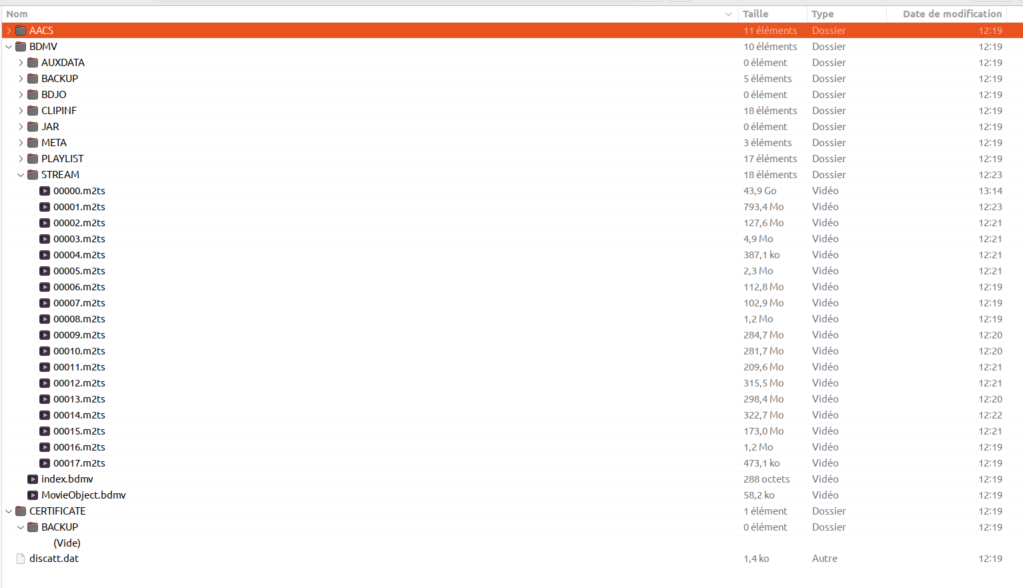
But I can't visualise any m2ts file with VLC. All I get is the yellow band moving from right to left and left to right on the progress bar. The total play time stays at zero whatever the file I try to see.
Some help will be appreciated.
Many thanks in advance for your help.
-
Ezatoka
- Posts: 482
- Joined: Fri Dec 06, 2019 6:55 pm
Post
by Ezatoka » Mon May 13, 2024 4:56 pm
Did you make a decrypted backup? Because I can still see the AACS directory
-
georgesgiralt
- Posts: 113
- Joined: Thu Jun 04, 2020 12:40 pm
Post
by georgesgiralt » Mon May 13, 2024 5:47 pm
I don't know. I clicked on the backup icon. (the one with the arrow pointing to the open folder).
I'll try again tomorrow and see what gives.
Edit : i did this on Ubuntu 22.04 LTS using the latest Make MKV version.
-
MartyMcNuts
- Posts: 5079
- Joined: Wed Nov 22, 2017 11:45 pm
Post
by MartyMcNuts » Mon May 13, 2024 11:48 pm
georgesgiralt wrote: Mon May 13, 2024 5:47 pm
I don't know. I clicked on the backup icon. (the one with the arrow pointing to the open folder).
I'll try again tomorrow and see what gives.
Edit : i did this on Ubuntu 22.04 LTS using the latest Make MKV version.
When you click that button there will be a little screen popup for the output directory. There's also a checkbox to decrypt the files. This must be checked!!
-
georgesgiralt
- Posts: 113
- Joined: Thu Jun 04, 2020 12:40 pm
Post
by georgesgiralt » Tue May 14, 2024 6:05 am
Yes, my bad. The check box was not checked. But the message is very misleading in French...
It is running fine now.
Thank you both.
