Thanks for this. Fel is discarded on my a95k via app of default media player .Even if it is in dolby vision mode. I have tried every container (DL-ST) exept mp4.RESET_9999 wrote: Mon Nov 06, 2023 7:09 pmoh I see whats going on. My 2nd version of the fel test is misleading and i took the wrong EL.simonhazel00 wrote: Mon Nov 06, 2023 6:47 pm yes the text appeared correctly.
Im actually really unsure what it's doing to be honest. the tests would indicate so, and the manufactures page says it supports fel, however the word it in a way that makes it sound like they are discarding fel and doing bl+rpu.
are your test sample definitive proof of proper fel support?
Im willing to do any testing you can think of, if you want me to dig deeper.
slightly off topic - getting dolby vision and truehd atmos working at the same time has been a pain. then there's earc flakeyness that really drives a middle finger home XD.
please try this one instead and look for the 2nd video in the background like this:
https://drive.google.com/file/d/1rk-quC ... drive_link

Dolby Vision now possible through MP4 Mux.
-
Mattl0
- Posts: 37
- Joined: Mon Apr 26, 2021 6:57 pm
Re: Dolby Vision now possible through MP4 Mux.
-
DjObama
- Posts: 12
- Joined: Fri Oct 27, 2023 4:48 pm
Re: Flac in mp4 workflows
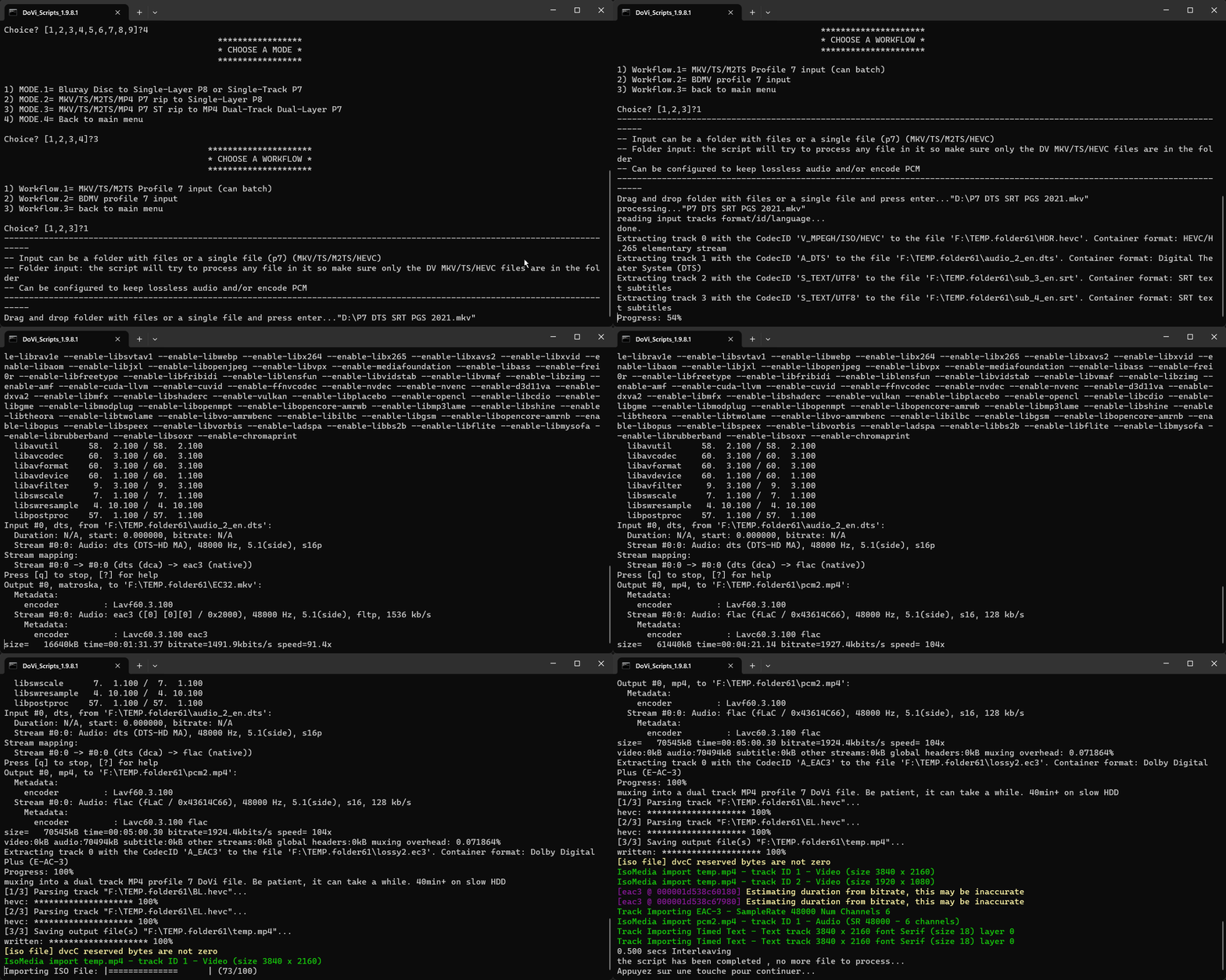
I set line 69 to FLAC as you instructed but the worflow 4-3-1 failed with:RESET_9999 wrote: Sun Nov 05, 2023 12:37 amOk, try the next version.
line 69 set encode_LL=NO
choices are NO or FLAC or LPCM (default=NO)
[flac @ 0000023f44d84300] encoding as 24 bits-per-sample
[mp4 @ 0000023f44daf880] flac in MP4 support is experimental, add '-strict -2' if you want to use it.
Could not write header for output file #0 (incorrect codec parameters ?): Experimental feature
Error initializing output stream 0:0 --
Conversion failed!
-
skull88
- Posts: 69
- Joined: Mon Mar 27, 2023 3:08 pm
Re: Flac in mp4 workflows
Don't forget you can now make official bug reports on the github page: https://github.com/R3S3t9999/DoVi_Scripts/issuesDjObama wrote: Fri Nov 10, 2023 5:15 pmI set line 69 to FLAC as you instructed but the worflow 4-3-1 failed with:RESET_9999 wrote: Sun Nov 05, 2023 12:37 amOk, try the next version.
line 69 set encode_LL=NO
choices are NO or FLAC or LPCM (default=NO)
[flac @ 0000023f44d84300] encoding as 24 bits-per-sample
[mp4 @ 0000023f44daf880] flac in MP4 support is experimental, add '-strict -2' if you want to use it.
Could not write header for output file #0 (incorrect codec parameters ?): Experimental feature
Error initializing output stream 0:0 --
Conversion failed!
-
RESET_9999
- Posts: 2421
- Joined: Mon Aug 05, 2019 7:12 pm
Re: Flac in mp4 workflows
Working fine on my end. Are you using your own ffmpeg ? if yes try with the version that comes with my tool pack.DjObama wrote: Fri Nov 10, 2023 5:15 pm I set line 69 to FLAC as you instructed but the worflow 4-3-1 failed with:
Code: Select all
General
Complete name                            : D:\P7 DTS SRT PGS 2021_DoVi.mp4
Format                                   : mp43
Codec ID                                 : mp43 (isom/mp43/dby1)
File size                                : 2.22 GiB
Duration                                 : 5 min 0 s
Overall bit rate mode                    : Variable
Overall bit rate                         : 63.5 Mb/s
Frame rate                               : 23.976 FPS
Encoded date                             : 2023-11-10 17:29:59 UTC
Tagged date                              : 2023-11-10 17:29:59 UTC
Writing application                      : GPAC-1.1.0-DEV-rev1027-g1daa0b5f-master

Video #1
ID                                       : 1
Format                                   : HEVC
Format/Info                              : High Efficiency Video Coding
Format profile                           : Main 10@L5.1@High
HDR format                               : SMPTE ST 2086, HDR10 compatible
Codec ID                                 : hev1
Codec ID/Info                            : High Efficiency Video Coding
Duration                                 : 5 min 0 s
Bit rate                                 : 58.0 Mb/s
Maximum bit rate                         : 100 Mb/s
Width                                    : 3 840 pixels
Height                                   : 2 160 pixels
Display aspect ratio                     : 16:9
Frame rate mode                          : Constant
Frame rate                               : 23.976 (24000/1001) FPS
Color space                              : YUV
Chroma subsampling                       : 4:2:0 (Type 2)
Bit depth                                : 10 bits
Bits/(Pixel*Frame)                       : 0.291
Stream size                              : 2.03 GiB (91%)
Default                                  : Yes
Alternate group                          : 1
Encoded date                             : 2023-11-10 17:29:56 UTC
Tagged date                              : 2023-11-10 17:30:01 UTC
Color range                              : Limited
Color primaries                          : BT.2020
Transfer characteristics                 : PQ
Matrix coefficients                      : BT.2020 non-constant
Mastering display color primaries        : Display P3
Mastering display luminance              : min: 0.0050 cd/m2, max: 4000 cd/m2
Maximum Content Light Level              : 9978 cd/m2
Maximum Frame-Average Light Level        : 5364 cd/m2
Codec configuration box                  : hvcC

Video #2
ID                                       : 2
Format                                   : HEVC
Format/Info                              : High Efficiency Video Coding
Format profile                           : Main 10@L5.1@High
HDR format                               : Dolby Vision, Version 1.0, dvhe.07.06, EL+RPU / SMPTE ST 2086, HDR10 compatible
Codec ID                                 : dvhe
Codec ID/Info                            : High Efficiency Video Coding with Dolby Vision
Duration                                 : 5 min 0 s
Bit rate                                 : 2 091 kb/s
Width                                    : 1 920 pixels
Height                                   : 1 080 pixels
Display aspect ratio                     : 16:9
Frame rate mode                          : Constant
Frame rate                               : 23.976 (24000/1001) FPS
Color space                              : YUV
Chroma subsampling                       : 4:2:0 (Type 2)
Bit depth                                : 10 bits
Bits/(Pixel*Frame)                       : 0.042
Stream size                              : 74.8 MiB (3%)
Default                                  : No
Alternate group                          : 1
Encoded date                             : 2023-11-10 17:29:56 UTC
Tagged date                              : 2023-11-10 17:30:01 UTC
Color range                              : Limited
Color primaries                          : BT.2020
Transfer characteristics                 : PQ
Matrix coefficients                      : BT.2020 non-constant
Mastering display color primaries        : Display P3
Mastering display luminance              : min: 0.0050 cd/m2, max: 4000 cd/m2
Codec configuration box                  : hvcC+dvcC

Audio #1
ID                                       : 3
Format                                   : E-AC-3
Format/Info                              : Enhanced AC-3
Commercial name                          : Dolby Digital Plus
Codec ID                                 : ac-3
Duration                                 : 5 min 0 s
Bit rate mode                            : Constant
Bit rate                                 : 1 536 kb/s
Maximum bit rate                         : 1 573 kb/s
Channel(s)                               : 6 channels
Channel layout                           : L R C LFE Ls Rs
Sampling rate                            : 48.0 kHz
Frame rate                               : 62.500 FPS (768 SPF)
Compression mode                         : Lossy
Stream size                              : 55.0 MiB (2%)
Title                                    : DDP
Language                                 : English
Service kind                             : Complete Main
Encoded date                             : 2023-11-10 17:30:01 UTC
Tagged date                              : 2023-11-10 17:30:01 UTC

Audio #2
ID                                       : 4
Format                                   : FLAC
Format/Info                              : Free Lossless Audio Codec
Codec ID                                 : fLaC
Duration                                 : 5 min 0 s
Duration_LastFrame                       : -3 ms
Bit rate mode                            : Variable
Bit rate                                 : 1 923 kb/s
Maximum bit rate                         : 3 094 kb/s
Channel(s)                               : 6 channels
Channel layout                           : L R C LFE Ls Rs
Sampling rate                            : 48.0 kHz
Bit depth                                : 16 bits
Compression mode                         : Lossless
Stream size                              : 68.8 MiB (3%)
Title                                    : FLAC
Language                                 : English
Default                                  : Yes
Alternate group                          : 1
Tagged date                              : 2023-11-10 17:30:01 UTC
MD5 of the unencoded content             : C8311326E38529F50C19D1257BFE8D59

Text #1
ID                                       : 5
Format                                   : Timed Text
Codec ID                                 : tx3g
Duration                                 : 4 min 55 s
Bit rate mode                            : Variable
Bit rate                                 : 35 b/s
Frame rate                               : 0.166 FPS
Stream size                              : 1.27 KiB (0%)
Title                                    : SRT
Language                                 : English
Forced                                   : No
Encoded date                             : 2023-11-10 17:30:01 UTC
Tagged date                              : 2023-11-10 17:30:01 UTC
Count of events                          : 24

Text #2
ID                                       : 6
Format                                   : Timed Text
Codec ID                                 : tx3g
Duration                                 : 4 min 55 s
Bit rate mode                            : Variable
Bit rate                                 : 39 b/s
Frame rate                               : 0.227 FPS
Stream size                              : 1.42 KiB (0%)
Title                                    : SRT
Language                                 : English
Forced                                   : No
Encoded date                             : 2023-11-10 17:30:01 UTC
Tagged date                              : 2023-11-10 17:30:01 UTC
Count of events                          : 33
-
tjayz
- Posts: 14
- Joined: Mon Feb 13, 2023 9:29 pm
Re: Dolby Vision now possible through MP4 Mux.
Use Emby, if still have problem, I assure you is not the media player. I cast to x800 which cannot process dv in mkv so I always use ts to preserve lossless audio as well. Some DL-ST will freeze black, just keep everything DL-DT.Mattl0 wrote: Wed Nov 08, 2023 9:37 pmThanks for this. Fel is discarded on my a95k via app of default media player .Even if it is in dolby vision mode. I have tried every container (DL-ST) exept mp4.RESET_9999 wrote: Mon Nov 06, 2023 7:09 pmoh I see whats going on. My 2nd version of the fel test is misleading and i took the wrong EL.simonhazel00 wrote: Mon Nov 06, 2023 6:47 pm yes the text appeared correctly.
Im actually really unsure what it's doing to be honest. the tests would indicate so, and the manufactures page says it supports fel, however the word it in a way that makes it sound like they are discarding fel and doing bl+rpu.
are your test sample definitive proof of proper fel support?
Im willing to do any testing you can think of, if you want me to dig deeper.
slightly off topic - getting dolby vision and truehd atmos working at the same time has been a pain. then there's earc flakeyness that really drives a middle finger home XD.
please try this one instead and look for the 2nd video in the background like this:
https://drive.google.com/file/d/1rk-quC ... drive_link
UBP-X800M2 / LG OLED CX / NAD M17 V2i
-
DjObama
- Posts: 12
- Joined: Fri Oct 27, 2023 4:48 pm
Re: Flac in mp4 workflows
Thank you, YES! That was the case, I had old ffmpeg. I'm happy to report Flac audio works with p7 DT-DL in MP4 containerRESET_9999 wrote: Fri Nov 10, 2023 5:31 pmWorking fine on my end. Are you using your own ffmpeg ? if yes try with the version that comes with my tool pack.DjObama wrote: Fri Nov 10, 2023 5:15 pm I set line 69 to FLAC as you instructed but the worflow 4-3-1 failed with:
 (Edit. On my LG B8)
Compression level 0 you set for flac encode is a good choice, I compared with level 5 on 2,5h movie and the size difference was only 200 mb.
However, the dts-hd ma track got discarded upon conversion, am I missing a setting to keep the original audio track?
-
RESET_9999
- Posts: 2421
- Joined: Mon Aug 05, 2019 7:12 pm
Re: Dolby Vision now possible through MP4 Mux.
yes, it's by design but I can remove that restriction in the next version.
for workflow 4-3-1, remove at lines 7331-7343: if not "%encode_LL%"=="YES"
replace:
for workflow 4-3-1, remove at lines 7331-7343: if not "%encode_LL%"=="YES"
replace:
Code: Select all
for /L %%i in (1,1,%count%) do (
     if "%encode_LL%"=="YES" if exist "%TEMP%audio_%%i_!T%%i.Lang!.thd" "%ffmpeg_path%" -i "%TEMP%audio_%%i_!T%%i.Lang!.thd" -map 0:0 -c %llcodec% "%TEMP%pcm%%i.%mcont%"& set AL%%i=-add "%TEMP%pcm%%i.%mcont%"#audio:lang=!T%%i.Lang!:name=%mname%!FORCED%%i!
)
for /L %%i in (1,1,%count%) do (
     if exist "%TEMP%audio_%%i_!T%%i.Lang!.thd"	if "%keep_lossless%"=="YES" if not "%encode_LL%"=="YES" "%ffmpeg_path%" -y -i "%TEMP%audio_%%i_!T%%i.Lang!.thd" -map 0:0 -c copy -strict -2 "%TEMP%lossless%%i.mp4" & set AL%%i=-add "%TEMP%lossless%%i.mp4"#audio:lang=!T%%i.Lang!:name=THD!FORCED%%i!
)

for /L %%i in (1,1,%count%) do (
     if "%encode_LL%"=="YES" if exist "%TEMP%audio_%%i_!T%%i.Lang!.dts" "%ffmpeg_path%" -i "%TEMP%audio_%%i_!T%%i.Lang!.dts" -map 0:0 -c %llcodec% "%TEMP%pcm%%i.%mcont%"& set AL%%i=-add "%TEMP%pcm%%i.%mcont%"#audio:lang=!T%%i.Lang!:name=%mname%!FORCED%%i!
)
for /L %%i in (1,1,%count%) do (
     if exist "%TEMP%audio_%%i_!T%%i.Lang!.dts"	if "%keep_lossless%"=="YES" if not "%encode_LL%"=="YES" "%ffmpeg_path%" -y -i "%TEMP%audio_%%i_!T%%i.Lang!.dts" -map 0:0 -c copy "%TEMP%lossless%%i.mp4" & set AL%%i=-add "%TEMP%lossless%%i.mp4"#audio:lang=!T%%i.Lang!:name=DTS!FORCED%%i!
)-
ans40
- Posts: 12
- Joined: Thu Sep 07, 2023 7:54 am
Re: Dolby Vision now possible through MP4 Mux.
For injecting both HDR10+ and DV into the same BL, does it matter which you do first?
-
powdeau
- Posts: 57
- Joined: Sat Jan 12, 2019 1:01 am
Re: Dolby Vision now possible through MP4 Mux.
@RESET_9999 Do i need to change something in your DaVinci preset for DV generation in 18.6 or is everything the same?
Now I have these settings:

Thanks!
Now I have these settings:
Thanks!
-
RESET_9999
- Posts: 2421
- Joined: Mon Aug 05, 2019 7:12 pm
Re: Dolby Vision now possible through MP4 Mux.
noans40 wrote: Mon Nov 13, 2023 9:12 am For injecting both HDR10+ and DV into the same BL, does it matter which you do first?
yes
-
DjObama
- Posts: 12
- Joined: Fri Oct 27, 2023 4:48 pm
FLAC/LPCM lower volume FIX
Hi,
I did some more testing with Flac audio. For some movies after converting trueHD/dts-hd to Flac (i think it applies to lpcm too) the resulting audio track is significantly lower volume. Probably because dts contains metadata that instructs the receiver by how much it should boost the signal and flac/lpcm is just raw audio information. For example Gladiator is a movie for which flac/lpcm is 4,5 dB lower than it could be.
I found a good way to safely increase the signal with ffmpeg. First you have to find by how many dB you can losslessly increase volume with this command:
This outputs information about how much dB you can increse the volume without going into clipping. For example:
[Parsed_volumedetect_0 @ 0x7f8ba1c121a0] mean_volume: -16.0 dB
[Parsed_volumedetect_0 @ 0x7f8ba1c121a0] max_volume: -5.0 dB
[Parsed_volumedetect_0 @ 0x7f8ba1c121a0] histogram_0db: 87861
Important is only the max_volume
Then use the command to increase the volume by max_volume amount:
This command only boosts the overall signal, there is no normalization happening, so it's still a lossless process.
Is it possible to incorporate this process into dovi_scripts @RESET_9999
You can find more information about it under this link (Option 3)
https://superuser.com/questions/323119/ ... ing-ffmpeg
I did some more testing with Flac audio. For some movies after converting trueHD/dts-hd to Flac (i think it applies to lpcm too) the resulting audio track is significantly lower volume. Probably because dts contains metadata that instructs the receiver by how much it should boost the signal and flac/lpcm is just raw audio information. For example Gladiator is a movie for which flac/lpcm is 4,5 dB lower than it could be.
I found a good way to safely increase the signal with ffmpeg. First you have to find by how many dB you can losslessly increase volume with this command:
Code: Select all
ffmpeg -i video.avi -af "volumedetect" -vn -sn -dn -f null /dev/null
[Parsed_volumedetect_0 @ 0x7f8ba1c121a0] mean_volume: -16.0 dB
[Parsed_volumedetect_0 @ 0x7f8ba1c121a0] max_volume: -5.0 dB
[Parsed_volumedetect_0 @ 0x7f8ba1c121a0] histogram_0db: 87861
Important is only the max_volume
Then use the command to increase the volume by max_volume amount:
Code: Select all
ffmpeg -i input.wav -af "volume=5dB" output.wav
Is it possible to incorporate this process into dovi_scripts @RESET_9999
You can find more information about it under this link (Option 3)
https://superuser.com/questions/323119/ ... ing-ffmpeg
-
PhantomIceman
- Posts: 3
- Joined: Sat Jun 20, 2020 12:22 am
Re: Dolby Vision now possible through MP4 Mux.
This may have been answered somewhere within this thread but since makemkv is able to rip the dolby vision layer is it possible to create a dolby vision playable mkv file through mkv or do you have use scripts?
-
Gatorman
- Posts: 84
- Joined: Thu Feb 10, 2022 3:47 pm
Re: Dolby Vision now possible through MP4 Mux.
This really depends on the player you plan on viewing your media on. Checkout the signature under RESET_9999.PhantomIceman wrote: Tue Nov 14, 2023 5:09 pm This may have been answered somewhere within this thread but since makemkv is able to rip the dolby vision layer is it possible to create a dolby vision playable mkv file through mkv or do you have use scripts?
More reasons to collect physical media. Ugoos AM6B+ CE p3i PM4K.
-
RESET_9999
- Posts: 2421
- Joined: Mon Aug 05, 2019 7:12 pm
Re: FLAC/LPCM lower volume FIX
I'll check it out but I'm pretty sure LPCM is fine.DjObama wrote: Tue Nov 14, 2023 3:45 pm Hi,
I did some more testing with Flac audio. For some movies after converting trueHD/dts-hd to Flac (i think it applies to lpcm too) the resulting audio track is significantly lower volume.
EDIT: did some tests and the original THD/DTS, flac or lpcm all sound at the same level on my PC.
Anyway, I added -drc_scale 0 in the cli, maybe that will help?
-
DjObama
- Posts: 12
- Joined: Fri Oct 27, 2023 4:48 pm
Re: FLAC/LPCM lower volume FIX
Yes, I checked and on PC there is no problem. However on TV there is a significant diffrence. I just checked another movie - Hero (2002), not even a HDR movie, but Flac plays very quiet compared to dts. Can somebody check the flac playback on their tvs/recievers compared to dts-hd tracks? I read about it a bit and seems that dts format boosts the volume while decoding, but it doesn't happen on pc.RESET_9999 wrote: Tue Nov 14, 2023 11:29 pmI'll check it out but I'm pretty sure LPCM is fine.DjObama wrote: Tue Nov 14, 2023 3:45 pm Hi,
I did some more testing with Flac audio. For some movies after converting trueHD/dts-hd to Flac (i think it applies to lpcm too) the resulting audio track is significantly lower volume.
EDIT: did some tests and the original THD/DTS, flac or lpcm all sound at the same level on my PC.
Anyway, I added -drc_scale 0 in the cli, maybe that will help?