@RESET_9999
When trying to grade HDR in DaVinci, the preview looks washed out (I have a 4K HDR monitor).
Is there any way to get a proper preview without any specific hardware?
If not, what is the most budget friendly option?
Dolby Vision now possible through MP4 Mux.
-
thirdmoon
- Posts: 35
- Joined: Mon Jul 03, 2023 6:17 am
-
RESET_9999
- Posts: 2421
- Joined: Mon Aug 05, 2019 7:12 pm
Re: Dolby Vision now possible through MP4 Mux.
you need a capture card supported by Resolve. Alternatively, you can export a couple of 16bit tiffs and add ''transfer=HDR.matrix=2020'' in the filename. Then madvr/MPC will trigger HDR.

-
lolipeid47
- Posts: 13
- Joined: Sun Nov 20, 2022 1:24 pm
Re: Dolby Vision now possible through MP4 Mux.
Hey @RESET 

Any quick way to determine if an HDR10+ metadata on a WEB-DL is generated by the uploader from a conversion of the DoVi metadata ?
I'd like to know if there's a way to determine that when looking at the json file to then not trust those uploaders still doing these bad DoVi to HDR10+ conversions
Any quick way to determine if an HDR10+ metadata on a WEB-DL is generated by the uploader from a conversion of the DoVi metadata ?
I'd like to know if there's a way to determine that when looking at the json file to then not trust those uploaders still doing these bad DoVi to HDR10+ conversions
-
RESET_9999
- Posts: 2421
- Joined: Mon Aug 05, 2019 7:12 pm
Re: Dolby Vision now possible through MP4 Mux.
yes, just plot HDR10plus(6-6) and DV(6-3). The plots will be identical (minus the 10 and 100nits DV floor).
E.G.: https://slow.pics/c/M4pQAj7i
E.G.: https://slow.pics/c/M4pQAj7i
-
speeddemon
- Posts: 77
- Joined: Wed Oct 16, 2019 3:44 am
Re: Dolby Vision now possible through MP4 Mux.
Does anyone know why more playback devices aren't capable of utilizing the 100-nit L2 trim for playback on SDR devices?
I've noticed that Apple, Google, and Amazon devices don't use the 100-nit L2 trim for playback on an SDR device even though all of them are Dolby Vision compatible. I'm following @RESET_9999's tutorial for using the 100-nit trim to create an SDR encode (via Resolve and Staxrip). Thanks!
I've noticed that Apple, Google, and Amazon devices don't use the 100-nit L2 trim for playback on an SDR device even though all of them are Dolby Vision compatible. I'm following @RESET_9999's tutorial for using the 100-nit trim to create an SDR encode (via Resolve and Staxrip). Thanks!
-
thirdmoon
- Posts: 35
- Joined: Mon Jul 03, 2023 6:17 am
Re: Dolby Vision now possible through MP4 Mux.
Not able to replicate this.RESET_9999 wrote: Wed Nov 01, 2023 11:11 am Alternatively, you can export a couple of 16bit tiffs and add ''transfer=HDR.matrix=2020'' in the filename. Then madvr/MPC will trigger HDR.
-
RESET_9999
- Posts: 2421
- Joined: Mon Aug 05, 2019 7:12 pm
Re: Dolby Vision now possible through MP4 Mux.
AFAIK, the Fire Stick tv 4k and sony x700/x800m2 can. Not sure if it does its own tone mapping internally or if it's using the trim pass though. That would be easy to test with a capture card.speeddemon wrote: Thu Nov 02, 2023 12:23 am Does anyone know why more playback devices aren't capable of utilizing the 100-nit L2 trim for playback on SDR devices?
I've noticed that Apple, Google, and Amazon devices don't use the 100-nit L2 trim for playback on an SDR device even though all of them are Dolby Vision compatible. I'm following @RESET_9999's tutorial for using the 100-nit trim to create an SDR encode (via Resolve and Staxrip). Thanks!
Try harder. I've been using this filename trick for years.thirdmoon wrote: Thu Nov 02, 2023 5:36 amNot able to replicate this.RESET_9999 wrote: Wed Nov 01, 2023 11:11 am Alternatively, you can export a couple of 16bit tiffs and add ''transfer=HDR.matrix=2020'' in the filename. Then madvr/MPC will trigger HDR.
-
speeddemon
- Posts: 77
- Joined: Wed Oct 16, 2019 3:44 am
Re: Dolby Vision now possible through MP4 Mux.
I haven't tested Apple/Amazon/Google devices with a capture card, but I have hooked them all up to a calibrated screen, compared, and the differences were significant. They all appeared to be doing their own tone mapping. I haven't tested this in a long time though so it's possible some/all have improved.RESET_9999 wrote: Thu Nov 02, 2023 11:00 amAFAIK, the Fire Stick tv 4k and sony x700/x800m2 can. Not sure if it does its own tone mapping internally or if it's using the trim pass though. That would be easy to test with a capture card.speeddemon wrote: Thu Nov 02, 2023 12:23 am Does anyone know why more playback devices aren't capable of utilizing the 100-nit L2 trim for playback on SDR devices?
I've noticed that Apple, Google, and Amazon devices don't use the 100-nit L2 trim for playback on an SDR device even though all of them are Dolby Vision compatible. I'm following @RESET_9999's tutorial for using the 100-nit trim to create an SDR encode (via Resolve and Staxrip). Thanks!
I also never tested from a Sony/Oppo blu-ray player.
I feel like it's an interesting scenario though for people with projectors.
-
RESET_9999
- Posts: 2421
- Joined: Mon Aug 05, 2019 7:12 pm
Re: Dolby Vision now possible through MP4 Mux.
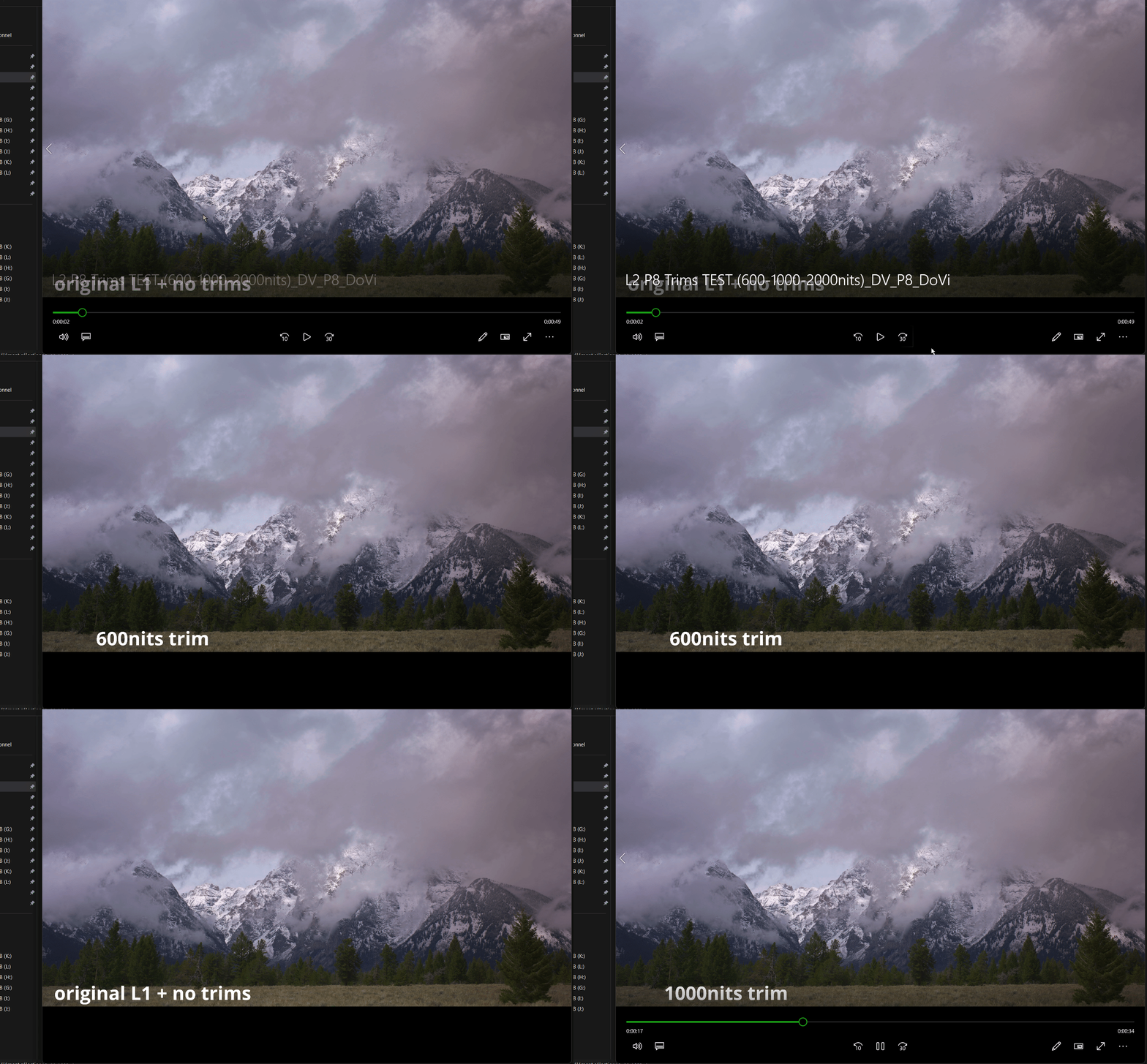
With Windows 10/11 mediaplayer, even the 600nits trim is used for SDR/HDR and the 100nits trim has very little effect(at least on the test file i used).speeddemon wrote: Thu Nov 02, 2023 6:20 pm I haven't tested Apple/Amazon/Google devices with a capture card, but I have hooked them all up to a calibrated screen, compared, and the differences were significant. They all appeared to be doing their own tone mapping. I haven't tested this in a long time though so it's possible some/all have improved.
I also never tested from a Sony/Oppo blu-ray player.
I feel like it's an interesting scenario though for people with projectors.
-
Rainbaby
- Posts: 1
- Joined: Tue Mar 23, 2021 3:53 am
Re: Dolby Vision now possible through MP4 Mux.
A common misconception is the confusion between DV display management and the meaning of "SDR" in the context of display operating modes. While in the context of DV, "SDR" usually refers to a 100-nit BT.709 Gamma 2.4 target display, the latter only roughly denotes the display is using a SDR gamma. In this scenario, the DV target brightness can be just any value and is typically greater than 100 nits. The final trim used for your display depends on the target brightness and available trims in metadata and is usually interpolated values from trims for lower and higher target brightness.RESET_9999 wrote: Thu Nov 02, 2023 7:23 pmWith Windows 10/11 mediaplayer, even the 600nits trim is used for SDR/HDR and the 100nits trim has very little effect(at least on the test file i used).speeddemon wrote: Thu Nov 02, 2023 6:20 pm I haven't tested Apple/Amazon/Google devices with a capture card, but I have hooked them all up to a calibrated screen, compared, and the differences were significant. They all appeared to be doing their own tone mapping. I haven't tested this in a long time though so it's possible some/all have improved.
I also never tested from a Sony/Oppo blu-ray player.
I feel like it's an interesting scenario though for people with projectors.
You may want to find out the target brightness of your current display, I made a test pattern for a quick check.
Download: https://mega.nz/file/XEQRyC6S#PIoiGsnCx ... 3j8AbPjmSQ
Check the grayscale in the center of the screen, visually identify the point where the grayscale stops (start turning into white), and use the logarithmic scale below to determine the approximate target brightness. For example, the screenshot below means a target brightness of 500-nit.

It only works in players with DV display management support, so players like mpv that only composes base layer will not work, they will just show a full grayscale.
On Windows, you will get a target brightness of 270-nit in SDR mode and 1500-nits in HDR mode if your display doesn't provide any useful data about this through EDID.
On macOS, you should not use any reference mode with locked brightness, it will just bypass display management.
The target brightness may change with user tunable display parameters like brightness setting and DV mode, and other parameters such as ambient brightness. And it doesn't mean your display is actually operating with that brightness (although it would better be).
-
RESET_9999
- Posts: 2421
- Joined: Mon Aug 05, 2019 7:12 pm
Re: Dolby Vision now possible through MP4 Mux.
Oh right, in DV playback, I knew that all the trims worked together in interpolation but I didn't know it was the same in SDR playback.
thanks for the info.
thanks for the info.
-
nateify
- Posts: 1
- Joined: Fri Nov 03, 2023 1:50 am
Re: Dolby Vision now possible through MP4 Mux.
Hello, I had a question based on some posts around page 595 seen here about using Dovibaker for FEL to HDR10+P8 baking: viewtopic.php?p=140818&sid=fb796c7eeede ... 85#p140818
I am trying to figure out how to accurately determine the value to set for "-max-cll" in the x265 encoder. I see some discussion on that page but I'm still unsure.
My specific example is using Dovibaker on Total Recall P7 FEL ST-DL MKV, converting the FEL RPU to p8.1 RPU, then injecting the p8.1 RPU into encoded+baked HDR10 stream finally for playback on a device and TV which support DV P8.1.
When I extract the RPU and get a summary from dovi_tool, this is shown:
Is the L1 or L6 value what I am looking for here?
Additionally, I found a Github thread here for Dovibaker https://github.com/erazortt/DoViBaker/i ... 1257758611
Where the original author made the following comment: "To find the actual values for max-cll of your created stream you can use MaxCllFind. To do this put the command ConvertToRGB64() after the call to DoViBaker. As the very last command in the script put the call to MaxCllFind()."
When I do this I find this by the final frame the values are: MaxCLL: 3870.62 and MaxFALL: 84.1747 this seems quite different than what dovi_tool tells me and I did not find a lot of discussion on this method and not sure if it is even relevant to my use case.
One more bonus question if anyone has any input. On a private tracker in a discussion someone mentioned AviSynth with MapNLQ plugin is preferred to DoViBaker, has anyone here tested this or have any more info on it and what tangible benefits it has?
I am trying to figure out how to accurately determine the value to set for "-max-cll" in the x265 encoder. I see some discussion on that page but I'm still unsure.
My specific example is using Dovibaker on Total Recall P7 FEL ST-DL MKV, converting the FEL RPU to p8.1 RPU, then injecting the p8.1 RPU into encoded+baked HDR10 stream finally for playback on a device and TV which support DV P8.1.
When I extract the RPU and get a summary from dovi_tool, this is shown:
Code: Select all
Summary:
  Frames: 7203
  Profile: 7 (FEL)
  DM version: 1 (CM v2.9)
  Scene/shot count: 28
  RPU mastering display: 0.0001/1000 nits
  RPU content light level (L1): MaxCLL: 708.26 nits, MaxFALL: 25.98 nits
  L6 metadata: Mastering display: 0.0001/1000 nits. MaxCLL: 0 nits, MaxFALL: 0 nits
L2 trims: 100 nits, 600 nits, 1000 nitsAdditionally, I found a Github thread here for Dovibaker https://github.com/erazortt/DoViBaker/i ... 1257758611
Where the original author made the following comment: "To find the actual values for max-cll of your created stream you can use MaxCllFind. To do this put the command ConvertToRGB64() after the call to DoViBaker. As the very last command in the script put the call to MaxCllFind()."
When I do this I find this by the final frame the values are: MaxCLL: 3870.62 and MaxFALL: 84.1747 this seems quite different than what dovi_tool tells me and I did not find a lot of discussion on this method and not sure if it is even relevant to my use case.
One more bonus question if anyone has any input. On a private tracker in a discussion someone mentioned AviSynth with MapNLQ plugin is preferred to DoViBaker, has anyone here tested this or have any more info on it and what tangible benefits it has?
-
hugard
- Posts: 2
- Joined: Fri Nov 03, 2023 2:06 am
Re: Dolby Vision now possible through MP4 Mux.
Hey @RESET_9999  , Firstly thanks for that awesome spreadsheet of yours. It has helped me understand a lot about how DV works. I have a question. For the UHD BD movies where the brightness/details get expanded via the FEL layer, would those movies look dimmer or have slightly less detail even if I play them in just HDR10? Or is this a problem only when I try to play them in DV with a device that can't decode FEL? I would assume that they would look dimmer or have slightly less detail even if I play them in just HDR10. If so, why do studios do this? They're essentially downgrading the HDR10 output and fixing things in the DV output through the FEL. Ideally the HDR10 version should be the best it can possibly be and DV should just be an improvement over it, right?
, Firstly thanks for that awesome spreadsheet of yours. It has helped me understand a lot about how DV works. I have a question. For the UHD BD movies where the brightness/details get expanded via the FEL layer, would those movies look dimmer or have slightly less detail even if I play them in just HDR10? Or is this a problem only when I try to play them in DV with a device that can't decode FEL? I would assume that they would look dimmer or have slightly less detail even if I play them in just HDR10. If so, why do studios do this? They're essentially downgrading the HDR10 output and fixing things in the DV output through the FEL. Ideally the HDR10 version should be the best it can possibly be and DV should just be an improvement over it, right?-
RESET_9999
- Posts: 2421
- Joined: Mon Aug 05, 2019 7:12 pm
Re: Dolby Vision now possible through MP4 Mux.
Yes, I would use the values from the dovi Level 1 (MaxCllFind).nateify wrote: Fri Nov 03, 2023 2:17 am When I do this I find this by the final frame the values are: MaxCLL: 3870.62 and MaxFALL: 84.1747 this seems quite different than what dovi_tool tells me and I did not find a lot of discussion on this method and not sure if it is even relevant to my use case.
One more bonus question if anyone has any input. On a private tracker in a discussion someone mentioned AviSynth with MapNLQ plugin is preferred to DoViBaker, has anyone here tested this or have any more info on it and what tangible benefits it has?
I tried MapNLQ and didn't notice any benefits. The speed was exactly the same as the dovi_baker (+prefetch)
It's only a problem when you try to play those FEL movies in DV on a device that can't process the EL. HDR10 will be as intended.hugard wrote: Fri Nov 03, 2023 2:54 am Hey @RESET_9999
viewtopic.php?p=137560#p137560why do studios do this?
-
DjObama
- Posts: 12
- Joined: Fri Oct 27, 2023 4:48 pm
Flac in mp4 workflows
Hi,
Is it possible to add lossless (DTS-HD MA, TrueHD) conversions to FLAC to mp4 workflows?
If not then how can I add flac tracks to p7 DT-DL MP4s created using Dovi scripts?
Is it possible to add lossless (DTS-HD MA, TrueHD) conversions to FLAC to mp4 workflows?
If not then how can I add flac tracks to p7 DT-DL MP4s created using Dovi scripts?