There are even flashes in some HDR10 releases... The 2017 US Lionsgate UHD BD of La La Land (2016) even has flashes in its HDR10 BL. Only the 2022 IT Eagle UHD BD of La La Land (2016) fixes this issue in its Base Layer (it also has P7 FEL), but the Base Layer of that release appears to be extremely problematic and requires the FEL for expanded brightness, and the L2 Trims to correct the saturation.RESET_9999 wrote: Mon Sep 11, 2023 8:11 pm Well, I have definitely seen flashes as a single shot in retail DV source...
The Bad Guys animation movie is one I remember because it confused me when I did my P8 hybrid remux.
Dolby Vision now possible through MP4 Mux.
-
speeddemon
- Posts: 77
- Joined: Wed Oct 16, 2019 3:44 am
Re: Dolby Vision now possible through MP4 Mux.
-
RESET_9999
- Posts: 2421
- Joined: Mon Aug 05, 2019 7:12 pm
Re: Dolby Vision now possible through MP4 Mux.
Then it must be my AVR (its quite old) and maybe it was the same on my x700 and I just never noticed.axeyou wrote: Mon Sep 11, 2023 8:16 pm Interesting. I’m playing through network as well. Both the X800M2 and my AVR report DTS-HD MA on a 2.0 track.
I know that the ffmpeg DDP 1536kbps track doesn't work on the x800m2 and I'm certain they worked on the x700. The EAE 7.1 DDP tracks play fine.
2.0 DTS-HD:

5.1 DTS-HD:

Re: Dolby Vision now possible through MP4 Mux.
Does anyone know if it's possible to get 10k nit with CM v4.0 like these?


I'm asking because whatever mastering display I choose with 3-1 (Professional CM v4.0 Dolby Algo) I get lesser results, maximum 1k, 2k or 4k nits. 10k nits doesn't seem available. Is there a reason for this or?
Do the guys above have access to tools we don't or does Dovi_scripts just not allow 10k nits (yet)?
I'm asking because whatever mastering display I choose with 3-1 (Professional CM v4.0 Dolby Algo) I get lesser results, maximum 1k, 2k or 4k nits. 10k nits doesn't seem available. Is there a reason for this or?
Do the guys above have access to tools we don't or does Dovi_scripts just not allow 10k nits (yet)?
-
Mrmorrison
- Posts: 33
- Joined: Thu Oct 20, 2022 2:13 pm
Re: Dolby Vision now possible through MP4 Mux.
Claiming that a P7 FEL is the same if you convert it to a P8 is wrong, I understand.
Can you explain to me what exactly is lost from this operation?
Can you explain to me what exactly is lost from this operation?
-
RESET_9999
- Posts: 2421
- Joined: Mon Aug 05, 2019 7:12 pm
Re: Dolby Vision now possible through MP4 Mux.
The metadata cannot be 10k if the content is not 10k. The Algo measures each pixel's brightness and produces metadata accordingly.Trees wrote: Tue Sep 12, 2023 9:00 am Does anyone know if it's possible to get 10k nit with CM v4.0 like these?
I'm asking because whatever mastering display I choose with 3-1 (Professional CM v4.0 Dolby Algo) I get lesser results, maximum 1k, 2k or 4k nits. 10k nits doesn't seem available. Is there a reason for this or?
Do the guys above have access to tools we don't or does Dovi_scripts just not allow 10k nits (yet)?
-
RESET_9999
- Posts: 2421
- Joined: Mon Aug 05, 2019 7:12 pm
Re: Dolby Vision now possible through MP4 Mux.
look at the comparisons in the red section that says:Mrmorrison wrote: Tue Sep 12, 2023 10:21 am Claiming that a P7 FEL is the same if you convert it to a P8 is wrong, I understand.
Can you explain to me what exactly is lost from this operation?
https://docs.google.com/spreadsheets/d/ ... edit#gid=0Can only be played on a FEL device and can't be converted to P8 without baking FEL into EL
Re: Dolby Vision now possible through MP4 Mux.
But according to the plot, they are 10k nits:RESET_9999 wrote: Tue Sep 12, 2023 11:05 amThe metadata cannot be 10k if the content is not 10k. The Algo measures each pixel's brightness and produces metadata accordingly.Trees wrote: Tue Sep 12, 2023 9:00 am Does anyone know if it's possible to get 10k nit with CM v4.0 like these?
I'm asking because whatever mastering display I choose with 3-1 (Professional CM v4.0 Dolby Algo) I get lesser results, maximum 1k, 2k or 4k nits. 10k nits doesn't seem available. Is there a reason for this or?
Do the guys above have access to tools we don't or does Dovi_scripts just not allow 10k nits (yet)?
Even though the original plots are like this:
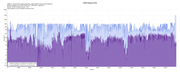
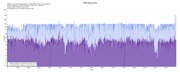
How are they achieving 10k nit peaks with a CM v4.0 conversion (CM v4.0 according to the plots)? I've tied to replicate it but the plots don't go above 4k nits. Here are the MediaInfo outputs:
Code: Select all
Complete name                            : /media/user/WD 1 TB/Videos/The Grand Tour/Series 5/S05E01 - A Scandi Flick missing chapters 2160p HDR10p Amazon Prime Web-DL.mkv
Format                                   : Matroska
Format version                           : Version 4
File size                                : 10.8 GiB
Duration                                 : 1 h 39 min
Overall bit rate                         : 15.4 Mb/s
Movie name                               : A Scandi Flick
Encoded date                             : UTC 2023-09-07 15:54:25
Writing application                      : mkvmerge v75.0.0 ('Goliath') 64-bit
Writing library                          : libebml v1.4.4 + libmatroska v1.7.1

Video
ID                                       : 1
Format                                   : HEVC
Format/Info                              : High Efficiency Video Coding
Format profile                           : Main 10@L5@Main
HDR format                               : SMPTE ST 2094 App 4, Version 1, HDR10+ Profile B compatible
Codec ID                                 : V_MPEGH/ISO/HEVC
Duration                                 : 1 h 39 min
Bit rate                                 : 14.8 Mb/s
Width                                    : 3 840 pixels
Height                                   : 2 160 pixels
Display aspect ratio                     : 16:9
Frame rate mode                          : Constant
Frame rate                               : 25.000 FPS
Color space                              : YUV
Chroma subsampling                       : 4:2:0
Bit depth                                : 10 bits
Bits/(Pixel*Frame)                       : 0.071
Stream size                              : 10.3 GiB (96%)
Title                                    : 2160p HDR10+ Amazon Prime Web-DL
Language                                 : English
Default                                  : No
Forced                                   : No
Color range                              : Limited
Color primaries                          : BT.2020
Transfer characteristics                 : PQ
Matrix coefficients                      : BT.2020 non-constant
Mastering display color primaries        : Display P3
Mastering display luminance              : min: 0.0001 cd/m2, max: 1000 cd/m2
Maximum Content Light Level              : 999 cd/m2
Maximum Frame-Average Light Level        : 745 cd/m2
Code: Select all
Complete name                            : /media/user/WD 1 TB/Videos/The Grand Tour/Series 5/S05E02 - Eurocrash missing chapters 2160p HDR10p Amazon Prime Web-DL.mkv
Format                                   : Matroska
Format version                           : Version 4
File size                                : 11.5 GiB
Duration                                 : 1 h 46 min
Overall bit rate                         : 15.4 Mb/s
Movie name                               : Eurocrash
Encoded date                             : UTC 2023-09-07 16:01:55
Writing application                      : mkvmerge v75.0.0 ('Goliath') 64-bit
Writing library                          : libebml v1.4.4 + libmatroska v1.7.1

Video
ID                                       : 1
Format                                   : HEVC
Format/Info                              : High Efficiency Video Coding
Format profile                           : Main 10@L5@Main
HDR format                               : SMPTE ST 2094 App 4, Version 1, HDR10+ Profile B compatible
Codec ID                                 : V_MPEGH/ISO/HEVC
Duration                                 : 1 h 46 min
Bit rate                                 : 14.8 Mb/s
Width                                    : 3 840 pixels
Height                                   : 2 160 pixels
Display aspect ratio                     : 16:9
Frame rate mode                          : Constant
Frame rate                               : 25.000 FPS
Color space                              : YUV
Chroma subsampling                       : 4:2:0
Bit depth                                : 10 bits
Bits/(Pixel*Frame)                       : 0.071
Stream size                              : 11.0 GiB (96%)
Title                                    : 2160p HDR10+ Amazon Prime Web-DL
Language                                 : English
Default                                  : No
Forced                                   : No
Color range                              : Limited
Color primaries                          : BT.2020
Transfer characteristics                 : PQ
Matrix coefficients                      : BT.2020 non-constant
Mastering display color primaries        : Display P3
Mastering display luminance              : min: 0.0001 cd/m2, max: 1000 cd/m2
Maximum Content Light Level              : 1000 cd/m2
Maximum Frame-Average Light Level : 680 cd/m2-
RESET_9999
- Posts: 2421
- Joined: Mon Aug 05, 2019 7:12 pm
Re: Dolby Vision now possible through MP4 Mux.
Well you're comparing madvr vs dolby tunning 1.
You have control of the L1 tunning at line 95 in the bat file, change it to 0. default is 1 and the best tunning.
if you use the old legacy mode (0), this will probably get you that frame at 10knits but you shouldn't do that.
:: choose the L1 analysis tuning... Choices are: (old=0 - Most Highlight Detail/Most Mapping=1(default) - More Highlight Detail/More Mapping=2 - Balanced=3 - Less Highlight Detail/Less Mapping=4 - Least Highlight Detail/Least Mapping=5
set L1_Tuning=1
Re: Dolby Vision now possible through MP4 Mux.
I don't follow. Are you saying The.Grand.Tour.S05E01/02.2023.2160p.AMZN.WEB-DL.DDP5.1.DoiVi.HBRID.P8 are MadVR generated? How do you know that? The plots say CM v4.0 Dolby Vision. Do you think they chose different L1 analysis tuning to achieve "10k nits"? Is it really 10k nits or is that decided by the pixel brightness relative to other pixel brightnesses? I really don't understand what you mean, I'm not sure how it correlates with my question, to be honest with you. I realise I have alot to learn, but I just don't understand what you mean.RESET_9999 wrote: Tue Sep 12, 2023 5:47 pm Well you're comparing madvr vs dolby tunning 1.
You have control of the L1 tunning at line 95 in the bat file, change it to 0. default is 1 and the best tunning.
if you use the old legacy mode (0), this will probably get you that frame at 10knits but you shouldn't do that.
:: choose the L1 analysis tuning... Choices are: (old=0 - Most Highlight Detail/Most Mapping=1(default) - More Highlight Detail/More Mapping=2 - Balanced=3 - Less Highlight Detail/Less Mapping=4 - Least Highlight Detail/Least Mapping=5
set L1_Tuning=1

-
RESET_9999
- Posts: 2421
- Joined: Mon Aug 05, 2019 7:12 pm
Re: Dolby Vision now possible through MP4 Mux.
The Grand Tour is not DV AFAIK.Trees wrote: Tue Sep 12, 2023 7:00 pm I don't follow. Are you saying The.Grand.Tour.S05E01/02.2023.2160p.AMZN.WEB-DL.DDP5.1.DoiVi.HBRID.P8 are MadVR generated? How do you know that? The plots say CM v4.0 Dolby Vision. Do you think they chose different L1 analysis tuning to achieve "10k nits"? Is it really 10k nits or is that decided by the pixel brightness relative to other pixel brightnesses? I really don't understand what you mean, I'm not sure how it correlates with my question, to be honest with you. I realise I have alot to learn, but I just don't understand what you mean.
Your file is DV is not original.
-
Vellichroma9
- Posts: 7
- Joined: Fri Jun 23, 2023 12:18 pm
Re: Dolby Vision now possible through MP4 Mux.
Hey guys,
Hope you're good. I'm working on a project and was wondering if you know of a way to extract the HDR10 stream from a video file and then inject it into another video file. Is there a go-to tool or DovI_Scripts workflow that people use for this?
I would appreciate any tips or advice!
Thanks.
Hope you're good. I'm working on a project and was wondering if you know of a way to extract the HDR10 stream from a video file and then inject it into another video file. Is there a go-to tool or DovI_Scripts workflow that people use for this?
I would appreciate any tips or advice!
Thanks.
-
RESET_9999
- Posts: 2421
- Joined: Mon Aug 05, 2019 7:12 pm
Re: Dolby Vision now possible through MP4 Mux.
No, HDR must be graded otherwise it will be the same 100nits video in an HDR container.Vellichroma9 wrote: Tue Sep 12, 2023 7:10 pm Hey guys,
Hope you're good. I'm working on a project and was wondering if you know of a way to extract the HDR10 stream from a video file and then inject it into another video file. Is there a go-to tool or DovI_Scripts workflow that people use for this?
I would appreciate any tips or advice!
Thanks.
-
Vellichroma9
- Posts: 7
- Joined: Fri Jun 23, 2023 12:18 pm
Re: Dolby Vision now possible through MP4 Mux.
Hey,RESET_9999 wrote: Tue Sep 12, 2023 7:16 pmNo, HDR must be graded otherwise it will be the same 100nits video in an HDR container.Vellichroma9 wrote: Tue Sep 12, 2023 7:10 pm Hey guys,
Hope you're good. I'm working on a project and was wondering if you know of a way to extract the HDR10 stream from a video file and then inject it into another video file. Is there a go-to tool or DovI_Scripts workflow that people use for this?
I would appreciate any tips or advice!
Thanks.
Thanks for the insight on the HDR10 streaming process. It got me thinking — could I possibly do this using Dolby Vision instead? I've heard that the madVR workflow might allow for the generation of an HDR video from an SDR source with the right brightness characteristics, or is that only from HDR10 to HDR10+?
Just to recap, I have two versions of the same video file — one in 1080p which contains HDR10/Dolby Vision content, and a 4K one that is in SDR. My ultimate goal here is to create a 4K file that has the proper HDR or Dolby Vision characteristics leveraging the data from the 1080p file if necessary.
Obviously if the HDR must be graded, it probably involves a specialized process that generally requires professional tools and expertise beyond the scope of what I might be able to do, but i thought I'd still shoot the question. Do you think this is possible, and do you have any advice or resources that might help me in achieving this?
Thanks again for your help!
-
RESET_9999
- Posts: 2421
- Joined: Mon Aug 05, 2019 7:12 pm
Re: Dolby Vision now possible through MP4 Mux.
The SDR generated DV would be capped at 100nits so I'm not sure what would be the point of doing that.generation of an HDR video from an SDR source with the right brightness characteristics,
Yes, it can be done in Davinci Resolve but it requires experience and time.Obviously if the HDR must be graded, it probably involves a specialized process that generally requires professional tools and expertise beyond the scope of what I might be able to do, but i thought I'd still shoot the question. Do you think this is possible, and do you have any advice or resources that might help me in achieving this?
It takes me about 2h to manually convert an SDR movie to HDR shot by shot.
-
Vellichroma9
- Posts: 7
- Joined: Fri Jun 23, 2023 12:18 pm
Re: Dolby Vision now possible through MP4 Mux.
Ah, gotcha. Makes sense that the brightness would be capped given the SDR's nit limitations. Seems like it might not give the full benefits of HDR then.The SDR generated DV would be capped at 100nits so I'm not sure what would be the point of doing that.
Thanks for the heads up about using DaVinci Resolve. I'm going to delve into it and see what I can make of it.Yes, it can be done in Davinci Resolve but it requires experience and time.
It takes me about 2h to manually convert an SDR movie to HDR shot by shot.
Thanks again.