Dolby Vision now possible through MP4 Mux.

Please post here for issues related to UHD discs
johnjon94
Posts: 35
Joined: Thu Nov 11, 2021 5:59 am

Re: Dolby Vision now possible through MP4 Mux.

Post by johnjon94 »

RESET_9999 wrote:
Wed Oct 05, 2022 1:08 am
yes, I forgot to remove the "P5" in the menu title. It can do P7/P8 input and the output will always be P8 (or fake p5 for apple)
Understood! Thanks for the clarification, I'm giving it a test now. I also own an Apple TV and can test if the fake P5 works. Is there a specific player that its been said to work on like Infuse?
RESET_9999
Posts: 2411
Joined: Mon Aug 05, 2019 7:12 pm

Re: Dolby Vision now possible through MP4 Mux.

Post by RESET_9999 »

johnjon94 wrote:
Wed Oct 05, 2022 1:11 am
Understood! Thanks for the clarification, I'm giving it a test now. I also own an Apple TV and can test if the fake P5 works. Is there a specific player that its been said to work on like Infuse?
you have to use PLEX IIRC. infuse removed support for fake p5 i think.

I'm noticing that the 7.1 EC3 audio is stuttering. EC3 Atmos and ffmpeg EC3 5.1 are fine.
TS and mkv have no issue with 7.1 EC3 tracks
Sorry for my English.
G5 / AM6B+ / Denon 7.2.4
DoVi_Scripts
DoVi Playback Devices
johnjon94
Posts: 35
Joined: Thu Nov 11, 2021 5:59 am

Re: Dolby Vision now possible through MP4 Mux.

Post by johnjon94 »

RESET_9999 wrote:
Wed Oct 05, 2022 1:14 am
johnjon94 wrote:
Wed Oct 05, 2022 1:11 am
Understood! Thanks for the clarification, I'm giving it a test now. I also own an Apple TV and can test if the fake P5 works. Is there a specific player that its been said to work on like Infuse?
you have to use PLEX IIRC. infuse removed support for fake p5 i think.

I'm noticing that the 7.1 EC3 audio is stuttering. EC3 Atmos and ffmpeg EC3 5.1 are fine.
TS and mkv have no issue with 7.1 EC3 tracks
A few things I noticed that need to be set with mp4box -

When adding the video input you need to add hdr=none to make sure the static metadata from the HDR10 base file is not changed.
viewtopic.php?p=124635#p124635

When using dv profile to 8 (or whatever profile the file is that you're muxing into MP4) you need to include dv-profile=8.1 (I'm not sure how this would affect the "fake" P5 though).

The flag xps_inband needs to be set if the source file is dvhe rather than dvh1 (also not sure how this would affect the "fake" P5).

The settings -for-test cleans up the MP4 file by removing the "Encoded Date" "Tagged Date" and "Writing Application" information for each track.

So the full command would be like this

Code: Select all

mp4box -for-test -add "input.hevc:hdr=none:dv-profile=8.1:xps_inband" 
sw5163
Posts: 146
Joined: Sat Jun 25, 2022 7:28 am

Re: Dolby Vision now possible through MP4 Mux.

Post by sw5163 »

staknhalo wrote:
Tue Oct 04, 2022 9:58 pm
johnjon94 wrote:
Tue Oct 04, 2022 3:37 pm
hdr=none prevents HDR10 from being displayed twice in the mediainfo
i've seen this, is that the only thing it effects (mediainfo redaout)? is playback effected at all on anything?
I can't tell the difference between quality from my eyes. So I just don't bother to change it.
johnjon94 wrote:
Tue Oct 04, 2022 3:37 pm

Code: Select all

mp4box.exe -add "%BL%:hdr=none:dv-profile=8.1:xps_inband" -add "audio" -add "subtitle" -brand mp42isom -ab dby1 -no-iod -enable 1 "output.mp4"
Hi, I'm curious about what does `-ab dby1 -no-iod -enable 1` mean?
Will they affect final quality of the image?
Could you please explain a little bit more of this, thanks!
johnjon94 wrote:
Wed Oct 05, 2022 1:11 am
Understood! Thanks for the clarification, I'm giving it a test now. I also own an Apple TV and can test if the fake P5 works. Is there a specific player that its been said to work on like Infuse?
Apple's native player or any player that "passthrough" that file to Apple's player core. Avoid using INFUSE.
I play them in "FILE" App directly SMB from my PC.
sw5163 wrote:
Thu Sep 22, 2022 4:56 pm
Also do you guys know if there is an option in mp4box to convert dvhe->dvh1 when importing mp4?

Currently I'm using:
ffmpeg -i dvhe.mp4 -c copy dv.hevc
mp4box -add dv.hevc -new dvh1.mp4
But it would be nice if I could just skip the ffmpeg step.
Thanks.
The command is: https://github.com/gpac/gpac/issues/199 ... 1262491409

Code: Select all

MP4Box -add source_dvhe.mp4:dopt:xps_inband=no -new source_dvh1.mp4
Also if anyone is interested, the latest mp4box auto detects DV Profile now, instead of tag everything as P5 dvh1.
https://github.com/gpac/gpac/issues/199 ... 1263426298
johnjon94
Posts: 35
Joined: Thu Nov 11, 2021 5:59 am

Re: Dolby Vision now possible through MP4 Mux.

Post by johnjon94 »

RESET_9999 wrote:
Wed Oct 05, 2022 1:14 am
johnjon94 wrote:
Wed Oct 05, 2022 1:11 am
Understood! Thanks for the clarification, I'm giving it a test now. I also own an Apple TV and can test if the fake P5 works. Is there a specific player that its been said to work on like Infuse?
you have to use PLEX IIRC. infuse removed support for fake p5 i think.

I'm noticing that the 7.1 EC3 audio is stuttering. EC3 Atmos and ffmpeg EC3 5.1 are fine.
TS and mkv have no issue with 7.1 EC3 tracks
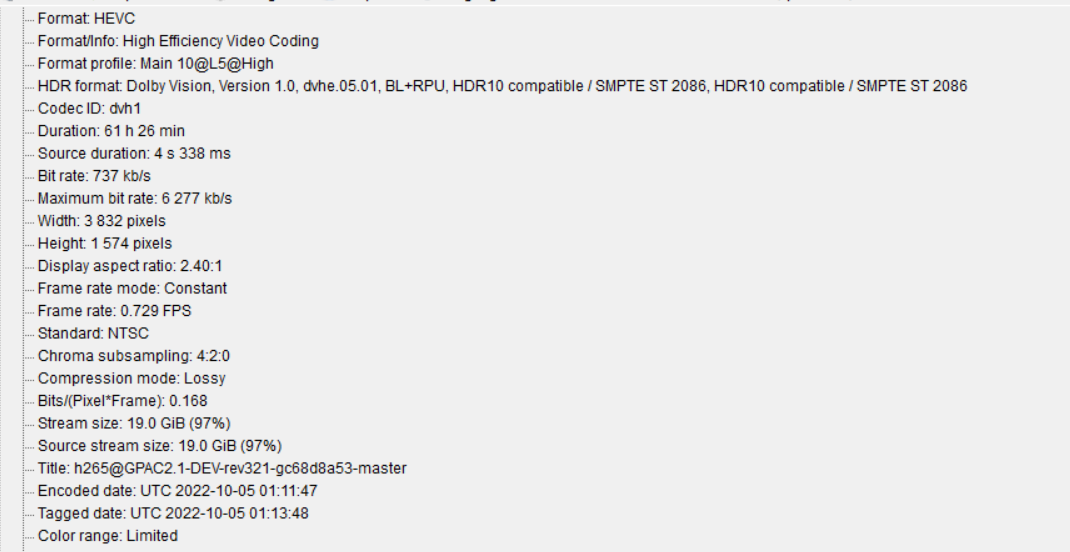
The fake P5 doesn't seem to be working properly. It set a very odd FPS resulting in this crazy length

Image
RESET_9999
Posts: 2411
Joined: Mon Aug 05, 2019 7:12 pm

Re: Dolby Vision now possible through MP4 Mux.

Post by RESET_9999 »

johnjon94 wrote:
Wed Oct 05, 2022 1:30 am
A few things I noticed
I know, and all of this is in the script.
when apple is used, it's not used...

The only thing i didnt add is " -brand mp42isom -ab dby1 -no-iod -enable 1 " because i didnt want to mess up apple since i did all the test with @ragico with it.
I always been using it on the old mp4muxer workflows though
Sorry for my English.
G5 / AM6B+ / Denon 7.2.4
DoVi_Scripts
DoVi Playback Devices
johnjon94
Posts: 35
Joined: Thu Nov 11, 2021 5:59 am

Re: Dolby Vision now possible through MP4 Mux.

Post by johnjon94 »

johnjon94 wrote:
Tue Oct 04, 2022 3:37 pm

Code: Select all

mp4box.exe -add "%BL%:hdr=none:dv-profile=8.1:xps_inband" -add "audio" -add "subtitle" -brand mp42isom -ab dby1 -no-iod -enable 1 "output.mp4"
Hi, I'm curious about what does `-ab dby1 -no-iod -enable 1` mean?
Will they affect final quality of the image?
Could you please explain a little bit more of this, thanks!
These are the general Dolby Vision parameters that are required when authoring a DV-compliant MP4 file. If you look at that link you posted to github, you'll see the comment under the person is using those same settings. I don't believe it has any effect on the quality but rather ensuring its a proper DV MP4 file.
RESET_9999
Posts: 2411
Joined: Mon Aug 05, 2019 7:12 pm

Re: Dolby Vision now possible through MP4 Mux.

Post by RESET_9999 »

johnjon94 wrote:
Wed Oct 05, 2022 1:49 am
The fake P5 doesn't seem to be working properly. It set a very odd FPS resulting in this crazy length
maybe an appleTV web-dl ? i know the old mp4muxer also had issue muxing those file because they dont have FPS bistream information.
with the sample files i used, there is no problem:


Code: Select all

Video
ID                                       : 1
Format                                   : HEVC
Format/Info                              : High Efficiency Video Coding
Format profile                           : Main 10@L5.1@High
HDR format                               : Dolby Vision, Version 1.0, dvhe.05.06, BL+RPU, HDR10 compatible / SMPTE ST 2086, HDR10 compatible / SMPTE ST 2086
Codec ID                                 : dvh1
Duration                                 : 2 min 1 s
Bit rate                                 : 12.1 Mb/s
Maximum bit rate                         : 30.8 Mb/s
Width                                    : 3 840 pixels
Height                                   : 2 160 pixels
Display aspect ratio                     : 16:9
Frame rate mode                          : Constant
Frame rate                               : 23.976 (24000/1001) FPS
Color space                              : YUV
Chroma subsampling                       : 4:2:0 (Type 2)
Bit depth                                : 10 bits
Compression mode                         : Lossy
Bits/(Pixel*Frame)                       : 0.061
Stream size                              : 176 MiB (85%)
Title                                    : hevc@GPAC2.1-DEV-rev321-gc68d8a53-master
Encoded date                             : UTC 2022-10-05 01:59:51
Tagged date                              : UTC 2022-10-05 01:59:52
Color range                              : Limited
Color primaries                          : BT.2020
Transfer characteristics                 : PQ
Matrix coefficients                      : BT.2020 non-constant
Mastering display color primaries        : Display P3
Mastering display luminance              : min: 0.0001 cd/m2, max: 1000 cd/m2
mdhd_Duration                            : 121830
Codec configuration box                  : hvcC+dvcC
Sorry for my English.
G5 / AM6B+ / Denon 7.2.4
DoVi_Scripts
DoVi Playback Devices
johnjon94
Posts: 35
Joined: Thu Nov 11, 2021 5:59 am

Re: Dolby Vision now possible through MP4 Mux.

Post by johnjon94 »

RESET_9999 wrote:
Wed Oct 05, 2022 2:00 am
johnjon94 wrote:
Wed Oct 05, 2022 1:49 am
The fake P5 doesn't seem to be working properly. It set a very odd FPS resulting in this crazy length
maybe an appleTV web-dl ? i know the old mp4muxer also had issue muxing those file because they dont have FPS bistream information.
with the sample files i used, there is no problem:


Code: Select all

Video
ID                                       : 1
Format                                   : HEVC
Format/Info                              : High Efficiency Video Coding
Format profile                           : Main 10@L5.1@High
HDR format                               : Dolby Vision, Version 1.0, dvhe.05.06, BL+RPU, HDR10 compatible / SMPTE ST 2086, HDR10 compatible / SMPTE ST 2086
Codec ID                                 : dvh1
Duration                                 : 2 min 1 s
Bit rate                                 : 12.1 Mb/s
Maximum bit rate                         : 30.8 Mb/s
Width                                    : 3 840 pixels
Height                                   : 2 160 pixels
Display aspect ratio                     : 16:9
Frame rate mode                          : Constant
Frame rate                               : 23.976 (24000/1001) FPS
Color space                              : YUV
Chroma subsampling                       : 4:2:0 (Type 2)
Bit depth                                : 10 bits
Compression mode                         : Lossy
Bits/(Pixel*Frame)                       : 0.061
Stream size                              : 176 MiB (85%)
Title                                    : hevc@GPAC2.1-DEV-rev321-gc68d8a53-master
Encoded date                             : UTC 2022-10-05 01:59:51
Tagged date                              : UTC 2022-10-05 01:59:52
Color range                              : Limited
Color primaries                          : BT.2020
Transfer characteristics                 : PQ
Matrix coefficients                      : BT.2020 non-constant
Mastering display color primaries        : Display P3
Mastering display luminance              : min: 0.0001 cd/m2, max: 1000 cd/m2
mdhd_Duration                            : 121830
Codec configuration box                  : hvcC+dvcC
Thats interesting, it is an Apple TV file, but the fps was corrected at the bitstream level so it shouldn't be pulling an incorrect fps. I'll try with a different file
RESET_9999
Posts: 2411
Joined: Mon Aug 05, 2019 7:12 pm

Re: Dolby Vision now possible through MP4 Mux.

Post by RESET_9999 »

hdr=none
we tested on appletv and LPCM audio didn't work when using it IIRC so that's why you see HDR10 two times when choosing fake p5
Sorry for my English.
G5 / AM6B+ / Denon 7.2.4
DoVi_Scripts
DoVi Playback Devices
johnjon94
Posts: 35
Joined: Thu Nov 11, 2021 5:59 am

Re: Dolby Vision now possible through MP4 Mux.

Post by johnjon94 »

RESET_9999 wrote:
Wed Oct 05, 2022 2:00 am
johnjon94 wrote:
Wed Oct 05, 2022 1:49 am
The fake P5 doesn't seem to be working properly. It set a very odd FPS resulting in this crazy length
maybe an appleTV web-dl ? i know the old mp4muxer also had issue muxing those file because they dont have FPS bistream information.
with the sample files i used, there is no problem:


Code: Select all

Video
ID                                       : 1
Format                                   : HEVC
Format/Info                              : High Efficiency Video Coding
Format profile                           : Main 10@L5.1@High
HDR format                               : Dolby Vision, Version 1.0, dvhe.05.06, BL+RPU, HDR10 compatible / SMPTE ST 2086, HDR10 compatible / SMPTE ST 2086
Codec ID                                 : dvh1
Duration                                 : 2 min 1 s
Bit rate                                 : 12.1 Mb/s
Maximum bit rate                         : 30.8 Mb/s
Width                                    : 3 840 pixels
Height                                   : 2 160 pixels
Display aspect ratio                     : 16:9
Frame rate mode                          : Constant
Frame rate                               : 23.976 (24000/1001) FPS
Color space                              : YUV
Chroma subsampling                       : 4:2:0 (Type 2)
Bit depth                                : 10 bits
Compression mode                         : Lossy
Bits/(Pixel*Frame)                       : 0.061
Stream size                              : 176 MiB (85%)
Title                                    : hevc@GPAC2.1-DEV-rev321-gc68d8a53-master
Encoded date                             : UTC 2022-10-05 01:59:51
Tagged date                              : UTC 2022-10-05 01:59:52
Color range                              : Limited
Color primaries                          : BT.2020
Transfer characteristics                 : PQ
Matrix coefficients                      : BT.2020 non-constant
Mastering display color primaries        : Display P3
Mastering display luminance              : min: 0.0001 cd/m2, max: 1000 cd/m2
mdhd_Duration                            : 121830
Codec configuration box                  : hvcC+dvcC
Can you point me to the place in the code where the final mp4box settings are for the Apple TV mux with AC3? It will work if I manually set the fps with mp4box, I can't seem to figure out why its pulling the incorrect fps from the stream.
RESET_9999
Posts: 2411
Joined: Mon Aug 05, 2019 7:12 pm

Re: Dolby Vision now possible through MP4 Mux.

Post by RESET_9999 »

johnjon94 wrote:
Wed Oct 05, 2022 2:10 am
Can you point me to the place in the code where the final mp4box settings are for the Apple TV mux with AC3? It will work if I manually set the fps with mp4box, I can't seem to figure out why its pulling the incorrect fps from the stream.
tell me how to set the fps with mp4box and I'll make the process automatic.

line 19287 if input is 1 video 1 lossy audio and 1 srt

Code: Select all

"%mp4box2_path%" -add %BL%%mbox% -add %audio% -add %subtitles_path% -tmp %TEMP% "%output_path%%filename%_DoVi.sub.DD.mp4"
Sorry for my English.
G5 / AM6B+ / Denon 7.2.4
DoVi_Scripts
DoVi Playback Devices
sw5163
Posts: 146
Joined: Sat Jun 25, 2022 7:28 am

Re: Dolby Vision now possible through MP4 Mux.

Post by sw5163 »

RESET_9999 wrote:
Wed Oct 05, 2022 2:02 am
hdr=none
we tested on appletv and LPCM audio didn't work when using it
lol, apple is hilarious
johnjon94
Posts: 35
Joined: Thu Nov 11, 2021 5:59 am

Re: Dolby Vision now possible through MP4 Mux.

Post by johnjon94 »

RESET_9999 wrote:
Wed Oct 05, 2022 2:15 am
johnjon94 wrote:
Wed Oct 05, 2022 2:10 am
Can you point me to the place in the code where the final mp4box settings are for the Apple TV mux with AC3? It will work if I manually set the fps with mp4box, I can't seem to figure out why its pulling the incorrect fps from the stream.
tell me how to set the fps with mp4box and I'll make the process automatic.

line 19287 if input is 1 video 1 lossy audio and 1 srt

Code: Select all

"%mp4box2_path%" -add %BL%%mbox% -add %audio% -add %subtitles_path% -tmp %TEMP% "%output_path%%filename%_DoVi.sub.DD.mp4"
It goes directly after the hevc input file like this

Code: Select all

mp4box -add "input.hevc:fps=24000/1001"
RESET_9999
Posts: 2411
Joined: Mon Aug 05, 2019 7:12 pm

Re: Dolby Vision now possible through MP4 Mux.

Post by RESET_9999 »

johnjon94 wrote:
Wed Oct 05, 2022 2:19 am
It goes directly after the hevc input file like this

Code: Select all

mp4box -add "input.hevc:fps=24000/1001"
thanks. next version will set a fps all the time regardless of if the input is appleTV web-dl or not
Sorry for my English.
G5 / AM6B+ / Denon 7.2.4
DoVi_Scripts
DoVi Playback Devices
Post Reply