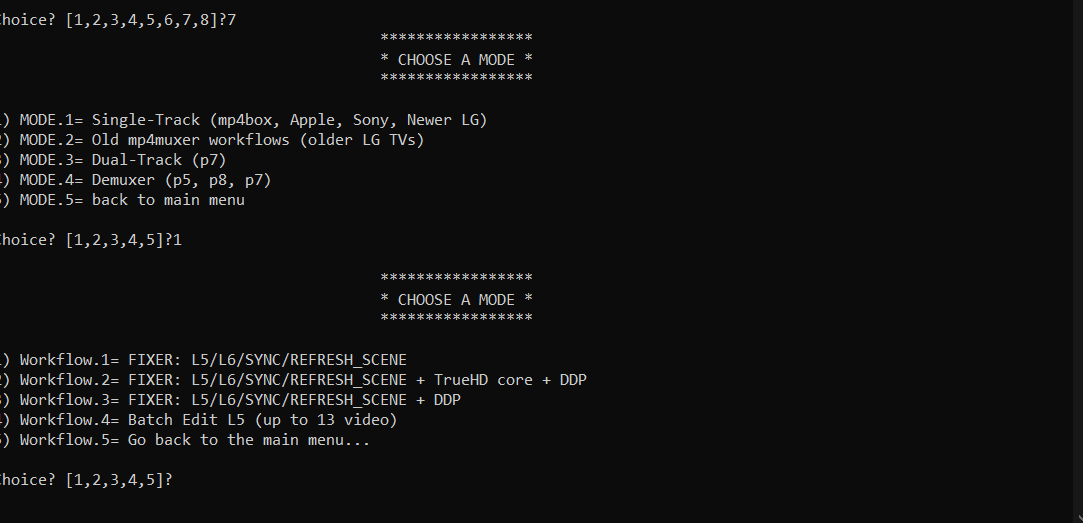
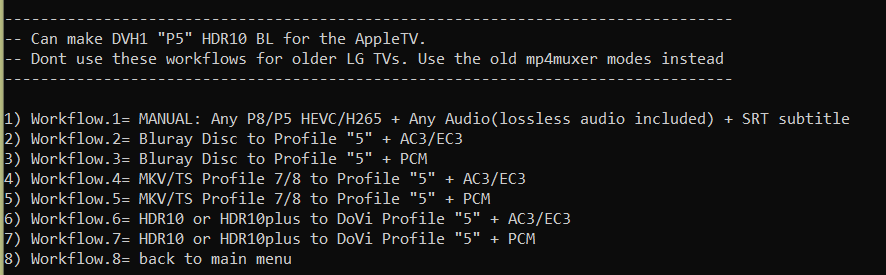
johnjon94 wrote: Tue Oct 04, 2022 4:38 pm
I haven't tested the older mp4box just yet, what is the reason for using the older versions?
Only the very first version of the mp4muxer works on older LG TVs. And the newer mp4box doesnt work with that old mp4muxer version because of the missing BL compatibility id.
Also I noticed that in your script, if there are multiple subtitles in the input file it seems to only include the first subtitle rather than all of them. (mode 7-1-5)
yes, it prioritizes subtitles with FORCED flag. So if your input doesnt have a forced flag, it will only takes the first subtitle
the first workflow is more flexible, you can manually input 1 video and 2 audio/2 subs
johnjon94 wrote: Tue Oct 04, 2022 4:38 pm
I haven't tested the older mp4box just yet, what is the reason for using the older versions?
Only the very first version of the mp4muxer works on older LG TVs. And the newer mp4box doesnt work with that old mp4muxer version because of the missing BL compatibility id.
Also I noticed that in your script, if there are multiple subtitles in the input file it seems to only include the first subtitle rather than all of them. (mode 7-1-5)
yes, it prioritizes subtitles with FORCED flag. So if your input doesnt have a forced flag, it will only takes the first subtitle
the first workflow is more flexible, you can manually input 1 video and 2 audio/2 subs
Is it possible to adjust the first workflow to use mp4box rather than mp4muxer and add more than just 2 subtitles?
johnjon94 wrote: Tue Oct 04, 2022 5:42 pm
Is it possible to adjust the first workflow to use mp4box rather than mp4muxer and add more than just 2 subtitles?
Yes, I'm currently implementing MKV and TS muxing for all the workflows that convert audio so I think I'll add mp4 muxing with mp4box as well.
May I know why you want more than two subtitles? forced and complete is not enough?
johnjon94 wrote: Tue Oct 04, 2022 5:42 pm
Is it possible to adjust the first workflow to use mp4box rather than mp4muxer and add more than just 2 subtitles?
Yes, I'm currently implementing MKV and TS muxing for all the workflows that convert audio so I think I'll add mp4 muxing with mp4box as well.
May I know why you want more than two subtitles? forced and complete is not enough?
mp4box muxing rather than mp4muxer has a drastic change on the time it takes to complete the mux, so that would be great. (minutes vs hours)
For subtitles, I like to include all of the subtitles for every language that it available in my MP4 files. So if I have an MKV file with 20+ subtitles, I include those with the MP4 as well. I also include chapters when they are available, which can also be added using mp4box.
johnjon94 wrote: Tue Oct 04, 2022 6:06 pm
mp4box muxing rather than mp4muxer has a drastic change on the time it takes to complete the mux, so that would be great. (minutes vs hours)
For subtitles, I like to include all of the subtitles for every language that it available in my MP4 files. So if I have an MKV file with 20+ subtitles, I include those with the MP4 as well. I also include chapters when they are available, which can also be added using mp4box.
johnjon94 wrote: Tue Oct 04, 2022 6:06 pm
mp4box muxing rather than mp4muxer has a drastic change on the time it takes to complete the mux, so that would be great. (minutes vs hours)
For subtitles, I like to include all of the subtitles for every language that it available in my MP4 files. So if I have an MKV file with 20+ subtitles, I include those with the MP4 as well. I also include chapters when they are available, which can also be added using mp4box.
So as expected, it doesnt trigger DV on LG C8. So I kept the old mp4muxer workflow for older LG TV owners but now the main mode(single track) can do both "fake P5" and HEV1 P8.
I didn't add more subtitles/audio support because it requires more work but I will.
So as expected, it doesnt trigger DV on LG C8. So I kept the old mp4muxer workflow for older LG TV owners but now the main mode(single track) can do both "fake P5" and HEV1 P8.
I didn't add more subtitles/audio support because it requires more work but I will.
RESET_9999 wrote: Wed Oct 05, 2022 1:08 am
yes, I forgot to remove the "P5" in the menu title. It can do P7/P8 input and the output will always be P8 (or fake p5 for apple)
Understood! Thanks for the clarification, I'm giving it a test now. I also own an Apple TV and can test if the fake P5 works. Is there a specific player that its been said to work on like Infuse?
johnjon94 wrote: Wed Oct 05, 2022 1:11 am
Understood! Thanks for the clarification, I'm giving it a test now. I also own an Apple TV and can test if the fake P5 works. Is there a specific player that its been said to work on like Infuse?
you have to use PLEX IIRC. infuse removed support for fake p5 i think.
I'm noticing that the 7.1 EC3 audio is stuttering. EC3 Atmos and ffmpeg EC3 5.1 are fine.
TS and mkv have no issue with 7.1 EC3 tracks
johnjon94 wrote: Wed Oct 05, 2022 1:11 am
Understood! Thanks for the clarification, I'm giving it a test now. I also own an Apple TV and can test if the fake P5 works. Is there a specific player that its been said to work on like Infuse?
you have to use PLEX IIRC. infuse removed support for fake p5 i think.
I'm noticing that the 7.1 EC3 audio is stuttering. EC3 Atmos and ffmpeg EC3 5.1 are fine.
TS and mkv have no issue with 7.1 EC3 tracks
A few things I noticed that need to be set with mp4box -
When adding the video input you need to add hdr=none to make sure the static metadata from the HDR10 base file is not changed. viewtopic.php?p=124635#p124635
When using dv profile to 8 (or whatever profile the file is that you're muxing into MP4) you need to include dv-profile=8.1 (I'm not sure how this would affect the "fake" P5 though).
The flag xps_inband needs to be set if the source file is dvhe rather than dvh1 (also not sure how this would affect the "fake" P5).
The settings -for-test cleans up the MP4 file by removing the "Encoded Date" "Tagged Date" and "Writing Application" information for each track.