Hello , as it seems i fucked up my brand new asus bw-16d1ht by flashing it (no more spin when i introduce disc n, cd n dvd n br the same ... ) and as seller dosent answer me (chinese seller on ebay ) i got an asus bw-12b1st in stock that cant read BR anymore (but dvds ok) and i'd like to know if a swap was possible to make one functional drive with those 2 ?
Thanks for your help guys and hope my english not too bad
bruno
swap parts of ASUS drives
Re: swap parts of ASUS drives
Not really sure swapping parts like that is a good idea or even worth trying, but im no expert on those units, just that most drives sold from china on ebay are in all intentions fake drives, and might not be flashable at all. What did makemkv say when you first checked the internals of the drive, and what does makemkv say now that it doesn't spin anymore?
Re: swap parts of ASUS drives
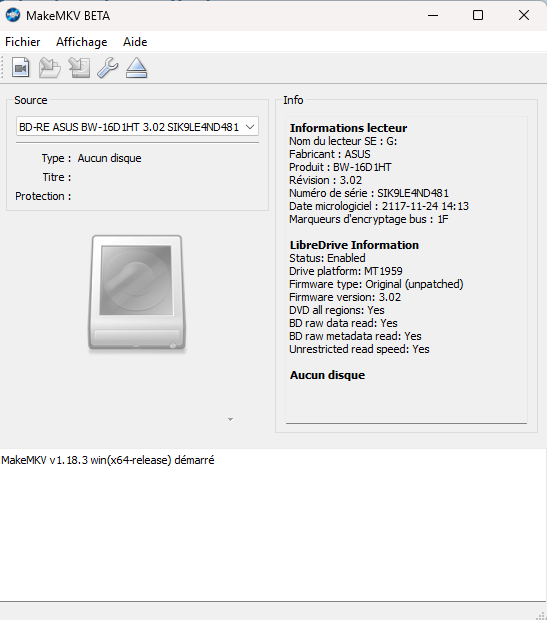
i missed to screen makemkv first drive use , here is what it saus now (all seems ok ... -_- )
Re: swap parts of ASUS drives
First, please take some photos of the drive and post them here on the forum.
Also show the entire label that is attached to the drive.
We will try to determine whether what you bought is a genuine BW‑16D1HT or a fake.
Every ASUS BW‑16D1HT I’ve seen has a serial number starting with KL… and your drive has a serial number beginning with SI…
Correct me if I’m wrong.
Also show the entire label that is attached to the drive.
We will try to determine whether what you bought is a genuine BW‑16D1HT or a fake.
Every ASUS BW‑16D1HT I’ve seen has a serial number starting with KL… and your drive has a serial number beginning with SI…
Correct me if I’m wrong.
Looking for a Pioneer 4K UHD drive?
Click here
Click here
Re: swap parts of ASUS drives
Hi , thanks for your time , here is the pictures :


Indeed serial is the one in makemkv screenshot and i see its not the same written on the lable too ...
Indeed serial is the one in makemkv screenshot and i see its not the same written on the lable too ...
-
Billycar11
- Posts: 5727
- Joined: Sun Aug 24, 2014 5:49 am
Re: swap parts of ASUS drives
sorry man its fake likle a 2014 or older drive with mt1939
see guide for recovery your chances are slim unless you have a pc that has sata ide mode
Buy a drive from the guide and video maker: https://www.makemkv.com/forum/viewtopic ... 20&t=17831
UHD Drive Guide: https://www.makemkv.com/forum/viewtopic ... 16&t=19634
Auto flash kit $40 Email Billycar5924@gmail.com No attachments
UHD Drive Guide: https://www.makemkv.com/forum/viewtopic ... 16&t=19634
Auto flash kit $40 Email Billycar5924@gmail.com No attachments
Re: swap parts of ASUS drives
Not sure if that's what you talking about but i already tried yo make a recovery with 1.01 firmware and modified Asus tool picked up here on the forum and i cant , have error message each time. If this is not the way can you please lead me to the dedicated recovery guide ?
-
Billycar11
- Posts: 5727
- Joined: Sun Aug 24, 2014 5:49 am
Re: swap parts of ASUS drives
its on the bottom of the regular guideboby21 wrote: ↑Thu May 07, 2026 2:02 pmNot sure if that's what you talking about but i already tried yo make a recovery with 1.01 firmware and modified Asus tool picked up here on the forum and i cant , have error message each time. If this is not the way can you please lead me to the dedicated recovery guide ?
your not supposed to use the asus tool you must use dos flash
Buy a drive from the guide and video maker: https://www.makemkv.com/forum/viewtopic ... 20&t=17831
UHD Drive Guide: https://www.makemkv.com/forum/viewtopic ... 16&t=19634
Auto flash kit $40 Email Billycar5924@gmail.com No attachments
UHD Drive Guide: https://www.makemkv.com/forum/viewtopic ... 16&t=19634
Auto flash kit $40 Email Billycar5924@gmail.com No attachments
Re: swap parts of ASUS drives
so if understand :
first i have to downgrade FW with SDF (i try to 1.01 fw , the one installed when i get the drive but i have an error mesage " 0x82052400"
and ... DOSFLASH cant see the port of the drive ( the list stay blank) ( i exe the x64 version as my system is win11 x64 version)
so is it dead for me ?
(PS: i'm not really sure to understand 100% the recovery part of the guide so ... ^^ )
first i have to downgrade FW with SDF (i try to 1.01 fw , the one installed when i get the drive but i have an error mesage " 0x82052400"
and ... DOSFLASH cant see the port of the drive ( the list stay blank) ( i exe the x64 version as my system is win11 x64 version)
so is it dead for me ?
(PS: i'm not really sure to understand 100% the recovery part of the guide so ... ^^ )
-
Billycar11
- Posts: 5727
- Joined: Sun Aug 24, 2014 5:49 am
Re: swap parts of ASUS drives
As I told you in the email you need sata ide mode for dos flash and 32bit systemboby21 wrote: ↑Thu May 07, 2026 4:12 pmso if understand :
first i have to downgrade FW with SDF (i try to 1.01 fw , the one installed when i get the drive but i have an error mesage " 0x82052400"
and ... DOSFLASH cant see the port of the drive ( the list stay blank) ( i exe the x64 version as my system is win11 x64 version)
so is it dead for me ?
(PS: i'm not really sure to understand 100% the recovery part of the guide so ... ^^ )
Buy a drive from the guide and video maker: https://www.makemkv.com/forum/viewtopic ... 20&t=17831
UHD Drive Guide: https://www.makemkv.com/forum/viewtopic ... 16&t=19634
Auto flash kit $40 Email Billycar5924@gmail.com No attachments
UHD Drive Guide: https://www.makemkv.com/forum/viewtopic ... 16&t=19634
Auto flash kit $40 Email Billycar5924@gmail.com No attachments
Re: swap parts of ASUS drives
That is a generic case they use to recase rma or drives with issues. The top and bottom are from a DVD drives. Since the guts are pretty much the same they all fit in the same case. Only way to really know if it's a fake is to take off the bottom and see if the main board looks like the one on the right of this picture. That has the MT1959 (on the chip MT1959H) >2016 and the one on the left has the MT 1939 (on the chip MT1959U) <2016.
- Attachments
-
- 1939_1959.jpg (1.72 MiB) Viewed 505 times
Last edited by OneDay on Fri May 08, 2026 4:29 pm, edited 1 time in total.
Re: swap parts of ASUS drives
@Billycar11 is there any detailed guide includind switching IDE mode here ? I cant find it sorry 
@Oneday do you think that switch pcb part from my 12b1ht to the bw-16b1ht could work ?
@Oneday do you think that switch pcb part from my 12b1ht to the bw-16b1ht could work ?
-
Billycar11
- Posts: 5727
- Joined: Sun Aug 24, 2014 5:49 am
Re: swap parts of ASUS drives
If you PC is newer than around 2013 it likely won't have it
It's in your bios and different for every PC so sorry can't help with that
Make sure to read in to all the consequences of ide mode if you let your os boot It will change things and make so your is will not boot anymore unless you change registry settings to make it support ahci again
Kinda weird it will auto fix for ide but not ahci but whatever maybe that's fixed in newer win 10/11 not sure have not tested that in years
Buy a drive from the guide and video maker: https://www.makemkv.com/forum/viewtopic ... 20&t=17831
UHD Drive Guide: https://www.makemkv.com/forum/viewtopic ... 16&t=19634
Auto flash kit $40 Email Billycar5924@gmail.com No attachments
UHD Drive Guide: https://www.makemkv.com/forum/viewtopic ... 16&t=19634
Auto flash kit $40 Email Billycar5924@gmail.com No attachments
Re: swap parts of ASUS drives
To be quite honest I would say no. I'm not familiar with the Asus 12b1ht. Also hardware differences would make things non compatible.@Oneday do you think that switch pcb part from my 12b1ht to the bw-16b1ht could work ?
Re: swap parts of ASUS drives
So i brought back to life an old computer and installing win XP 32 bits version now ( i try to get back to life my drive for free so i do with what i have ^^ ) but ... i'm not sure to really understand the recovery process as described in the guide so could you explain me as to a 5 YO kid please ?Billycar11 wrote: ↑Fri May 08, 2026 2:55 pmIf you PC is newer than around 2013 it likely won't have it
It's in your bios and different for every PC so sorry can't help with that
Make sure to read in to all the consequences of ide mode if you let your os boot It will change things and make so your is will not boot anymore unless you change registry settings to make it support ahci again
Kinda weird it will auto fix for ide but not ahci but whatever maybe that's fixed in newer win 10/11 not sure have not tested that in years
 (i dont undestand why first flash with sfr and then with dosflash ...