Forum for discussions about UHD-capable dives
-
KineKilla
- Posts: 8
- Joined: Mon Feb 23, 2026 3:55 pm
#1
Post
by KineKilla » Fri Mar 13, 2026 12:45 pm
Greetings all,
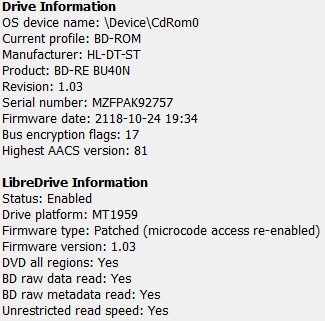
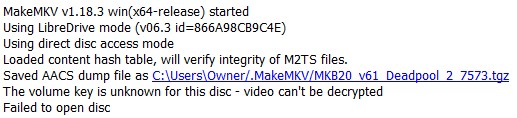
I have been successfully ripping my entire library and after flashing the firmware on my drive to 1.03, things have gone perfectly. Until today. Today I got to my first 4k Blu Ray disc and my player cannot seem to decrypt it. All my reading says this should work. Here is what MakeMKV says about my drive and the errors I get when attempting this.
At first I was getting a different error...it would say LibreDrive is needed (which it appears I have) but now after a restart it is giving me this error instead.
- Screenshot 2026-03-13 063717.jpg (40.59 KiB) Viewed 6026 times
- Screenshot 2026-03-13 064322.jpg (25.43 KiB) Viewed 6026 times
Total NOOB! (but learning fast!)
-
Billycar11
- Posts: 5831
- Joined: Sun Aug 24, 2014 5:49 am
#2
Post
by Billycar11 » Fri Mar 13, 2026 1:32 pm
You likely have a HK download issue try changing DNS or look at the keydb page under the UHD discs section to manually get keys
-
KineKilla
- Posts: 8
- Joined: Mon Feb 23, 2026 3:55 pm
#3
Post
by KineKilla » Fri Mar 13, 2026 3:58 pm
Thanks for the reply.
I managed to get past this for that disc and it copied well. It ended up being an issue with the Keydb file.
Upon trying the next disc in line, I got a different error. I didn’t take a screenshot. The link that came up in the description eluded to the possibility of a failing drive. This drive was new when I started ripping discs a couple weeks ago.
I’m about 240 movies in and another dozen tv boxes sets or so. All went well, but do you think I have now worn out this Verbatim drive?
Total NOOB! (but learning fast!)
-
KineKilla
- Posts: 8
- Joined: Mon Feb 23, 2026 3:55 pm
#4
Post
by KineKilla » Fri Mar 13, 2026 4:32 pm
Yeah, now I am getting failures on both; BluRay and UHD discs.
What is the typical lifespan of an external drive? I have been running it pretty hard trying to get my library scanned, still think its a bit pre-mature. The most recent error was having to do with Keys again, not necessarily medium or drive errors.
Total NOOB! (but learning fast!)
-
Coopervid
- Posts: 4548
- Joined: Tue Feb 19, 2019 10:32 pm
#5
Post
by Coopervid » Fri Mar 13, 2026 4:53 pm
It's unlikely that it fails so soon but you should maybe clean the laser lens with a cotton swab and alcohol and then dry it with a cotton swab.
If you are on Windows you should use KeyDB_helper to get the newest keys.
-
KineKilla
- Posts: 8
- Joined: Mon Feb 23, 2026 3:55 pm
#6
Post
by KineKilla » Fri Mar 13, 2026 4:57 pm
I'll clean the lens and try again.
I'm trying the DVD version of one of the failed movies at this time. Just trying to see if it is a BD/UHD issue or if it affects all discs and attempts.
I pulled that Key file earlier when trying to address the first issue.
Total NOOB! (but learning fast!)
-
Coopervid
- Posts: 4548
- Joined: Tue Feb 19, 2019 10:32 pm
#7
Post
by Coopervid » Fri Mar 13, 2026 5:07 pm
Also make sure the drive gets enough USB power. Ports on the back side of a desktop are better or a powered USB hub helps.
-
KineKilla
- Posts: 8
- Joined: Mon Feb 23, 2026 3:55 pm
#8
Post
by KineKilla » Fri Mar 13, 2026 5:25 pm
Coopervid wrote: Fri Mar 13, 2026 5:07 pm
Also make sure the drive gets enough USB power. Ports on the back side of a desktop are better or a powered USB hub helps.
I'll give this a shot as well. I have been running it in the same, side USB port this entire time. Unfortunately my laptop only has USB C on the back so I'll have to use a USB A to C adapter to use those ports. I have one.
It appears to have ripped the DVD version of this movie successfully and without error. The BD version always fails at 2200Mb.
Total NOOB! (but learning fast!)
-
Coopervid
- Posts: 4548
- Joined: Tue Feb 19, 2019 10:32 pm
#9
Post
by Coopervid » Fri Mar 13, 2026 5:43 pm
KineKilla wrote: Fri Mar 13, 2026 5:25 pm
Coopervid wrote: Fri Mar 13, 2026 5:07 pm
Also make sure the drive gets enough USB power. Ports on the back side of a desktop are better or a powered USB hub helps.
I'll give this a shot as well. I have been running it in the same, side USB port this entire time. Unfortunately my laptop only has USB C on the back so I'll have to use a USB A to C adapter to use those ports. I have one.
It appears to have ripped the DVD version of this movie successfully and without error. The BD version always fails at 2200Mb.
Clean the disc with liquid soap and warm water. The discs often have an invisible film that makes them hard to read. This applies especially to UHDs.
-
KineKilla
- Posts: 8
- Joined: Mon Feb 23, 2026 3:55 pm
#10
Post
by KineKilla » Sat Mar 14, 2026 1:13 pm
Just to sort of close the door on this thread:
I eventually was able to rip all the discs that were giving me a problem, except for, the BD version of The Force Awakens. Although the disc appears flawless and I cleaned it with soap, it always fails at the same spot during extraction.
I’m blaming that on the disc at this point.
As for getting the drive to work again, I’m not positive on what ended up being the fix because I tried a number of things between attempts.
I re-flashed the drive with 1.03 firmware, I cleaned the lenses with alcohol, I made sure the box was checked that allows MakeMKV to access the internet for updated Keys, I even bought a paid subscription to MakeMKV (I planned on doing this anyway to support the cause).
Then, it just started ripping discs again. I hope to finish my movie library today.
Total NOOB! (but learning fast!)