SDFtool Flasher

Forum for discussions about UHD-capable dives
sushi714
Posts: 1
Joined: Fri Jun 12, 2026 3:49 pm

Re: SDFtool Flasher

Post by sushi714 »

75th Trombone wrote: Thu Jun 11, 2026 9:23 pm Disregard the above. The device I received (from a Newegg seller) is counterfeit.
Glad I came across this post -- I have a feeling I ordered from the same 3rd party seller that shipped out of China (RIGX). Thought I was going crazy encountering the error with SDFtool and tried flashing via Powershell and even via Mac terminal since MakeMKV kept showing LibreDrive status enabled, but I encountered the same issue trying to use SDFtool and, regardless of how many times or what firmware I flashed, all the info in MakeMKV looked the same after each attempt.

Luckily I snagged the same model drive from Best Buy that's arriving soon -- showed as being a sold/shipped by them and not a 3rd party seller, so fingers crossed that one works, since I bought a few used UHD titles that apparently are 100GB UHDs that my Series X isn't able to read and just need to confirm they're actually UHDs and not counterfit lol
75th Trombone
Posts: 4
Joined: Thu Jun 11, 2026 6:21 pm

Re: SDFtool Flasher

Post by 75th Trombone »

The current theory on the VGPC Discord is that the fake drive I got is the correct internal drive in a fake/incompatible enclosure. (Because MakeMKV does say it is the correct platform.) They suggested I try a cheapo enclosure from Aliexpress that they say has a good success rate when a valid drive is put inside it. We’ll see!
Billycar11
Posts: 5831
Joined: Sun Aug 24, 2014 5:49 am

Re: SDFtool Flasher

Post by Billycar11 »

75th Trombone wrote: Fri Jun 12, 2026 7:22 pm The current theory on the VGPC Discord is that the fake drive I got is the correct internal drive in a fake/incompatible enclosure. (Because MakeMKV does say it is the correct platform.) They suggested I try a cheapo enclosure from Aliexpress that they say has a good success rate when a valid drive is put inside it. We’ll see!
whats your drive info look like? in makemkv
Buy a drive from the guide and video maker: https://www.makemkv.com/forum/viewtopic ... 20&t=17831
UHD Drive Guide: https://www.makemkv.com/forum/viewtopic ... 16&t=19634
Auto flash kit $40 Email Billycar5924@gmail.com No attachments
75th Trombone
Posts: 4
Joined: Thu Jun 11, 2026 6:21 pm

Re: SDFtool Flasher

Post by 75th Trombone »

Image
Billycar11
Posts: 5831
Joined: Sun Aug 24, 2014 5:49 am

Re: SDFtool Flasher

Post by Billycar11 »

75th Trombone wrote: Sat Jun 13, 2026 3:47 am Image
do you have original drive info?

you partially flashed it.

does it still see discs?

have your tried cli flashing from the guide below?
Buy a drive from the guide and video maker: https://www.makemkv.com/forum/viewtopic ... 20&t=17831
UHD Drive Guide: https://www.makemkv.com/forum/viewtopic ... 16&t=19634
Auto flash kit $40 Email Billycar5924@gmail.com No attachments
seamus
Posts: 51
Joined: Wed Jun 25, 2025 7:13 am

Re: SDFtool Flasher

Post by seamus »

Hello,

This question may have already been answered - but I couldn't find it! Is there a version of the SDF tool that runs on macOS (Sequoia)??

If not - are there any recommendations for a firmware upgrade for my BRXL-16U3 (Buffalo)?

FWIW: This is a fairly recent model, bought new in 2025.

Thanks,
~S
Billycar11
Posts: 5831
Joined: Sun Aug 24, 2014 5:49 am

Re: SDFtool Flasher

Post by Billycar11 »

seamus wrote: Sun Jun 21, 2026 5:31 am Hello,

This question may have already been answered - but I couldn't find it! Is there a version of the SDF tool that runs on macOS (Sequoia)??

If not - are there any recommendations for a firmware upgrade for my BRXL-16U3 (Buffalo)?

FWIW: This is a fairly recent model, bought new in 2025.

Thanks,
~S
no windows only
Buy a drive from the guide and video maker: https://www.makemkv.com/forum/viewtopic ... 20&t=17831
UHD Drive Guide: https://www.makemkv.com/forum/viewtopic ... 16&t=19634
Auto flash kit $40 Email Billycar5924@gmail.com No attachments
subduedcarrot
Posts: 2
Joined: Mon Jun 22, 2026 9:44 pm

Re: SDFtool Flasher

Post by subduedcarrot »

I have a BP50NB40 SVC 52 (manufactured in March 2024 if that matters) and it seems like I've flashed it to a UHD-enabled firmware (it's recognized in MakeMKV), but the drive will not read UHD discs. I've followed the steps a bunch of times and no matter what I do, the drive refuses to recognize UHD discs. I confirmed that it does work with Blu-Rays (so I've ruled out a bricked device) and the disc works in my PS5 (so I've ruled out a faulty disc), I've tried on both version 1.3.5 and 1.3.6 of SDFtool Flasher, I've tried to use a powered USB hub, but nothing works - any ideas why I can't get my drive to read UHDs?
Last edited by subduedcarrot on Mon Jun 22, 2026 10:05 pm, edited 3 times in total.
MartyMcNuts
Posts: 4913
Joined: Wed Nov 22, 2017 11:45 pm

Re: SDFtool Flasher

Post by MartyMcNuts »

subduedcarrot wrote: Mon Jun 22, 2026 9:55 pm I have a BP50NB40 SVC 52 (manufactured in March 2024 if that matters) and it seems like I've flashed it to a UHD-enabled firmware (it's recognized in MakeMKV), but the drive will not read UHD discs. I've followed the steps a bunch of times and no matter what I do, the drive refuses to recognize UHD discs. I confirmed that it does work with Blu-Rays (so I've ruled out a bricked device) and the disc works in my PS5 (so I've ruled out a faulty disc), I've tried on both version 1.3.5 and 1.3.6 of SDFtool Flasher, I've tried to use a powered USB hub, but nothing works - any ideas why I can't get my drive to read UHDs?
You probably aren't doing the cross-flash correctly. You use the RECOVER option to do this as per the instructions and gif in the first post of this thread. It might actually help if you copy and paste the MakeMKV drive info and libredrive info sections text so we can see what you have done.
Cheers :D
----------------------------------------------------------------------------------------------------------------------------
For UHD enabled drives (AU/NZ/SG + Others) & DIY Single Drive Flasher (WW): https://uhdenableddrives.com
subduedcarrot
Posts: 2
Joined: Mon Jun 22, 2026 9:44 pm

Re: SDFtool Flasher

Post by subduedcarrot »

MartyMcNuts wrote: Tue Jun 23, 2026 12:42 am
subduedcarrot wrote: Mon Jun 22, 2026 9:55 pm I have a BP50NB40 SVC 52 (manufactured in March 2024 if that matters) and it seems like I've flashed it to a UHD-enabled firmware (it's recognized in MakeMKV), but the drive will not read UHD discs. I've followed the steps a bunch of times and no matter what I do, the drive refuses to recognize UHD discs. I confirmed that it does work with Blu-Rays (so I've ruled out a bricked device) and the disc works in my PS5 (so I've ruled out a faulty disc), I've tried on both version 1.3.5 and 1.3.6 of SDFtool Flasher, I've tried to use a powered USB hub, but nothing works - any ideas why I can't get my drive to read UHDs?
You probably aren't doing the cross-flash correctly. You use the RECOVER option to do this as per the instructions and gif in the first post of this thread. It might actually help if you copy and paste the MakeMKV drive info and libredrive info sections text so we can see what you have done.
Sorry, I thought I had added a screenshot to my post but I guess it didn't work.
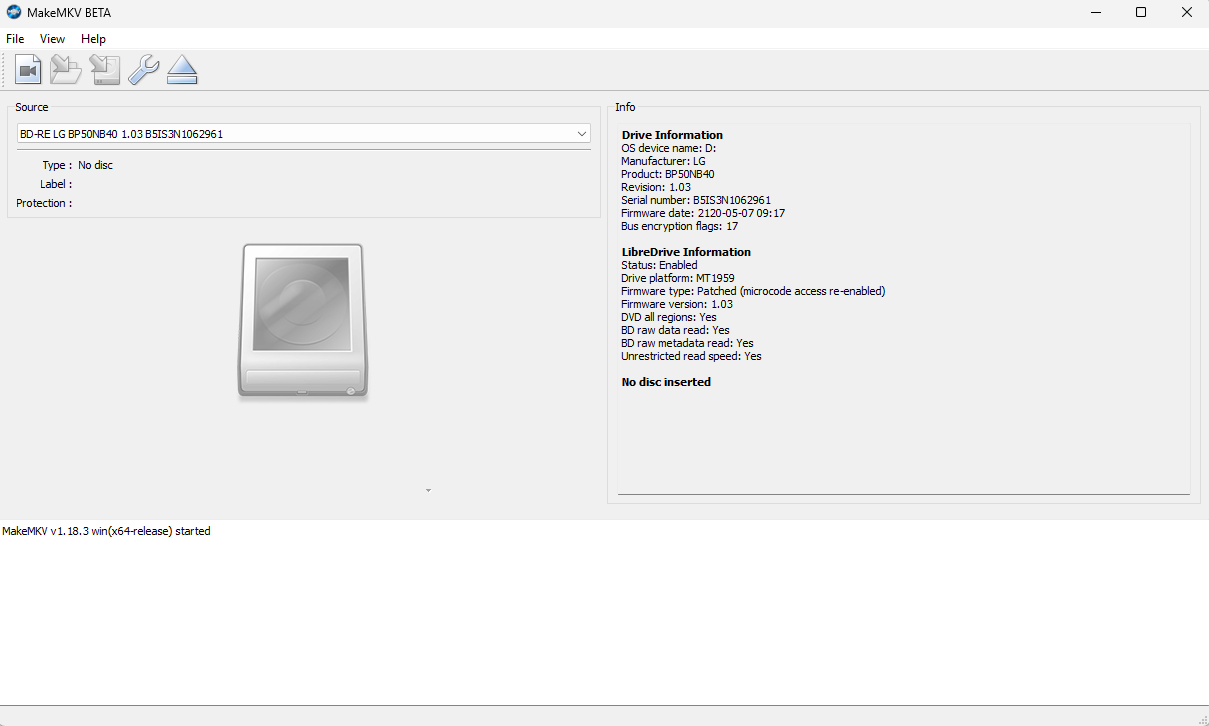
I did use the RECOVER option to crossflash. Here's what I see in MakeMKV:

Drive Information
OS device name: D:
Manufacturer: HL-DT-ST
Product: BD-RE BU40N
Revision: 1.03
Serial number: *************
Firmware date: 2118-10-24 19:34
Bus encryption flags: 17
Highest AACS version: 82

LibreDrive Information
Status: Enabled
Drive platform: MT1959
Firmware type: Patched (microcode access re-enabled)
Firmware version: 1.03
DVD all regions: Yes
BD raw data read: Yes
BD raw metadata read: Yes
Unrestricted read speed: Yes

No disc inserted
Post Reply