swap parts of ASUS drives

Forum for discussions about UHD-capable dives
Billycar11
Posts: 5772
Joined: Sun Aug 24, 2014 5:49 am

Re: swap parts of ASUS drives

Post by Billycar11 »

boby21 wrote:
Sun May 10, 2026 8:07 pm
Billycar11 wrote:
Fri May 08, 2026 2:55 pm
boby21 wrote:
Fri May 08, 2026 6:57 am
@Billycar11 is there any detailed guide includind switching IDE mode here ? I cant find it sorry :oops:

@Oneday do you think that switch pcb part from my 12b1ht to the bw-16b1ht could work ?
If you PC is newer than around 2013 it likely won't have it

It's in your bios and different for every PC so sorry can't help with that

Make sure to read in to all the consequences of ide mode if you let your os boot It will change things and make so your is will not boot anymore unless you change registry settings to make it support ahci again

Kinda weird it will auto fix for ide but not ahci but whatever maybe that's fixed in newer win 10/11 not sure have not tested that in years
So i brought back to life an old computer and installing win XP 32 bits version now ( i try to get back to life my drive for free so i do with what i have ^^ ) but ... i'm not sure to really understand the recovery process as described in the guide so could you explain me as to a 5 YO kid please ? :roll: (i dont undestand why first flash with sfr and then with dosflash ...
You don't need to understand it just follow it that's all I can say I no longer assist with this recovery process

Been burned way to many times on it
the guide for it works 100% as it's the process I use
Buy a drive from the guide and video maker: https://www.makemkv.com/forum/viewtopic ... 20&t=17831
UHD Drive Guide: https://www.makemkv.com/forum/viewtopic ... 16&t=19634
Auto flash kit $40 Email Billycar5924@gmail.com No attachments
boby21
Posts: 17
Joined: Mon May 04, 2026 12:50 pm

Re: swap parts of ASUS drives

Post by boby21 »

Hi , so i try to foolow the recovery guide but ... SDF TOOL dosent work on a 32 bits system .... so how can I do ?
DOSFLASH is ok but ays me : "no known flash chip on this port " (it sees the drive well )
Billycar11
Posts: 5772
Joined: Sun Aug 24, 2014 5:49 am

Re: swap parts of ASUS drives

Post by Billycar11 »

boby21 wrote:
Fri May 15, 2026 7:55 am
Hi , so i try to foolow the recovery guide but ... SDF TOOL dosent work on a 32 bits system .... so how can I do ?
DOSFLASH is ok but ays me : "no known flash chip on this port " (it sees the drive well )
sorry man your doing something wrong
you sure your using the right dosflash the bh16ns40 one? from the video?
Buy a drive from the guide and video maker: https://www.makemkv.com/forum/viewtopic ... 20&t=17831
UHD Drive Guide: https://www.makemkv.com/forum/viewtopic ... 16&t=19634
Auto flash kit $40 Email Billycar5924@gmail.com No attachments
boby21
Posts: 17
Joined: Mon May 04, 2026 12:50 pm

Re: swap parts of ASUS drives

Post by boby21 »

I use dosflash 2.0 , probably not the bh16ns40 one . Its ok even with an Asus drive ?
Where can i get so ?
I certainly missed something :?
boby21
Posts: 17
Joined: Mon May 04, 2026 12:50 pm

Re: swap parts of ASUS drives

Post by boby21 »

ok here we are , drive seems back to life now (with BH16NS40 DOSFLASH from the video link)

so dvds are ok , tried BRs and :

the prestige : ok

abyss (from new version ) : not ok

so why ?

i dont rip , just play discs live in my tiny cine-room with htpc and use Xreveal for BR protections

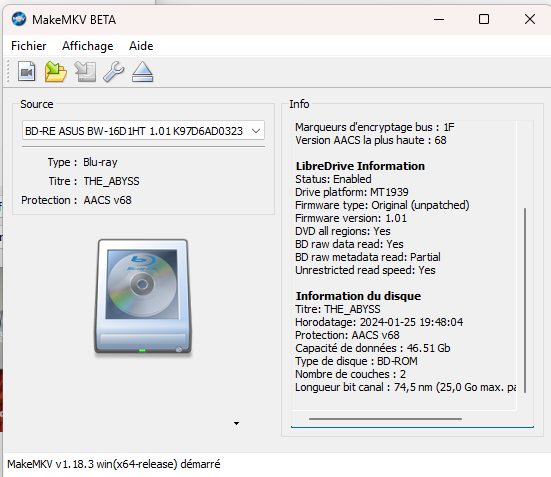
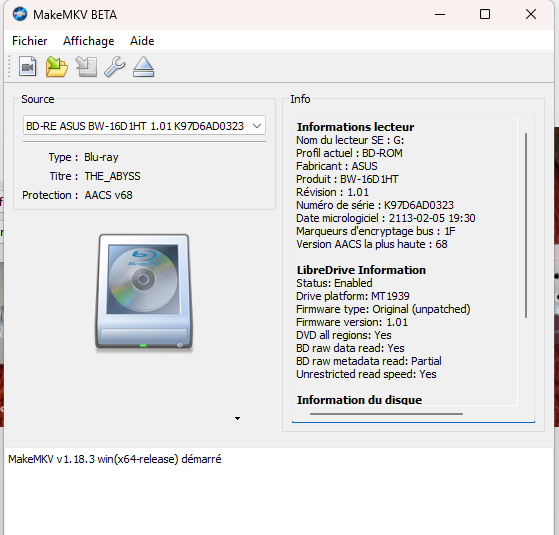
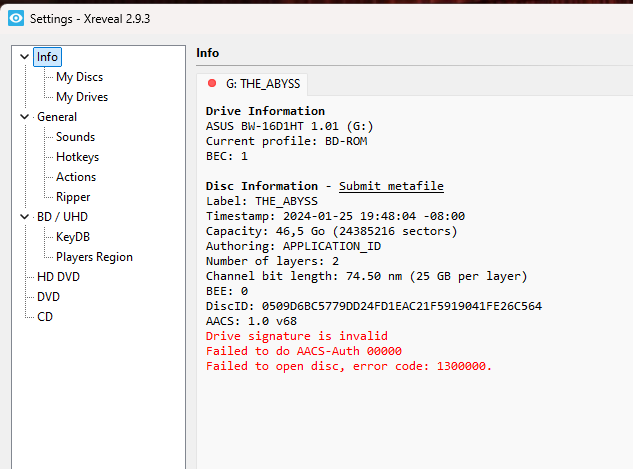
here is screens from makemkv now and from xreveal that say "drive signature invalid" , so can you help me a little bit more ? (i have last keydb.cf file i think ) any other solution to just play discs without any trouble and no so expensive than dvdfab or else ?

ANd already huge thank you for your help , situation is quite better now

Image
Image
Image
Coopervid
Posts: 4522
Joined: Tue Feb 19, 2019 10:32 pm

Re: swap parts of ASUS drives

Post by Coopervid »

Most likely your keydb.cfg is not up-to-date or your haven't set the correct path in XReveal. You should use KeyDB_helper by SamuriHL to synchronize / update it. There's a link in the first post.

viewtopic.php?f=12&t=38293
Billycar11
Posts: 5772
Joined: Sun Aug 24, 2014 5:49 am

Re: swap parts of ASUS drives

Post by Billycar11 »

boby21 wrote:
Fri May 15, 2026 10:19 am
I use dosflash 2.0 , probably not the bh16ns40 one . Its ok even with an Asus drive ?
Where can i get so ?
I certainly missed something :?
idk how you missed it its in linked in the howto video.
https://www.youtube.com/watch?v=eXgybNfHhcg


in general you should use the things provided in guide not source them from elsewhere then complain it dont work
its a modified version of dosflash to support mt1939-1959 flashing and dumping
Buy a drive from the guide and video maker: https://www.makemkv.com/forum/viewtopic ... 20&t=17831
UHD Drive Guide: https://www.makemkv.com/forum/viewtopic ... 16&t=19634
Auto flash kit $40 Email Billycar5924@gmail.com No attachments
boby21
Posts: 17
Joined: Mon May 04, 2026 12:50 pm

Re: swap parts of ASUS drives

Post by boby21 »

Coopervid wrote:
Fri May 15, 2026 11:51 am
Most likely your keydb.cfg is not up-to-date or your haven't set the correct path in XReveal. You should use KeyDB_helper by SamuriHL to synchronize / update it. There's a link in the first post.

viewtopic.php?f=12&t=38293
path in xreveal is correct , keydb.cfg is the last update (tried with the one online just now) , one strange thing is when xreveal refuse to unlock BR i use powerdvd soft (i use xreveal to read BR with MPC-BE and madVR config) , it always works with any BR (but i hav no video treatment like with MADVr ) . In this case with ABYSS BR even powerdvd says content is corrupted , that join the error messages screened below in xreveal and "invalid drive signature " too no ?
Coopervid
Posts: 4522
Joined: Tue Feb 19, 2019 10:32 pm

Re: swap parts of ASUS drives

Post by Coopervid »

You should post that in the Xreveal.com support thread
boby21
Posts: 17
Joined: Mon May 04, 2026 12:50 pm

Re: swap parts of ASUS drives

Post by boby21 »

so i think i put the finger on something (really bad ... ) i tried with 3 BR , the prestige , the abyss , jurassic world dominion : only the prestige is OK and the main difference is .... layers number ...
The prestige is a single layer BR , the abyss and jurassic world dominion (most recents BR ) are 2 layers ... so am I fucked up and the drive can only read single layer BR ? I guess that yes but wait for your answers :?
boby21
Posts: 17
Joined: Mon May 04, 2026 12:50 pm

Re: swap parts of ASUS drives

Post by boby21 »

my bad , was the bonus BR for the prestige , the movie is a 2 layers BR too ... sorry ...
keydb_helper
Posts: 821
Joined: Fri Sep 06, 2024 4:47 pm

Re: swap parts of ASUS drives

Post by keydb_helper »

boby21 wrote:
Fri May 15, 2026 4:08 pm
path in xreveal is correct , keydb.cfg is the last update (tried with the one online just now) , one strange thing is when xreveal refuse to unlock BR i use powerdvd soft (i use xreveal to read BR with MPC-BE and madVR config) , it always works with any BR (but i hav no video treatment like with MADVr ) . In this case with ABYSS BR even powerdvd says content is corrupted , that join the error messages screened below in xreveal and "invalid drive signature " too no ?
You probably trashed the AACS drive certificate & private key during your firmware flashing escapades. This means you won't be able to perform the AACS authentication process. This loss of functionality will impact both licensed players like PowerDVD as well as most unlicensed decryption tools. If available, LibreDrive should mitigate this issue for decryption via MakeMKV.
Public KeyDB Disc Submissions
  • Please use file hosts, not forum attachments
  • You must include the MKB_RO.inf file from the AACS folder on your disc
boby21
Posts: 17
Joined: Mon May 04, 2026 12:50 pm

Re: swap parts of ASUS drives

Post by boby21 »

Thanks for your reply , how can i deal so ? Have to install or activate something more ? Libredrive seems activated in makemkv , so i have to activate makemkv when i want to play a disc ?
keydb_helper
Posts: 821
Joined: Fri Sep 06, 2024 4:47 pm

Re: swap parts of ASUS drives

Post by keydb_helper »

boby21 wrote:
Fri May 15, 2026 7:05 pm
Thanks for your reply , how can i deal so ? Have to install or activate something more ? Libredrive seems activated in makemkv , so i have to activate makemkv when i want to play a disc ?
I'm more familiar with MT1959 compared to MT1939 but generally if your drive no longer has a valid AACS drive certificate there isn't much you can do to restore playback via PowerDVD. Even if you activate MakeMKV first the AACS authentication process will fail in licensed software and that is a hard stop.

I'd expect decryption of most titles already in the keydb to work via Xreveal/VLC/libaacs/Kodi etc. You can use LibreDrive/MakeMKV to retrieve the details required to derive the disc keys but this process isn't exactly streamlined for MKB versions older than v82.

Bus encryption enabled AACS 1.0 discs may be an issue. I'm not sure if your drive will still activate bus encryption in its current state. If it does, you'll need to use MakeMKV to disable bus encryption even when the disc keys are contained in the public keydb.
Public KeyDB Disc Submissions
  • Please use file hosts, not forum attachments
  • You must include the MKB_RO.inf file from the AACS folder on your disc
Post Reply