Page 1 of 1
Error 'Scsi error - ILLEGAL REQUEST:INVALID FIELD IN CDB'
Posted: Sun May 10, 2020 10:16 pm
by Louisa
I keep getting this error 3/4 through converting an UHD disk to .mkv. Haven't had problems before, but after the update it's started to act up. I know some people have downgraded their MakeMKV, but I'm not sure how to do that? I'm still fairly new to this and haven't had problems converting before. I've double cleaned the disk and it doesn't have any scratches, it's brand new.
Re: Error 'Scsi error - ILLEGAL REQUEST:INVALID FIELD IN CDB'
Posted: Mon May 11, 2020 1:58 am
by Billycar11
Louisa wrote: ↑Sun May 10, 2020 10:16 pm
I keep getting this error 3/4 through converting an UHD disk to .mkv. Haven't had problems before, but after the update it's started to act up. I know some people have downgraded their MakeMKV, but I'm not sure how to do that? I'm still fairly new to this and haven't had problems converitng before. I've double cleaned the disk and it doesn't have any scratches, it's brand new.
bad disc or bad drive try a replacement disc first.
Re: Error 'Scsi error - ILLEGAL REQUEST:INVALID FIELD IN CDB'
Posted: Mon May 11, 2020 5:45 pm
by Louisa
Will have to buy the entire collection of DVDs again, that's a bummer, since it doesn't come separately (it's a TV show season).
Re: Error 'Scsi error - ILLEGAL REQUEST:INVALID FIELD IN CDB'
Posted: Mon May 11, 2020 8:05 pm
by Woodstock
If it is "every disk", it is more likely to be a drive problem. If it is "all triple-layer disks", it is more likely to be a drive problem, because they drives are supposed to be able to handle triple-layer disks (but not all do).
Re: Error 'Scsi error - ILLEGAL REQUEST:INVALID FIELD IN CDB'
Posted: Tue Apr 04, 2023 7:37 am
by saturn2888
How can you tell if you have a triple-layer disc?
I have 4 of the same drive type: ASUS BW-16D1X-U. Is it possible I need to buy another model? I bought these drives within the last year.
Re: Error 'Scsi error - ILLEGAL REQUEST:INVALID FIELD IN CDB'
Posted: Tue Apr 04, 2023 2:32 pm
by dcoke22
saturn2888 wrote: ↑Tue Apr 04, 2023 7:37 am
How can you tell if you have a triple-layer disc?
One way is to look in the 'Disc Information' section on the first screen in MakeMKV. Just launch MakeMKV and put a disc in; don't start a rip. For example:
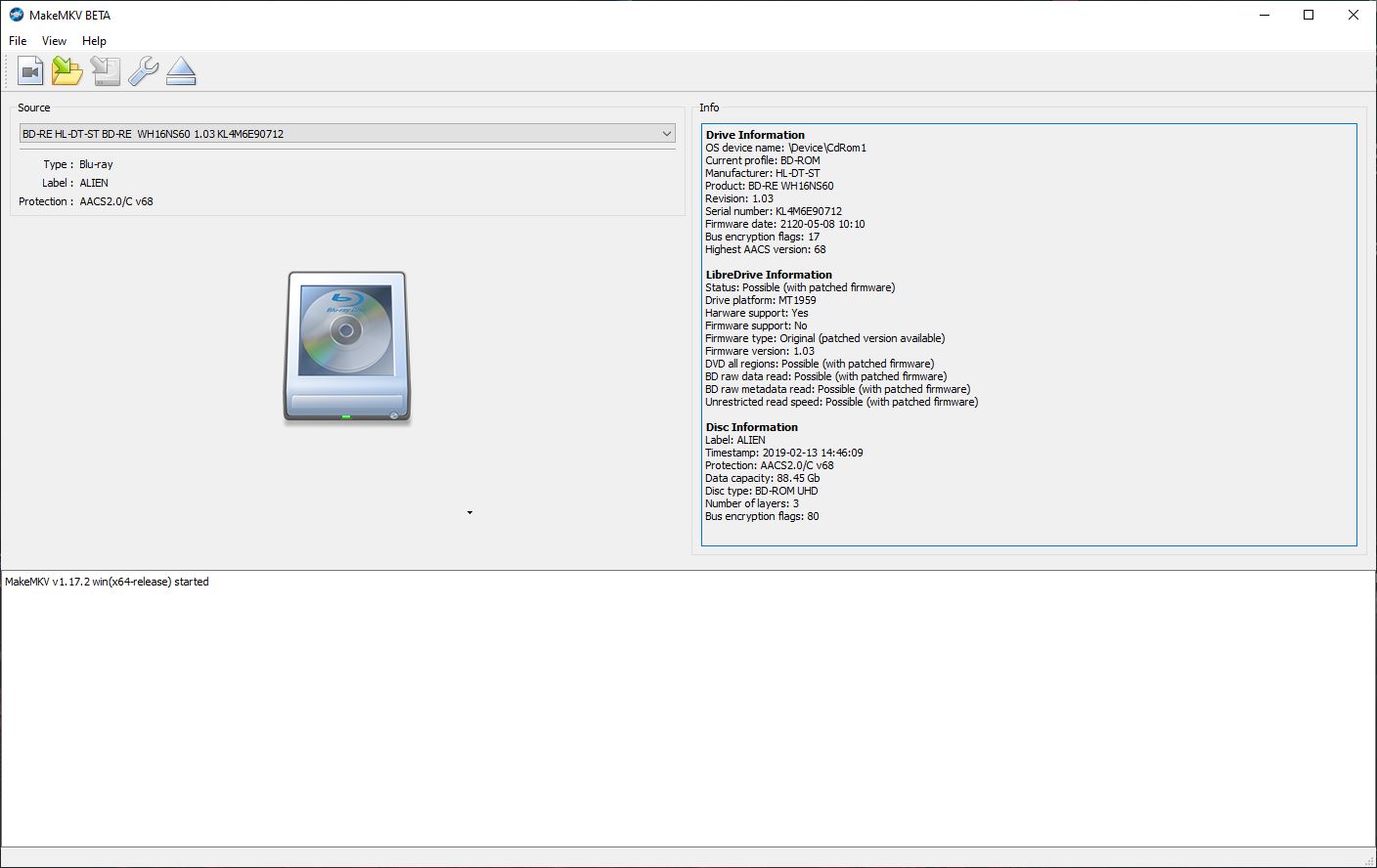
Another way is to look up the disc on something like
blu-ray.com. For example:
https://www.blu-ray.com/movies/The-Suic ... ay/295757/ shows that it is a two disc set: 'Two-disc set (1 BD-100, 1 BD-50)'
A
BD-100 is a triple layer UHD disc. A
BD-50 is a dual layer blu-ray disc.
Re: Error 'Scsi error - ILLEGAL REQUEST:INVALID FIELD IN CDB'
Posted: Wed Apr 05, 2023 8:11 am
by saturn2888
A PC restart fixed most of my issues. But I'm not sure that actually did anything.
I'm wondering if the drives got hot and that warped the discs enough to make reading problematic.
I ripped 70 discs in the last few days, and it appears to be the drives I have manufactured in September 2022 that have issues. The one from April 2022 is fine.
I bought some LG slim Ultra HD Blu-ray drives today, and those worked fine on all media except 3 discs, but it seems to be bad discs. Of the 6 I tried, No drive could successfully the problematic video file.
Re: Error 'Scsi error - ILLEGAL REQUEST:INVALID FIELD IN CDB'
Posted: Wed Jan 07, 2026 6:31 am
by MaximRecoil
My incident isn't about UHD discs, but it involves this exact same error (Scsi error - ILLEGAL REQUEST:INVALID FIELD IN CDB). I was getting this error on every disc in a DVD box set on some of the episodes. For example, on the first disc I tried it only ripped 1 episode and failed due to that error on the other 6. I had to try it multiple times to get all 7 episodes ripped. With the next disc it ripped 2 episodes and failed on 5 of them, and again I had to keep trying to get all 7 episodes ripped.
Eventually, after having this happen on every disc I tried, I decided to try imaging them with ImgBurn instead (since they aren't copy-protected), and ImgBurn has had no problems with them whatsoever; zero read errors so far. Then I mount the ISOs that ImgBurn generates and run them through MakeMKV to get individual MKV files, and of course it has no problems with the ISOs.
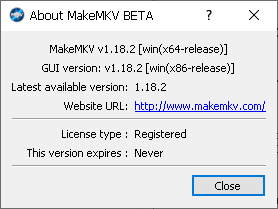
Since ImgBurn has no problems imaging these discs, that proves there's nothing wrong with the discs nor with my optical drive, which only leaves MakeMKV as the source of the problem. I'm using the latest version on Windows 10:
- 1.png (3.83 KiB) Viewed 12150 times
Re: Error 'Scsi error - ILLEGAL REQUEST:INVALID FIELD IN CDB'
Posted: Sat Jan 10, 2026 8:18 am
by MaximRecoil
MaximRecoil wrote: ↑Wed Jan 07, 2026 6:31 am
Since ImgBurn has no problems imaging these discs, that proves there's nothing wrong with the discs nor with my optical drive, which only leaves MakeMKV as the source of the problem. I'm using the latest version on Windows 10:
I now believe that my optical drive was the problem. I imaged about 25 of the DVDs in this box set with ImgBurn with no errors (whereas MakeMKV had the "Scsi error - ILLEGAL REQUEST:INVALID FIELD IN CDB" error on every DVD), but then ImgBurn started having problems too; it was losing communication with the optical drive.
I figured that if MakeMKV and ImgBurn, both of which are normally reliable programs, are both having problems, it has to be either the optical drive or the DVDs. So I plugged in an old DVD drive that I haven't used in ages, and so far it's working perfectly fine.
Re: Error 'Scsi error - ILLEGAL REQUEST:INVALID FIELD IN CDB'
Posted: Sun Feb 22, 2026 9:02 pm
by teroxel
saturn2888 wrote: ↑Wed Apr 05, 2023 8:11 am
A PC restart fixed most of my issues. But I'm not sure that
actually did anything.
I'm wondering if the drives got hot and that warped the discs enough to make reading problematic.
I ripped 70 discs in the last few days, and it appears to be the drives I have manufactured in September 2022 that have issues. The one from April 2022 is fine.
I bought some LG slim Ultra HD Blu-ray drives today, and those worked fine on all media except 3 discs, but it seems to be bad discs. Of the 6 I tried, No drive could successfully the problematic video file.
Gotta thank you for this stupidly simple, universal advice of "have you tried turning it on and off again" It worked flawlessly. Had "ILLEGAL REQUEST:INVALID FIELD IN CDB" pop up after extracting one file and I tried restarting the operation with no files being able to extract the 2nd time around, then PC restart and it magically worked without issues
